Tips & tricks · Apps · Everywhere · ~15 min a week · 3 min read
One database, many views: no more copying
Last reviewed:
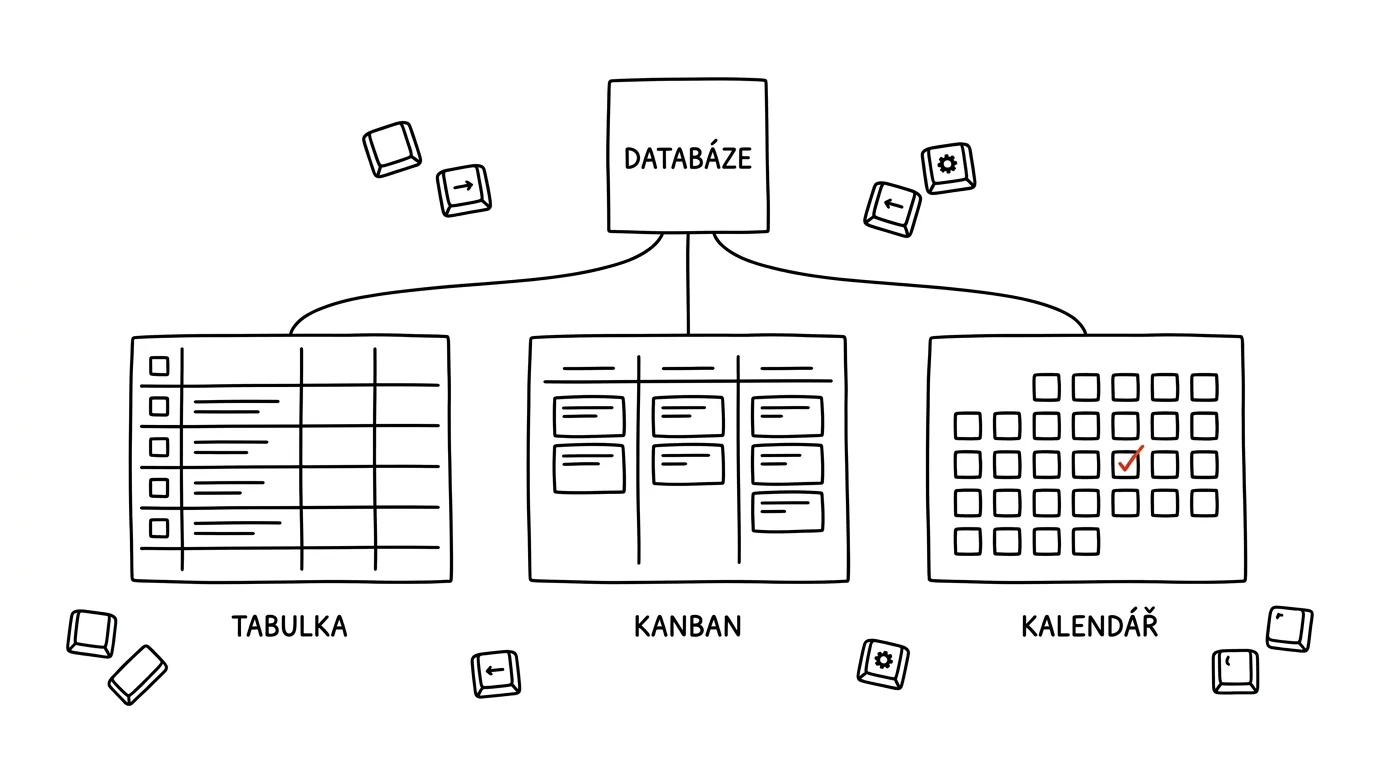
When you keep the same information in two places, sooner or later one of them will be wrong. Notion solves that by having the data exist only once — in a single database — while different views simply filter and display it differently. You switch a table to a kanban board or a calendar without rewriting or copying anything.
A typical scenario
Team manager Lucie needs a detailed table of all tasks with every column for herself, a visual kanban board by status for the team, and a simple calendar of deadlines for leadership. Without linked views, she'd have to maintain three separate lists and sync them manually — which means that the moment a deadline changes in one of them, the other two drift out of sync and nobody knows which is current. With linked views, it's still the same data, just three different views onto it. Changing a deadline in the calendar immediately shows up in the table and the kanban board too, because it's one and the same record.
How to do it
- Above an existing database, click the + button next to the names of the current views (Table, Board, and so on).
- Choose the type of new view based on what you need to see: Table for a table with all columns, Board (kanban) for a visual breakdown by status, Calendar for deadlines, or Timeline for planning over time.
- Set a custom filter and sort order for each view — say, “My active” (filtered by person and status), “This week” (filtered by deadline), or “By status” (grouped by the status column).
- Name your views by purpose, not by type — “My tasks” is a more useful name than “Table 2,” especially once you have several of them.
- Share only the view that's relevant with colleagues or leadership — the filter and display carry over, while the underlying data stays shared across the whole team.
- Views can be sorted or grouped by any property of the database, not just status — say, by owner or priority, so you organize the same data differently depending on what you're currently trying to look at.
The best tools
- Views in Notion databases — a built-in, free feature that works on any existing database with no extra setup.
- Linked databases (a linked view on another page) — lets you display the same database outside its home page, say on a team dashboard.
- Filters and sorting within a view — combine them with linked views so everyone sees only the relevant subset of the data.
What you get out of it
- Time: an estimated fifteen minutes a week you'd otherwise spend manually copying the same information into multiple places.
- Data consistency: one change shows up everywhere, so there's never a question of which of three lists is the current one.
- A tailored view for everyone, no compromises: you get a detailed table, the team gets a visual kanban board, leadership gets a simple calendar — everyone in their own format, over the same data.
- Fewer mistakes: no risk of a typo in a deadline during manual copying, or forgetting to update one of several duplicate lists.
- Easier adaptation to new needs: when the team eventually needs a new angle on the same data, you just add another view instead of rebuilding the whole structure from scratch.
Pro tip
Before adding another database, try extending your existing one with a new view first — very often you'll find that the problem you wanted to solve with a new database can be solved with just a different filter on data you already have.
Want to go deeper? The handbook has a whole chapter on it — The app categories that matter.
Similar tips
In-depth guide · 19 min
Morning routine: reply drafts are waiting before you arrive
A complete guide with prompts: connect your mail, write rules in plain language, and cut morning email to fifteen minutes. AI drafts — only a human sends.
In-depth guide · 21 min
Evening routine: AI pulls every promise you made out of your inbox
A guide with prompts: the routine tells a promise from a pleasantry, sweeps mail and meetings each evening — five minutes to approve. A human confirms.
In-depth guide · 16 min
Reply templates from your own sent mail: analysis, extraction, upkeep
A complete guide with prompts: have a year of sent mail analyzed, find the recurring types, and pull templates in your own words — time savings measured.
Was this helpful?
Liked this tip?
I send one like it every week by email. Two minutes to read, hours saved.
The Top 30 tips e-book, free — it lands in your inbox right away.
Then 1 tip a week · no spam · unsubscribe in one click
Prefer a system to single tips? The free email course — seven days, seven emails, one skill a day.