Tips & tricks · Gear · Everywhere · healthy back · 3 min read
Top edge of your monitor at eye level
Last reviewed:
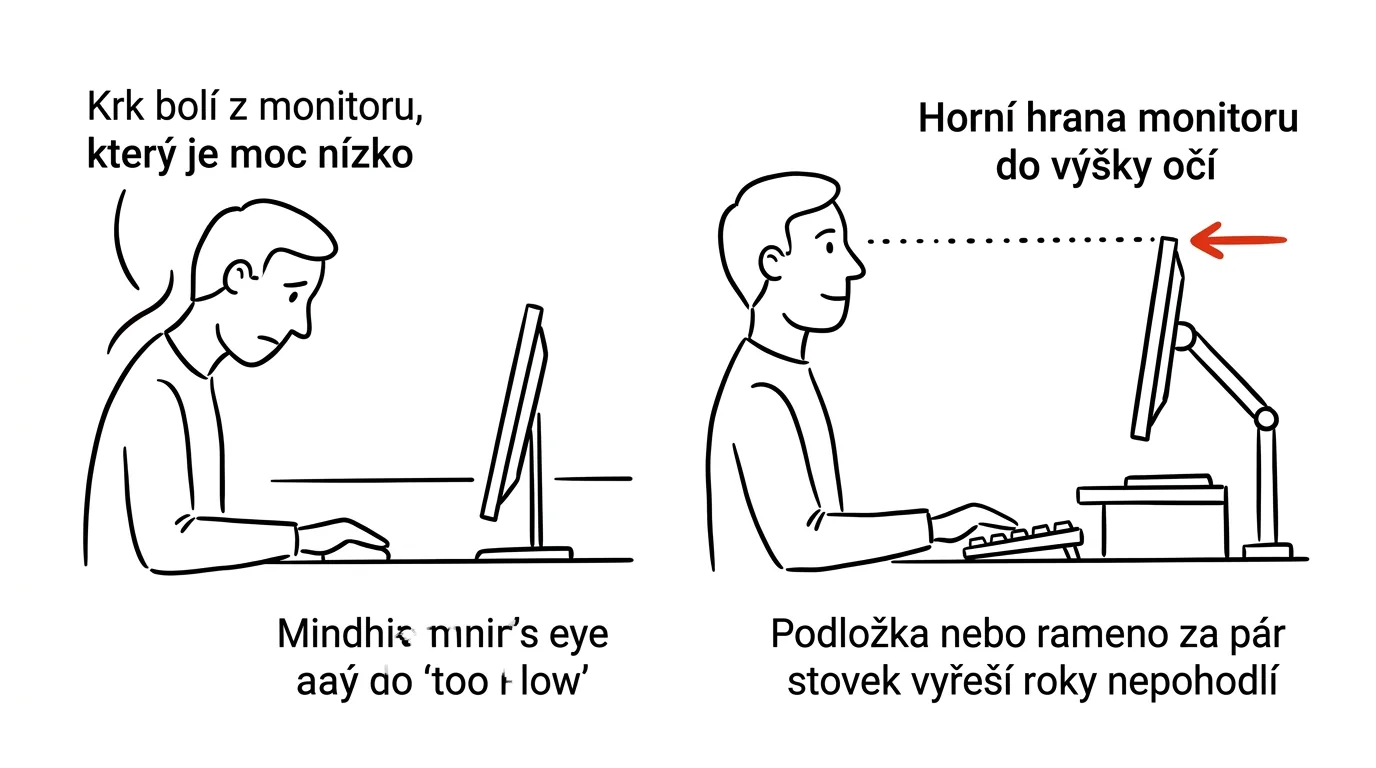
Laptop on the desk = looking down 30 degrees = a strained neck for eight hours a day. It's one of the most common, and yet most easily fixed, mistakes in a home or office setup. A laptop screen sits low because it has to fit next to the keyboard in a single body — and that's exactly the problem behind years of neck and upper-back pain in people who work on a laptop all day.
A typical scenario
Petr works from home on a laptop set directly on his desk. After a few months, he noticed his neck and shoulders regularly hurt by evening, and a physical therapist explained why: at desk height, the laptop's screen has its top edge well below eye level, so he keeps his head slightly tilted down all day. Eight hours a day, five days a week, that adds up in the cervical spine, even when the tilt is mild.
After getting a simple laptop stand and connecting an external keyboard and mouse, the screen ended up at eye level. The pain eased off within a few weeks — it wasn't an expensive investment, just a correction of geometry so the head can stay in a natural, upright position.
How to do it
- The top edge of your screen should be roughly at eye level when you sit upright and look straight ahead, measured at arm's length from the monitor.
- Raise your laptop up — a laptop stand does the job, but a sturdy box or a stack of thick books works too, as long as it looks stable.
- Once you raise the laptop, its own keyboard becomes uncomfortable to reach for typing — connect an external keyboard and mouse (wired or wireless) so your hands can stay in a natural position at elbow level.
- The same rule applies to an external monitor: top edge at eye level, achieved either with an adjustable monitor stand or a desk-mounted monitor arm.
- Even the ideal position is harmful if you spend the whole day in it without moving — alternate sitting with short breaks to stand and stretch, roughly once an hour.
- If you work from multiple places some of the time (home, office, café), consider a light foldable laptop stand that fits in your bag — ergonomics doesn't have to be limited to a single workspace.
The best tools
- Laptop stand — the simplest and cheapest solution, raises the display to the right height in seconds of setup.
- External keyboard and mouse — a necessary companion to a stand; without them, a raised laptop is uncomfortable to use.
- Monitor arm (VESA mount) — for a setup with an external monitor, allows precise adjustment of height, angle, and distance from your eyes.
- Adjustable sit-stand desk — pricier, but the most complete solution, since it combines correct monitor height with changing your whole body's position throughout the day.
What you get out of it
- A healthy back and neck: the right monitor height removes the main cause of chronic neck tension in people who work at a computer.
- Fewer headaches: tension in the neck and shoulders often shows up as headaches by the end of the workday.
- Higher productivity: a body that isn't in pain focuses better and longer without needing frequent breaks for discomfort.
- Long-term prevention: a small investment today saves years of problems that would otherwise mean physical therapy or an orthopedist.
Pro tip
If you're not sure about the right height, start by sitting naturally upright, closing your eyes, then opening them — wherever your gaze lands without effort is roughly where the top edge of your display should be. It's faster and more accurate than measuring with a ruler.
Want to go deeper? The handbook has a whole chapter on it — The complete guide to an effective home office.
Similar tips
Quick Finder jumps: Desktop, Applications, Downloads
Cmd+Option+L
Finder has shortcuts for the folders you use most — Cmd+Shift+D for Desktop, Cmd+Option+L for Downloads, and more.
Finder tags: one file in multiple “folders” at once
Does an invoice belong in the project folder and in accounting? Tags solve the age-old dilemma of where to save a file — it can show up in more than one place at once.
Focus modes: every activity gets its own rules
Set up a Work mode that lets through only colleagues and family — synced to your iPhone and Apple Watch too.
Was this helpful?
Liked this tip?
I send one like it every week by email. Two minutes to read, hours saved.
The Top 30 tips e-book, free — it lands in your inbox right away.
Then 1 tip a week · no spam · unsubscribe in one click
Prefer a system to single tips? The free email course — seven days, seven emails, one skill a day.