Tips & tricks · AI · Everywhere · ~cheaper conversions · 19 min read · in-depth guide, doing it ~2 h
Ad Campaigns with AI: Audiences, Creative, Reporting
Last reviewed:
In this article
- A typical scenario
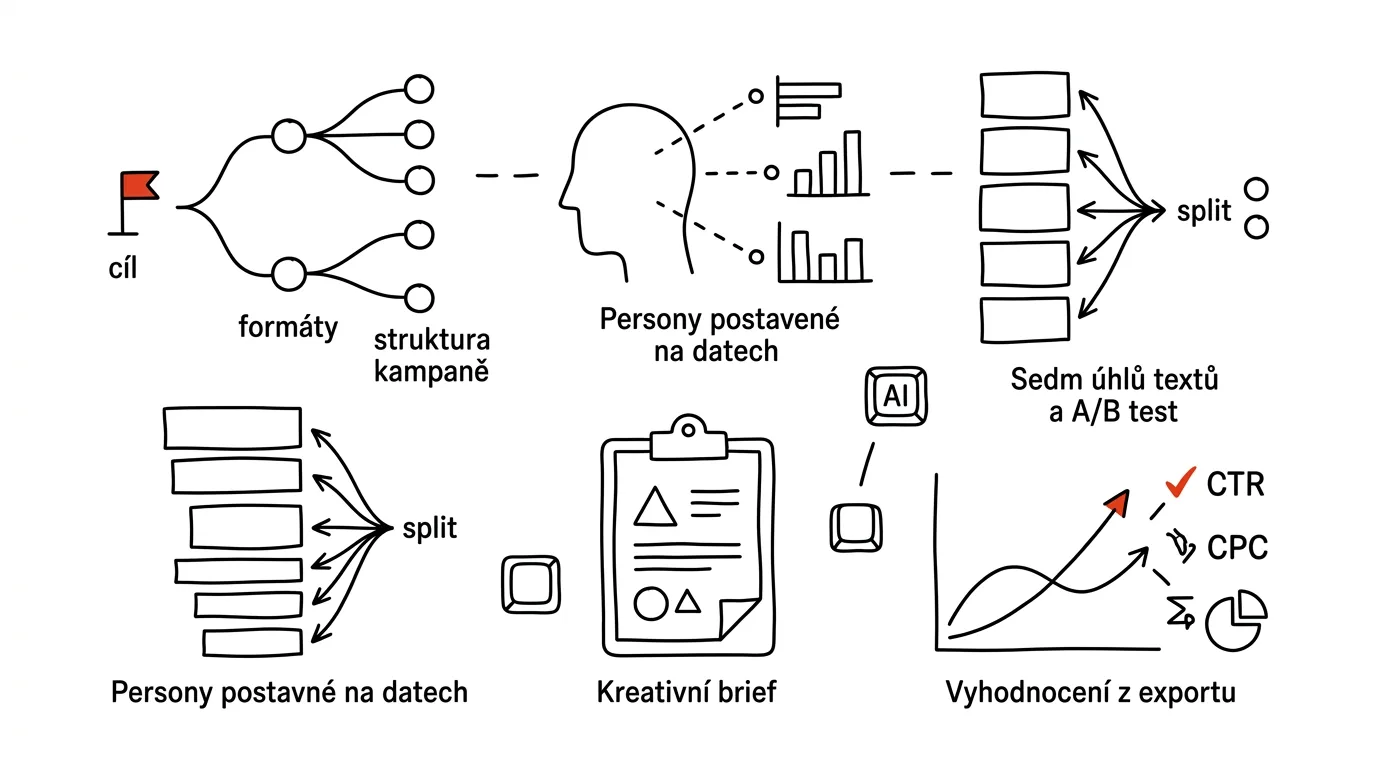
- Phase 1: campaign structure — goal, audience, message, format
- Phase 2: personas and insights from real data
- Phase 3: ad copy variants and seven angles for A/B testing
- Phase 4: creative brief and visuals
- Phase 5: performance evaluation
- Phase 6: iteration — kill, scale, rewrite
- Phase 7: budget discipline
- The most common mistakes
- The best tools
- What you get out of it
- Pro tip
Most small campaigns don't fail because of budget. They fail because it was one ad for everyone, written on a Friday afternoon and launched without a single number that would let you tell whether it's working. The money drains away just as reliably as it does for a big campaign — you just end up with nothing to build on next time.
A campaign isn't an ad, it's a chain of decisions: goal, audience, message, format — and each link depends on the one before it. AI won't build that chain for you, but it's unexpectedly good at three places where people waste the most time: pulling the customer's actual language out of a pile of reviews and support tickets, generating ten copy variants instead of your usual two, and turning a numbers export into a conclusion you can act on.
The guide moves phase by phase from the brief to switching off what doesn't work, and every phase has a prompt to copy. One rule sits above all of it, because in advertising it costs real money: AI proposes, a human approves. The model may write, sort, and calculate. Only a human may turn a campaign on, raise the budget, or pay.
A typical scenario
Petra runs a two-person studio and sells an online course. Last year she tried advertising: three ads with a stock photo and the copy “Finally learn to do it properly,” a month of runtime, 40,000 Kč gone. Nine orders came in and she had no idea which ad brought them or which audience — the dashboard showed hundreds of rows and no answer.
This year she did it differently. First she set one number: how much a single order was allowed to cost for it to pay off against the course price. Then she spent two hours on something she'd skipped before — she dumped forty reviews, transcripts of six client calls, and a year of email questions into one file and had it pull out the words people actually use to describe their problem. It turned out nobody says “I want to finally learn this properly.” They say “I'm embarrassed that after ten years in the field I'm still doing this by hand.”
That produced three personas and seven message angles to go with them. She didn't write the copy from scratch: she had variants generated and rewrote them into her own voice. She sent the designer a one-page brief instead of the sentence “make me something nice.” After ten days she downloaded the CSV export, had a short script written over it, and for the first time saw what had actually happened: two angles out of seven were pulling their weight, three were expensive, two were dead. She switched off five and moved the budget.
Twenty-two orders came in and the average cost per order dropped to roughly two-thirds of last year's. The most valuable thing isn't that number, though — it's the note she kept: she knows which message works, and why.
Phase 1: campaign structure — goal, audience, message, format
This phase is boring and it decides everything else. You pick the format last, because it follows from the message, the message follows from the audience, and the audience follows from the goal. Anyone who starts with the format (“let's do an Instagram video”) is building a house from the roof down.
One goal and one number
A campaign has one goal. Not three. “We want more awareness, more orders, and more leads” isn't a goal, it's a wish list — and a system can't decide who to show the ad to based on a wish list. Every goal comes with one number and its limit: not “we want more orders” but “orders at up to 1,000 Kč apiece, at least twenty a month.” Calculate that limit up front from what a customer is actually worth to you — not after the campaign, from whatever the numbers happened to say.
The three goal types don't mix in one campaign. Getting a lead is cheap, but a lead isn't a customer yet — track how many of them convert later. Selling now costs more per unit but is measurable down to the dollar. Being seen is the hardest to measure and the easiest to burn money on for nothing; for a small budget it almost never makes sense as a primary goal.
The cascade: from goal to format on a single page
Before you write the first line of ad copy, have a brief put together. The model will structure it in a way that exposes the gaps — typically you'll find that your target audience is “everyone.”
I'm setting up a paid ad campaign and I want a brief, not ad copy.

What I'm selling: [product/service, for whom, how it differs from
the competition]
Price and margin: [what a customer is worth to me]
Campaign goal: [get leads / sell / be seen]
Budget and duration: [e.g. 20,000 Kč over 4 weeks]
Where I'll be advertising: [platform]
What I already know about customers: [briefly]

Build the brief in this order:
1. The goal translated into one measurable number and its limit
   (how much a single result is allowed to cost) — show the math.
2. Three to four distinct audiences who might respond. For each:
   what's different about the situation they're in, not
   demographics.
3. One message per audience — one sentence describing what it
   solves for them.
4. Only then the format: what type of ad fits that message and
   why (static image, video, carousel, text-only).
5. What has to be ready on the website for the campaign to make
   sense (where people land, what they do there, how I'll know).

At the end, list which inputs I didn't give you and without which
the brief is just a guess. Don't fill them in yourself.
The last paragraph of the prompt is there on purpose: without your margins, the model will invent a cost-per-result limit and it'll sound perfectly reasonable. Go over points 1 and 5 with extra care — most budgets get lost on a campaign that's technically running fine and simply sends people to a page where nothing can be ordered.
Before you let any money loose, this should already be true: a few customers have already bought without advertising, you know where people land and what they're supposed to do there, and you can tell when an order came from the campaign.
Phase 2: personas and insights from real data
This is where the quality of the whole campaign gets decided. The typical workshop persona — “Jane, 34, manager, loves to travel and drink coffee” — is useless because it's invented. A usable persona is recognizable by containing sentences someone actually said. And this is exactly the work AI is good at: reading three hundred reviews, four hundred support emails, and six interview transcripts and pulling out the patterns that repeat. You'd spend a week reading that and forget half of it.
Where to find the raw material
The material almost always already exists, just scattered across five places. The most valuable sources are the ones where people speak in their own words:
- Reviews and ratings — yours and your competitors'. For competitors, read the three-star ones: that's where the gaps are written down.
- Support questions and pre-purchase emails — a question like “but does it still work if…?” is a ready-made objection your ad should answer.
- Sales call transcripts — have recordings transcribed and work from the text; getting consent to record is a given.
- Search queries that bring people to your site.
Before you paste anything into AI, anonymize it: strip names, emails, phone numbers, company names, and anything else that could identify a person. And the site's own rule applies here too — customer data belongs only in a paid account with a data-protection agreement, never in a free chat.
Mining customer language
The first prompt doesn't build a persona, it builds a dictionary — the most valuable raw material is the phrasing you'll use in the ad word for word.
Below are [40] anonymized reviews and questions I received over
the past year about [product/service].

[paste the text]

Go through them and return six lists. For EVERY item, give the
exact quote from the source it's based on, and how many times
the theme appeared:

1. Pains — how people describe their problem in their own words
2. Wants — what they want once the problem is gone
3. Objections and concerns before buying
4. What ultimately convinced them (from satisfied-customer reviews)
5. Disappointments — what they expected and didn't get
6. Words and phrases they use that I don't (their vocabulary
   versus my marketing vocabulary)

Don't summarize and don't add anything from general knowledge
about the industry. When you see a theme only once, say so —
I want to know what's a pattern and what's a one-off.
You'll get back material you can actually write from. Checking it is mandatory: spot-check a handful of quotes against the original file. Models like to “smooth out” a quote, and that smoothing removes exactly what made it usable. Save list 6 separately — you'll come back to it for every piece of copy.
A persona built on evidence
Only now the persona — and only as much of it as the data can support.
Here are the findings from analyzing my reviews and customer
questions [paste the output from the previous step] and my
interview notes [paste].

Build 3 personas. For each:
- The situation they're in when they encounter the offer (what
  just happened, what pushed them to look for a solution) — this
  is the most important field
- How they describe their problem, in their own words
- What they already tried and why it didn't work
- What they're afraid of when buying and what they need to see to
  believe it
- Where they'd realistically run into this ad

Back every claim with a quote from the source material; for a
claim with no support, write UNSUPPORTED and leave it as an open
question. Only include demographics where the source material
actually shows it — don't invent age, income, or hobbies. The
personas must differ by situation, not just by name.
You'll get back three profiles where you can tell what you know from what you're just assuming. Don't ignore the UNSUPPORTED lines — they're the questions for your next three customer calls. A persona with zero supporting evidence is still just well-written fiction.
Objection map
An ad with no answer to the main objection pays for clicks from people who leave right after.
Objections and concerns from reviews and questions: [paste]. My
product: [description]. What I actually have to back it up:
[references, numbers, guarantee, demo].

For each objection, return: how it's phrased in the customer's own
words; what's probably behind it; how I can counter it using
ONLY what I actually have (if there's no evidence for it, write
“nothing to counter it with” and suggest what I'd need to gather);
where it belongs — in the ad, on the landing page, or in a
follow-up email.

Sort by how many people mentioned the objection.
Don't invent references, numbers, or studies.
Point three is the whole point of the prompt. The most common way to damage your own ad is promising proof you don't have — and models will add claims like “trusted by thousands of clients” without a moment's hesitation. The process for checking claims is in the tip on fact-checking with AI.
Phase 3: ad copy variants and seven angles for A/B testing
Most people write two ads from the same angle and then wonder why “testing showed nothing.” A test only means something when the variants differ in principle, not just in word choice.
Seven angles for saying the same thing
The same offer can be pitched seven different ways. Each one speaks to a different slice of the audience, and you don't know in advance which one wins.
- Pain — names the problem before the solution. (“You spend three hours a week retyping invoice numbers into a spreadsheet.”)
- Benefit — opens with the outcome. (“Invoices in your spreadsheet in under a minute, no retyping.”)
- Proof — leans on a number, reference, or demo. Only on what you actually have.
- Fear — names the risk of doing nothing. Sparingly, without scaremongering; manipulative pressure crosses a line.
- Status — talks about who the person becomes (“the colleague who's got this handled”), not about features.
- Curiosity — opens a question that only the click closes. It has to be paid off by the content, or you're just paying for disappointment.
- Humor — exaggeration, self-deprecation. The riskiest angle: it either lands or it tanks trust. Never at someone else's expense.
I'm writing copy for an ad campaign. Inputs:
Offer: [what, for whom, how it differs]
Persona: [paste one persona]
Customer language: [paste the list of their phrasing]
Proof I actually have: [references, numbers, guarantee, demo]
Platform and format: [e.g. Facebook, static image]

Write 7 variants of the main copy — each from one angle: pain,
benefit, proof, fear, status, curiosity, humor.

For each variant give:
- 3 headline versions (max [30] characters)
- primary text (max [125] characters)
- a call to action (2–4 words)
- one sentence on who from the persona it targets and what it's
  testing

Rules:
- Use words from the attached customer vocabulary, not marketing
  language (“innovative solution,” “tailored to your needs”).
- Don't claim anything that isn't in my evidence. If the “proof”
  angle has nothing to lean on, say so instead of making something up.
- For the “fear” variant, no pressure tactics. No superlatives
  like “the best in the industry,” no named comparisons with
  competitors, and no promised results I can't guarantee.
You'll get back seven genuinely different directions. Don't use them as they come out: read them out loud and rewrite them in your own voice. Copy that sounds like someone else will still get the click, but the customer notices the difference the moment they land on your site. To keep the style consistent, feed the model samples of your older copy — the process is in the tip on showing AI a sample.
Once the first round shows an angle that's pulling, have more variants made from it — a different opening line, a different length, one written as a question, one written as the customer's own words. Watch that the actual promise doesn't drift along the way: if a variant starts promising something different, you're no longer testing execution, you're testing a new offer, and the results won't be comparable.
How to test so it actually tells you something
Three rules, without which a test is just a random number generator:
- Change one thing. Different copy and a different image and a different audience at once means you have no idea what worked.
- Let it collect enough data. Killing a variant after two days and fifty clicks is fortune-telling; a two-versus-three-percent difference shows up on small numbers just from chance.
- Test high-impact things before details. The message angle changes the outcome by orders of magnitude; the button color changes it by a percentage point.
Checking claims before it goes live
The last step of the phase. Five minutes that can save you a real headache — in some industries (finance, health, supplements, education with employment promises) the rules are strict and platforms reject ads that cross the line.
Review this ad copy the way someone whose job is checking accuracy
and ad compliance would. Don't rewrite it, just list the findings.

Copy: [paste]. Industry: [industry].
What I have to back it up: [references, measurements, guarantee]

List: claims unsupported by my evidence; promised outcomes I can't
guarantee; superlatives and comparisons with competitors; wording
that creates undue pressure or fear; places missing material
information (terms, limitations, price); anything that might be
regulated in my industry.

For each finding, quote the exact passage and explain why it's
risky. Don't give a legally binding assessment — I want a list of
places to go over with someone who knows the industry.
The model isn't a lawyer, and the last paragraph says so out loud; for regulated industries, the final call always belongs to a person who knows the rules of your field.
Phase 4: creative brief and visuals
Neither a designer nor a generator can guess what an image is supposed to do. A one-page brief is the difference between one round of revisions and three.
Brief for the designer
Write a creative brief for a designer for ad visuals, one page,
in bullet points, no marketing jargon.

Campaign: [goal and the one number]. Audience: [persona in two
sentences].
Message and angle: [winning angle].
Copy that goes in the visual: [headline + call to action].
Formats: [1:1, 4:5, 9:16], placement: [platform].
What we have: [logo, colors, product photos]. What we don't have:
[gaps].

The brief should contain:
1. What the visual has to communicate in the first second (what
   should be visible instantly)
2. The main concept and 2 alternative directions, one sentence each
3. How much text is allowed in the image and what it must include
4. What must not be used (stock-photo clichés, illegible details,
   elements that disappear in a small thumbnail)
5. Technical spec: dimensions, safe zone, file format
6. Three questions I should answer for the designer up front
Point 1 is usually the most valuable: it forces you to decide whether the image should show the product, a person, or a number — and that's a decision the designer shouldn't have to make for you.
Generated images: what they can and can't do
Generated visuals have their place in advertising — backgrounds, illustrative scenes, quick-test variants. But they have three weak spots: text inside the image often comes out garbled (typeset headlines in an editor over the image instead), hands, fingers, and small objects tend to come out wrong, and anything meant to look like a photo of your actual product ends up looking like a product that doesn't exist.
The legal side matters just as much: don't generate likenesses of real people, other companies' logos, or protected characters, and don't pass off a generated scene as a photo from your own business. Some platforms also require disclosure of AI-generated content — rules keep changing, so check the current policy of wherever you're advertising.
Write 3 prompt variants for an image generator, for an ad visual.

Message: [angle and main idea]. Audience: [persona in one sentence].
Format: [aspect ratio], placement: [platform].
Our brand style: [colors, mood, what to avoid].

Each variant should include: the main concept as a scene (not just
an object), composition including empty space for text I'll add
myself, lighting and color, style (photography / illustration /
graphic), and what the generator should avoid.

Don't put any text in the image — I'll add that in an editor.
No real living people, no other companies' logos, no protected
characters.
For each variant, add one sentence on what to check in the result.
Look at the generated visual on a phone before you use it. What looks fine on a monitor is often illegible mush at thumbnail size.
Phase 5: performance evaluation
Ad platform dashboards can show a hundred columns, which is exactly as useless as showing none. The process that actually works: download the export, have a script calculate a handful of numbers, and interpret them with rules attached.
Export or connector
You have two paths. A CSV export from the campaign dashboard is boring, reliable, and works everywhere. A connector or MCP server can pull data straight into the conversation, so there's no clicking around — how connectors work and what to grant them is covered in a separate tip. One hard rule applies to connectors: connect them read-only. Write access means the model could change budgets and launch campaigns — exactly what it should never do on its own.
What each metric actually means
Every metric answers a different question, and mixing up two of them is the most common cause of a bad decision.
- Impressions is how many times the ad was shown, reach is how many people saw it; impressions divided by reach gives frequency. When frequency climbs and performance drops, the audience is fatigued.
- CTR (click-through rate) answers “did the ad grab attention?” Low means a weak message or the wrong audience. High doesn't mean much on its own: the best CTR often belongs to ads that promised more than the offer delivers.
- CPC (cost per click) is good for comparing variants, bad as a goal — cheap clicks from the wrong people are still expensive. CPM (cost per thousand impressions) tells you how expensive your audience is.
- Conversion rate is about your website, not the ad. When it's weak, throwing more budget at it is throwing money into a hole.
- CPA (cost per acquisition/conversion) is the most important number for performance campaigns — compare it against the limit from phase 1. ROAS (return on ad spend) makes sense for e-commerce — calculate it from margin, not revenue, or a “successful” campaign will quietly shrink your profit.
Two things the numbers won't tell you: attribution (the system will credit a conversion to itself even when several channels contributed) and lag (for bigger purchases people take days to decide; a campaign judged after three days looks worse than it is).
Script does the math, not the chat
The same rule applies here as to any data analysis: a language model doesn't calculate, it generates text. Paste it a six-hundred-row table and ask for the average cost per conversion, and you'll get a number that sounds plausible and that nobody actually computed. A number like that has no business in a decision about money. More detail in the tip on data analysis with AI.
I have a CSV export from the ad platform. Here's the header and the
first 5 rows (semicolon delimiter, UTF-8 encoding, decimal comma):

[paste 5 rows including column headers]

Write a Python script (pandas) that:
1. loads the file as data/campaign.csv and handles the number
   formatting and empty cells,
2. sums the metrics at the level of individual ads and audiences,
3. calculates CTR, CPC, CPM, conversion rate, and cost per
   conversion (for zero conversions, don't crash on division by
   zero — flag them instead),
4. sorts ads by cost per conversion and adds the conversion count,
5. prints totals and how much budget was spent by rows with zero
   conversions,
6. saves the result to results.csv.

For each step, write a comment explaining WHY it's done that way.
Don't calculate anything in your reply — I want a script I run
myself.
Check two things: whether the file loaded in full (the row count should match the export) and whether the conversion column is the one you actually mean — platforms export several and they differ in what counts as a conversion. The output looks roughly like this:
ad                impressions   clicks    CTR     CPC       conv   cost/conv
angle-pain-A          42,180      912   2.16%  4.10 Kč      18    207.70 Kč
angle-proof-C         29,510      410   1.39%  6.05 Kč       4    620.10 Kč
angle-curiosity-D     51,220    1,184   2.31%  3.80 Kč       2  2,249.00 Kč
angle-humor-E         22,700      188   0.83%  7.40 Kč       0          —

Total: 12,490 Kč, 35 conversions, average 356.90 Kč
The “curiosity-D” row is a textbook trap: the best CTR in the whole campaign and the most expensive conversion. The ad promised something the landing page didn't deliver.
Interpretation with a brake pedal
My campaign results, calculated by the script: [paste table]
Context: goal [goal], cost-per-conversion limit [amount], campaign
has been running [number] days, every ad had the same daily budget.

Answer in four blocks, no marketing language:
1. What the data clearly shows — only what the numbers actually
   support.
2. Which conclusions have too little data to decide on. State how
   many conversions or clicks would be needed.
3. Contradictions and suspicious spots (high CTR with low
   conversion, totals that don't add up, rows with a small sample).
4. Three explanations for the worst result and how I'd verify each.

Don't recommend any budget changes yet. Don't calculate new
numbers — work only with what I gave you.
Block 2 is the reason the prompt is built this way: without it you get confident conclusions built on three conversions. When the model states a number you don't see in the table, ask where it came from.
Phase 6: iteration — kill, scale, rewrite
A campaign isn't a finished thing, it's a loop. Evaluation has four possible outcomes and each moves at a different speed.
- Kill whatever has enough data and clearly misses the limit. Best return on effort — moving budget from an expensive variant to a cheap one cuts campaign cost more than any new piece of copy.
- Let it run whatever is borderline or still short on data. Patience is cheaper than decisiveness here.
- Scale whatever's working — but slowly, in small steps, with time in between. A sudden budget jump usually hurts performance, because the system has to relearn the audience.
- Rewrite whatever worked and is starting to fade. Creative fatigue is real: you'll recognize it by rising frequency and falling CTR.
And one more rule: don't check the numbers every hour. Daily swings are noise, and reacting to noise only scrambles the campaign further. Check every few days, decide once a week.
Here's my campaign's current performance: [paste the table from the
script]. Cost-per-conversion limit: [amount]. Campaign has been
running [days]. Total daily budget: [amount].

Build a decision table: for each ad, recommend one action — KILL
/ LET RUN / SCALE / REWRITE — along with:
- the number the decision is based on
- whether there's enough data (and if not, how much more is needed)
- what to do specifically (for SCALE, suggest a step size and how
  long to wait; for REWRITE, what to change in the copy)
- the risk of that decision

Finally, state which single decision in the whole table matters
most, and why. Don't change any budgets, just recommend — I'll
make the changes myself.
You'll get back a table you can decide from in ten minutes instead of an hour of staring at a dashboard. The last sentence of the prompt isn't a formality: your hand is the last safeguard, even when the model has access to the account.
After every campaign, save three things: what you tested, what won, and why you think it won. That third point is what saves money next time. If you keep your notes in a project with persistent context, the next campaign starts with everything you already know.
Phase 7: budget discipline
Advertising is the one area of productivity where a mistake turns into spent money instantly. Hence a few boring rules. A daily cap instead of a total one, because it caps the damage from a bad setup to a single day. Set an account-wide spending limit even if you plan to spend less — it's the last line of defense against a typo. And check billing, not just the dashboard: once a month, compare what the campaign reports against what actually left the account.
AI never manages the budget on its own. The hardest rule in the whole guide. The model may suggest how much to raise a budget and calculate what that will do — but the change is made by a human, by hand, aware of the amount. The same goes for launching and pausing a campaign. Automation that can spend without confirmation will eventually spend wrong. This ties into access: don't give any tool the password to your ad account, connect connectors read-only, and remove a collaborator's access once the work ends.
Build me a weekly check-in routine for paid advertising.

Campaigns: [count and type]. Daily budget: [amount].
Goal and cost-per-conversion limit: [number].
Who has account access: [roles, not names].

Build a 15-minute checklist:
- what to check in the numbers (metrics and what counts as a
  warning sign)
- what to check in settings (budgets, caps, audiences, end dates,
  access)
- what to check outside the ad platform (billing, landing page,
  form)
- three signals that mean stop the campaign immediately

For each item, note where to find it and how long it takes.
Make it fit on one screen.
You'll get back a checklist you can pin next to your monitor or run as a scheduled task. Add one item the model doesn't know: the date the campaign is supposed to end. A forgotten campaign running for another month is the dumbest way to lose money.
The most common mistakes
- One ad for everyone. Without variants there's no way to tell what works, and without audiences, for whom. A campaign with no structure returns exactly one piece of information: how much you spent.
- Personas from imagination. A made-up customer leads to made-up pains and copy that speaks to no one. A persona with no quote from a real source is fiction, no matter how good the model that wrote it.
- Letting AI invent proof. “Over 2,000 satisfied clients” — a model will write that without blinking. An unsupported claim in an ad isn't a style problem, it's a real one.
- Killing variants after two days. A decision on ten clicks is guessing — small numbers wobble and randomness looks exactly like a trend.
- Doing performance math in chat. The model fills in numbers it doesn't actually have from a long table; averages and cost per conversion belong to a script.
- Optimizing for clicks instead of results. The best CTR often belongs to ads that promise more than the offer delivers — and those end up being the most expensive in the end.
- Giving AI write access to the budget. A convenience you'll pay for exactly once. Connectors read-only, changes by hand.
The best tools
- Claude (claude.ai) — writing copy variants, mining customer language from reviews, the creative brief; Projects hold the campaign context between sessions.
- Claude Cowork — working across a folder of source material: exports, call transcripts, notes, and copy in one place, with nothing to copy-paste into chat.
- A Python script over the export — evaluation that gives the same numbers every time and can be rerun after the next campaign.
- Connectors or an MCP server to the ad account — pulling data without clicking, strictly read-only.
- Scheduled tasks — a recurring reminder for the weekly check, so the campaign doesn't gather dust.
What you get out of it
- Time: campaign prep goes from “an entire weekend” to a single afternoon — personas, seven angles, and a brief come together in a few hours.
- Money: the biggest savings come from killing what doesn't work — and you can only do that once you can actually see it. Shifting budget to the two variants that work out of seven is usually the single biggest saving in a campaign.
- Peace of mind: daily caps, a checklist, and the “a human makes the change” rule mean you don't have to check the campaign five times a day.
- Quality: copy written in customers' own words and visuals built from a brief look like they came from someone who knows the field — because they're built on what people actually said.
Pro tip
Before you put money behind an ad, test the message for free. The seven angles from phase 3 can be tried out on your own audience — in a newsletter, in a post, in an email to existing customers. The response will tell you within two days which angle has a real shot, and then you enter the paid campaign with a favorite instead of seven lottery tickets. That takes a channel of your own — how to build one is covered in the tip on a newsletter from zero.
And one closing rule that outranks everything else: advertising amplifies, it doesn't rescue. If an offer doesn't work without ads, it won't start working because of them — you'll just find out more expensively, and faster.
Want to go deeper? The handbook has a whole chapter on it — AI and automation.
Similar tips
Search Gmail like a pro: from:, has:attachment, older_than:
Search operators find in seconds an email you'd otherwise spend fifteen minutes hunting for by hand.
A Forgotten Password? Your Browser Knows It
A password your browser once saved can be revealed anytime — uncovering a login you thought was lost for good.
Voice capture: write down an idea even when you can't type
In the car, on a walk, with your hands full of groceries: “Hey Siri, add…” and the thought is in the system.
Common questions
Can I let AI invent a customer persona?
Not from imagination — a made-up customer leads to made-up pains and copy that speaks to no one. A usable persona is built on sentences someone actually said: have AI mine your reviews, support emails, and call transcripts and back every claim with a quote. Anything unsupported gets flagged and verified in your next customer calls.
Why did my A/B test show nothing?
Most likely the variants differed only in word choice, not in principle. A test means something when the variants come from different angles (pain, benefit, proof, fear, status, curiosity, humor), you change one thing at a time, and you let it collect enough data — a decision after two days and fifty clicks is fortune-telling.
Can I have campaign performance calculated right in the chat?
No — a language model doesn't calculate, it generates text. Over a long table it returns a number that sounds plausible but that nobody actually computed. The math belongs to a script over the CSV export; the model then only interprets the script's numbers — and must not add any of its own.
What if an ad has a great CTR but expensive conversions?
That's a textbook trap: the best click-through rates often belong to ads that promised more than the offer delivers — people click and then leave the page. Don't optimize for clicks; optimize for cost per conversion compared against the limit you calculated up front from your margin.
May AI change budgets or launch campaigns on its own?
Never. The model may suggest a change and calculate its impact, but a human makes it, by hand, aware of the amount. Connect connectors to the ad account read-only — automation that can spend without confirmation will eventually spend wrong.
Can I use AI-written copy exactly as it comes out?
Better not — read it out loud and rewrite it in your own voice, or the customer will notice the difference the moment they land on your site. And check the claims before going live: a model will add “trusted by thousands of clients” without hesitation, and an unsupported claim in an ad isn't a style problem, it's a real one.
Was this helpful?
Liked this tip?
I send one like it every week by email. Two minutes to read, hours saved.
The Top 30 tips e-book, free — it lands in your inbox right away.
Then 1 tip a week · no spam · unsubscribe in one click
Prefer a system to single tips? The free email course — seven days, seven emails, one skill a day.