Tips & tricks · AI · Everywhere · ~dozens of hours of retyping and arguing · 56 min read · in-depth guide, doing it ~3 h
A wedding as a system: one source of truth for guests, the website, place cards, and the seating chart
Last reviewed:
In this article
- A typical scenario
- A wedding is a project like any other
- Eight months in practice: when to run which phase
- Phase 1: one source of truth
- Phase 2: visual identity — one template, five outputs
- Phase 3: the wedding website — a hub for guests
- Phase 4: an RSVP database instead of three group chats
- Phase 5: the seating chart — AI proposes variants, the couple decides
- Phase 6: vendors — inquiries, comparing quotes, contracts, and deposits
- Phase 7: the day's schedule — one truth, three views
- Phase 8: the budget and tracking deposits
- Privacy: the guest list is personal data
- Crisis scenarios: write plan B while things are calm
- After the wedding: thank-yous, photos, the final tally, and cleanup
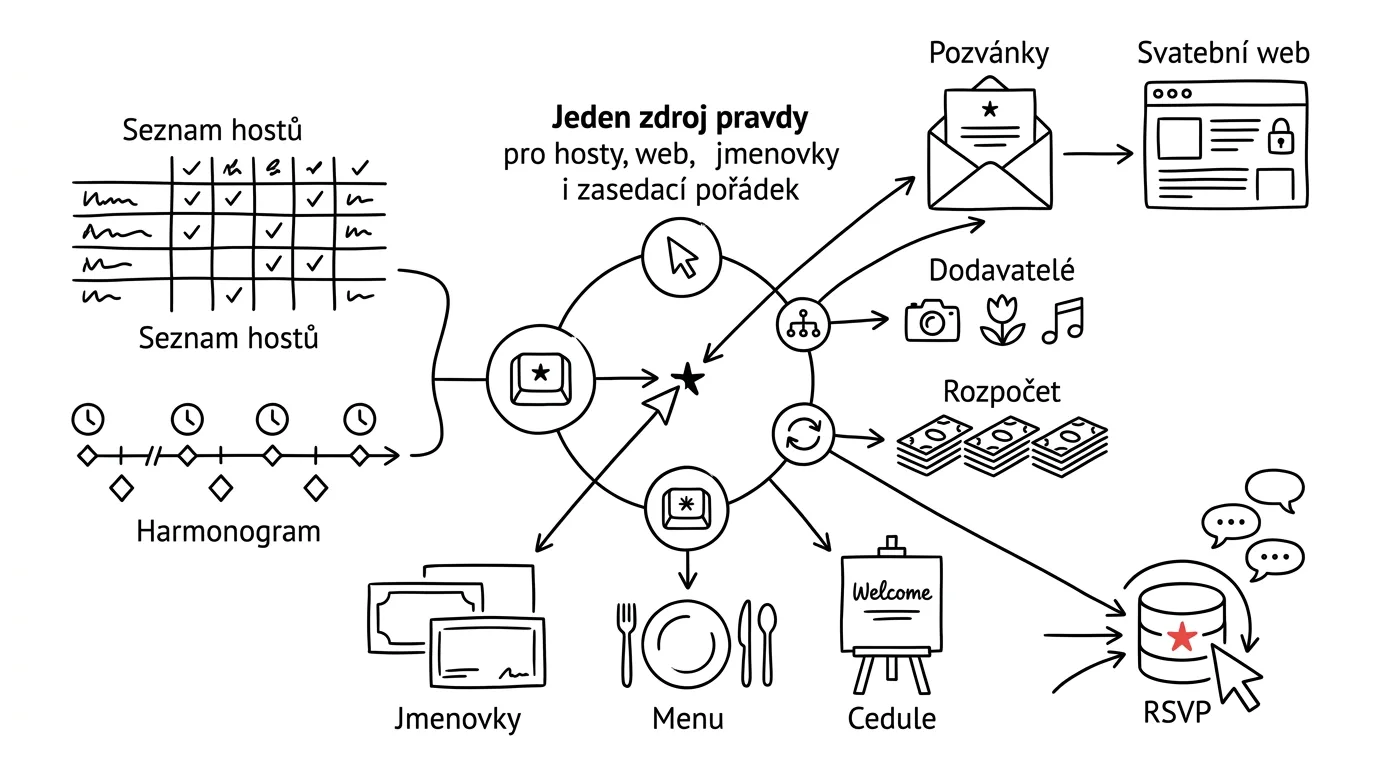
- What gets generated from what: a map of the outputs
- The most common mistakes
- The best tools
- What you get out of it
- Pro tip
A wedding for eighty people is probably the biggest event you'll ever organize: more vendors than a small conference, a harder deadline than anything at work, and a team made up of people you can't swap out, because they're your relatives. And yet most weddings run on tools that wouldn't survive a school prom — five spreadsheets, three Messenger threads, a notebook of phone numbers, and the most important part living "in someone's head." Anyone who has been through it knows the result: the same piece of information exists in four versions, changing the ceremony time means fixing it in five places, and three weeks before the wedding nobody can say how many people are actually coming.
This guide shows a different path: build the wedding as a system with one source of truth that everything else is derived from. The guest list, the day's schedule, vendors, and the budget live as structured data — and invitations, the wedding website, place cards, table menus, and signage are just outputs generated from that data. When something changes, you fix it once, at the source, and regenerate the outputs. AI does exactly what it's good at here: the mechanics. It merges three versions of the guest list and lists the conflicts, proposes seating-chart variants that fit your constraints, drafts vendor inquiry emails, and lines up quotes in a table. The decisions — who to invite, who sits with whom, who gets a reminder — stay yours.
You can read it phase by phase; each one stands on its own and comes with copy-paste prompts, just fill in the brackets. Two rules sit above the whole guide. First: AI proposes, a human approves — no message to a guest and no payment to a vendor goes out without a person reading it and sending it themselves. Second: a guest list with diets and children is personal data. It belongs only in a paid account with contractual data protection, never on a public website, and never in a spreadsheet shared with "anyone with the link" — privacy gets its own chapter in this guide and is taken seriously from phase one.
A typical scenario
Klára and Martin are getting married in eight months: eighty guests, an outdoor ceremony in a meadow, the reception in a barn just outside town. Both work full time, so evenings and part of the weekends are all they have for the wedding. Klára's sister Veronika "took charge" of the organizing — which in practice means five spreadsheets: guests, budget, vendors, accommodation, and favors, each one looking different, two of them contradicting each other, and one existing in three copies suffixed "final," "final2," and "final-FOR-REAL." Meanwhile Martin's mother keeps her own guest list, which has six more people on it, because "we obviously can't skip the Shepards."
And RSVPs arrive however anyone feels like sending them: a text to Klára, a voicemail for Martin, a message to Veronika in the thread that was just discussing the band, and one "we'll be there, right?" said at a family gathering that nobody wrote down.
Then the ceremony time changed for the first time — the officiant couldn't make it before two. It got fixed in two spreadsheets out of five, Veronika told the caterer but not the florist, and the guests coming from out of state, who had already booked a morning flight, found out by accident. Every following change set off a wave of questions across three threads at once, because there was no single place to point to and say: this is always the current version.
The systemized version of the same wedding looks different. On the drive there's one folder: inside it, a single guest list (merged from every version, conflicts resolved over Sunday lunch, not in the data), the schedule as a text file, a vendor table with deposit deadlines, and a budget. The wedding website reads the schedule and the FAQ, RSVP lands in a database instead of a text message, and place cards and menus are generated from the guest list through one template in Canva. The second time the ceremony time moved, it was one fix in the schedule, one checklist of outputs to regenerate, and one batch message to guests — drafted in bulk, sent by hand. Veronika stopped being a spreadsheet re-typist and became a coordinator; Mom kept the right to propose changes — but in one place, not by quietly editing her own version. The rest of the guide is how you get from the first version to the second.
A wedding is a project like any other
If a company were running an event this size, a project manager would take it on, with a budget, a schedule, and a risk plan. A wedding has all of that: a budget with dozens of line items and payments spread across months, eight to twelve vendors with their own contracts, deposits, and deadlines, a deadline that can't move by a single day, and eighty "stakeholders," each with an opinion, a diet, or both. Plus one complicating factor corporate projects rarely have: nobody on the team has ever done this before, everyone's doing it in the evenings on top of a day job, and half the team are relatives you don't part ways with on LinkedIn after the project — you see them at the holiday table.
That's exactly why it's worth stealing what works from project management — and skipping the ceremony around it. This site has a similar playbook written out for a company in the guide to your brand as a system: there, company materials become one source of truth about the brand, and from it come a brochure, a website, and a CRM. The mental sequence here is exactly the same, just translated into a household context: a typical scenario → an inventory → one source of truth → derived outputs → editability → privacy. Instead of a brand manual, the wedding's visual identity; instead of a company website, the wedding website; instead of a CRM, a guest database with RSVP. Anyone who has read the company guide will recognize the structure at a glance; anyone who hasn't won't miss a thing.
What to borrow from project management — and what to leave at the office
Five things are worth borrowing. One source of truth: every piece of information has exactly one place where it's authoritative, and everything else either references it or is generated from it. Milestones worked backward from the date: not a wish list, but a chain of "no later than" deadlines that starts at the wedding and ends at today. Explicit roles: who decides (the two of you), who coordinates (one designated person), who proposes (everyone else) — unspoken roles are the source of half of all family friction. Plan Bs written down in advance: rain, a vendor no-show, and a key person falling ill don't get worked out on the wedding day, but calmly, three months ahead of it. And decision logs: one note saying "we picked the barn because the covered ceremony option is free; we turned down the uncle's band because of the setlist" saves you from reopening, three months later, a debate you already closed once.
And what to leave behind: corporate tooling. A wedding doesn't need Jira, a Gantt chart, or a sprint board — bringing project software into a family event is procrastination with a clean conscience. A folder of files, spreadsheets, a chat with AI, and discipline about exactly one thing is enough: changes happen at the source, never in the outputs.
The inventory: map the chaos before you start cleaning it up
The first step isn't setting up a new system, it's honestly writing down the one you already have. For a wedding you've been "somehow" planning for a few months, there are surprisingly many places where information lives — and an inventory is the only way to make sure none of it gets lost in the move.
We're planning a wedding for [80] guests, on [date], with the
ceremony [outdoors in a meadow] and the reception [in a barn].
Here's how we've been organizing it so far: [list everything that
honestly exists — a guest spreadsheet with your sister, a second
list with your mom, a budget in a notebook, a Messenger thread with
the band, catering quotes in email, accommodation notes on your
phone].

Do an inventory:
1. List every place information currently lives, and for each one:
   what it contains, who maintains it, and what it overlaps with.
2. Flag information that exists in more than one version, and for
   each one, write down why the duplication is dangerous (two guest
   lists = two different headcounts for catering and two different
   ideas about the budget).
3. Propose what should become the single source of truth for four
   areas: guests, schedule, vendors, budget — and what can stay
   where it is (old quotes, inspiration).
4. Rank the move by urgency: what's on fire because the date is
   approaching, and what can wait.
Don't set anything up yet, we're just mapping for now.
It comes back with a map of your chaos and a moving plan. Watch for two things: be ruthlessly honest in the brief (a system built over half of reality falls apart on the other half), and treat point 3 as a starting point for discussion — where the guest list ends up living is a decision for the two of you, not the model.
Milestones worked backward from the date
Weddings don't collapse because something took a long time — they collapse because something was noticed too late: invitations get printed once the design is done, the design waits on a final ceremony time, and the ceremony time waits on the officiant's confirmation. A backward-planned schedule surfaces these chains before they knot up.
The wedding is on [date], today is [date]. We both work; realistically
we have [4] hours a week for planning, more only on some weekends.
What's already done: [venue booked / officiant confirmed / nothing].

Build a milestone plan working backward from the wedding date:
- for each milestone, a "no later than" date, exactly what needs to
  be done, and why then specifically (the dependency on other steps:
  printing invitations needs a final time and place, catering needs
  final headcounts, the ceremony's legal filing has its own deadline)
- separately flag the points that can't move: booking the venue and
  key vendors, the ceremony's legal requirements, the print deadline
- no more than 3 major tasks per month — anything more won't fit in
  our hours; if it doesn't add up, say so directly so we can cut
  somewhere else
- leave the last two weeks for confirming and small details only, no
  big tasks or decisions
Output as a table: month, milestone, tasks, what it feeds into.
It comes back with the skeleton of eight months that you transfer into your calendar. Check the dependencies especially: the model sometimes suggests printing invitations before the ceremony time is confirmed, or leaves the invitation mailing and the RSVP deadline too close together — guests need at least six to eight weeks between them, more if there are small children or a long trip involved.
Roles: who decides, who coordinates, who proposes
The system doesn't erase family roles — it makes them visible, and that's what tames them. A trio works well: the couple decides (every final yes/no is the two of you), one person coordinates (for Klára and Martin, that's Veronika: she has the right to edit the source data, and on the wedding day it's her phone that rings), everyone else proposes (Mom can propose the Shepards — but as a proposal in one shared system, not as a quiet edit to her own version of the list).
This is easier to roll out than it sounds, as long as you don't frame it as taking work away from anyone. The sentence "your spreadsheet is wrong, we're doing it differently now" loses; the sentence "we merged all the versions into one, here's the link, everything of yours is in there — and please make changes right there, so nobody overwrites you" wins. Shared data paradoxically gives Mom more influence, not less: her suggestions no longer get lost in forwarded attachments, they have one place to land, and they either go through or get an answer. And Veronika stops spending her evenings retyping spreadsheets and starts doing what a coordinator is actually for: watching deadlines and holding the plan together on the day.
Eight months in practice: when to run which phase
The phases in this guide are building blocks, not a calendar — in real planning they overlap. To show how they line up over time, here's a typical timeline for an eight-month wedding; your own plan from the milestone prompt will be more precise, this is just a map for orientation:
- Months 1–2 (roughly eight to seven months out): the inventory, guest-list consolidation, and milestones (chapter above); setting up the folder and source files (phase 1). At the same time, inquiries from phase 6 are already going out to the big four — venue, catering, photographer, music — because those book up first and their deadlines are harder than yours. And one decision that can't wait: the guest count. The venue, the budget, and everything else flows from it.
- Month 3 (around six months out): once the date and venue are locked in, comes the visual identity and templates (phase 2), a basic version of the wedding website (phase 3), and invitations going to print. The RSVP form has to be live before the first invitation goes out — an invitation with a QR code linking to a website that doesn't exist yet wastes the first impression.
- Months 4–5: RSVP operations with a weekly review (phase 4), remaining vendors, contracts, and deposits (phase 6), ongoing collection of seating constraints (phase 5 — constraints get gathered over a long stretch, the chart itself comes together quickly). Tastings and the final menu.
- Months 6–7: the RSVP deadline and reminders, first seating-chart variants, the master day-of schedule (phase 7), and crisis plans. Final headcounts and diets go to the caterer — from live data, not from memory.
- Final month: place cards, menus, and signage from templates (phase 2 pays off now), the final seating chart, derived versions of the schedule; printing for the coordinator only the evening before. No new decisions in the last two weeks — just confirming, fine-tuning, and sleep.
Two logics sit behind that timeline. External deadlines (bookings, printing, catering headcounts) are fixed and non-negotiable — you plan backward from them. The internal order is a dependency chain: the website needs the identity, place cards need RSVP and the seating chart, the seating chart needs the constraints. Swap phases around and nothing explodes — you'll just end up doing something twice. The system tolerates deviation; the one thing it doesn't tolerate is a second source of truth.
Phase 1: one source of truth
The core of the whole system is boring, and that's exactly why it works: one folder with four source files. No special app, no subscription — plain text and spreadsheets that survive anything and open anywhere. You work over the folder with AI: on claude.ai, set up a "Wedding" Project (persistent context — you don't have to explain who you are and when you're getting married in every conversation), and if you're on the desktop app, Claude Cowork can work directly on the folder of files: it reads them, edits them, and creates new ones while you approve.
The folder structure that's proven itself:
wedding/
  guests.csv         the single guest list (phases 1 and 4)
  schedule.md         the day's schedule + prep milestones (phase 7)
  vendors.csv         contacts, statuses, deposits, deadlines (phase 6)
  budget.csv          line items, estimates, agreed prices, payments (phase 8)
  visual/             identity.md, colors, fonts, theme (phase 2)
  documents/          contracts and quotes as PDFs
  web/                wedding website code (phase 3)
  notes.md            decisions and why they were made
We'll walk through the individual files in later phases; for now, the most important thing — how to turn five spreadsheets and two private lists into one.
The guest list: the columns worth having
The guest list isn't a list of names — it's the single most valuable database in the whole wedding, because almost everything is derived from it: catering headcounts, kitchen diets, place cards, the seating chart, accommodation, transport, even thank-you notes. Columns worth having from day one:
- Identity and relationship: first name, last name, side (bride/groom), relationship to you (sister, coworker, college friend), group (family / friends / work). Relationships will be gold when you build the seating chart.
- Who's with whom: plus-one (name, if you know it), children and their ages. A child isn't a footnote — it's a meal, a high chair, and an argument for a kids' corner.
- Food: diet and allergies (vegetarian, gluten-free, nuts…). This column will eventually go to the kitchen, so write it so a stranger can understand it.
- Logistics: interest in accommodation, how they're getting there (car / train / a ride), and from where.
- Status: rsvp_status (invited → confirmed / declined / no response), date of last update, contact (phone, email).
- Operational: table number (filled in during phase 5), note.
That's a lot of columns? It is — and each one is a question you'd otherwise be scrambling to answer at the last minute in a panic. You'll fill them in gradually; what matters is that they exist, and that they exist exactly once.
Consolidation: from five versions to one
Now the hardest step, one AI handles in minutes instead of costing you an evening — merging every existing version. A reminder from the top: guest lists are personal data, upload them only to a paid account with contractual data protection.
I'm uploading [three] files with wedding guest lists that were built
independently of each other: [guests-veronika.xlsx,
list-mom.xlsx, and text copied from a Messenger thread].

Merge them into one table with columns: first name, last name, side
(bride/groom), relationship to us, group, plus-one, children and
ages, diet, contact, note, source (which list the row came from).

Rules:
- the same person written differently ("Jane Smith" vs. "J. Smith")
  belongs on one row — merge them, but flag that you guessed the
  merge; we'll check every one
- where the versions disagree (with a plus-one in one, without in
  another; a different diet), DON'T DECIDE: list both values in a
  CONFLICT column, we'll pick
- anyone who appears in only one version, mark "only on [source]" —
  those are guests we haven't discussed at home yet
- don't drop anyone, even if they look like an obvious duplicate
At the end, write a check: row count in each source, count after
merging, and count of conflicts — the numbers have to add up.
It comes back with one table and — more valuable still — a list of conflicts. That's not a flaw in the system, it's its first win: every conflict is a conversation that had to happen anyway, just one that would otherwise have happened at a worse moment. "Only on Mom's list: the Shepards, and Kratky with his girlfriend" isn't a row in a table, it's a topic for Sunday lunch — and once you've talked it through, the decision gets written down and stops haunting you. The end-of-prompt counts aren't paranoia: merging is exactly the operation where rows quietly go missing, and the totals are the only way to catch it right away.
Schedule, vendors, budget: the rest of the sources
schedule.md has two parts: prep milestones (from the prompt above) and the wedding-day schedule, which comes together in phase 7. Keep the format simple: time from–to, what's happening, who's responsible, where, what needs to be ready for it. vendors.csv tracks each vendor as a row: name, service, contact person, phone, status (contacted → quote received → confirmed → contract), deposit due date and status, balance due date, final-headcount deadline, note. budget.csv holds the line items: category, item, estimate, agreed price, paid (deposit), remaining, payment due date. We'll come back to the budget in phase 8 — for now it just needs to exist as a file, not a feeling.
Once the sources are in place, have them checked against each other and against reality:
Here are our four source files: guests.csv, schedule.md, vendors.csv,
and budget.csv [upload]. The wedding is on [date] for [80] guests,
the ceremony is [outdoors in a meadow], the reception [in a barn],
[more context].

Go through them like an experienced wedding coordinator and list
what's missing:
1. In the data: guests with no contact info, vendors with no deposit
   date, budget items with no estimate, schedule steps with no
   responsible person.
2. In reality: what weddings like ours usually need that isn't in
   the files at all — sound for an outdoor ceremony? a rain plan?
   a late-night ride home for guests? flowers? someone watching the
   kids? Phrase these as questions for us, don't decide.
3. Mismatches between files: a vendor in the budget who isn't in
   vendors.csv; a schedule time that doesn't match the service
   window from a quote; a guest count that doesn't match the number
   of rows in guests.csv.
Output as three lists, sorted by severity. Don't fix anything
yourself — we'll make the fixes, so we know what changed.
It comes back with a list of gaps that's priceless at this stage: mismatches between files are exactly the kind of error nobody catches in spreadsheet chaos, because nobody ever reads every file at once. Treat point 2 as a checklist of questions, not a shopping list — the model doesn't know a friend is lending you the sound system; answer the questions and write the answers into your notes.
The one-fix rule
Now the whole point of this phase. In the old world, changing the ceremony time from 12:00 to 14:00 meant five fixes: two spreadsheets, the website (if it existed), a message to catering, a message to the florist — and two of the five got forgotten. In the new world it's one fix in schedule.md plus a checklist of derived outputs. And since even the checklist is mechanical, AI does it:
We just changed the ceremony time in schedule.md from [12:00] to
[14:00]. Go through every file in the wedding/ folder and give me
three lists:
1. What's connected to the change and also needs to shift: guest
   arrival, photos (watch the light — sunset is at [time]), the
   hotel shuttle, the reception start, the evening program. Suggest
   new times, I'll approve them.
2. Which derived outputs are now outdated and need regenerating:
   the wedding website, the printed schedule for the coordinator,
   signage, the FAQ, the email to guests. For each one, note whether
   it's already been printed.
3. Which vendors the change affects and exactly what they need to
   know — draft short messages, we'll send them ourselves.
Don't change anything without approval, just return the lists.
It comes back with the kind of impact analysis a project manager at a company would spend half a day on. Notice the last line: the model drafts the vendor messages, but you send them — partly because of the "a human approves" rule, and partly because the vendor relationship is yours, not the model's. And one more discipline, without which the one-fix rule falls apart: outputs never get edited by hand. If you spot a mistake on the website or on the signage, fix it at the source and regenerate the output — otherwise the source and the outputs drift apart, and you're back to five spreadsheets, just with nicer graphics.
Phase 2: visual identity — one template, five outputs
A wedding has its own little brand: colors, fonts, a motif, a tone. Not for marketing's sake, but for consistency and speed — when the invitation, place cards, menus, signage, and website all come from one visual identity, the wedding looks "put together," even though a couple built it in the evenings. And best of all: the fifth output takes ten minutes, because you're not solving colors and fonts again, just content. It's the same principle as a brand manual in the company guide, just a couple of orders of magnitude smaller.
Identity as a file, not a feeling
Set up visual/identity.md — one page of text describing: two main colors and two accent colors (with hex codes, so they're consistent everywhere), a pair of fonts (headline and body), a recurring motif (a eucalyptus sprig, a monogram, a line), and the tone of the copy — how you're phrasing the invite, whether you're addressing guests informally, how formal the wedding is. That last point gets underrated: an invitation written in formal, ceremonial language and a website that talks to guests casually are two different weddings.
If you don't have a direction yet, have some proposed — a classic "AI produces variants, a human picks" task:
Propose three visual directions for our wedding. Inputs: [venue — barn
/ garden estate / meadow], [season and month], [what we love —
colors, flowers, dress style, music], [what we're afraid of —
over-decoration, kitsch, cold elegance].

For each direction:
- a palette: 2 main and 2 accent colors with hex codes and a note on
  where each gets used (print, web, flowers, textiles)
- a pair of fonts (headline + body) that are free to use, print-ready,
  and note how well each handles diacritics — decorative fonts often
  fail on this
- a motif or ornament that can repeat across every material and still
  works in single-color print
- a sample invitation sentence, so we can hear how the direction reads
Make the directions actually differ in mood, not just three shades of
the same thing.
It comes back with three comparable cards. Two checks before you pick: verify the diacritics with your own eyes — write out something with the accented letters your names and venue actually use in both fonts and look at the marks closely; decorative fonts often don't have them, or render them badly. And test-print the colors: a hex code that looks sage green on a monitor can come out of a home printer looking khaki.
Canva: templates that survive changes
Canva is the obvious tool for producing the materials — a free-to-use editor with templates and, crucially, a bulk-fill feature that becomes essential for place cards. At the time of writing, Canva also has an official connector for AI assistants (MCP): once accounts are linked, you can create designs from Claude, fill templates with content, edit them, and export — straight from the chat. The connector is still evolving, so check Canva's help center for its current capabilities — but the approach doesn't depend on it: everything below also works if you build the templates in Canva by hand and use AI just for content, copy, and data.
One decision matters most here: you're not making five separate graphics, you're making one family of templates. The invitation, the place card, the menu, the signage, and the wifi card are one family — same palette, same fonts, same motif, different format.
Using the Canva connector, set up a set of wedding templates based on
the attached visual/identity.md (colors, fonts, motif):
1. invitation [A6 portrait] — names, date, venue, link to the
   website with a QR code
2. table place card [folded 9 x 5 cm] — guest name, motif
3. table menu [DL] — courses, allergen labels, drinks
4. information sign [A3] — big headline + text (will double as the
   day's schedule, "this way to the ceremony," and the seating chart
   at the entrance)
5. card [A7] — wifi, photo hashtag, link to the album
Same palette everywhere, same pair of fonts, motif from identity.md.
Leave the copy as placeholder text — we'll fill in the content from
the data. Send links to the drafts, I'll fine-tune the details in the
editor myself.
It comes back with a set of linked drafts in your Canva account — editable source files, not finished images. Do the fine-tuning (nudge a line, enlarge a name) by hand in the editor; the point of the connector isn't to replace the mouse, it's to save you setting up and carrying the identity across every piece. And deliberately don't generate any of these as a finished image in a chat window: a generated graphic is a dead end you can't reopen a month later to fix a date — that's exactly the argument made in the company guide, and it holds just as true for a wedding.
Place cards and menus, in bulk, from data
Now graphics meets data for the first time. Eighty place cards don't get made eighty times — they get made from one template and one data file:
From guests.csv, take every guest with rsvp_status = confirmed and
generate a data file for bulk place cards:
- columns: name for the card (first + last name; children get first
  name only), table number, diet abbreviated (V = vegetarian,
  GF = gluten-free, A = allergy per note), so serving staff can read
  it off the back of the card
- check lengths: flag any name longer than [18] characters and
  suggest a line break or smaller font, so it's not left to the
  printer to decide
- list plus-ones we don't have a name for yet separately — a card
  that just says "+1" at a table won't work, we need to get those
  names
- sort by table number, and within each table by seating order
Save as place-cards.csv — this feeds the bulk-fill feature in the
Canva template.
It comes back with a file ready for Canva's bulk-fill feature (template + table = every place card at once) and two useful side effects: a list of unknown plus-ones (getting those names is a task for the next round of calls, not the morning of the wedding) and a flag on long names that would otherwise spill off the card. The same mechanism produces the menus (the data is the confirmed catering menu plus allergen labels) and the signage (text pulled from schedule.md). After exporting to PDF, check the diacritics and spot-check three place cards against guests.csv before printing — bulk-fill is reliable, but checking three cards takes a minute and printing the whole batch doesn't give you a second chance.
And once more, the one-fix rule in practice: if the menu changes a month out, or a guest moves to table 4, you don't edit the graphic — you fix the source (the menu, the seating chart), regenerate the data file, and re-run the bulk fill. No graphic-design round trip.
Printing invitations: the check you only need to run once
The invitation is the one output in the whole system that can't be regenerated once it's out — which is why it deserves a tougher check than everything else. Checklist before sending to the printer: verify the date, time, and venue against schedule.md, not from memory (from memory is exactly how you check the thing you misremembered). Print the QR code on a home printer as a test and scan it with three different phones off the paper — every QR code works on a screen, far fewer work on matte paper in dim light, and a code that's too small or too dark is the single most common print defect on invitations. Check the diacritics in your chosen font and check the names — whether parents' names belong on the invitation, and in what order, is exactly the kind of detail that starts a family storm. Paste the printer's requirements into the chat verbatim from their email and have the exported PDF checked against them (format, bleed, color mode). And finally, read one test print out loud — reading aloud catches mistakes your eyes have skipped past twenty times already.
And a rule for what belongs on the invitation: only what's fixed. Names, date, venue, a QR code to the website, and a password to the website if it has one. Everything that can still change — exact times, maps, dress code, accommodation — belongs on the website, which, unlike the invitation, can actually be fixed. An invitation mailed with the wrong time can't be recalled; a website with the corrected time is one regeneration away.
Phase 3: the wedding website — a hub for guests
A wedding website isn't an obligation and it isn't a vanity page for the couple — it's a service to guests that saves you dozens of repeated answers. Eighty people means eighty times "how do I get there," "what should I wear," "can I bring the kids," and "by when do I need to let you know." A website answers all of it once, and stays current — because it reads its data from the wedding/ folder, so when the time changes, the website changes too, and guests have a place they can trust.
What belongs on the website — and what doesn't
Belongs: first names and the date (first names are enough), a map with the address, directions, and parking, the day's schedule in the guest-facing version (when to be where, when the food's served, when the shuttle leaves — not vendor logistics), an FAQ, an RSVP form, and a contact for the day-of coordinator. Doesn't belong: the guest list, a named seating chart, addresses, anything personal about third parties. The website is semi-public — the link from the invitation gets forwarded, indexed, discovered. The rule is simple: nothing goes on the website that you'd be uncomfortable seeing printed on a supermarket noticeboard. Extra protection comes from a simple password printed on the invitation, or at least an unlisted address kept out of search engines; a password that's weak (every guest knows it) is still enough to stop random passersby and bots.
Building it: one evening with Claude Code
The full process for building and deploying the website — from the first prompt through git as a safety net to a custom domain — is written up in detail on this site in the guide to a website with Claude Code and Vercel, and we won't repeat it here; a wedding website is its simplest possible case, a single page with no admin panel. Hosting on Vercel's base tier is more than enough for a site like this. Here's the brief that turns that guide into a wedding website:
Build a single-page wedding website. Sources in the wedding/ folder:
schedule.md (use only the "guest version" section),
visual/identity.md (colors, fonts, tone of voice), faq.md.

Page structure:
- intro: [Klára and Martin], [date], venue [town] — no last names
- how to get to us: map, address, parking [where], hotel shuttle
  [times], contact for the coordinator [first name and phone — I'll
  fill in the number myself, it doesn't belong hardcoded in the code]
- the day's schedule, guest version
- FAQ from faq.md
- RSVP form: first and last name, attending yes/no, plus-one (names),
  children and ages, diet (dropdown + free text field), interest in
  accommodation and the shuttle, a message — answers get saved to
  [Google Sheets / Supabase], not to email
Rules: no guest names or seating info anywhere; copy in the tone from
identity.md; the site has to work perfectly on a phone — guests will
open it from the QR code on the invitation.
It comes back with a working website you can walk through and fine-tune iteration by iteration ("make the date bigger," "move the map lower," "the form's success message should sound friendlier"). Three checks before you share it: open the site on a phone (that's where most guests will see it), fill out the form as a test and confirm the response actually lands in the table, and try submitting the form with blank fields — guests fill out forms every which way, and the site can't crash on grandma's "yes yes we're both coming." The website link then belongs on the invitation as a QR code — the bridge between the printed and the live world: the invitation stops changing the moment it's printed, the website doesn't, so the invitation carries only what's fixed (names, date, venue, the QR code) and everything that can still change lives on the website.
FAQ: answers up front
The FAQ is the most rewarding page on the site — every question you answer there is a question nobody has to ask you six times across three channels.
Write an FAQ for the wedding website. Context: [ceremony outdoors in
a meadow, reception in a barn, kids welcome, dress code "summer
formal," gifts — a contribution to the honeymoon is preferred,
parking at the town hall 300m away, shuttle to the hotel at 23:00 and
1:00, breakfast for guests staying overnight].

Write 10 to 14 questions guests actually ask, with short answers:
what to wear (especially for men — jacket or not), what happens if
it rains, can I bring kids / a partner, how do gifts work, what time
should I arrive, where do I park, how do I get home at night, by
when and how do I confirm attendance, who do I contact on the day,
is there somewhere to change a diaper. Keep the answers specific and
in our tone per identity.md, no vague "use your own judgment."
Wherever you don't know the answer from the context, write QUESTION
FOR US — don't guess.
It comes back with a ready FAQ draft with the gaps flagged QUESTION FOR US — and those gaps are, once again, more valuable than the finished answers: they're operational decisions you haven't actually made yet (is there somewhere to change a diaper?). Decide, add the answers to faq.md, and regenerate the website. Write the FAQ once and point people to it: when someone asks by text, the answer becomes "it's on the website in the FAQ — and if something's missing, tell us, we'll add it." That's what turns the website into what it's meant to be: the place people go for the truth.
The website in operation: three kinds of changes
The website stays live through the whole engagement, and three kinds of changes happen to it, each with its own discipline. Routine updates — an added FAQ question, a clarified parking note — happen anytime: fix the source, regenerate, done, nobody gets notified. Major changes — a shifted time, a new venue — go through the same mechanism, but the website alone isn't enough: a website isn't a notification channel, and whoever doesn't happen to open it knows nothing. A major change therefore always means the website plus a message to guests (drafted from the impact analysis in phase 1, sent by hand). Crisis messages on the wedding day get their own lane: one bold sentence right at the top of the page that everyone has in their phone — more on that in the crisis-scenarios section below.
One rule sits above all of this: the website must never fall behind reality. A guest who once discovers "the website was wrong" stops trusting it and goes back to asking in the group chats — and you're right back where you started. That's why the website is listed in the outputs table at the end of this guide as an output with continuous updates: every source change that touches it means a regeneration that same evening.
Phase 4: an RSVP database instead of three group chats
RSVP is where wedding chaos hurts the most, because money and food both hang on it: the caterer needs a final headcount and diets by a fixed date, accommodation has a capacity limit, and a seating chart can't be built from guesses. And yet responses traditionally get collected in the worst possible way — every guest replies through a different channel, to a different person, and in a different format. Does "we'll be there" from an aunt mean two people, or five with kids? Did a cousin reply to you, or to your mom, or to nobody? Three weeks before the wedding you're sitting over seven group chats reconstructing reality like a detective.
The fix: responses flow into one database, guests enter them themselves through a form, and statuses are tracked per guest, not in anyone's head. "Database" sounds grand; in its basic form it's just a Google Sheets table wired to a form.
Option A: Google Forms and Sheets — no code, free
The simplest path, and enough for most weddings: a Google Forms form (or the form on the website from phase 3, which writes to the same table), responses land in Sheets, and that spreadsheet is the RSVP part of your system. Guests with no form ambitions (grandma) remain the exception, handled by phone — their response gets entered into the table by the coordinator, not by "whoever happens to hear about it."
The form itself has to be well built, though, or it just moves the chaos from texts into a spreadsheet:
Design an RSVP form for our wedding and how it links back to the
guest list.

1. Form fields: first and last name, attending yes/no, names of
   anyone in your party, children and their ages, diet and allergies
   (dropdown + free text), interest in accommodation, interest in the
   late-night shuttle, a message. For each field, write the exact
   wording of the label so guests answer unambiguously — for the
   plus-one field, for instance, we want names, not just a headcount,
   because of the place cards.
2. What NOT to ask for: addresses, dates of birth, anything we don't
   actually need for organizing — the fewer personal details we
   collect, the fewer we have to protect.
3. Matching against guests.csv: what to do if a guest fills in a
   nickname, if they confirm a whole family in one submission, if
   they submit the form twice with different answers. Propose rules
   so we handle it the same way every time.
4. Guest statuses in guests.csv: invited → confirmed / declined / no
   response, plus date of last update. Write down when each status
   gets set, and by whom.
It comes back with both the form's structure and the operating rules — and it's the rules that matter most. Double submissions, nicknames, and family group answers will happen no matter what; the difference between chaos and a system isn't that they stop happening, it's that there's an agreed procedure for them (the latest response wins; matching happens by hand once a week; the coordinator breaks a family group answer out into individual guest rows).
Option B: Supabase — for couples with a little bit of code between them
If you built the website with Claude Code and want to go a step further, the form on the site can write to Supabase — a managed database with a free tier that's more than enough for a wedding. The upside over a spreadsheet: responses are structured the moment they're submitted (no "yes yes we're both coming" typed into a free-text field), the data is separate from the site's code, and access can be restricted. Two rules if you go this route: create the project in the EU region (it's guests' personal data) and turn on Row Level Security from the start — an anonymous visitor should be able to submit a response, but never read anyone else's. Only you should be able to read responses, through an admin view. For most couples this is more than they need — a spreadsheet is plenty; this option is here for completeness, not as a recommendation.
The weekly review: turning responses into reality
A database is worthless if nobody looks at it. Set up a ten-minute Sunday ritual — and let AI handle the mechanics of it:
Here's the current export of RSVP responses and our guests.csv
[upload]. Give me a weekly review:
- how many guests have confirmed, declined, and not responded — in
  PEOPLE, including plus-ones and children, not in row counts;
  separately, a count of children by age (for portions and childcare)
- what's changed since last week, and what task that creates (another
  gluten-free diet → tell the caterer; confirmed accommodation →
  book the room)
- mismatches: a confirmed plus-one who was never invited; a diet
  that doesn't match what's in the guest list; a guest who submitted
  the form twice with different answers
- guests who haven't responded and have fewer than [14] days left
  before the RSVP deadline [date] — sort by how much they matter to
  planning (a family of 5 needing accommodation ranks above one
  coworker)
Don't send anyone anything, just the review and the task list.
It comes back with a review you can read in two minutes and that steers the whole week. The people-not-rows conversion matters most — the single most common RSVP mistake is counting spreadsheet rows and then being surprised the caterer is twelve portions short, because nobody added up plus-ones and children. And the second key thing is the mismatch list: each one is a phone call or a decision, and it's much easier to handle two at a time as they come up than twenty all at once at the end.
Reminders for non-responders — drafts yes, autopilot no
There will always be a group of guests who haven't replied: not out of ill will, usually because the invitation got buried. Nudging them is uncomfortable, which is exactly why it gets put off — ideal work for AI to draft, and for a human to send.
For the guests in "no response" status [paste the list with
relationships], draft reminders. Context: the RSVP deadline is
[date], catering needs final numbers [10 days] before the wedding,
the form is on the website at [address].

- split guests into groups by relationship: close family, friends,
  coworkers, our parents' friends — and write a different message
  for each group: warm and personal for family, short and to the
  point for coworkers, all of it in our tone per identity.md
- in every message: a reminder of the deadline, a link to the form,
  and a line saying that even "sorry, we can't make it" is a
  genuinely useful answer — nobody should feel awkward declining
- for guests who don't fill out forms [grandma, uncle Jarda], suggest
  who in the family should call instead, and exactly what to find out
- no guilt-tripping, no "we already asked" — write it as if this is
  the first time, even when it isn't
We'll send the messages ourselves, each one after reading it and
adding something personal.
It comes back with a set of messages split by relationship, plus a list of phone calls to make. The last line of the prompt is the whole point of this section: reminders don't get automated. A mass message that grandma can spot as a mass message does more damage to a family than the time it saves — and one extra personal line ("we can't wait for little Jane to see the ponies") costs ten seconds and changes the whole tone of the message. AI gives you a skeleton and gets you past the awkwardness of the first sentence; you supply the relationship.
A deadline that holds
The RSVP deadline isn't set by feel, it's worked out backward: caterers typically want final headcounts and diets ten days to two weeks before the wedding, you want a week before that for chasing down non-responders and another week for building the seating chart without rushing — which puts the guest-facing deadline roughly four to five weeks before the wedding. And a trick worth using: the invitation and the website show one date, your internal plan has a date a week earlier. That's not lying to guests, it's a buffer — because some guests always reply after the deadline, and a buffer keeps that from throwing you off.
Set one rule about late replies in advance, so it doesn't get decided under pressure: whoever gets in touch after the deadline gets whatever's still realistically possible — and the two of you decide that based on capacity and cost, not a guilty conscience at ten at night. Even this decision ("after the deadline, we seat people if there's room, with no guarantee of menu choice") is worth a sentence in notes.md; relatives have long memories, and a consistent rule is the only real defense against "but you let the Smiths in."
Phase 5: the seating chart — AI proposes variants, the couple decides
The seating chart is a combinatorics problem disguised as family diplomacy: eighty people, ten tables, dozens of relationships, and a handful of landmines. It's exactly the kind of problem where a human brain gets stuck in a loop ("if I move Peter, the table by the window falls apart…") while a machine happily generates variant after variant. The division of labor here is clean: you know who can't stand whom — AI is fast at assembling and reassembling. Neither one works without the other.
Constraints first, then assembly
The mistake almost everyone makes is jumping straight into seating people. The right order is the opposite: write down the constraints first — and only then build on top of them. Constraints come in three kinds: hard (divorced parents can't sit at the same table; kids sit with their parents; the aunt using a cane needs an aisle seat near the exit), soft (college friends would love to sit together; a cousin is more fun next to that uncle), and structural (table capacities, who sits at the head table, where the dance floor and speakers are — the table next to the speaker stack isn't for grandma).
Help us write down the constraints for the seating chart. Go through
guests.csv (the relationship and group columns) and ask us one
question at a time about what's not in the data:
- who absolutely CANNOT sit at the same table (divorced parents?
  cousins who had a falling out? exes who are both invited?)
- who MUST sit together: couples and families in one place, kids
  with their parents, [grandma] near the exit and away from the
  speakers
- who knows whom: for guests with no obvious ties (coworkers, our
  parents' friends), suggest who they might sit with based on the
  data — same workplace, similar age, kids the same age — and ask
  us if it fits
Write every rule into seating-constraints.md in this format: rule,
type (hard/soft), reason. Phrase the reasons neutrally and briefly —
someone in the family might end up seeing this file.
It comes back with a structured constraints file — and that last line of the prompt isn't a throwaway: "Peter can't sit with Jane because Peter is unbearable" is a sentence that should never exist in any file; "keep apart — tense relationship" does the same job without hurting anyone if the file happens to get opened on a shared computer. The one-question-at-a-time format is deliberate: sensitive relationships deserve some thought, not a quick click-through.
Variants: three seating philosophies
Propose three seating-chart variants. Inputs: guests.csv (confirmed
guests only, headcounts including plus-ones and children),
seating-constraints.md, and the room layout: [10 tables of 8, head
table for 6, dance floor on the right, entrance and bar at the back].

Rules:
- hard constraints are non-negotiable; if they can't all be satisfied
  at once, say so and list which ones conflict — don't bend any of
  them
- satisfy as many soft constraints as you can; for each variant, list
  which ones you had to sacrifice and why
- make the variants differ in philosophy: 1) families and groups kept
  together, 2) mix the bride's and groom's sides so the families get
  to know each other, 3) grouped by age and interests (younger guests
  near the dance floor, older guests farther from the music)
- for each table: names, number of children, a summary of diets (for
  serving staff)
- for each variant, 3 risks ("table 6 has no shared common ground,"
  "table 2 has two strong personalities")
We'll pick ourselves, probably by mixing elements of more than one.
It comes back with three complete charts and an explanation of the trade-offs in each. You'll read them differently than you expect: finished variants are mainly a tool for provoking a reaction — it's only over a concrete draft ("Vera next to Aunt Millie? You can't be serious") that you realize a constraint you forgot to write down. Add it to seating-constraints.md and regenerate; two or three rounds is usually enough. Take the risk flags seriously: the model doesn't know your family, but it reliably spots "a table made up entirely of people who don't know each other" from the data — and that's exactly the table that goes quiet by ten o'clock.
The final call is yours, and it gets made at the kitchen table, not in a chat window: print out the winning variant, go through it table by table, and ask at each one: "Will this table actually have a good time?" The model optimizes for constraints; whether it makes for a good party, only you can tell.
The head table and kids: two zones outside the algorithm
Two parts of the seating chart don't get optimized, they get decided — and enter the prompt as settled facts. The head table is a matter of protocol and your own preference: the classic version with parents and the best man/maid of honour, an intimate version for just the two of you, or a casual table with your closest friends — each is legitimate, but it has to be settled first, because it determines how many seats are left for the algorithm, and because it touches the most sensitive relationships (divorced parents at one head table is exactly the hard constraint seating-constraints.md exists for). Kids have their own logic: young children belong with their parents (and a high chair is a full seat in the table's capacity — this is easy to forget when counting), older kids tend to be happier together at a kids' table with their own activity. A kids' table comes with two conditions that belong in the constraints file: it has to be visible from the parents' seats, and one adult has to be on duty. The model knows these conventions and will suggest them on its own — but they're cultural and family decisions, so make them yourselves and hand them to the model as an input, not a question.
When something changes — and it will
A week before the wedding, a family cancels and a plus-one confirms. On paper, that means erasing an evening's worth of work; with source data, it's a prompt:
Change in guests.csv: [Aunt Alena's family (4 people) canceled,
coworker Tom confirmed a plus-one]. Update the chosen seating chart
with the SMALLEST possible number of moves:
- every hard constraint still has to hold
- list each move separately with a reason — I'll approve them one
  by one
- if a table ends up half-empty after the cancellation, suggest
  merging tables and what to do with the freed-up one (gifts?
  desserts?)
- once approved, regenerate place-cards.csv (names and table
  numbers) and flag which cards have already been printed and need
  reprinting
It comes back with a minimal set of moves instead of a whole new chart — and that matters, because every move a week before the wedding is a potential phone call and an offended cousin; the less it shifts, the better. And notice the last step: changing the chart automatically means regenerating the place cards. That's the phase-2 system in action — the seating chart is a source, place cards are an output, and outputs never get hand-edited.
Phase 6: vendors — inquiries, comparing quotes, contracts, and deposits
A wedding for eighty people usually means eight to twelve vendors: venue, catering, photographer, band or DJ, florist, makeup artist, cake, transport, maybe video and a day-of coordinator. Each one is its own round of inquiries, quotes, a decision, a contract, and payments — and every round has the same shape. That's exactly why this is the most rewarding place for AI support: the mechanics repeat, only the subject matter and the names change.
Before you start: everything about vendors lives in vendors.csv. Every vendor you've reached out to is a row with a status (contacted → quote received → meeting → confirmed → contract → deposit paid), quotes get saved into documents/, and decisions ("we picked catering by the Lynwood team, because they were the only ones who could do a fully gluten-free menu") go into notes.md. It sounds bureaucratic right up until the moment, three months later, you need to remember what someone promised you.
An inquiry that gets a real answer
A good inquiry is half the selection process: a vendor who gets a specific brief sends back a specific quote — and specific quotes can actually be compared. A vague "how much does a wedding for 80 people cost?" gets you vague answers and a second round of questions.
Write an inquiry email for [a photographer]. Facts: wedding on [date],
[town and venue], [80] guests, ceremony [at 14:00] outdoors, reception
until [around 2am], getting-ready starting [9:00] at [location]. We
want [a documentary style, minimal posed group shots, an emphasis on
kids and grandparents].

Structure:
- who we are and what we're planning (2 sentences, enough for them to
  picture us)
- exactly what we're asking for: number of hours, expected
  deliverables (number of edited photos, delivery timeline, delivery
  format)
- our questions: do you have the date free? what's included in the
  base package and what costs extra? how do deposits and
  cancellations work? how long is the quote valid? can you send a
  full gallery from one past wedding, not just portfolio highlights?
- when we'd appreciate a reply by
Tone: friendly and to the point, no flattery or superlatives. Give me
the text, I'll review and send it myself.
It comes back with an email you can just review, tweak, and send — and, more usefully, a template you can adapt for catering (add diets and preliminary numbers from RSVP), the band (repertoire, how late they play, what equipment they need), and the florist (colors straight from identity.md — the visual identity is already starting to pay off). The question about a full gallery isn't random: a portfolio is a photographer's best shots, a full wedding shows you the average — and the average is what you'll actually get.
Log every response into vendors.csv as it comes in (status, dates) and save quotes into documents/ — the next step needs them all in one place.
Comparing quotes: a table instead of a gut feeling
Three catering quotes are three PDFs written in three different languages: one prices per person, another per menu, a third has half its line items as "to be discussed." A human brain turns that into a feeling; a table turns it into a decision.
I'm uploading [three] quotes for [catering] from documents/ [files].
Build a row-by-row comparison table that shows what each quote
doesn't say:
- what's included: number of courses, drinks, staffing (how many
  servers per how many guests), dishware and glassware, delivery,
  corkage, overtime hours, kids' portions, cleanup
- what costs extra, and what the quote doesn't address at all — an
  empty cell in the table is a question, not a point in that vendor's
  favor
- deadlines: deposit, balance, final headcount and diet deadline,
  cancellation terms and how they're staged
- for each quote, a list of questions to ask before deciding —
  especially wherever the wording is vague
Don't just compare the totals: normalize the quotes to the same scope
(80 guests, same number of courses and hours) and flag anywhere the
scope differs enough that a direct comparison doesn't really hold.
It comes back with a comparison table and a list of follow-up questions — and the question list matters more than the table. Quotes almost never differ by price alone; they differ by what's missing, and a missing line item (band overtime, post-reception cleanup) is tomorrow's unpleasant surprise. Send the questions, fill the answers into the table, and only then decide. And log the decision — which is yours, not the model's — into notes.md along with the reason; six months from now, when someone at a party asks "wait, why didn't you go with the other one," you'll have an answer instead of a shrug.
The contract: AI as a co-reader, not a lawyer
Bigger vendors (venue, catering, music) come with a contract. AI has a clearly bounded role here: it helps you understand the contract and ask good questions — legal review on large sums belongs to an actual lawyer.
Here's a draft contract from [vendor] [upload]. You're not my lawyer
and I don't want legal advice — I want to understand the contract and
ask good questions:
1. Summarize it in plain language: what we're committing to, what
   they're committing to, when payments are due, and what happens if
   either side backs out.
2. List anything one-sided or unusual: cancellation terms that only
   protect them, the right to change the menu without our consent,
   penalty clauses that only apply to us, uncapped overtime.
3. What's missing that weddings typically need to address: a delayed
   ceremony, a backup for a sick photographer, rain affecting the
   outdoor portion, damage caused by guests, how late headcounts can
   change.
4. A list of questions to clarify by email — so we have the answers
   in writing, not over the phone.
It comes back with a plain-language summary and a list of questions. Two rules to go with it: get answers to your questions in writing by email (verbal promises are hard to prove come May), and for contracts involving real money — typically the venue and catering — have a lawyer look over the final text; an hour of their time is nothing next to the value of the contract. The model will also sometimes flag something as "unusual" that's actually standard for the industry — treat findings under point 2 as topics to ask about, not an accusation against the vendor.
Meetings and tastings: show up prepared, leave with a note
You get to know your finalists in person — and an unprepared meeting slides into pleasant small talk that leaves you with a good feeling and no actual answers. Before a meeting, pull together your prep from the chat: "prepare questions for tomorrow's meeting with the caterer — base them on the open items from our quote comparison and on what their quote didn't address" returns a list that lets you run the meeting instead of the other way around. After the meeting, the second half of the ritual: on the drive home, dictate what was said into your phone (voice mode is ideal for this — you talk, the model asks about the gaps), have the notes cleaned up and written into notes.md, and get anything promised verbally confirmed in a short follow-up email: "thanks for meeting with us, just confirming that the price includes…". Not out of distrust — from the plain experience that by May, both sides remember a February meeting differently.
The same discipline applies to tastings: score them on the spot in a table (course, impression, note, photo), not from memory — two tastings blur into one after a week, and you'll end up deciding based on whichever was most recent, not whichever was actually better.
Deposits: a deadline radar
The most mundane and most expensive failure in wedding planning is a forgotten deposit and a lost booking. vendors.csv holds the deposit and balance date for every vendor — and once a month (no more often than that) you run a check against it; a full financial review, including the payment calendar, is phase 8. If you want a safety net, a scheduled task in Claude can go through vendors.csv every Monday and flag anything due in the next three weeks — the reminder is automatic, the payment never is; money always gets sent by a human.
Phase 7: the day's schedule — one truth, three views
The wedding-day schedule is the most-read document of the whole event, and also the one with the most different audiences: guests need to know when to be where and when the food's served; the coordinator needs a minute-by-minute rundown with phone numbers and backup plans; catering just needs its own window and a contact. The classic mistake is producing three separate documents — which immediately drift apart. The systemized fix: one master schedule as the source of truth, and three derived views that never get edited on their own.
The master: a minute-by-minute plan with buffers
Build a detailed wedding-day schedule into schedule.md. Inputs:
ceremony [14:00, meadow by the barn], reception [barn, 200m walk],
sunset [19:40 — for photo timing], bride's prep [starting 9:00 at
the inn], vendor times from vendors.csv, evening program [first
dance, cake cutting, band until 2am], shuttles [23:00 and 1:00].

Rules:
- cover from the morning (prep, decor delivery) through the last
  guests leaving, and what happens to the decor and gifts overnight
- for each item: time from–to, what's happening, who's responsible
  (by name), where, and what needs to be ready beforehand
- buffers: build in [15–20] minutes of slack around the ceremony,
  congratulating the couple, photos, and transitions — a schedule
  with no slack is fiction
- flag the ANCHORS that can't move (catering's arrival, sunset,
  shuttle times), and the blocks that can safely stretch or get
  dropped
- at the end, list the 5 places weddings most commonly run late, and
  what we're doing about each one in our plan
It comes back with a minute-by-minute plan you'll go through twice: once on your own (do the distances work? can grandma actually make it in 10 minutes?), and once with the coordinator, who'll be carrying it on the day. The buffers and anchors matter most: the day will run late — that's not a risk, it's a certainty — and the difference between a relaxed wedding and a stressed one comes down to whether the plan has somewhere for the delay to absorb into, and whether everyone knows what can't move. Post-ceremony congratulations are the classic underestimate: eighty guests times thirty seconds of hugging is forty minutes, not "a quick moment."
Three views from one source
From the master schedule in schedule.md, derive three versions:
1. FOR GUESTS (for the website and signage): only what they need —
   when and where to be, the ceremony, the meal, the cake, the first
   dance, the shuttles. No logistics, no vendors, 10 lines max, times
   rounded.
2. FOR THE COORDINATOR (printed, fits in a hand, A4): everything,
   including vendor phone numbers, what needs to be ready where,
   anchors highlighted, and for risky blocks, a note on "if this runs
   late, then…".
3. FOR VENDORS: each one gets only their own window — arrival, setup,
   the event itself, teardown — plus the coordinator's contact, so
   on the day they call her, not us.
Save the versions as sections in schedule.md below the master. When
the master changes, all three get regenerated — never edit them
separately.
It comes back with three consistent views of the same day. The guest version goes on the website (phase 3) and on signage at the entrance (the template from phase 2); the coordinator's version gets printed the evening before — not earlier, so it's genuinely current; the vendor version goes out by email ahead of time, each vendor getting only their own slice. That it's all one file isn't a small detail — it's the reason the ceremony-time change in phase 1 only took one fix.
The day itself: paper and one phone
On the wedding day, the system steps off the screen. The coordinator carries her printed version (and a backup copy in her bag), the guest version is up on the signage, and the last organizational rule applies, and needs saying out loud to every vendor and family member: on the day, everyone calls the coordinator, not the bride and not the groom. The two of you have exactly one item on that day's schedule you're not allowed to delegate. Hand the phone to your best man or maid of honour.
Phase 8: the budget and tracking deposits
You can write anything about wedding budgets except actual numbers — they vary so much by region, season, and taste that any figure in this guide would look laughable a year from now. What doesn't change is the shape of the problem: a wedding budget has dozens of line items, payments spread across many months, two stages for most vendors (deposit and balance), and one universal law — the actual cost ends up higher than the first estimate, because the first estimate forgets about the twenty small things.
Good news on the cost of the system itself: almost everything in this guide runs for free or on a free tier. Google's spreadsheets and forms are free, Canva has a usable free plan, hosting the website on Vercel's base tier is plenty, and Supabase's free tier is well beyond what one wedding needs. The one line item that costs real money is a paid AI account with contractual data protection — and you should have that anyway, because of guests' personal data. So the system doesn't compete with the wedding budget; it pays for itself against a single avoided mistake (a lapsed deposit, twelve extra portions, a reprinted batch of invitations).
The structure: estimate → agreed → paid
budget.csv from phase 1 tracks every line item across three columns: estimate (what you thought at the start), agreed price (what's in the contract or quote), and paid (how much has gone out, typically the deposit). Alongside that, a payment date and a link to the vendor. That trio is the whole trick: the gap between the estimate and the agreed price shows how reality is evolving, and the gap between the agreed price and what's been paid is your payment calendar. And right at the top, one extra line: a contingency — a line item with no vendor attached that still gets spent.
The monthly financial review
Here are budget.csv and vendors.csv [upload]. Run a monthly financial
review:
- which line items don't have an agreed price yet, even though their
  deadline (per the prep schedule) is coming up — those are estimates
  about to stop being estimates
- a payment calendar for the next [3] months: what, to whom, when,
  deposit or balance, sorted by date — so we know what's going out
  each month
- where the agreed price differs from the estimate by more than [15]
  percent, and what that does to the total and to the contingency
- cross-check: a vendor with a contract who's not in the budget; a
  budget line with no vendor; a deposit that's overdue
- what wedding budgets typically include that ours is missing:
  tipping, transport, flowers and last-minute extras, band overtime,
  next-day breakfast
Don't pay anything and don't log anything — just give us the review,
we handle the payments and the entries.
It comes back with a monthly snapshot you can read in five minutes, and it heads off the two most expensive failure modes: a budget quietly drifting (ten line items that are each "just a little more" add up to an ugly number) and a forgotten payment. Treat the last bullet — what's typically missing — as a checklist, not an instruction to spend: you'll cut half the extras, but you'll cut them deliberately. And a rule from across this whole guide applies here word for word: AI prepares the review, a human is the only one who enters a payment. No agent gets banking access, no automatic transfers "so we don't forget" — reminders exist for forgetting, not autopilot.
After the wedding, budget.csv gets opened one last time for the final tally — more on that in the last phase.
Privacy: the guest list is personal data
This chapter is short and non-negotiable, because wedding data is more sensitive than it looks at first glance. guests.csv holds names, contact details, relationships, information about children including their ages, and diets — and a diet can reveal something about health (celiac disease, diabetes) or religion. seating-constraints.md holds family relationships nobody wants read out loud. The RSVP database knows who's going to be where on a given Saturday night — and by extension, whose home will be empty. All of this gets handled under a few rules; the broader framework lives in the chapter on ethical, safe AI.
- Only through a paid account with contractual data protection. The guest list, diets, seating constraints — none of it belongs in an anonymous free chat. This is the one paid item in the whole system, and it's non-negotiable.
- No guest names on the website. A wedding website is semi-public; a named guest list, seating chart, or captioned photos have no business being there. The website carries information about the event, not about people. A simple password from the invitation adds extra protection.
- Shared spreadsheets go to named people only. Share the RSVP table by name (the two of you and the coordinator), never "anyone with the link" — a link gets forwarded faster than you'd think. Give other family members an export of what they need, not access to everything.
- Collect the minimum. Every column you don't actually need for organizing is unnecessary risk. You only need addresses for printed invitations — delete them once they've been sent.
- Write neutrally. Phrase reasons in the seating constraints and notes about guests so nobody gets hurt if they happen to read them. Files get shared, and computers get left open.
- Clean up after the wedding. Delete RSVP data, contacts, and constraints once they've served their purpose (after thank-you notes go out); whatever's worth keeping as a memento (the schedule, the visual identity, the website) shouldn't contain personal data. A system that knows how to come into being should know how to be retired, too.
And one more thing that's only half about data: photos. There will be children at the wedding, and people who don't want to end up online. Protect the shared guest album with at least a password, only post photos of people who've agreed to it on public social media, and always ask parents before posting a photo of someone else's kid. None of that is something AI solves — it's plain courtesy, and the system's only job is not to get in its way.
Crisis scenarios: write plan B while things are calm
Three months before the wedding is the only right moment to ask "what if it rains?" — on the wedding day itself, the only thing answering that question is panic. Project management calls this a risk plan; in wedding terms: for every likely mishap, there's a procedure worked out in advance, the coordinator knows it, and whatever the plan needs is ready to go. This isn't catastrophic thinking — it's the simple fact that decisions made calmly beat decisions made in the rain.
Prepare plan Bs for our wedding: [ceremony outdoors in a meadow,
reception in a barn, 80 guests, August, photographer + band +
catering all external]. For each scenario, spell out: the trigger
(when we activate the plan, and WHO decides), exactly what changes,
who we tell and how, and what has to be ready beforehand.

Scenarios:
1. Rain on the ceremony day — where the covered backup is, how fast
   it can be set up, when the call gets made (8am? two hours before?),
   and who tells the officiant and the guests
2. A vendor doesn't show — especially catering, the photographer, the
   band: a backup plan for each, and how late it can realistically be
   activated
3. A key person gets sick — best man/maid of honour, the coordinator,
   the officiant
4. A power or sound outage in the barn
5. Temperatures above 90°F — shade at the ceremony, water for guests,
   ice cream for kids, moving photos
For each scenario, end with the contents of one A5 card with the
procedure for the coordinator — she'll be the one deciding, we'll be
at the ceremony.
It comes back with a set of plans that also produces a shopping and prep list along the way (a stash of umbrellas, an extension cord and a backup speaker, a backup photographer's number "just in case"). The most important line in every plan is the trigger and the decision-maker: a plan B that gets voted on in the critical moment isn't a plan, it's another source of chaos. "If the 8am forecast calls for rain after noon, Veronika decides, and the ceremony moves indoors" — that's what a sentence looks like that saves an hour of arguing on a Saturday morning.
Print the cards using the template from phase 2 (even a crisis plan can look nice) and hand them to the coordinator along with her copy of the schedule. And every plan needs a communication step: who tells the guests. The fastest channel for wedding-day changes is already built — the website from phase 3. One line — "Due to weather, the ceremony is moving into the barn, everything else stays the same" — at the top of the page that everyone already has open from the QR code, backed up with a text to anyone who won't check the website; keep that text pre-written in your notes, so on the day you only need to fill in the time.
After the wedding: thank-yous, photos, the final tally, and cleanup
The system's job doesn't end at the wedding — there are still four tasks left, and because it's already built, they take a fraction of the time they'd take from scratch. It's also the phase you have zero energy for right after the wedding, so the rule is: the more it's prepped in advance, the more likely it actually happens.
Thank-yous that don't read as a form letter
Thank-yous are the mirror image of the reminders from phase 4: AI drafts the structure and the skeletons, you supply the personal touch. The source data already exists — guests.csv, with a gift/help column added after the wedding (who gave what, who helped set up the decorations, who drove grandparents around).
We want to send thank-yous after the wedding. Here's guests.csv with
the gift/help column filled in [upload] — wherever it's blank, we'll
fill it in before anything goes out.

- split guests into groups by relationship and by type of gift or
  help, and for each group, write a thank-you template in our tone
  per identity.md: personal and specific ("thank you for helping
  move the benches in the rain"), no generic "thanks for coming and
  for the lovely gift"
- in every template, leave one [bracket] for a personal line or
  memory — no thank-you goes out without it
- separately, draft thank-yous for vendors who did great work, and
  for each one, a short public review to go with it — for small
  vendors, a review is worth more than a tip
- suggest an order and pace: who gets one within a week, who can wait
  a month
We'll send them ourselves, gradually; nothing goes out as a mass
message.
It comes back with templates by group and a sending plan. The trick with the mandatory personal line in brackets works well: it forces you to pause on every name for a second and actually remember something — and that one second is what turns a formality into a real connection. Write vendor reviews while the details are still fresh; they're future bookings for those vendors, and the cheapest form of thanks you can give.
Photos: an album for guests, not for the internet
The photographer sends a gallery; guests send hundreds of shots from their phones. A process that works well: one shared, password-protected album (send the link and password to guests — a page on the wedding website works nicely, giving it a second life), an invitation for guests to upload their own photos into it, and a smaller "official" selection of the best shots. The privacy rules from earlier still apply: only share photos publicly of people who've agreed to it, and ask parents before posting photos of their kids. And one practical tip: picking two hundred photos out of eight hundred is an evening's work with good music playing — doing it together beats delegating it.
Post-wedding paperwork
The last thing left to think about after the wedding is the administrative round — and that's exactly why it deserves a checklist, not a vague sense of obligation. If either of you is changing your last name, that means new documents and notifying a whole list of places: ID, bank, employer, insurance, contracts. Have a personal checklist put together ("we're changing a last name, we work at such-and-such, we have a mortgage and two cars — build a list of institutions to notify, in what order, and what we'll need for each") and work through it with the same Sunday ritual you used to plan the wedding. One warning that applies to any AI-built checklist of official business: deadlines and requirements change — verify actual dates and fees on official government sites; a checklist from a model is an outline, not legal certainty.
The final tally and the archive
The last time you open budget.csv: fill in the actual amounts, compare them to the estimates, and write three sentences into notes.md — what cost more than expected, what cost less, and what you'd do differently next time. Not for bookkeeping's sake — because friends getting married next year will ask, and your three sentences will save them a month.
Then the cleanup the privacy chapter promised: delete RSVP data, contacts, and seating constraints — they've done their job. And the archive: the schedule, the visual identity, the Canva templates, the website (feel free to let it live on as a memory page — once it's stripped of personal data), and the notes with your decisions. That's not nostalgia, it's a reusable system: the next big family event — a milestone birthday, an anniversary, a christening — starts from a copy of this folder, a rename, and a prompt: "go through this wedding's structure and adapt it for a 60th-birthday party for 40 guests." With the system already built, the second event is an evening's work, not months.
What gets generated from what: a map of the outputs
The whole system on one table — every output, its source of truth, and when it was last updated. Rule for reading it: when an output is wrong, you fix the source and regenerate the output; the output itself never gets hand-edited.
| Output | Source of truth | When to last update it |
|---|---|---|
| Invitation (print + QR) | identity.md + schedule.md + website address | Before printing — after that, only the website |
| Wedding website | schedule.md (guest version), faq.md, identity.md | Continuously; last revision a week before the wedding, then only crisis messages |
| FAQ | faq.md | Whenever a missing question comes up |
| Place cards | guests.csv + seating chart + Canva template | After the RSVP deadline; reprint only what changed |
| Table menus | confirmed catering menu + identity.md | After the menu and allergens are finalized |
| Information signage | schedule.md (guest version) + identity.md | A week before the wedding |
| Seating chart at the entrance | seating chart | The day before the wedding, after the last changes |
| Coordinator's schedule | schedule.md (master) | The evening before — print it last |
| Vendor windows | schedule.md (master) + vendors.csv | After every change to the master; send out with lead time |
| Catering headcounts and diets | guests.csv (confirmed status) | By the catering deadline — from live data, not memory |
| Reminders and messages to guests | guests.csv + identity.md | Fresh from live data every time; a human sends it |
| Thank-yous | guests.csv + gift/help column | After the wedding, before personal data gets deleted |
The table doubles as a checklist for any bigger change: scan the source column, find what's affected, and you know exactly which outputs to regenerate. That's the entire impact analysis from phase 1, condensed into one view.
The most common mistakes
- A second "just to be safe" list. The moment anyone — Mom, the best man, even you — starts their own copy of the guest list or budget, the system is dead; a month later the versions have drifted and nobody knows which one is authoritative. One truth, everyone else reads or proposes.
- Editing outputs instead of the source. Fixing a typo directly on the website or on the signage is fast and fatal: the source still carries the old version, and the next regeneration brings the mistake right back. The fix belongs at the source, and the output gets regenerated — no exceptions, even when you're in a hurry.
- RSVP through "just send us a message." Responses scattered across texts, Messenger, and phone calls mean the final catering headcount gets built by reconstruction. Form + spreadsheet + weekly review; exceptions (grandma) get logged by one designated person.
- A seating chart at the last minute with no written-down constraints. Assembling seating the night before the wedding, from memory, is a lottery played with family relationships. Constraints get gathered over weeks (phase 5), the machine generates variants, you decide with a clear head.
- Automating communication with guests. A mass reminder, a robotic thank-you, an autopilot message — family always notices, and remembers it for a long time. AI writes drafts; reading, personalizing, and sending is a human's job. The same goes for payments.
- The guest list in a free chat, or a spreadsheet shared "with anyone with the link." Names, diets, children, and relationships are personal data. A paid account with contractual data protection, named sharing only, minimal columns — and delete what's served its purpose after the wedding.
The best tools
- Claude (claude.ai) with a "Wedding" Project — persistent context for the whole event: describe the wedding, the style, and the roles once, and every following conversation builds on it. A paid account, because of guests' personal data.
- Claude Cowork — working directly on the wedding/ folder: consolidating lists, running impact analyses on changes, generating data files — the model reads and edits the files, you approve.
- Canva — templates for invitations, place cards, menus, and signage, all from one visual identity; bulk-fill for place cards straight from a spreadsheet. At the time of writing, with a connector for AI assistants too.
- Google Forms + Sheets — an RSVP form and response database, free and code-free; for more ambitious couples, Supabase (EU region, locked down from the start).
- Claude Code + Vercel — a wedding website in an evening, following the standalone guide: map, schedule, FAQ, RSVP form.
- Scheduled tasks in Claude — a weekly RSVP review and deposit-deadline monitoring: reminders on autopilot, decisions and payments always by hand.
What you get out of it
- Time: consolidating lists, comparing quotes, seating-chart variants, and derived schedules shrink from evenings of work down to minutes — and, more than that, the endless retyping of the same thing in five places and answering the same question in six group chats simply disappears.
- Money: no lapsed deposits, no extra portions from a bad headcount, no reprinted invitations because of an outdated time. The system runs on free tiers — the one paid item is the AI account protecting guests' data.
- Peace of mind: the last week before the wedding is for confirming and fine-tuning, instead of tracking things down and putting out fires. On the day itself, there's one piece of paper with the truth on it, one phone that rings, and plan Bs written while things were calm.
- Quality: a consistent look from the invitation to the signage, guests informed from one place, a seating chart that's actually thought through instead of assembled in a panic — and thank-you notes that feel personal, because there was energy left over to write them.
Pro tip
Set up a Sunday wedding check-in as a routine: a scheduled task in Claude runs every Sunday evening, goes through the RSVP export, vendors.csv, and budget.csv, and drafts one message — what changed, what's overdue, what needs deciding next week, who to reach out to. The two of you sit down with it for twenty minutes and a cup of tea, go through it, and split up three tasks. The wedding stops being planned "constantly" (which in practice means never properly, in scraps, everywhere) and starts being planned in a set block of time, over current data — which, as it happens, is exactly the skill that keeps paying off after the wedding too; for how AI helps run family life from there, see the guide to AI in the family.
And the closing rule of this whole guide: one fix, not five. Any time during the planning that you catch yourself fixing the same piece of information in a second place, the system just told you it has a leak — one of those two places needs to be the source, and the other needs to be an output. Fix it right away, and the wedding stays what it's supposed to be: a celebration, not the administration of five spreadsheets.
Want to go deeper? The handbook has a whole chapter on it — AI and automation.
Similar tips
Noise suppression: the mower outside your window stays yours alone
Zoom and Teams can filter out barking, keyboard clatter, and next-door drilling. Just switch noise suppression to high in your audio settings.
Turn on captions during a meeting — they work in Czech too
Teams, Zoom, and Meet can all show live speech captions, and Czech is among the supported languages. A lifesaver in noise, with bad audio, or a quiet speaker.
Shutting down isn't enough: Windows only fully resets on a restart
Because of Fast Startup, shutting down Windows isn't a clean stop — the system tucks part of its state away. When the PC misbehaves, only Restart helps.
Common questions
Why isn't a shared spreadsheet and a Messenger group enough?
For a while, it is — right up until the first change. A shared spreadsheet has no rules (everyone edits it their own way), Messenger has no memory (information gets buried under the next message), and above all: neither one lets you generate outputs from it. One source of truth with structure means place cards, catering headcounts, and the website all come from the same data — and a change propagates everywhere.
Do we need to know how to code to build our wedding as a system?
No. The core of the system is a folder of spreadsheets and text files, plus Canva for graphics and Google Forms for RSVP — none of it requires a single line of code. A wedding website is an optional extra step: with Claude Code and the website-building guide, even a non-technical couple can manage it, but the system works fine without it too.
Are we allowed to upload the guest list to an AI?
Only to a paid account with contractual data protection — a guest list with diets, children, and contact details is personal data and doesn't belong in an anonymous free chat. And regardless of the account: never put guest names on a public website or in a publicly shared spreadsheet, and delete the data you no longer need after the wedding.
Can AI send reminders to guests on its own?
No. AI drafts reminders — split by relationship, in your wedding's tone — but a human reads and sends every single message. An automated message that writes to grandma gets noticed, and the family remembers it longer than the wedding itself. The same rule applies to payments and to anything going to vendors.
What if the ceremony time changes a month before the wedding?
That's exactly the moment you're building the system for: you fix the time in one place in the schedule, have an impact analysis run (what shifts, which outputs are now outdated, which vendors are affected), and regenerate the website, signage, and the coordinator's version. One fix and a checklist — instead of five fixes and two forgotten spots.
Does this work for events other than weddings?
Yes, the system is portable: a birthday milestone, a golden anniversary, a reunion, or a bigger kids' party all share the same skeleton — guests, schedule, vendors, budget, one source of truth, and derived outputs. Just the scale shrinks: instead of a website, a shared page with a map and a time is enough; instead of a seating chart, a seating habit.
Was this helpful?
Liked this tip?
I send one like it every week by email. Two minutes to read, hours saved.
The Top 30 tips e-book, free — it lands in your inbox right away.
Then 1 tip a week · no spam · unsubscribe in one click
Prefer a system to single tips? The free email course — seven days, seven emails, one skill a day.