Handbook · Methods · 15 min read
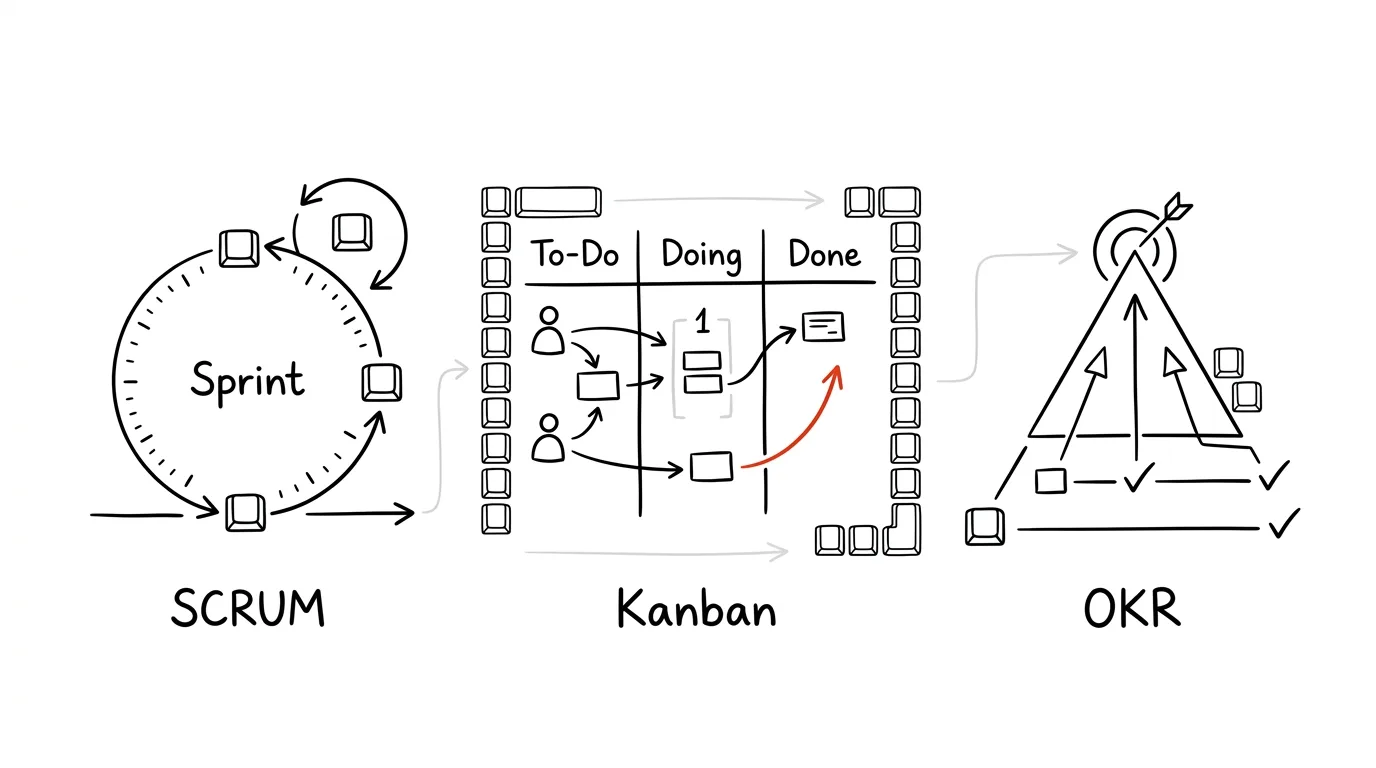
Scrum, Kanban and OKRs for individuals
Last reviewed:
Three frameworks from big companies that work beautifully for one person too: sprints, a visual board with WIP limits, and measurable goals.
In this article
Scrum for one person? Isn't that overkill? Not really. The frameworks that run development at Toyota, Google and Intel work perfectly well at the scale of a single person — you just have to shrink them properly.
Why bother with advanced systems
Basic methods like GTD or Pomodoro work brilliantly for personal tasks and simple projects. But sooner or later you hit a situation where they stop being enough:
- you're running several projects at once,
- you work with a team or with contractors,
- you need to measure and optimize performance rather than guess at it,
- you have complex long-term goals that can't be ticked off with a single task.
That's when you need a more sophisticated approach. Advanced systems aren't a hobbyist's add-on — they're a response to growing complexity. And they're not merely tools for working more efficiently: they're tools for understanding your own working patterns more deeply.
The four advanced systems in a nutshell
- 1Scrum for individuals1–2 week sprints, stand-ups, reviews, a backlog. For projects with clear deliverables and a need for fast feedback.
- 2Personal KanbanVisual flow of work with limits on work in progress. For varied work that arrives continuously.
- 3OKRsAn inspiring objective plus 3–5 measurable results. For quarterly planning and personal development.
- 4Agile PPMManaging an entire portfolio of projects. For organizations with shared resources and dependencies.
Agile PPM (Project Portfolio Management) is the most sophisticated of the four and is aimed mainly at larger teams and organizations. Its essence is managing a portfolio of projects as a whole — visibility across all projects, their prioritization and resource allocation, combined with agile flexibility. It treats projects as a connected ecosystem: instead of managing each in isolation, it gives you a view that accounts for interdependencies, strategic priorities and available capacity. For an individual it's usually overkill — so from here on we'll focus mainly on the first three.
Personal Scrum: the week as a sprint
Scrum came out of software development, but today it's a general approach to project management. Its core idea is dividing work into short, intense cycles — sprints. Each sprint opens with planning, where you set clear goals, and closes with a review, where you assess the results.
What changes in the personal version: you're both Product Owner and Scrum Master, the daily stand-up becomes personal reflection, the sprint review becomes a quick self-review, and the retrospective focuses on your own improvement.
What stays the same: time-boxed sprints, a prioritized backlog, incremental progress, and regular review with adaptation.
- Mon 30'Sprint planningreview the backlog, assess the week's capacity, pick tasks and set a sprint goal
- Daily 5'Personal stand-upwhat did I finish yesterday? what am I doing today? what's blocking me?
- Daily 10'Evening closereview what's done, prepare for tomorrow, notes for the retrospective
- Fri 15'Sprint reviewwhat's finished, what quality it is, what moves — plus velocity (how much I got through)
- Fri 15'Retrospectivewhat worked, what didn't, what I'll do differently next sprint
For a small team (2–5 people) the same rituals simply grow: a two-week sprint, a 10-minute stand-up, an hour of planning, and 30 minutes each for review and retrospective.
Setting the system up
In Notion (or any other tool) four building blocks are enough:
Scrum home page:
1. Backlog (database)
   - Task name, Priority, Estimate, Status, Sprint

2. Sprint Board (kanban view)
   - To Do | In Progress (WIP limit: 2-3) | Done

3. Sprint Planning (document)
   - Sprint goals, Capacity, Commitments

4. Daily Log (database)
   - Date, What I finished, What I'm doing, Blockers
The daily routine
Set aside fifteen minutes in the morning: five for a personal stand-up (what I finished yesterday, what I'm doing today, what's in my way), five to review the sprint board (update statuses, check WIP limits, add new tasks to the sprint backlog) and five to prioritize the day (choose the main tasks, check deadlines, spot likely problems).
During the day, just keep the board alive — update statuses, record blockers, and watch your WIP limits. Give ten minutes in the evening to reviewing what got done, preparing for the next day, and jotting notes for the retrospective.
The weekly cycle
Sprint planning (Monday, 30 minutes) has three parts. First, ten minutes reviewing the backlog — reorder by priority, update estimates, drop items that no longer matter. Then ten minutes of capacity planning: how many hours do I realistically have, what other commitments exist, how many story points can I handle. And finally ten minutes of selection — move items into the sprint backlog, break big ones down, and set the sprint goal.
Sprint review (Friday) answers three questions: what got finished, what quality the output is, and what moves to the next sprint. At the same time you measure progress — velocity (how many story points you got through), burndown, and blockers along with how you resolved them.
The retrospective has just three questions: what worked well, what didn't, and what I'll change next sprint.
Templates worth having
Daily Log
Date: [date]

Completed:
- [task 1]
- [task 2]

Plan:
- [task 3]
- [task 4]

Blockers:
- [blocker] → [resolution]
Sprint Review #[X]

Sprint goals:
- [goal 1]
- [goal 2]

Completed:
- [output 1] — done
- [output 2] — moving to next sprint

Learnings:
- [learning 1]

Next steps:
- [action 1]
I keep the sprint backlog as a simple table: task, priority, story points, status, notes. Nothing more is needed.
Tips and common problems
Start simple: weekly sprints, basic metrics, minimal ceremony. Add more detailed planning, more metrics and more sophisticated tools only gradually. Stay consistent — the same times for your rituals, regular updates, disciplined measurement.
- “I can't fit in the daily stand-up.” Shorten it to three minutes and pair it with your morning coffee. For some people a short audio recording works better than writing.
- “I have too much in progress.” Set stricter WIP limits, focus on finishing, and break tasks into smaller pieces.
- “Retrospectives feel repetitive.” Change the format, focus on one specific aspect each time, and experiment with techniques.
Remember: Personal Scrum isn't about following rules rigidly, it's about creating a structure that gives you a better view of your own work.
Kanban: managing work visually
Kanban started as a production management system at Toyota. Where Scrum emphasizes sprints, Kanban focuses on a continuous flow of work. Its power lies in its simplicity — three rules:
- 1Visualize the workEvery task visible, a clear status, a view of the whole flow.
- 2Limit WIPLess work started = more work finished. Prevents overload.
- 3Manage the flowFind the bottlenecks where work piles up, and remove them.
A basic board: Backlog → To Do (WIP 5) → In Progress (WIP 3) → Done. A more advanced version adds a Review (WIP 2) column between working and done — the place where you check your output or wait for someone else's feedback.
The WIP limit is what makes Kanban Kanban — when a column is full, you can't add anything until you finish something. It's uncomfortable in exactly the right way: it forces you to finish things instead of starting them.
Where to build the board
Trello is the fastest start: columns for Backlog, Selected, In Progress, Review and Done, labels for priority, type and project, custom fields for due date and estimate, plus Power-Ups for calendar and time tracking if you want them.
Notion is stronger because you can build several views on top of one database — board, calendar, timeline and a plain list. Properties: status, priority, owner, due date and tags.
A physical board with colored sticky notes works surprisingly well — mostly because you can't close it in a browser tab. Use vertical lanes for different types of work, horizontal rows for priorities, and colors for individual projects.
Metrics and how to read them
Track four numbers: lead time (total time from request to completion), cycle time (time spent actively working), throughput (items completed per period) and WIP (how much work is in progress). Two simple charts are enough: a cumulative flow diagram shows where work piles up between columns, and a control chart of lead times reveals which tasks are outliers.
The daily routine is short: fifteen minutes in the morning to check the board (work in progress, blocked items, new opportunities) and plan the day (pick priorities, check WIP limits, identify risks). During the day you update statuses and clear blockers. Ten minutes in the evening for reviewing finished work, updating metrics and preparing for the next day.
Optimizing the system
You spot bottlenecks with three questions: where does work pile up, which columns are often empty instead, and where does processing take longest. Set WIP limits conservatively at first — for To Do, twice the number of people; for In Progress, the number of people; for Review, half. For an individual that means 2 / 1 / 1, which sounds strict, but that's exactly what produces the biggest effect.
You improve flow by removing unnecessary steps, automating routine, and standardizing repeating processes.
Advanced techniques, worth it only once the basics are running:
- Swim lanes — horizontal bands for urgent, standard and maintenance work. You immediately see how much time firefighting eats.
- Classes of service — categories of work with different rules: Expedite (may bypass WIP limits), Fixed Date (a hard deadline), Standard, and Intangible (important but with no deadline).
- Blocker markers — mark visibly on the card why it isn't moving: waiting on the client, technical problem, resolved.
Common problems
- “Work piles up in one column.” Lower the WIP limit, add capacity, or split the column. You've just found the bottleneck in your system — and that's exactly what Kanban is designed to reveal.
- “WIP limits aren't being respected.” Explain the reasoning, visualize the consequences, or automate the enforcement directly in the tool.
- “Priority is hard to judge.” Define clear criteria, use an important/urgent matrix, and for team work involve whoever is requesting it.
Remember: Kanban isn't a rigid system — it's a framework you're meant to adapt and keep improving.
OKRs: from dreams to measurable results
Before OKRs, company goals were often abstract phrases on a noticeboard. Managers produced sprawling strategy documents that ended up in a drawer. Andy Grove at Intel and later John Doerr at Google introduced a method that transformed that approach: connect an inspiring objective with measurable results (key results).
Instead of a vague “improve marketing”: an objective of “become a recognized expert in the field” with results like “publish 3 professional articles,” “speak at a conference,” “increase reach by 50%.”
The anatomy of an OKR is simple. The objective is inspiring, qualitative, time-bound, ambitious but achievable. The key results are 3–5 measurable outcomes with numeric values and trackable progress. Beneath them live concrete initiatives, and out of those come weekly tasks.
Objective:
Build the best customer experience in our industry

Key Results:
1. Raise NPS from 30 to 50
2. Cut average resolution time from 24 h to 4 h
3. Raise customer retention from 75% to 90%
Three levels
- Organizational OKRs — an annual horizon, vision and strategy, owned by leadership. For example: become a leader in sustainable business, with results like cutting the carbon footprint by 50%, fully renewable energy at every location, and three environmental certifications.
- Team OKRs — a quarterly horizon, tactical goals that support the strategy. For example: digitize key customer processes, with results like 80% of interactions through digital channels or a 90% reduction in paper documentation.
- Individual OKRs — monthly or quarterly, personal development and contribution. For example: become an expert in UX design, with results like completing 3 certified courses, producing 5 case studies, presenting at 2 conferences.
How to introduce OKRs
Before you start, make sure you have a clear vision, leadership support (if this is a company), defined time cycles, and a tool for tracking. Creating them takes three steps: brainstorming (gathering ideas, identifying priorities, consulting stakeholders), drafting (clear objectives, measurable key results, a check that they align with higher-level goals) and validation (an outside view, a reality check, final edits).
- 1SetDefine objectives and key results for the period.
- 2AlignLine them up across levels — individual OKRs support team ones, team ones support the organization's.
- 3TrackA weekly check-in: where each key result stands and what's holding it back.
- 4ReviewA monthly assessment of progress and confidence score.
- 5ReflectA retrospective at the end of the cycle — what did I learn.
The weekly check-in is short and always the same: for each key result, note the movement (from 35% to 40%, say), then blockers with a proposed fix, and two or three concrete steps for next week. The monthly review sums up overall progress, the confidence score, and above all three findings: what's working, what isn't, and what I'll adjust.
Scoring: 0.0 = no progress, 0.3 = progress but not achieved, 0.7 = goal achieved, 1.0 = exceeded. If you're hitting 1.0 on everything, your goals weren't ambitious enough.
Tools and common mistakes
There are dedicated tools like WorkBoard, Lattice, 15Five and Perdoo. For an individual, though, Notion is more than enough (an Objectives database linked by relations to key results, initiatives and weekly tasks), or a Google Sheets workbook with four tabs: dashboard, weekly tracking, metric detail and charts.
There are three common mistakes. Bad phrasing — instead of “improve marketing,” go with “become a recognized expert in the field,” and instead of a key result like “implement a new CRM,” go with “raise lead conversion by 25% using the new CRM.” The crucial difference: a key result describes an outcome, not an activity. Too many OKRs — stick to the limits above. Weak tracking — regular check-ins, automated reports and a visual dashboard all help.
OKRs connect well to other systems: you tie sprint goals to key results, fold the OKR review into your sprint review, and tag backlog items with the key result they serve. In companies, OKRs often feed performance reviews and career development too — but beware of tying them too tightly to bonuses, because then nobody sets an ambitious goal.
The most important message of OKRs: this isn't about hitting everything perfectly, it's about continuous learning and movement. Mistakes aren't failures — they're data.
How to combine them
- Kanban + GTD: the inbox is the backlog, next actions are Selected, projects become swim lanes.
- Kanban + Scrum: the sprint backlog acts as a WIP limit, the stand-up happens at the board, and the sprint review includes flow metrics.
- OKRs + both: objectives determine what sits at the top of the backlog; key results measure whether the finished work led anywhere.
For individual projects, Kanban plus OKRs works well. Small teams benefit from Scrum topped up with OKRs. Complex organizations go for Agile PPM with OKRs. A fuller decision guide is in the chapter How to choose your system.
Adapting to the kind of work you do
The same framework looks different depending on what you do for a living:
- Manager: 30 minutes of portfolio review in the morning, a 15-minute team stand-up, two hours of strategic deep work, an hour for stakeholder communication, and 30 minutes for the daily close and planning.
- Product team: Monday for sprint planning, Tuesday through Thursday as development days with no meetings, Friday for review and retrospective.
- Creative professions: a project cycle with a time budget — 20% research and inspiration, 30% exploring options, 40% execution, 10% review and polish.
Measurement and the review rhythm
- DailyQuick checkstate of the metrics, identify blockers, a brief sync
- WeeklyPerformance reviewprocess adjustments, retrospective, movement on key results
- MonthlySystem assessmentbigger adjustments, strategic planning, revisiting goals
Metrics worth tracking across all three frameworks: cycle time, lead time, throughput and, for a team, velocity. It's also useful to connect the system to its surroundings — calendar, communication tools and company systems — so you don't end up with two versions of the truth.
Watch out for three classic traps. Too many systems: run an audit, find the overlaps, consolidate the tools and automate the connections. Weak adoption: simplify the process, show quick wins, and in a team find the people who will champion it. Information overload: filter by relevance, set an information hierarchy, and prune the system regularly.
Pick one framework, run it for a month, and only then start adding pieces of the others. Advanced systems are tools, not goals — they should help you work more effectively, not add another layer of complexity. The goal isn't a complicated system. The goal is clarity and calm.
Related tips
In-depth guide · 57 min
Company know-how out of your head: AI interviews, Lucid, and Notion
A complete guide with 25 prompts: AI interviews the owner and the foreman, draws the processes into editable maps via the Lucid connector, and saves the procedures into a living knowledge base in Notion. The company stops running on what's in Franta's head.
A written status instead of a status meeting
Three questions in a form on Friday: what went well, what's in progress, what's stuck. Suddenly the 45-minute status meeting is unnecessary.
Notion: the slash inserts anything
/
The / key opens the block menu — headings, tables, reminders, columns. Notion's core control.
In-depth guide · 18 min
Notion vs. Obsidian vs. Built-In Notes Apps: What to Pick
A fair comparison of three camps across eight criteria — from capture speed to price. With a comparison table, a pick for your situation, and an exit plan.
Want to keep the momentum?
One tip from the handbook by email each week — in an order that makes sense.
The Top 30 tips e-book, free — it lands in your inbox right away.
Then 1 tip a week · no spam · unsubscribe in one click
Prefer a system to single tips? The free email course — seven days, seven emails, one skill a day.