Tips & tricks · AI · Everywhere · ~weeks of development and waiting on other people · 26 min read · in-depth guide, doing it ~2 h
A custom website with Claude Code, git, and Vercel: from idea to domain
Last reviewed:
In this article
- A typical scenario: the site you're reading this on
- What you'll need
- Decisions only you can make
- Scaffolding the project
- Git as a safety net
- The domain, and why each language gets its own
- Deploying to Vercel
- What a routine change looks like
- What to hand off to the agent, and what not to
- Common mistakes
- The best tools
- What you get out of it
- Pro tip
You have something to say and nowhere to put it. A template tool offers you someone else's design and a monthly fee for the privilege of typing into your own text box. A developer offers a six-week timeline and a price that only pays off on the third project. In between sits a third path that exists today: a custom-built website you run yourself, with an agent instead of a dev team.
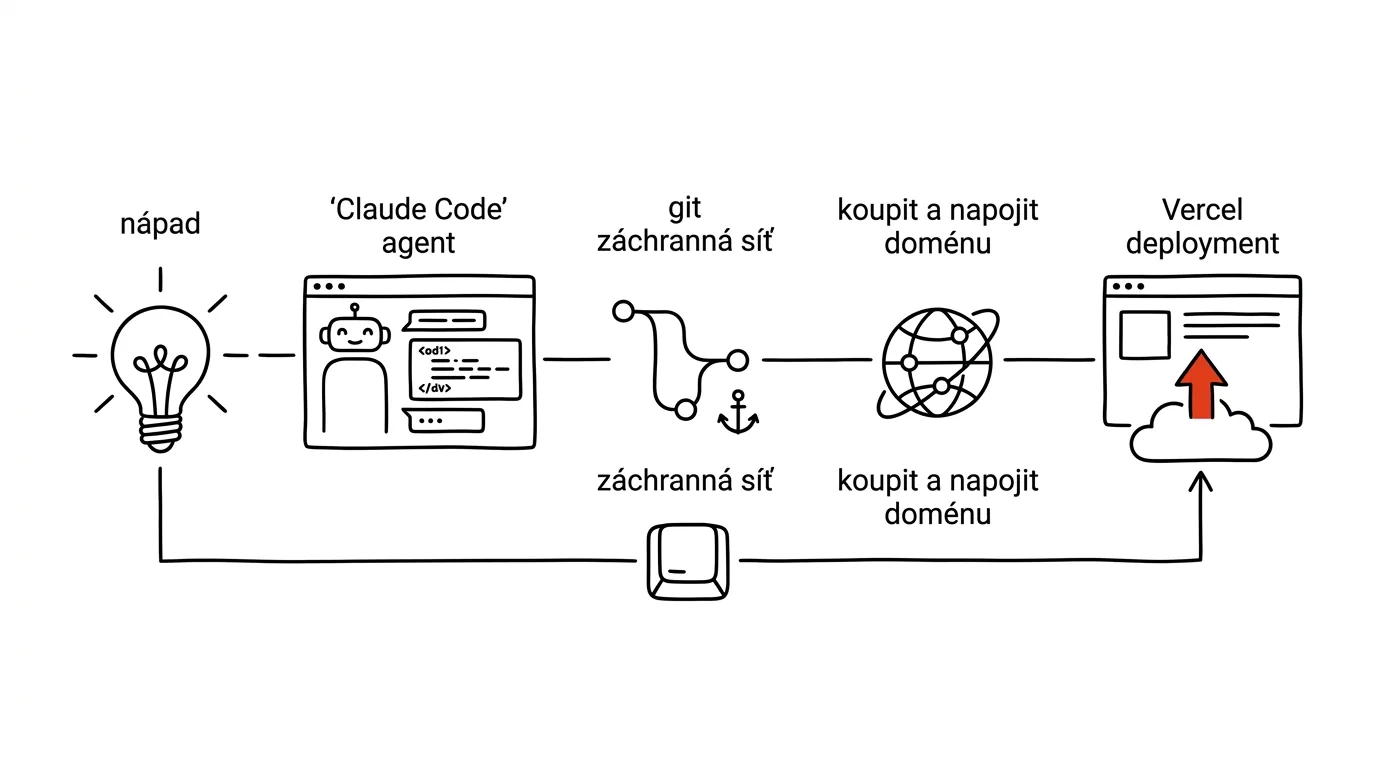
This guide covers the whole thing — from deciding what to build the site on, through scaffolding the project, git, the domain, and deployment, to the everyday cycle of “I want a change, it's live in ten minutes.” It isn't hypothetical: the concrete example is the very site you're reading right now. Every number below was pulled straight from its repository, and it keeps growing — so by the time you look, it'll be higher.
And an honest warning up front. This isn't “a website with no work.” It's “a website with no outside developer.” The work is still there: you need to know what you want, make decisions when the agent asks, read an error message, and above all write the content. What disappears is waiting on someone else, translating your ideas into a brief for a stranger, and hundreds of hours learning things you'll use exactly once. Anyone who expects to say “build me a website” and go get coffee will get exactly what they deserve: something that looks like a website until you try to use it.
A typical scenario: the site you're reading this on
The brief went roughly like this: a website about productivity that won't go stale, with a handbook, tips, news, a newsletter, and an English edition. No dev team, no CMS subscription. The author is one person who can write and make decisions but doesn't want to spend evenings fighting plugins.
What came out of a few days of work with an agent can be measured. The site runs on Next.js 16.3.0, React 19.2.8, TypeScript, and Tailwind 4. The content doesn't live in any database — it's 716 files in Markdown and MDX sitting right in the repository: 302 tips in Czech and 300 in English, 48 handbook chapters in both languages, eight installments of an email course. The application code on top of that is surprisingly small: 29 page routes, 22 components, 13 modules in lib/, and three helper scripts.
The repository's history is itself only a few days long: 235 commits, the first from August 11, 2026. That number matters most for this guide because it shows the style of work. Not three big “done” moments, but two hundred small steps, each one independently reversible. That includes things you don't see at first glance: AGENTS.md with rules for the agent, docs/RUTINA.md with instructions for a daily editorial routine, and scripts/qa-mega.py, which checks long articles before every commit.
What you'll need
Four things. Three you can set up in an afternoon; the fourth is a decision.
A GitHub account. This is where the code and content live, and where Vercel pulls from when it deploys. The free tier covers private repositories too, so you don't have to worry about the whole internet seeing your half-written draft.
A Vercel account. Hosting that watches the repository and builds and publishes the site on every change. It has a free tier that's plenty for a personal site or blog; paid plans are mostly about commercial traffic and team features.
A domain. The one item you can't get free forever anywhere. It's registered for a year or more and has to be renewed. Prices vary so much by extension and registrar that any number here would just mislead you — compare two or three registrars directly.
Claude Code. An agent that works directly with the files on your disk and runs commands — unlike a browser chat, where you copy results back and forth by hand. That's the whole difference: the agent scaffolds the project, writes the files, runs the build, reads the error message, and fixes it. It's part of a paid subscription. If you don't want a terminal, you can use Claude Cowork for part of the work — a desktop mode that operates over a folder of files; git and deployment, though, are better done in Claude Code. The basics of both are in the tip Claude Code as a personal automation engine.
What you don't need: to know how to program. What you do need: to be able to read. When the agent says “the build failed, there's a missing export in lib/tips.ts,” you don't need to know what an export is — you need to read that sentence and answer “fix it.”
Decisions only you can make
This is the one part of the guide you can't delegate. The agent will happily build you anything you describe — and when you don't describe it, it'll build whatever occurs to it first.
What the site runs on: generated pages, or a CMS
A classic CMS (WordPress and its relatives) runs on a server, keeps content in a database, and assembles the page on every load. The upside: an admin panel for people who never want to see a file. The downside: updates, plugins, backups, security holes, and hosting that has to carry all of it.
The other path is a generated website: pages are built once at deploy time and served as finished files. Fast, cheap, practically unbreakable, because there's nothing to hack. The downside is that content gets added as a file, not through a browser form — and that's exactly the downside the agent erases, because it creates and fills in the file for you.
Where the content lives: in the repository, or in a database
The most important decision in the whole project, because it's the hardest one to change later.
Kvadrant „Důležité, neurgentní“ je místo, kde vzniká skutečný pokrok — plánujte si pro něj čas dřív, než ho urgence sežerou.
On this site, files in the repository won, and the reasons transfer to most projects. There's one author. The content is text with images, not data. Version control is free — every article shows who changed what and when, and you can roll it back. The agent works with files far better than with a browser-based admin panel: it can see all 302 tips at once, search across them, bulk-fix them, and check them.
And there's one bonus property you only discover later: files let you cheaply build things that would be a whole project in a database. The prompt library on this site isn't a database at all — the lib/prompts.ts module scans every article at build time, pulls out the prompt blocks, attaches the heading they sit under, and turns them into a searchable library. Nobody entered anything twice.
Choose a database only when you genuinely need one: user accounts, orders, content generated by visitor actions. For text, it's unnecessary complexity.
One language, or more
Decide this up front, even if the second language is a year away. Bolting multilingual support onto a finished site means touching every page, every link, every heading. When it's planned in from the start, it's just one extra layer of structure — the concrete solution has its own section below.
Scaffolding the project
Only now does the agent enter the picture. The first ten minutes decide whether a month from now you have a project you understand, or a pile of generated files nobody can maintain. Ask for three things up front. Design in variables, not scattered across components — otherwise you'll never change a color. No third-party UI library, because bringing one in means importing someone else's decisions, someone else's updates, and a look shared with a thousand other sites. And a readable folder structure, where it's obvious where the content is, where the code is, and where the scripts are.
Scaffold: the first prompt
Scaffold a new website project in the current folder. Brief:

Purpose: [personal site about a topic / company site / how-to blog].
Sections: [hub page, article list, article detail, about, contact].
Content will be MDX files in a content/ directory, not a database.

Technically:
- Next.js latest version, TypeScript, Tailwind
- no prebuilt component library (no Bootstrap, no MUI,
  no shadcn) — we write our own components
- folder structure: app/ (pages), content/ (content in MDX),
  lib/ (loading content from files), components/ (components),
  public/ (images), scripts/ (helper scripts)

First tell me how you plan to do it, and wait for my approval.
Once I approve, scaffold the project, run the build, and show me
that it passes. Don't write content yet — just one sample page
and one sample article, so I can see how it fits together.
“Tell me how you plan to do it first” is the most important sentence in the prompt: you read the plan, say what you don't like, and only then does anything happen. Check two things — whether the agent added packages you didn't ask for, and whether the content ended up in files rather than as an array baked into the code.
A design system in variables
The look gets designed once and then changed from a single place. On this site, the entire design system lives in app/globals.css — variables for paper white, ink black, muted grays, and one signal red, plus fonts, text column width, and animation timing. When it turned out the original red didn't pass the contrast standard, one value changed and the whole site changed with it.
Build the site's design system as a set of variables in one file,
so the look can be changed from a single place.

Character: [understated and text-focused / playful / technical].
Colors: [at most three — background, text, one signal color].
Use the signal color only for interactions: links, hover, and one
primary button per page. Never as a background for large areas.
Fonts: [one sans-serif for UI, one serif for long-form text,
one monospace for code samples].

Define variables for colors, fonts, text column width, corner
radii, and animation timing. For every color, check contrast
against WCAG AA (4.5:1 for body text) and write a comment next
to the value with the measured ratio, so nobody lightens it by
accident a month from now.

Then show me one page with every state: headings, a paragraph,
a link, a button, a card, a code sample.
That sample page with every state is a goldmine — you'll spot inconsistencies before they spread across the site. Verify that no hardcoded colors are left in the components: have the agent search for every color value outside the variables file and convert it.
Loading content from files
The third prompt connects content to pages — this is where the site gets its real structure.
Add a layer that loads content from MDX files in content/.

Each article has a header with fields: title, excerpt, category,
date, updated, and [other fields specific to your site].

In lib/, build a module that:
- loads all articles from the folder and returns them as a list
- can return a single article by slug (the filename without
  the extension)
- estimates reading time (200 words per minute, excluding code
  blocks)
- sorts articles from newest to oldest

The list and article detail pages should be built statically at
build time, not on every request at runtime.

Finally, explain in five sentences what happens when I add a new
file to content/ — I want to understand it, not just have it.
That last sentence pays off at every step. When you have the mechanism explained to you, a month from now you'll be able to figure out on your own why a new article didn't show up — it's almost always a typo in the header or a wrong date.
Git as a safety net
Now the part that makes non-technical people give up on the project. Unnecessarily, because you only need to know three things about git to get started.
A commit is a saved version of the whole project. Not one file — the whole thing. It has a message (“Added the domain article”) and shows exactly what changed since the last save. Make ten commits and you have ten points you can return to at any time. This site has 235 of them.
A branch is a parallel line of history. The main branch is what's live on the site. When you want to try something big and don't want to break the live site, you make a branch, break things there as much as you like, and the main branch feels nothing. If it works out, the branch merges into main. If not, it gets deleted and nobody's the wiser.
Rolling back to a previous version means saying “I want the project exactly as it looked at this point.” It doesn't throw work away — the history stays; you just move back. That's exactly what makes git a safety net: the worst thing that can happen is losing the work since the last commit.
One rule follows from that: commit in small steps. Not everything at once at the end of the day, but after each finished piece. And write the message so it makes sense to you a month from now — “fix” is useless, “fix typos in tip headers” is a record.
Explain the state of git in this project as if I'd never used it.
Specifically:

1. What branch am I on and what does that mean
2. Which files do I have changed and not saved
3. What exactly happens if I commit right now
4. How many commits are already in the project and when was the first

Then set up .gitignore so these never end up in the repository:
files with passwords and keys (.env and its variants), downloaded
dependencies, build output, and system junk.

Finally, write down three commands I should memorize, and one
sentence for each of what it does. Nothing more.
It returns a picture of the project in plain language, plus the single most important security measure right away: files with keys don't belong in the repository. On this site, .gitignore has a .env* line that excludes every variant at once. The second prompt is the one that makes you stop being afraid:
I broke something and want to go back.

First show me the last 10 commits: the message, the date, and one
sentence each on what changed. For each one, say whether you think
the site was working at that point.

Then explain the three options I have:
1. discard only the unsaved changes and stay on the last commit
2. restore the project's contents to the state of a specific older
   commit, but leave the history untouched
3. undo one specific change in the middle of the history

For each, say what happens to my work and what's irreversible.
Don't do anything yet. Wait until I give you a number.
“Don't do anything yet, wait for a number” is essential. Rolling back has several variants, and some rewrite history. You want to choose, not find out afterward what happened.
The domain, and why each language gets its own
A domain is the name people find you by, and the one part of the project that's hard to change back. Pick it against three criteria: short (so it can be typed without a typo), speakable over the phone (say it out loud and have someone write down what they heard), and available — a constraint that beats the other two.
Check availability with a registrar or through the relevant extension's public registry; for Czech domains that's the CZ.NIC registry. Watch for the trap: an available domain isn't automatically usable. Before you buy it, search the internet and the trademark registry for that name — a collision with an existing brand costs more to fix than a change of idea.
I'm looking for a domain for [project description, target audience,
language]. The brand should feel [understated / playful / expert].

Suggest 20 candidates. For each, note:
- how it reads out loud and where a typo is likely when dictating it
- risk of confusion with an existing brand you know of

Sort them into three groups: descriptive (say what it's about),
brandable (a made-up word), and two-word combinations. Rule out
anything over 12 characters, with a hyphen, with numbers, and
anything that's awkward to spell out in [language].

For the five best, also suggest a variant for the English version
of the project.

Don't check availability or guess it — I'll verify that myself.
That last constraint is essential. The model has no reliable view of which domains are currently free, and if you push it for an answer, it'll make one up. Use it for ideas and a feel for the language.
Connecting the domain to Vercel
A purchased domain doesn't point anywhere on its own. Connecting it has two common approaches, and the difference is who manages the DNS records. Changing nameservers hands the domain's entire management over to Vercel: you set it up once at the registrar and handle everything else in one place. Simplest, if you don't have anything else running on the domain. A and CNAME records mean you keep management at the registrar and just add two records there: A for the bare domain and CNAME for www. Choose this path when the domain already runs email or something else you don't want to move.
Whichever you choose, propagation takes time — anywhere from minutes to tens of hours. That's not a delay on Vercel's side or the registrar's: DNS is a distributed system, and providers cache answers for a duration set by the TTL. Until the old records expire, part of the world sees the old state and part sees the new one. The practical takeaway: let the domain propagate a day ahead, not on the day you plan to announce it. The certificate for a secure connection is issued automatically once the records are correct; when that fails, it's almost always a forgotten www record or a domain lock at the registrar.
Two domains, two languages, no prefix
A multilingual site is usually built so the language is part of the address: site.com/en/article and site.com/cs/article. It works, and it's the simplest option.
This site does it differently. The Czech edition lives on produktivni.cz and the English one on productive.tips — and neither has a language prefix in the URL. A Czech reader sees produktivni.cz/tipy/..., an English one sees productive.tips/tips/.... Underneath, it's a single project, a single repository, and a single deployment.
A file called middleware.ts handles this — code that runs on every request before the page starts building, and decides what should happen. The logic is short:
- 1Read the domainIt checks whether the request arrived on the English domain or the Czech one. Both are held in environment variables, not hardcoded.
- 2Internal rewriteIt internally rewrites the address to the matching language variant. The visitor never sees this — the address bar keeps a clean URL with no prefix.
- 3A prefixed linkAnyone landing on the English address on the Czech domain gets a permanent redirect to the correct domain. One address, one piece of content.
- 4First visit to the homepageWith no stored preference, the browser's language decides which edition to offer, and the choice is saved to a cookie. On the second visit, there's no redirect.
- 5ExceptionsImages, the API, the sitemap, and files with an extension are skipped — the middleware has nothing to say about them.
Why is this better than /cs and /en on one domain? For readers, the address is shorter and feels like home — productive.tips is an English site, not an English detour off a Czech one. For search engines, the separation is clearer, and the domain extension itself carries a signal about the target country. And for you, it's a safer bet long-term: if one language edition ever needs to split off or move elsewhere, that's a configuration change, not a rebuild.
There's one cost: two domains and two language sets of content. Here, 302 tips in Czech and 300 in English — the gap isn't a mistake, it's just that new text gets written first and translated afterward.
I want a multilingual site on two domains, not one with prefixes:
[domain.cz] = [Czech], [domain.tips] = [English]. Both domains
should have URLs with no language prefix.

Set up the middleware so it:
- internally rewrites the address to the correct language version
  based on the domain, without changing the address shown in
  the browser
- permanently redirects a prefixed address on the wrong domain to
  the correct, prefix-free domain (so only one address is ever valid)
- on the homepage, on a first visit with no stored preference,
  offers a language based on the browser and remembers the choice
- skips images, the API, the sitemap, and files with an extension
- reads both domains from environment variables, not hardcoded

Add hreflang links and canonical URLs so search engines know these
are two language versions of the same content.

When it's done, list ten addresses and say what happens with each
one — I want to check this before we ship it.
Always do that last step. A routing bug is hard to spot because the site works — just not for everyone. Ten concrete addresses with described behavior catch a redirect loop before a visitor does.
Deploying to Vercel
Deployment is the simplest part of the whole guide, which surprises people. You connect Vercel to your GitHub account, pick the repository, and you're done. From that point on, one simple rule applies: whatever's on the main branch is what's live.
The most valuable thing you get from this is a preview deployment. Every change that lands in the repository outside the main branch gets its own temporary address with the entire working site behind it. It's not a screenshot or a description — it's a real site you can open on your phone, send to a colleague, and click through. Only once it checks out does the change go to the main branch and, with it, to production. That's exactly what lets you move fast and stay safe at the same time.
Environment variables and keys
A website almost always needs some kind of key: for the newsletter, for analytics, for a service that computes something for you. One rule applies without exception: keys never go into the repository. It's not just that the repository might be public — even a private one keeps a leaked key in its history forever, and that history travels through backups, clones on other people's laptops, and every tool that ever pulls the repo. Once a key leaks, the only correct fix is to generate a new one.
The right place is Vercel's environment variable settings, where you can set values separately for production and for preview deployments. Locally, you use a file excluded in .gitignore. On this site, that's where the newsletter key, the image service key, the site URL, and both domains used by the middleware are stored — the repository shows only the variable's name, never its value.
Prepare the project for deployment to Vercel.

1. Go through the code and find every place that reads an
   environment variable. Turn it into a table for me: variable
   name, what it's for, whether it's required, and what happens
   if it's missing.
2. Check the entire git history for any file with keys, or any
   key hardcoded in the code, that ever got committed. If you find
   one, tell me and advise what to do — don't rewrite anything
   yourself.
3. Verify that .gitignore excludes every variant of key files.
4. Write me a list of steps to take in Vercel's web interface,
   including which variables to set for production and which for
   preview deployments.
5. Check that the project can build without the optional keys too,
   and that the corresponding feature just turns off instead of
   the build failing.

Don't set anything in Vercel itself — just prepare the groundwork
for me.
Point 5 comes back to bite you on the first deployment: a site that crashes because an analytics key is missing is needlessly fragile. Do point 2 right away, while the history is still short.
What a routine change looks like
This is the cycle you'll run over and over from here on. For a small change, going from brief to live in production takes about ten minutes.
- 1BriefYou describe what you want to the agent — by outcome, not technically. You have it write a plan and approve it.
- 2ChangeThe agent edits the files. You look at exactly what it changed, not just that it reports it as done.
- 3Build locallyThe build has to pass on your machine. If it fails here, you've saved yourself a deployment that would have failed too.
- 4Your own checkYou open the site locally and look at it yourself. The build checks that it can be constructed, not that it makes sense.
- 5CommitA saved version with a message that still makes sense a month from now. A small step, not a whole day at once.
- 6PushThe change goes to GitHub. Vercel notices on its own and starts building.
- 7Check in productionA few dozen seconds later the change is live. You check that it looks right there too — a different domain, different content.
Describing the change
I want this change on the site: [describe the change by outcome,
not technically — for example, "the article card should show when
it was last updated, and anything older than a year should get a
quiet note"].

Before you do anything:
1. Find every place in the project this touches, and list them
2. Write in three to five sentences how you plan to do it
3. Say what this could break elsewhere
4. Ask about anything in the brief that isn't clear — don't guess

Wait for my approval. Once I approve, edit the files, run the
build, and give me a list of changed files with one sentence
about each.
Point 4 is the most valuable one: a good agent asks about the things you'd otherwise only discover from the result — say, whether the note should show up in the list too, or only in the detail view. If it never asks, it's guessing.
Checking before the commit
Before I save this, walk me through it.

1. Show me the list of all changed files, and for each one, in one
   sentence, what changed and why
2. Run the project build and show me the output — I want to see
   warnings too, not just errors
3. Check whether anything among the changes wasn't something I
   asked for: a new package in the dependencies, a config change,
   a deleted file, edited content the brief didn't cover
4. Check that no key or password made it into the changes

If anything in points 3 or 4 comes up, say so first, not at the end.
Point 3 catches the most unpleasant class of problem: the agent, while fixing one thing, “tidies up” something else along the way. Add your own check on top of this — on this site that job belongs to scripts/qa-mega.py, which watches length, structure, and recurring mistakes in long articles. The agent can write a script like that in five minutes.
Commit, push, and checking it live
Save the change and ship it.

1. Write me a proposed commit message: one sentence, specific about
   what changed — not "updates," not a file list
2. Show it to me and wait for approval
3. After approval, commit and push to GitHub on branch [branch name]
4. Tell me what happens on Vercel now and how long it should take
5. Once the deployment is done, give me the URL and five specific
   spots to check in production because of this particular change

Don't push to the production branch without my explicit go-ahead.
Point 5 is the one people skip and then wonder why. Production differs from your machine: a different domain, different environment variables, different caching, the full content instead of a sample. Most bugs that only show up in production come down to exactly these differences — most often links and images. And the prompt's last line is the final safeguard: a change to the main branch is a release, and a human approves it.
What to hand off to the agent, and what not to
An agent with access to your files, your git, and your deployment is a powerful tool, and a powerful tool comes with rules. The framework is simple: AI proposes, a human approves. Concretely, three modes for three kinds of work.
No need to ask. Reading files, searching the project, running builds, writing and editing files in the working directory, proposing solutions, explaining existing code. The worst possible outcome is a change you don't like, which you discard with a single command — as long as you have a commit, which is the entire point of the previous sections.
Only with approval of that specific step. Installing new dependencies (every extra package is someone else's code in your project), changing build configuration, bulk edits across dozens of files, working with environment variables.
Never without explicit permission, granted individually every time. Three things where going back is expensive or impossible:
- Deleting files. A deleted file that was never in a commit is gone for good. Never let a bulk cleanup of “unused” files run loose — the agent can't see inside your head, and a half-written draft looks like clutter from the outside.
- Rewriting git history. Some commands rewrite history or discard unsaved changes. At the right moment they're useful; at the wrong one they reliably erase half a day of work. Rule: whatever rewrites history, you run yourself, and you know why.
- Deploying to production. A push to the main branch is a release. The agent may prepare the change and open it for approval, but a human does the merge. That's exactly how the editorial routine described in
docs/RUTINA.mdis set up: every day it scans sources, drafts content, and opens it for approval — and its instructions hardcode that it never pushes to the default branch and never publishes anything without human sign-off.
The same framework applies every time you give an agent access to your things — whether files or connectors to other services:
- Read first, write only after some experience. For the first week, let the agent only propose and show. Give it the right to actually change something once you've seen how it works.
- A human always confirms publishing, payments, and deletion. No exceptions. The delay costs a minute; a mistake costs a day.
- Set limits at the service level, not the agent level. An instruction can be overlooked; a hard limit in account settings can't. This matters most for anything that spends money — more in the tip on MCP connectors for ads and analytics.
- Only add connectors and tools you understand and that have a traceable author. Connecting one grants access to your account. How to choose them is covered in the tip on MCP connectors for everyday tools.
- Sensitive data only in a paid account with a data protection agreement. And even there, what doesn't have to go out shouldn't go out.
The best way to enforce this framework is to write it into the project. The agent reads the rules file on every run and behaves accordingly — on this site that's AGENTS.md and CLAUDE.md.
Create a rules file in the project that you'll read on every run.
Write into it:

- what this project is and how it's organized (briefly, so someone
  seeing it for the first time can find their way around)
- which commands you may run without asking
- what always requires my explicit approval: deleting files,
  rewriting git history, pushing to the main branch, installing
  new dependencies, changing deployment settings
- the rule that keys and passwords never get written into files
  in the repository, only into environment variables
- what a commit message should look like
- what has to run before every commit

Write it as rules, not documentation. Short sentences, imperative
mood. Then show it to me and let me edit it.
Reread that file after a month and add whatever you got burned on — it's the cheapest way to make sure the same mistake doesn't happen twice. More in the chapter Processes and automation and in the tip on subagents in Claude Code.
Common mistakes
- Starting with the look instead of the structure. Two days tweaking colors, and then you realize the site also needs categories, tags, and a second language — and half the work happens twice. Decide first what the site contains and how it links together.
- Letting yourself get talked into a package for everything. Every extra library is someone else's code, someone else's updates, and one more reason your build breaks a year from now. For a site that's mostly text, you need surprisingly little — this one has six runtime dependencies and eight for development.
- Committing once a day. When something breaks, you want to go back one step, not a whole day. Small steps with messages aren't pedantry, they're insurance.
- Believing “the build passed” means “it's good.” The build checks that the site can be constructed. Not that a link goes to the right place, that the text fits on mobile, or that you didn't swap two headings.
- Writing a key into a file “just for a moment.” That moment outlives your intention. Once a key is in a commit, it's in the history forever and has to be regenerated. Set up
.gitignorebefore you write the first key. - Announcing the domain the same day you connect it. DNS propagation takes time and can't be rushed. A day of buffer costs nothing.
- Letting the agent decide what goes on the site. The agent can prepare, translate, check, and flag. What appears on the site, and under whose name, is decided by the human who's accountable for it — more in the chapter AI, ethically and safely.
The best tools
- Claude Code — an agent that works directly with files, runs builds, reads error messages, and knows git. The core of the whole approach.
- Git and GitHub — version control and backup in one. The project's history, the ability to return to any point, and the source hosting pulls from to deploy.
- Vercel — hosting that watches the repository and builds and publishes automatically. Preview deployments on every change make fast work safe.
- Next.js — the framework the generated site is built in from files. This one runs on version 16.3.0; what matters is that pages are built at deploy time and served as finished output.
- MDX and gray-matter — the content format and how its headers get read. Text with the ability to embed a component, plus machine-readable metadata that lists, filters, and sitemaps get built from.
- A domain registrar — the one recurring payment on this list. Pick one where you can easily find DNS management and renewal, not the one with the lowest first-year price.
- A custom check script — a few dozen lines that scan the content and catch whatever keeps going wrong for you specifically. The agent can write it in five minutes.
What you get out of it
- Time: getting from idea to a live site on your own domain is a matter of days, not months. A routine change — a new article, a text fix, a layout tweak — is done and live in ten minutes, because you're never waiting on someone else's schedule.
- Money: the monthly CMS fee and the hourly rate for every small tweak both disappear. What's left is the domain, and maybe a higher hosting tier if the project grows. But the real payoff isn't a line item in a budget — it's that small changes stop being a decision about whether they're worth it.
- Peace of mind: every change gets a preview before it goes live, and every state of the project can be restored. The worst possible outcome of a mistake is losing the work since the last commit — minutes, given small steps.
- Quality: the site is yours, so it can be improved in small pieces forever. A color's contrast ratio that fails the standard gets fixed by changing one value. Within a few weeks you have a site that does exactly what you need, because every detail of it grew out of an answer to a real problem.
Pro tip
Once your site is live and you've run the change cycle a few times, take the step that turns a project into an operation: let the agent work even when you're not sitting there. Not by handing it the keys to production — by giving it precisely scoped work and having it present the result for approval.
On this site, that takes the shape of docs/RUTINA.md: scan sources, find two to five things that are genuinely new and useful, verify each against at least one trustworthy source, write them up in the site's format, check that the build passes, and open it for approval on a separate branch. Never push to the main branch. If nothing clears the filter, open nothing and say why.
Notice what that file actually is: it isn't a tool configuration, it's a written-down editorial process. If a human were doing the job, they'd get the same text. That's a rule that outlasts websites — good automation comes from writing down what the work should look like first, and only then handing it off. Skip that step and you've automated chaos. More in the chapter Routines and agents.
And the closing rule over the whole guide: the agent builds, git protects, the human ships. As long as those three stay separate, the worst case is an inconvenience. The moment they merge — an agent that commits on its own, merges on its own, and deploys on its own — you no longer have a website, you have a risk you'll only hear about from your visitors.
Want to go deeper? The handbook has a whole chapter on it — AI and automation.
Similar tips
Search Gmail like a pro: from:, has:attachment, older_than:
Search operators find in seconds an email you'd otherwise spend fifteen minutes hunting for by hand.
A Forgotten Password? Your Browser Knows It
A password your browser once saved can be revealed anytime — uncovering a login you thought was lost for good.
Voice capture: write down an idea even when you can't type
In the car, on a walk, with your hands full of groceries: “Hey Siri, add…” and the thought is in the system.
Common questions
Do I need to know how to code?
No — you need to read and decide. When the agent says “build failed, missing export”, you don't need to know what an export is; you need to read the sentence and reply “fix it”. The work is elsewhere: knowing what you want, answering the agent's questions, and writing the content. Anyone expecting to say “make me a website” and go get coffee gets something that looks like a website until they try to use it.
Why content in files instead of a database or CMS?
For one to three authors and text content, MDX files in the repository win: versioning comes free, the agent sees all articles at once and can fix them in bulk, and files let you cheaply build things that would be a whole project in a database. Choose a database only when you truly need it — accounts, orders, content created by visitor actions.
How much git do I have to know?
Three things to start: a commit is a saved version of the whole project, a branch is a parallel line of history, and rolling back means moving to an earlier point without losing history. One rule: commit in small steps with messages that make sense a month later — the worst that can then happen is losing the work since the last commit.
Can AI suggest an available domain for me?
Ideas and language instinct yes, availability no — a model has no reliable picture of which domains are free, and if you push it, it makes one up. Check availability with a registrar or the registry, run the name through a search engine and the trademark registry. And let a connected domain propagate for a day before announcing it — DNS can't be rushed.
Where do keys and passwords go?
Never into the repository — even in a private one, a key stays in the history forever and travels through backups and clones. They belong in Vercel's environment variables, and locally in a file excluded by .gitignore. Set up .gitignore before you write the first key, and have the agent check the whole history while it's still short.
What may the agent do on its own, and what never?
Without asking: read, search, build, and edit files — the worst outcome gets discarded with one command. With approval: installing dependencies and bulk edits. Never without an explicit instruction: deleting files, rewriting git history, and deploying to production — a push to the main branch is a release, and a human approves releases. Write the rules into a file the agent reads on every start.
Was this helpful?
Liked this tip?
I send one like it every week by email. Two minutes to read, hours saved.
The Top 30 tips e-book, free — it lands in your inbox right away.
Then 1 tip a week · no spam · unsubscribe in one click
Prefer a system to single tips? The free email course — seven days, seven emails, one skill a day.