Tips & tricks · AI · Everywhere · ~days of work per campaign · 57 min read · in-depth guide, doing it ~3 h
A single source of truth for your marketing campaign: Canva, Buffer, Meta Ads, and Brevo via MCP
Last reviewed:
In this article
- A typical scenario
- The campaign as a system: the thesis behind this whole guide
- Phase 1: an inventory — what you already have and what the campaign needs
- Phase 2: the campaign document — a single source of truth
- Phase 3: connectors — what they can do as of this writing, and how to connect them safely
- Phase 4: artwork — a brand template in Canva, formats derived, exports last
- Phase 5: copy and scheduling — batches of drafts in Buffer
- Phase 6: ads — a paused campaign in Meta Ads and manual locks
- Phase 7: newsletter — two tracks in Brevo, a test to your own address
- Week by week: how the campaign actually runs
- Changing the tagline: editability in practice
- Why not the old way: exports versus a system
- The approval loop: exactly where the human sits
- Measurement: what to read, what to ignore, and what a weekly report looks like
- Security: a connector is a key to company accounts
- Channel by channel: what to automate and what to leave to a human
- Cost: what this system costs, and where it pays for itself
- Common mistakes
- The best tools
- What you get out of it
- Pro tip
A small company's fall campaign usually comes together like this: copy gets written into a shared document, artwork gets clicked together in Canva, posts get scheduled by hand in a planner, ads get set up in Ads Manager, and the newsletter gets assembled in yet another tool. Five environments, five copies of the same message — and nowhere is it written down which one is the real one. As long as everything lines up, nobody minds. Then, in week two, it turns out the tagline doesn't land or the date has changed, and the cycle starts: rewrite the posts, redo the artwork, fix the ads, correct the email. Something gets missed — and for two weeks the campaign says two different things at once.
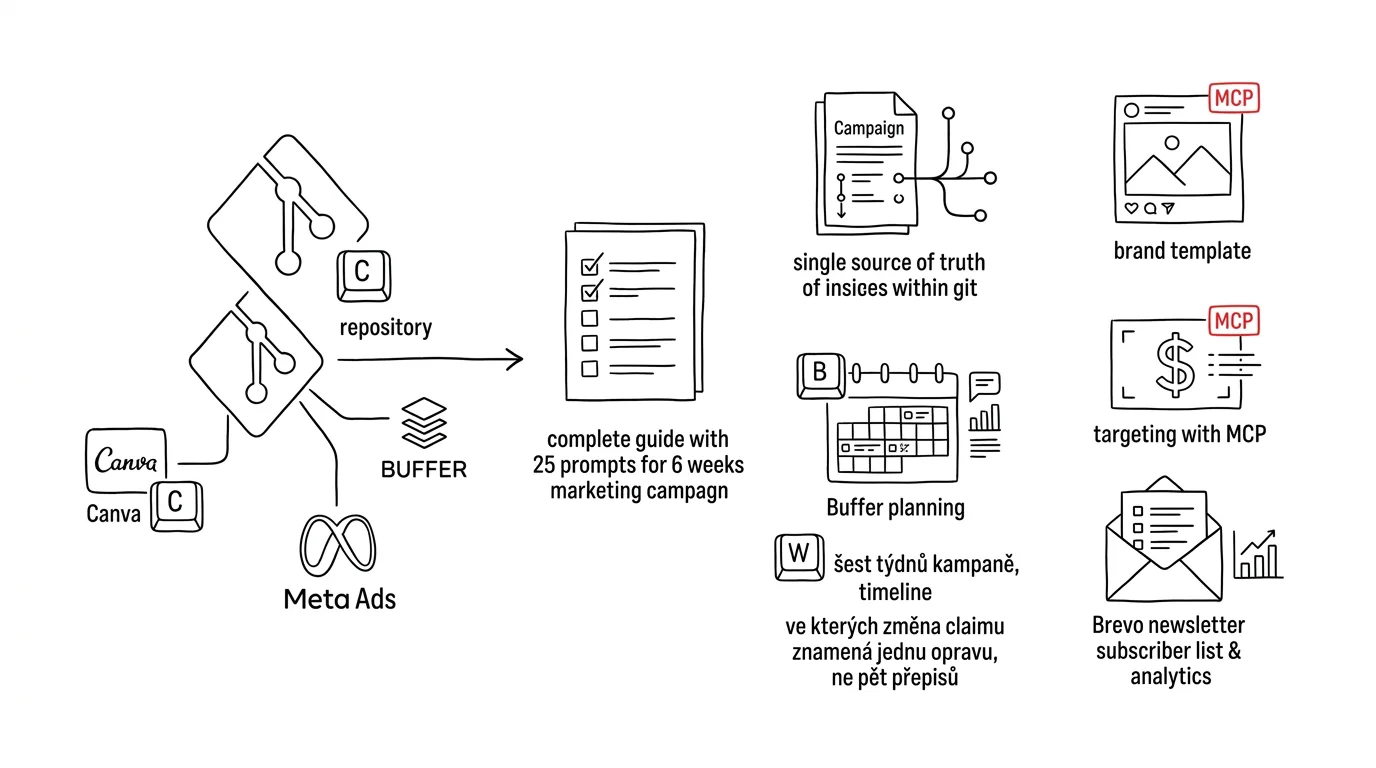
This guide shows a different construction: a campaign as a system with a single source of truth and derived, editable outputs — not a pile of one-off exports. The source of truth is a plain markdown file in a git repository: goal, message, tagline, audiences, channels, calendar. Everything else is derived from it through MCP connectors: artwork is produced in Canva from a brand template, posts are scheduled through Buffer, ads are built through the official Meta Ads connector, and the newsletter runs through Brevo. When anything changes, it changes once — at the source — and the change rolls out to the outputs in a controlled way, with a checklist, not from memory.
This builds on the guide about brand as a system, where one model company built a brand voice document, put it in git, and connected a brochure, a website, and a CRM to it. The mental model is the same and worth knowing: a typical scenario → an inventory → one source of truth → derived outputs → editability → security. Here we apply it to the discipline where one-off exports multiply fastest — a marketing campaign. You can read it phase by phase; each one stands on its own and has prompts to copy. Anyone who wants to first understand what MCP connectors are and how to connect them should start with the connector overview.
A typical scenario
Marta runs a small coffee roastery: six people, a direct-to-consumer online shop, and a growing wholesale business supplying cafés. From the previous guide she already has two things in place that now turn out to be the foundation: a brand voice document, versioned in a git repository — tone, vocabulary, forbidden phrases, examples — and a website that reads from it. The brand is no longer scattered across drives; now it faces its first real test in a campaign.
For October, the roastery is launching a new fall blend. The plan is a classic multi-channel campaign: six weeks, three channels. Social media (Instagram and Facebook, where the roastery has an audience), a newsletter to two recipient groups (retail customers from the online shop and wholesale café accounts), plus paid ads on Meta to support the first two weeks of sales. The goal is modest: sell the first roast of the new blend by the end of November and land three new wholesale café accounts.
Marta ran last campaign — the spring one — the old way, and it's exactly where she got burned. She clicked together artwork in Canva night after night, one format at a time. Post copy went into notes on her phone; the newsletter got assembled on Sunday night. Halfway through the campaign they changed the tagline, because people were confusing the original one with a competitor's — and everything had to be rewritten by hand: twelve scheduled posts, two ads, one email. One scheduled post got missed, so three weeks after the change it went out with the old tagline. Nobody noticed until a café that buys their coffee pointed it out.
This year Marta is building it differently. She spends one evening on a campaign document — writing the goal, the message, the tagline, the audiences, the channels, and the calendar into a markdown file, and putting it in the same repository where the brand voice already lives. Then she has AI, through connectors, derive the outputs: a set of visuals in Canva from the brand template, batches of posts as drafts in Buffer, a paused campaign in Meta Ads, a newsletter draft in Brevo. She herself does what shouldn't and can't be automated: approving, publishing, launching. And when something changes — and something always changes — she fixes one file and has the system list everywhere the change needs to propagate.
The difference from spring isn't that she's working more carefully this year. It's where that care lives: last year in Marta's head and memory, this year in a system that can be checked, versioned, and repeated for the next campaign.
The campaign as a system: the thesis behind this whole guide
Before we start building, one idea that carries everything else. In the guide about brand, the thesis was “a pixel output from a chat window is a dead end; a source file is a living asset.” The same holds for a campaign, just in more places at once: a campaign built from one-off exports can't be fixed — it can only be remade. An image downloaded from Canva and uploaded to Ads Manager is dead; a scheduled post with no source anywhere is an orphan; a newsletter assembled by hand in an editor is a one-off you'll assemble again next time.
A systemic campaign has three layers, and it's worth keeping them separate in your head from the start:
- Source of truth — the campaign document in git. The single place where decisions live: what we're saying, to whom, when, and where. It changes through commits, and every change has a reason.
- Derived assets — editable intermediate products in individual tools: designs in Canva (not exported PNGs, but a design you can open and change), drafts in Buffer, paused campaigns in Meta Ads, a template in Brevo. Every asset knows what it was derived from.
- Published outputs — what actually went out: a published post, a running ad, a sent email. Nothing lands here without human approval, and once something is out, you fix it through the source and the assets, not ad hoc.
MCP connectors are the plumbing between these layers: the model reads the source of truth, produces or edits an asset, and a human turns it into an output. Without connectors you'd do the same thing by copying between windows — it works, but that copying is exactly where the discrepancies between copies come from, which is exactly why we're building this system.
And right at the start, one principle that holds here just as it did in the previous guide: company materials — campaign plans, price lists, lists of accounts — belong in a paid account with contractual data protection, not in an anonymous free chat. And access to connectors is access to company accounts; we'll come back to security in its own section, because it deserves more than a footnote.
Phase 1: an inventory — what you already have and what the campaign needs
Don't jump straight to writing the tagline. The first evening belongs to an inventory — and a double one at that: what the company already has (assets, channels, audiences) and what the campaign will need (formats, deadlines, materials). An inventory is boring right up until the moment it saves you the third week of the campaign, which is usually when you discover you're missing portrait-orientation photos and that the account list is half full of addresses with no newsletter consent.
Taking stock of assets
Marta has an advantage: the brand voice and basic materials already live in the firma-znacka repository. So the inventory starts there — and Claude Code (or Cowork over the folder) can do it for her.
Work in the firma-znacka repository and the kampan-podzim folder I
just created. We're preparing a six-week fall campaign for a new
coffee blend: Instagram + Facebook, a newsletter (retail customers
and wholesale cafés handled separately), and paid ads on Meta for
the first two weeks of sales.

Take an inventory, don't produce anything yet:
1. List what's already in the repository and folder that the
   campaign will use: brand voice, logos, colors and fonts, photos
   (sort by format — portrait/landscape/square), copy about the
   new blend.
2. List what the campaign will need that we don't have yet — by
   channel: what visual formats, how much copy, what materials
   (e.g. sale start date, price, flavor description, packaging
   photos).
3. For each missing item, write who will most likely provide it
   (photo, copy, decision) and by when we need it, given the
   six-week timeline.
The output is a table: "have / missing / who / by when". Don't
guess what's in the files — open them and check.
It comes back with an overview that doubles as the campaign's first to-do list. The last sentence of the prompt isn't decoration: without it, the model tends not to open the files and "estimates" the inventory from filenames instead. Spot-check two or three items — if it claims a photo is portrait-orientation, open it.
Taking stock of channels and audiences
The second half of the inventory looks outward: what state the channels you'll be publishing to are in, and what audiences you'll be targeting. This is the first time we touch the connectors — for reading only, for now.
Using the Buffer, Meta Ads, and Brevo connectors, take an inventory
of channels and audiences for the fall campaign. Don't change or
create anything — just read and list:
1. Buffer: which channels are connected and active, what posting
   times they have set, how many posts are currently queued.
2. Meta Ads: which ad account you have access to, what custom
   audiences exist in the account, when they were last updated,
   and how large they are (if the account shows that).
3. Brevo: what contact lists and segments exist, how many contacts
   they have, when they last grew, and which email templates we
   have.
To finish: what's a problem for the campaign in all this (a dead
channel, a stale audience, an empty segment) and what you'd suggest
doing about it — just suggestions, I'll decide.
This prompt is also a test that the connectors work and have the right scope of permissions — more on that in phase 3. Typical findings for a small company: Buffer has a connected channel nobody has posted to in a year (decide whether the campaign revives it, or leaves it out — a dead channel revived just for a campaign looks worse than no channel at all), Meta's custom audiences are a year old, and Brevo's contacts have never been cleaned up in two years. None of that is a disaster; all of it is better to know in week minus two than in week three.
One more thing about contact lists that no AI will solve for you: you may only send a newsletter to people who consented to it. If the online shop's list is half full of addresses from before anyone tracked consent, it's time to clean it up — before the campaign, not after the first complaint. The model can prepare segments for you and flag suspicious groups (contacts with no consent record, addresses with long-term zero activity); the decision about what to do with them is yours, and possibly your lawyer's.
Phase 2: the campaign document — a single source of truth
Now the most important part of the whole guide. The campaign document is a markdown file — for Marta, kampan-podzim-2026.md in the firma-znacka repository, right next to brand-voice.md — that states, in one place, everything that's true about the campaign. It isn't a writing exercise for an agency, nor a slide deck for management; it's a working document that tools will read: Claude when writing posts, Canva when filling in a template, the Meta connector when building an ad. The form follows from that: structured, unambiguous, no “we'll see how it goes.”
The structure that has proven itself — and that every later phase will use:
# Campaign: Fall Blend 2026

## Goal
- Primary: sell the first roast of the new blend by 11/30
- Secondary: 3 new wholesale accounts (cafés)
- What is NOT the goal: follower growth, clearing out old blends

## Message
One sentence the audience should take away, even if they only see
a single post. Supporting points (max 3): where the coffee is from,
what it tastes like, who it's for.

## Tagline
Exact wording that appears on visuals and in ads.
Approved variants (short/long). Forbidden paraphrases.

## Audiences
- Retail customers: who they are, what they already know about us,
  what will convince them
- Cafés (wholesale): who decides, what they care about (margin,
  supply stability), what tone they'll tolerate
- Ad audiences: which custom audiences in the Meta account we'll use

## Channels
- Instagram + Facebook (Buffer): frequency, formats, who approves
- Newsletter (Brevo): 2 tracks — customers / cafés, who approves
- Meta Ads: period, campaign objective, who approves and launches

## Calendar
Week by week: weekly theme, what goes out when, milestones (sale
start, tasting event). Format: W1–W6 plus a prep week W0.

## Sources
- Tone: brand-voice.md (single source, don't paraphrase from memory)
- Photos: kampan-podzim/fotky folder
- Product facts: kampan-podzim/smes-fakta.md (flavor, origin,
  packaging, price — the only place the numbers live)
Three notes on the structure, because that's where most of the value is. First, the “What is NOT the goal” section — it sounds like a joke, but it's the cheapest insurance policy against a campaign that sprawls; when the model suggests, in week four, "what about a post on the roastery's history," the answer is already in the document. Second, the tagline has approved variants and forbidden paraphrases: models like to paraphrase, and quietly — without an explicit "these are the only approved wordings," the tagline will fragment into five versions, exactly what you're trying to prevent. Third, the “Sources” section turns the document into a hub: product numbers and facts live in one file, tone in another — the campaign document doesn't copy them, it just points to them. A copied number is a copy, and copies drift apart.
The calendar: a pace you can sustain
One lesson about the calendar before you let the model draft it: models plan optimistically. They'll suggest five posts a week, because five posts a week looks like a serious campaign — and then in week 4 a six-person company either publishes filler to keep the rhythm, or breaks the rhythm, which the audience notices more reliably than a lower frequency ever would. The right question isn't "how much content can the campaign carry," but "how much content can we keep inside the approval loop" — every post has to be read by someone, checked against the facts, and approved, and that capacity, not ideas, is the bottleneck. For Marta it works out modestly: three Instagram posts and two Facebook posts a week, one newsletter per track for the campaign plus one reminder, ads for two weeks. The calendar should also include things that aren't content: milestones (sale start, tasting event), production deadlines ("week 3 copy approved by Friday of week 2"), and, by name, who approves — a calendar that only says when things go out is half a calendar.
First draft: AI proposes the structure, you supply the decisions
Don't write the document from a blank page, but don't let the model invent the whole thing either. The right division of labor: you supply the decisions (goal, dates, audiences, a budget figure you're keeping in your head), the model supplies structure, wording, and flags the gaps.
Prepare a first draft of the campaign document kampan-podzim-2026.md
using the structure we use (goal, message, tagline, audiences,
channels, calendar, sources). Inputs:
- the inventory from the previous step (the have/missing table)
- brand-voice.md as the binding tone
- my decisions: [blend sales start on 10/6, campaign runs W1–W6
  starting 9/29, the social audience is retail customers, we reach
  cafés via newsletter and in person, ads only run W1–W2]
Where a decision is missing, DON'T MAKE ONE UP — put a question
mark in its place with a question for me. Don't propose a tagline
yet, just leave room for it; we'll work on the tagline separately.
Propose the message in three variants so I have something to
choose from.
It comes back with a skeleton of the document with question marks wherever you haven't decided — and those question marks are worth more than the finished paragraphs. Work through them like a checklist; every answered question mark is a decision you won't be making in a hurry in October.
The tagline: brainstorm with AI, decide without it
The tagline is a handful of words that will appear everywhere, so it deserves its own half hour. AI is a great generator of variants and a poor judge — use it for the first job only.
We're coming up with a tagline for the fall campaign for the new
blend. Materials: smes-fakta.md (flavor, origin, the blend's story)
and brand-voice.md (tone, vocabulary, forbidden phrases — honor
them in the taglines too).
Propose 15 taglines in three groups of five:
1. descriptive (what the blend is), 2. emotional (what it does to
   you), 3. bolder (wordplay is fine, but no cringey puns that
   clash with brand-voice).
For each one: a short variant for a visual (max 5 words) and a
longer one for ads (max 12 words). Rule out anything that sounds
like it could belong to any other roastery — and write down what
you cut and why, so I can see the discarded directions too.
Fifteen taglines because the first five are usually throwaways — generic positions that could belong to anyone. Pick yourself, feel free to combine ("wording from #7, rhythm from #12"), and write the winner into the document, including its approved variants. And after that, never edit the tagline anywhere else.
Stress-testing the document
Same trick as with brand voice in the previous guide: before declaring the document finished, flip roles and have it read by an "editor" who supposedly has to work from it tomorrow.
Read kampan-podzim-2026.md and act like a person who, tomorrow, has
to: a) write three posts, b) build an ad, c) prepare a newsletter
for the cafés. Ask me every question you can't find an answer to in
the document — one at a time, and work my answers straight into the
document as I give them. I'm especially interested in: can a person
who didn't come up with the campaign tell from the document exactly
what they may promise (availability, dates) and what they may not?
And can they tell when to use the short tagline variant and when
the long one?
Once the questions run out, the document is done — done enough for its first commit, that is. Have it committed with a message stating what was decided ("campaign document v1: tagline X, calendar W0–W6"). From this point on, the same rule that applied in the previous guide applies here too: whoever wants to change the campaign changes the document — not their post, their ad, their email. A change gets a commit, a date, and a reason, and the rollout phase (covered further below) spreads it to the assets.
Phase 3: connectors — what they can do as of this writing, and how to connect them safely
Before we get into production, an honest stop at the tools. MCP connectors evolve fast — what's true as this article is being written may not be true in six months, and the reverse: what's missing today may show up later. So read everything below with the caveat "as of this writing," and verify the current state before you build your own workflow on it. A general introduction to connectors — how to add them, what the permissions screen means, the difference between a remote and a local server — has its own overview; here we cover only what this campaign needs.
Canva
Canva has an official AI connector (an MCP server). As of this writing it can create editable designs from a conversation based on a text description, edit existing designs, search the account's content (designs, folders, assets), upload materials, comment, and export to common formats (PDF, PNG, JPG, PPTX, and more). Two capabilities this campaign relies on are tied to plan tier: resizing a design (deriving formats for different channels from one visual) is, as of this writing, a paid-tier feature, and brand templates with autofill (a template with named fields that the model fills in with text and images) belongs to higher business tiers. Check what your own plan offers — the workflow below covers both paths, with templates and without.
What matters is what the connector returns: an editable design in your own Canva account, not a finished image. That's exactly the difference between an asset and an export that this whole guide is built on — a week from now you open the design, fix the tagline in it, and re-export.
Buffer
Buffer has an official MCP server, available as of this writing on every plan, including the free one. It can list connected channels (supporting, among others, Instagram, Facebook, LinkedIn, X, TikTok, YouTube, Threads, Pinterest, Bluesky, and Mastodon), read the queue of scheduled content, create drafts and schedule posts to specific channels and times, save ideas to Ideas, and read post performance metrics — as of this writing, including aggregated metrics over a period (totals and averages across multiple posts). One feature worth noting for the approval loop: posts created through the connector land in the queue as drafts or scheduled items — you see them before they go out and can stop them.
Meta Ads
Meta runs an official MCP server at mcp.facebook.com/ads — labeled beta as of this writing. You sign in with an ordinary Meta Business account (no developer app, no App Review) and approve which ad account the tool may access. The scope, as of this writing, is broad: reading and creating campaigns, ad sets and ads, uploading creatives (images, video), managing custom audiences, ad previews, A/B tests, and rich analytics — insights with performance trends, industry benchmarks, and anomaly alerts. A detailed guide to connecting this connector and doing analytical work with it (plus Google Analytics alongside it) has its own article on ads via MCP; here we use it to build the campaign — with the emphasis that everything is created paused, and a human launches it.
Brevo
Brevo (email and SMS marketing) connects to AI via MCP; as of this writing, the connector can read and manage contacts, lists, and segments, create and read email templates, create email campaigns, send test emails, and read campaign statistics. Four operations matter for this guide: segmenting contacts (customers vs. cafés), building a template in the brand voice, creating a campaign as a draft, and sending a test to your own address. The actual send stays with a human — in Brevo, the final send is confirmed in the admin panel, and that's how it should stay.
Connecting: read first, write second
The order you connect things in isn't a detail. The approach from the connector overview holds here too: read-only for the first week. Connect the connectors, run the phase 1 inventory, and confirm the model is seeing the right accounts and the right data. Only once reading checks out does it make sense to enable writing — and even then, "writing" means "creating drafts and paused campaigns," never "publishing."
I just connected the Canva, Buffer, Meta Ads, and Brevo connectors.
Before we start working, do an environment check:
1. For each connector, list which tools you have available and
   which of them are write operations (creating, changing, deleting).
2. Verify with a read operation that you're seeing the right
   account: the organization name in Buffer, the ad account name
   in Meta, the account name in Brevo, my folders in Canva. List
   them so I can confirm they're not someone else's or personal
   accounts.
3. List which operations you'd need for the campaign and at what
   scope — I'll approve them one by one.
Don't create or change anything.
The second point isn't a formality. Anyone with multiple workspaces (a personal Canva next to a work one, two ad accounts) can easily connect the wrong one — and only find out once the campaign artwork shows up in a personal account, or an ad shows up in someone else's. A minute of checking at the start.
When a connector is missing or can't do what you need
Because connectors keep evolving, expect to run into gaps: a feature from the article isn't in your plan, a connector is temporarily down, or your company uses a different tool (a different scheduler than Buffer, a different email tool than Brevo). The good news: the guide's architecture doesn't depend on any specific connector. The source of truth is a plain markdown file, and the approval loop is a workflow — both work with any tool, or with none.
Fallback paths, ranked from smallest loss of convenience: first, half the value of a connector is reading — even without writing, "read the queue and compare it to the calendar" is still a huge saving over manual comparison. Second, transfer by hand: the model prepares copy and overviews in the chat, a human pastes them into the tool — slower, but the source of truth and the consistency check survive; this, after all, is how campaigns were run with AI before connectors existed, and it worked. Third, for tools with their own AI interface (Canva has one, so does Meta), you can combine: strategy and copy stay with Claude working from the document, production happens in the tool's own AI — just watch even more carefully that the tagline and facts carry over verbatim, because every interface tends to paraphrase in its own way.
What to avoid: unofficial third-party connectors to accounts that spend money or hold personal data. Connect the ad account and the contact database only to official servers run by the platform itself — or to nothing. Convenience isn't worth handing your keys to an unknown middleman.
Phase 4: artwork — a brand template in Canva, formats derived, exports last
Artwork is where Marta's spring campaign fell apart the most: every visual was clicked together separately, so twelve posts meant twelve manual productions — and when the tagline changed, twelve manual fixes. The systemic version reverses the order: template first, then content, formats get derived, and exporting happens dead last — and only where an export is actually needed.
Template first, not a visual
The campaign needs a visual skeleton: a layout into which the variations will be dropped — a photo of the blend, the tagline, the week's sub-message. Canva has exactly the tool for this: a brand template with named fields (heading, text, image) that gets filled with content. If your plan has brand templates with autofill, that's the strongest path; if not, a "poorer" variant works too — one sample design that gets duplicated, with the copy changed in each copy. The principle is the same, just with a weaker guarantee that the layout won't drift.
Using the Canva connector, prepare the visual skeleton for the fall
campaign. Materials: kampan-podzim-2026.md (the tagline and its
approved variants), brand-voice.md (tone), the colors and fonts
from our brand kit in Canva, and the photos I uploaded to the
Kampan-podzim folder.

Create ONE sample design for Instagram (square) with this
structure: photo as background, short tagline variant, a small
logo, a spot for the week's sub-message (one sentence). Use only
colors and fonts from the brand kit — no choices of your own. Take
the text verbatim from the campaign document, don't paraphrase.
Generate two or three layout variants and send me links to the
designs — I'll pick one, and we'll declare it the campaign template.
Don't export anything.
It comes back with links to editable designs in your account. Pick one and fine-tune it by hand in the editor — this is exactly the place where a human eye and ten minutes of clicking pay off: nudge the text, balance the photo. AI can propose layouts; the feel for which one "is yours" belongs to a person. Save the chosen design into the campaign folder with a clear name (sablona-kampan-podzim) — from this point on it's the campaign's visual source of truth: everything else is derived from it.
Two practical warnings. Generated designs need to be checked for Czech-specific typography — long words that don't fit, bad line breaks, quote marks in a foreign style; neither the model nor the template will watch your typography for you. And if the model claims it used the brand kit, verify it on one design by eye: compare a color against the guidelines. Trust, but verify — once, at the start, not on every single visual.
Deriving the set: variations and formats
Now the template multiplies. Per the calendar, the campaign needs: six "flagship" visuals (one for each week's theme), Facebook variants, a portrait format for stories, and two ad visuals. By hand: dozens of productions. With a template: one instruction and a review.
The sample design sablona-kampan-podzim is approved. Derive a set
of visuals from it, following the calendar in
kampan-podzim-2026.md:
1. Six variants for Instagram (square): same layout, only the
   photo and the week's sub-message change (W1–W6, take the copy
   verbatim from the calendar in the document; propose photos from
   the Kampan-podzim folder and note which one you picked and why
   for each).
2. From each variant, derive a portrait version for stories — same
   copy, adjust the layout, but don't change the order of the
   information.
3. Don't produce the ad visuals yet, those will get their own brief.
Save everything to the Kampan-podzim/vystupy folder as designs,
don't export anything. At the end, list a table: week → design →
photo → copy, so I can review it all at once.
Review it using the closing table, not by clicking through one at a time — that's exactly why you asked for it. The most common mistakes at this step: the model picks the same photo twice, paraphrases the sub-message ("freshly roasted" instead of "roasted this week" — and that's now a different promise), or reshuffles the order of information when deriving the portrait format. All of it gets fixed with a sentence in the chat, because the outputs are still editable designs.
If your plan supports resize, deriving formats is a single operation on a finished design. If not, have the model build the portrait format as a new design following the sample — one extra step, same result.
Exporting: last, and only where needed
This is an easy place to slide back into the old world: exporting everything into a "final artwork" folder. Don't. Buffer and Meta both need a file, but the design in Canva stays the source — export on demand, right before you need it, and treat exports as disposable, one-off copies with no life of their own. When anything changes, the design changes and the export gets redone; you never edit an exported file.
From the designs in the Kampan-podzim/vystupy folder, export only
what we actually need next week: the W1 and W2 variants (square
and portrait) as full-quality PNGs. Name the files following the
pattern kampan-podzim-W1-square.png. Don't export the other weeks
— we'll export those when their turn comes, in case something
changes in the meantime.
List the exported files with a link to the source design, I'll
save it into the campaign folder as an export → source map.
That "export → source map" is a small thing that pays for itself when the tagline changes: when you need to know which design an image running in an ad came from, it's one row in a table, not archaeology.
Phase 5: copy and scheduling — batches of drafts in Buffer
Post copy is the first place the campaign document meets brand voice — the tone document whose construction is covered by the tip on brand and tone of voice, which Marta distilled in the previous guide — and where you find out whether you did phase 2 properly. A good campaign document plus a good brand voice document = posts you can approve after minor edits. A bad input = posts you rewrite entirely, and that's a signal to go back to the source, not to write better prompts.
A batch for one week, not the whole campaign at once
It's tempting to have all thirty posts generated at once. Don't, for two reasons: quality drops with batch length (the twentieth post is a variation on a variation), and the campaign should learn from what's working — you want to write week-4 posts knowing what happened in weeks 1 and 2. Work week by week.
Prepare the post copy for the first week of the campaign (W1) based
on kampan-podzim-2026.md and brand-voice.md:
- 3 Instagram posts (for the W1 visuals — captions, not text on the
  image): one introduces the blend, one tells the origin story, one
  invites people to the 10/6 sale start
- 2 Facebook posts: longer, but not a rehash of the Instagram ones
  — their own angle for an audience that's known us longer
- use the tagline only in the approved wordings from the document
- take blend facts (flavor, origin, dates) only from smes-fakta.md;
  when something's missing there, write MISSING-FACT and leave the
  spot, don't make it up
For each post: a suggested first comment (the shop link belongs
there, not in the caption) and 3–5 hashtags per our usual practice.
Don't send anything to Buffer yet, I'll review the copy here.
The "MISSING-FACT" instruction is insurance against the most dangerous failure of this whole phase: the model making up a missing fact, and sounding completely credible while doing it. The sale start date, the blend's composition percentages, the farm's elevation — AI can fill in all of that out of thin air. That's why facts live in one file and everything else refers to it; and that's why, when approving, you check every number and every promise against the source, even when the copy reads well. Promises especially: "delivered by Christmas," "limited edition" — each one is a commitment someone will have to keep.
From approved copy to drafts in Buffer
Approved copy goes to Buffer — as drafts scheduled for the times from the calendar. This is the first time the connector writes, and so the first time the "AI drafts, a human approves" loop applies in full: writing means a draft in the queue, not publication.
The W1 copy is approved in the form I sent back to you (the version
with my edits is the final one — don't use your original drafts).
Using the Buffer connector, schedule them as DRAFTS:
- Instagram: Mon 10/6 at 6pm, Wed 10/8 at noon, Fri 10/10 at 5pm —
  attach the exported W1 visuals
- Facebook: Tue and Thu at the times the channel has set as
  optimal
Don't publish anything — everything has to stay in a state where I
can see it in Buffer before it goes out and can stop it. When
you're done, list the W1 queue: channel, time, first words of the
post, attached visual — I'll check it against the calendar.
The sentence "the version with my edits is the final one" looks like overkill, but it has a reason: models tend to revert to their original wording when transferring content into a tool. The closing queue listing is your check — and check it against the calendar in the document, because this is exactly where quiet drifts happen ("I scheduled it for Thursday, Monday was full") that slip through without a review.
On approving the actual publishing: as of this writing, Buffer treats posts from the connector so that they land in the queue as drafts or scheduled items — nothing goes out without you seeing it. So approval can take two legitimate forms: either you manually confirm every post in Buffer (start of the campaign, sensitive posts), or you approve posts in the chat, have them scheduled, and the approval already happened — publishing at the scheduled time is just carrying out your decision. What isn't legitimate: letting something publish that a human never read.
Ideas as a stockpile, not a dumping ground
Material comes up during a campaign that doesn't fit now but will later: a question from the comments, a photo from a roasting session, a line from a review. Buffer has Ideas for exactly this — and the connector can write to it, so capturing something is one sentence in the chat.
Save this idea to Buffer Ideas: a customer in the comments described
the blend's flavor as [quote] — use it in W4 (the "what you're
saying" theme) as material for a post. Tag it kampan-podzim so it's
all findable at once at the end of the campaign. Just save it, don't
produce anything from it yet.
The campaign-tagged stockpile has one more use: in weeks 3 and 4, when energy runs low (it always does), the model can pull real material from it — concrete and yours, instead of generic "fall" posts it would otherwise offer.
Phase 6: ads — a paused campaign in Meta Ads and manual locks
Ads are the one part of the campaign where a mistake costs real money directly, so the strictest version of every rule applies here. Do two things before you even connect the Meta Ads connector, and do them by hand in Ads Manager: set the account-level spending cap, and decide on a campaign budget limit. An instruction like "don't spend more than…" in a prompt is a wish; a limit set on the platform is a lock the model can't get around, because changing it will always require you. This principle — limits on the platform, not in the prompt — is covered in detail in the article on ads via MCP, and it's the single most important sentence in both articles.
Campaign structure: propose, explain, create paused
Marta's ad campaign is small and simple: support the sale start in W1–W2, target people who already know the roastery (website visitors, newsletter subscribers), and test two creatives. But even a small campaign has structure (campaign → ad sets → ads), and it's worth having it proposed and explained first — especially if you're not in Ads Manager every day.
Based on kampan-podzim-2026.md, propose the structure for an ad
campaign in Meta Ads for the period W1–W2 (10/6–10/19). I want: an
online-shop-sales objective, two audiences (website visitors from
the last 90 days; a lookalike of newsletter subscribers), two
creatives per audience (visuals from Canva, copy derived from the
campaign document — tagline only in approved wordings).
First explain the structure to me like I'm someone who opens Ads
Manager twice a year: what's a campaign, what's an ad set, what's
an ad, where the budget gets set and where the targeting does — and
exactly what you're proposing for each level, and why. Also show
which custom audiences already exist in the account and whether
they can be used instead of creating new ones.
Don't create anything yet.
It comes back with a structure plus an explanation — read that explanation, because approving something you don't understand at least at that level isn't approval, it's an alibi. Keep asking until the structure makes sense: why two ad sets and not one, why this audience. The model answers patiently and questions are free; a badly built campaign isn't.
Structure approved with changes: [notes]. Create the campaign
through the Meta Ads connector with these rules:
- create EVERYTHING in PAUSED state (campaign, ad sets, ads) —
  nothing may go live
- set budgets to the values from the approved structure; daily, not
  lifetime [fill in your own decision]
- upload creatives kampan-podzim-W1-* from the Canva exports, use
  the copy exactly as I approved it
- set the campaign end date hard to 10/19 — no ad without an end
  date
When you're done, list the entire created structure including
states (everywhere must say "paused"), budgets, and ad previews.
The "everything paused" rule is non-negotiable, and as of this writing it's achievable with the official connector — entities can be created paused, and activation is a separate operation. Checking the states in the listing is your safeguard; and do the actual launch yourself, in Ads Manager, not with a sentence in the chat. Not because the connector couldn't do it, but because launching an ad is exactly the kind of decision that deserves a human ritual: open Ads Manager, look at the previews, budgets, and end date one last time, click.
A check before launch
Between creation and launch there's one more loop — a review the model does, but against your checklist.
Before I launch the campaign, go through it in Ads Manager as an
auditor:
1. Previews of every ad: is the tagline in the approved wording?
   Does the visual match the copy? Are there any promises in the
   copy that aren't in the campaign document (free shipping, a
   discount)?
2. Targeting: does it match the approved audiences? Is there
   accidentally broad, unrestricted targeting anywhere?
3. Budgets and dates: daily budgets match the plan, end date is
   10/19 everywhere, currency is correct
4. Destination URL: it goes to the blend's page, not the homepage,
   and it works
Return findings point by point: OK / problem + what to do about it.
Don't fix anything without approval.
Typical findings: an ad pointing to the homepage instead of the product (a classic that quietly kills performance), a missing end date on one ad set, a creative with the tagline in a "polished" paraphrase. All of it cheap now, expensive after launch.
Once the ad is running, the mode described in the article on MCP advertising applies: the model may read insights and suggest changes ("creative B is performing noticeably worse, I'd suggest turning it off"), a human confirms every change in the account. For a six-week campaign with two weeks of ads, two or three check-ins are plenty — an ad needs a few days before it's meaningful to evaluate, and daily micro-optimization tends to hurt a small campaign more than help it.
Phase 7: newsletter — two tracks in Brevo, a test to your own address
The newsletter is the most valuable channel in Marta's campaign — it reaches people who've already bought or subscribed, and cafés she has a relationship with. It's also the channel where a mistake hurts the most: a badly sent email can't be taken back, and the wrong tone toward wholesale cafés damages a business relationship, not just a metric. So here the approval loop gets one extra step: a test send.
Segments: who gets what
The campaign document says the newsletter has two tracks — retail customers and cafés. In Brevo that means having clean segments, and that's a job for the phase 1 inventory plus one extra step.
Using the Brevo connector, prepare segments for the campaign
newsletter:
1. List existing lists and segments and propose a mapping onto the
   campaign's two tracks: "online shop customers" and "wholesale
   cafés".
2. Check for overlaps: contacts who are in both groups belong, for
   this campaign, only in the café track (they get the wholesale
   version, not the retail one) — list them, I'll decide on
   exceptions.
3. Flag suspicious contacts: no consent record, long-term inactive
   addresses [fill in your own criterion]. Leave those out of the
   campaign — list them separately, I'll decide what to do.
Don't delete anything and don't create the segments yet — propose,
I'll approve.
The overlap point is a detail that separates a well-thought-out campaign from a merely sent one: a café owner who buys bags of coffee from you shouldn't get an email saying "buy a 250g bag." It makes it look like you don't know them — and yet they're your most important recipient, someone you'll see in person next week on a delivery run.
Template and content: brand voice in the footer too
An email in Brevo is assembled from a template (layout, header, footer) and campaign content. The template is worth doing properly once — it'll serve the company after the campaign too.
Create an email template in Brevo for our roastery: simple, single
column, logo in the header, the website's colors and font (with
safe fallbacks for email clients), a footer with the required legal
notices and an unsubscribe link. Write the template copy (header,
footer, buttons) following brand-voice.md — even "Unsubscribe"
should sound like us, not like the legal department.
Then prepare the content of the first campaign email for the
customer track based on kampan-podzim-2026.md: introduce the blend,
the tagline in its long variant, one button to the blend's page.
Propose the subject line in three variants, I'll pick. Facts only
from smes-fakta.md.
Create the campaign as a DRAFT and send a test email to my address.
Don't send anything to the segments.
And then the second track — not as a copy with the greeting swapped out, but as its own email:
Prepare the content of the campaign email for the wholesale café
track. Same template, same tagline, but different content per the
Audiences section of the campaign document: cafés don't care about
"buy now," they care about what the blend does for their menu — the
flavor profile for their customers, supply stability through fall,
a free sample to try [verify the campaign document actually offers
this — if not, don't offer it].
Tone: business partner, not customer; per the wholesale-communication
section of brand-voice.md. Create it as a separate draft and send me
a test.
A test email to your own address is a level of approval you should never skip for the newsletter: an email looks different in the editor than in an inbox (a broken layout in dark mode, images that don't load, a subject line cut off halfway). Open the test on a computer and on a phone. And do the actual send — or the scheduling for the date from the calendar — in the Brevo admin panel yourself: for a channel where one click reaches your entire database, the final step belongs to a human, no exceptions, no debate.
Timing is set by the calendar in the document: the customer track on sale-start day (W2, Monday), the café track a week earlier — cafés need the lead time to order and have the blend on their menu by the time their customers see it on social media. This small choreography across channels is exactly why the calendar needs to live in one document: across five tools, nobody would keep it straight.
Week by week: how the campaign actually runs
Phases 1–7 describe the build; now, operations. Here's what Marta's campaign looks like spread out over time — seven weeks including the prep week. Don't copy the schedule literally (your product and pace will differ), copy the principle: every week has one theme, clear outputs, and one operating routine. And everything described here traces back to the campaign document — if, while reading, you find yourself asking "wait, where was this decided?", the answer is always "in the document, in phase 2."
W0: prep week
The last week before launch is for finishing production and locking in decisions. Concretely: finalize the sample template in Canva and derive the W1–W2 set; write and approve the W1 copy and send it to Buffer as drafts; create the paused ad campaign and go through the pre-launch check; prepare both campaign emails as drafts with a test sent; and send the café-track newsletter (it goes out a week ahead). At the end of W0, do a full dress rehearsal — one prompt that runs through the whole system one last time:
The campaign launches tomorrow. Go through everything and return a
status overview:
1. Buffer: list the W1 queue — channel, time, copy, visual. Compare
   it against the calendar in kampan-podzim-2026.md and flag any
   deviations.
2. Meta Ads: list the campaign structure, states (everything
   paused?), budgets, end dates, previews.
3. Brevo: the state of both campaigns (drafts?), scheduled dates,
   segment sizes.
4. Canva: which designs are finished (W1–W2) and which weeks still
   have no visuals.
5. Cross-check: is the tagline worded identically everywhere? Is
   the sale-start date 10/6 everywhere? List every occurrence and
   any deviation.
Don't change anything — just report. We'll fix deviations one by
one.
Point 5 is the most valuable one: a cross-tool consistency check is exactly the kind of work a human does badly (tedious, mechanical, lots of places to look) and a model does well. If an old version of the tagline or a typo in the date is hiding anywhere, it surfaces now.
W1–W2: launch and sales — the busiest stretch
The first two weeks run everything at once: posts per the queue, ads (launched by hand on Monday of W1, after the dress rehearsal), the customer newsletter on sale-start day. The operating rule for this stretch: check in the morning, capture in the evening. In the morning, look at what's going out today and what happened (comments, first sales, email deliverability); in the evening, save whatever the day brought into Ideas. Twenty minutes total covers both — because you're not producing, just steering.
One thing in this stretch stays fully human, and you should plan time for it: comments and messages. A campaign spikes interactions right in the weeks you have the least time — and a reply from the roastery is as much part of the brand as a post is. AI may help here at most in the background (suggest a reply to a recurring question, in the brand voice, for approval); it may not answer automatically, because comments are exactly the place where the audience tests whether there's a human behind the brand.
In W2, once the ad has had a few days to run, the first check-in over insights arrives — not before. Judging a two-day-old ad daily is reading noise; let the data settle.
W3–W4: the middle of the campaign — keeping the rhythm
The middle is the most dangerous part of any campaign: the launch energy has worn off, the finish line is far away, and this is exactly where campaigns quietly fall apart. The system helps in two ways. Producing the next batches is cheap — the W3 copy is written with the same prompt as the W1 copy, just with a different weekly theme, and visuals are derived from the finished template. And the Ideas stockpile from the first weeks supplies real material: customer reactions, early reviews, photos from operations. This is also the first point where the weekly report (see the measurement section below) really earns its keep — by W3 it already shows which type of post is working, and the W4 batch can lean into what's landing.
The ad ending on 10/19 creates one manual duty in W2/W3: confirm it actually stopped and that nothing in the account stayed active. The model can verify this with a listing; you confirm it by eye in Ads Manager.
W5–W6: the finale and the tail
The last two weeks belong to the second newsletter wave (a reminder for those who haven't bought yet — and a thank-you with practical content for those who have, if your list supports that kind of branching), posts made from material gathered during the campaign, and the wholesale line: following up with cafés that got a sample and never got back to you. That follow-up, incidentally, is exactly a job for the read-only mode over the CRM from the previous guide — the agent prepares a list and draft emails in the brand voice, Marta decides and sends. The loop of tools closes: the campaign reads from the CRM, the CRM fills from the campaign.
The Monday routine: one prompt for the whole operation
The entire operation of a running campaign fits into one Monday routine — a prompt you repeat every week with the same structure. Save it; and if you like, set it up as a scheduled task so the overview is waiting in the conversation Monday morning on its own.
Monday campaign operations, week [W3]. Review and prepare:
1. What's going out this week: the Buffer queue against the
   calendar in kampan-podzim-2026.md — does it match? Is anything
   missing?
2. What needs to be produced: copy and visuals for next week [W4],
   following the template and that week's theme from the document.
   Prepare drafts, I'll approve them this afternoon.
3. What the numbers say: last week's post metrics from Buffer
   (reach, engagement, clicks) and the ad's status from Meta
   insights, if it's still running. Three sentences on what it
   means — no tables full of nothing.
4. What's waiting on a decision: unanswered questions, suggestions
   from Ideas, anything tagged MISSING-FACT.
Format: four short sections, links to the drafts. Don't publish or
launch anything.
This routine shows how the nature of the work has changed: Marta doesn't click a hundred times on Monday, she reads one overview and makes five decisions. Production, transfers, and consistency checks — everything mechanical — the system handles. Deciding, taste, and responsibility — everything that matters — stays with her.
Changing the tagline: editability in practice
And now the scene this whole system was built for. It's Tuesday in W2. The ad has been running for a week, posts are going out — and from the comments and two conversations at cafés, Marta realizes the tagline isn't working: people are reading it differently than she intended, and two cafés have asked whether it's a dig at a competing roastery. It isn't. The tagline has to change — in the middle of a running campaign, with a live ad, scheduled posts, and a first email already sent.
In spring, this would have been a nightmare and three evenings of rewriting from memory. Now it's a controlled, three-step process.
Step 1: change at the source. The new tagline gets brainstormed (feel free to reuse the phase 2 prompt, with a note on why the old one failed), decided, and written into kampan-podzim-2026.md — new wording, new approved variants, and the old tagline moves into the forbidden paraphrases, so it never sneaks back in through the side door. Commit with a reason: "tagline v2: the original wording was being read as a dig at a competitor." A year from now, when the next campaign gets planned, that reason will be gold.
Step 2: rollout to the assets — following a listed checklist, not from memory.
The tagline changed in kampan-podzim-2026.md (commit "tagline v2").
Go through every campaign asset and list EVERY occurrence of the
old tagline or its paraphrases:
1. Buffer: scheduled drafts and the queue (W2–W6) — which posts
   contain it in their text
2. Canva: designs in the Kampan-podzim folder (the template, W1–W6
   variants, ad visuals) — where it appears in the artwork
3. Meta Ads: running and paused ads — copy and creatives
4. Brevo: drafts for the second newsletter wave, the template
5. The export → source map: which exported files are now outdated
Return a table: tool → asset → exact location → suggested fix.
Don't change anything, we'll approve the fixes in groups. Don't
forget first comments on posts and landing pages — the tagline
might be on the website too.
It comes back with a full list of touchpoints — typically the old tagline turns out to live in more places than anyone expected (first comments, alt text, one page on the website). The fixes then go in groups: text in Buffer gets edited by the connector in the drafts (and you check it), Canva designs get fixed in the source template and variants — this is exactly why exporting was left until last and only for what was needed: you're not fixing twelve PNGs, you're fixing a template and a handful of designs, and you only re-export the visuals that still have to run. Ads are the most sensitive fix: new creatives get created paused, get reviewed, and swapping out a live ad is a manual business decision — with the understanding that swapping a creative resets the ad system's learning phase; for a two-week ad halfway through its run, it may make more sense to let the old one finish and swap only what still has to run. The model can offer both options with arguments; the decision is a business one, not a technical one.
Step 3: confirm the rollout finished. The same cross-check prompt as the W0 dress rehearsal — "list every occurrence of the tagline across the tools" — just now you're checking whether the old one survived anywhere. If the rollout completed, it comes back with a clean list and a single wording.
The whole thing takes one evening — and above all: it's complete. No forgotten scheduled post going out with the old tagline three weeks later. Not because Marta is more attentive this year than in spring, but because completeness isn't guaranteed by memory — it's guaranteed by a system: the source of truth states what's current, and a machine-generated checklist states everywhere it has to show up. This is the main payoff of the whole construction, and the reason it paid off even for a six-week campaign at a small roastery.
Why not the old way: exports versus a system
The tagline-change scene is a good place to pause on a question that's been hanging over this guide from the start: wouldn't it be enough to just do it the old way — or the old way with AI "helping with the copy"? After all, the spring campaign got finished somehow too. The answer has the same shape as in the guide about brand: a one-off output can't be fixed, only remade — and a campaign is six weeks of fixes. The difference is in what happens on every single change, and a campaign has far more changes than a brochure does.
| Situation | Campaign from exports | Campaign as a system |
|---|---|---|
| Tagline changes in W2 | Rewrite posts, artwork, ads, and email from memory; something gets missed | One fix in the document, rollout via checklist, cross-check |
| A new post in W4 | Invent it from scratch, tone from memory, facts guessed | Derived from the document and template, facts from the source, a batch done in an afternoon |
| "Why did we decide that?" | Nobody knows; decisions live in heads and chat threads | Commit history: date, author, reason for every change |
| A colleague takes over the campaign | Handover by word of mouth, half of it gets lost | They read the document and the queue; the system is the handover |
| Inconsistency between channels | A customer notices it first | The cross-check catches it at the dress rehearsal and at every change |
| The next campaign | Starting from zero again | A document template, ready-made prompts, a variation on the visuals |
The left-hand column isn't a caricature — it's the normal state of a small company, and plenty of campaigns get finished exactly that way. The difference doesn't show up in a quiet week; it shows up every time a change hits the campaign, and it compounds: every next old-style campaign starts from zero, every next systemic one starts from a template. And "AI that helps with the copy" doesn't change that — without a source of truth, it's just faster production of inconsistent copies; producing chaos faster isn't progress.
One thing does hold in reverse, though, and it's only fair to say so: for a genuine one-off — a single post, a single announcement — a system is unnecessary machinery. Write it in a chat with brand voice in context and you're done. The line falls where communication spans more channels, runs longer, or you'll be coming back to it: that's where a source of truth pays for itself on the very first change. A six-week campaign across three channels is well past that line.
The approval loop: exactly where the human sits
The rule "AI drafts, a human approves" came up in every phase; now let's put it together into one picture, because in a campaign it has several tiers, each with a different threshold. The principle: the more irreversible and the more public an action, the harder the approval. And a second, less obvious one: approval has to be real — a human saw the thing and understood it — not a ritual click nobody remembers making.
- Drafts and concepts (copy in chat, designs in Canva, ideas in Ideas): a free zone. AI may create here without asking — nobody sees any of it and all of it can be thrown away. Approval happens by selection: what moves forward.
- Queued assets (drafts in Buffer with a publish time, a paused ad, a campaign draft in Brevo): a review zone. AI may write here, but every write ends with a listing a human reads. This is where a paraphrased tagline, a made-up fact, or a shifted time gets caught.
- Publication (a post going live, an ad launching, an email being sent): a human zone. A post may go out automatically only when a human already read and scheduled it — approval already happened, just with a time delay. Launching an ad and sending a newsletter for real are always done by hand, on the platform. For ads, because it spends money; for a newsletter, because one click reaches the whole database at once.
- Deletions and interventions in something live (deleting a published post, pausing a running ad, removing a segment): a human again — and deliberately so, because even a "fix" can do more damage than the original mistake.
The campaign document's Channels section says who approves — and for a six-person company that typically means: anyone in marketing may prepare drafts, one designated person publishes and launches (for Marta, herself), and a stand-in for vacations is named in advance. It sounds bureaucratic for a small company; it's one line in a document, and it saves you from exactly the situation of "the intern launched it, we thought it was approved."
One more note on the psychology of approving, because the whole loop rises or falls on it: after two weeks of flawless drafts, the temptation to skim sets in. Guard against that with structure, not willpower — that's why every prompt in this guide ends with "list a table," "return an overview," "list every occurrence." You'll honestly check an eight-row table even on a Friday afternoon; you won't honestly click through twelve expanded drafts.
When a mistake gets out anyway
No loop is bulletproof, and a plan for a mistake getting out belongs to the system just as much as approval does. Three principles. Scope first, then react: before you delete anything, find out exactly what's out there and where — that's a job for a cross-check ("list every published occurrence of the wrong figure across channels"), because a mistake from the source tends to be in more places than the one you noticed it in. Second, deleting is also a form of publishing: people had time to read a deleted post, and a silent swap with no note looks worse than a short, plain correction; for a factual error (wrong date, wrong price), a correction with an apology is almost always better than pretending it never happened. And third, the fix goes through the source again: first fix the document or the facts file, then roll it out to the assets and out into the world — otherwise you've fixed one occurrence and the rest is waiting for next time. Leave the crisis communication itself — how to respond to an angry comment — to a human; AI may draft wording in the brand voice, but the decision, the tone of the apology, and hitting send are human work, no exceptions.
Measurement: what to read, what to ignore, and what a weekly report looks like
A campaign that isn't measured can't be steered — but the reverse is also true: a campaign measured badly is steered badly. For a small company, the second risk is bigger. There are numbers everywhere, connectors can pull them with one prompt, and that creates the temptation to track everything. The result is well known: a dashboard nobody looks at, and decisions still made by gut feel.
The systemic answer: measure a few things, but regularly and always the same way. The campaign document defines the goal (sell the first roast, land three new cafés) — and metrics get picked so they trace back to the goal, not because they're interesting.
What to read in Buffer
Read Buffer's post metrics (as of this writing, including aggregated overviews for a period) on two levels. Weekly: reach and engagement for last week's posts — not for the numbers themselves, but to compare posts against each other: which type of content is landing (origin story vs. product photo vs. customer quote) and what that means for the next batch. Campaign-level: at the end, the aggregate for the whole period against normal operations — did the campaign raise the overall level, or just reshuffle attention? Ignore follower counts on a weekly cadence (noise) and likes as a headline metric (the cheapest interaction with the least signal — clicks and saves say more).
What to read in Meta insights
For ads, the principle is the same, just with a sharper budget lens. What matters: how many relevant visits the ad drove to the blend's page and what they cost (a trend, not one day's absolute number), the difference between creatives and audiences (this is what you built the two-ad-set structure to answer — who's responding), and frequency (once the same people see the ad for the fifth time, it stops working and starts annoying). The official connector, as of this writing, also offers trend overviews, industry benchmarks, and anomaly detection — nice for context, but a small campaign's decisions rest on the basic numbers.
And a crucial warning, covered in detail in the article on ads and analytics: the numbers from Meta, from Buffer, and from your online shop will never match up with each other — different attribution, different windows, blocked tracking. That's not a bug for AI to "fix"; it's a property. In practice: watch the trend within each tool, compare rankings and ratios between tools, and judge the campaign's overall success by your own numbers (orders in the shop, café inquiries), not by a platform's report, which has its own motivation to look successful.
Links with parameters: the link between channels and the shop
For your own shop numbers to be attributable to channels at all, every link leading from the campaign to the website needs UTM parameters — tags in the URL that let the site's analytics tell where a visitor came from. It's not advanced, but it's exactly the kind of detail that gets done halfway in a manual campaign: the post has parameters, the ad has different ones, the newsletter has none — and in the end you can't say which channel was actually selling.
The systemic fix is, again, "one place of truth": the campaign document's Sources section gets a table of links — the blend's landing page plus consistent naming (campaign fall-2026, sources instagram, facebook, newsletter-customers, newsletter-cafes, meta-ads). Every prompt that produces content with a link — posts, ads, emails — then gets the instruction to pull links from there, and the W0 dress-rehearsal cross-check can verify this too: list every link in the drafts and compare it against the table. Consistent naming matters more than the specific convention; the site's analytics will then show you visits and orders broken down by channel on its own, and the weekly report has real numbers to draw on instead of impressions. The article on ads and analytics shows how to read traffic via MCP on the website side too.
A weekly report, one prompt
The report is part of the Monday routine, but it deserves its own prompt — because a good report isn't a dump of numbers, it's an answer to three questions: what happened, what does it mean, what do we do about it.
Weekly campaign report, week [W2]. Sources: post metrics from
Buffer for last week, Meta insights for the ad campaign, [number
of blend orders from the shop, I'll fill in: X].
Structure — one screen, maximum:
1. Three numbers of the week against the previous week (pick the
   ones tied to the campaign goal in kampan-podzim-2026.md, not the
   most flattering ones)
2. What worked and what didn't: best and worst post with a
   hypothesis why; the difference between ad creatives/audiences,
   if it's meaningful — if the difference is small, say it's small,
   don't invent a story
3. Suggestions for this week: max 3, concrete, with an effort
   estimate
4. What to watch: anomalies, a declining trend, ad frequency
Don't compare absolute numbers between platforms. Where there's too
little data to conclude anything, say so.
The sentences "if the difference is small, say it's small" and "where there's too little data, say so" are in the prompt because models have a strong tendency to narrate a story even out of noise — two weeks of a small campaign often just don't produce a meaningful difference, and a report that admits that is worth more than one that invents a trend. A healthy distrust of overly smooth interpretations is part of running a campaign, the same as it is part of reading any AI output.
The final review
After W6, the campaign deserves a closing note — an evaluation against the goals in the document, not against a feeling:
The campaign is over. Prepare a final review against the goals in
kampan-podzim-2026.md:
1. Goals: first-roast sales (I'll provide the number: X of Y), new
   wholesale accounts (I'll provide: X of 3) — met/not met, and
   what the channel numbers say about it
2. Channels: aggregated Buffer metrics for W1–W6 against the six
   weeks before the campaign; overall ad results from Meta insights;
   results for both newsletter tracks from Brevo (delivery, opens,
   clicks — customers vs. cafés separately)
3. What worked in the process: which prompts and routines worked,
   where we improvised (go through the campaign document's commit
   history — was each change an improvisation or a fix)
4. Recommendations for the next campaign: 5 points, concrete
Write it soberly. Where a result can't confidently be attributed to
the campaign, say so — I don't need a celebratory report, I need to
make better decisions next time.
Point 3 is only possible because of git: the campaign document's commit history is an honest diary of the campaign — every change has a date and a reason, so you can read back, after the fact, what was planned and what actually happened. No relying on memory, no "I think we said back then…"
Security: a connector is a key to company accounts
Security notes were scattered across the phases; here they're gathered in one place, with one framing worth remembering: a connected connector is a key to a company account. Whoever can talk to a model that has a Buffer connector can prepare content on the company's behalf; whoever has a Meta connector touches an account that spends money; whoever has a Brevo connector touches the contact database — that is, personal data. None of this is a reason not to use connectors; it's a reason to treat them like keys, not like plugins.
- Separate who may do what. Connect connectors to individual people's own work accounts, not to one shared "company login" that half the company knows. Grade permissions to match the approval loop: a wider circle may prepare drafts, one or two people hold publish-and-launch rights. Most platforms have roles (Buffer teams, Meta Business roles, Brevo users) — use them, instead of giving everyone admin because it was faster.
- Budget limits by hand, in advance. One more time, because it's the single most important point: the account spending cap and campaign limits in Meta get set by hand on the platform before the connector is ever connected. A prompt is not a lock.
- Least privilege needed. When connecting a connector, read the permissions screen and pick the narrower option where one exists. A connector for reading metrics doesn't need the right to create campaigns. And disconnect connectors the campaign has finished with and no longer uses — a key that isn't lying around anywhere can't be lost.
- Someone leaving means revoking access. Add a line to your offboarding checklist: revoke access in Buffer, Meta, Brevo, Canva, and the AI account itself. For OAuth connectors, access is revoked in that service's own settings — go through all of them.
- Contact data is personal data. Brevo lists don't belong in prompts at any scale beyond what the task needs — the model should work with the database through the connector (data stays in the service), not by copying thousands of addresses into the conversation. And contact exports don't belong in a git repository, or in the campaign folder "just for a moment."
- A paid account with contractual data protection for anything company-related — unchanged from the previous guide, and it applies to campaign plans, price lists, and sales results alike.
And once per campaign, an audit — at the end, or any time it feels like access has piled up:
Do an access audit around the campaign:
1. List every connector attached to this account and, for each:
   which company account it reaches, what permissions it has
   (read/write), when it was last used.
2. Suggest what to disconnect or narrow: connectors unused for
   more than a month, write access where read would do.
3. Prepare a checklist for a manual check on the platforms
   themselves (you can't see this): who has which roles in
   Buffer/Meta/Brevo/Canva, which OAuth apps have access, where
   two-factor is missing.
Don't disconnect anything yourself — return an overview, I'll
decide.
The third point is honest: the model can't see role administration on the platforms through the connector, and shouldn't pretend it can. But it can prepare a checklist you can work through yourself in ten minutes — and that's exactly the division of labor security deserves: the machine prepares a complete list, the human clicks and decides.
Channel by channel: what to automate and what to leave to a human
The whole guide in one table — pin it up next to the campaign document. The "what to automate" column means "AI does it, a human checks via a listing"; the "what to leave to a human" column means "AI may not do this even if asked, in a moment of Friday-afternoon enthusiasm."
| Channel | Connector | What to automate | What to leave to a human |
|---|---|---|---|
| Artwork | Canva MCP | designs from the template, variations, deriving formats, exports on demand, watching the brand kit | choosing the sample layout, final fine-tuning, approving every visual before use |
| Social media | Buffer MCP | batches of copy, scheduling drafts into the queue, the Ideas stockpile, reading metrics, cross-checks | approving every piece of copy, decisions about times outside the usual pattern, replying to comments, crisis communication |
| Paid ads | Meta Ads MCP | proposing structure, creating everything paused, uploading creatives, reading insights, the pre-launch check | budgets and their limits (set by hand on the platform), launching, swapping creatives live, pausing |
| Newsletter | Brevo | segmenting and list hygiene (as suggestions), the template, content for both tracks, campaign drafts, test sends, reading stats | decisions about consent and disputed contacts, checking the test in an actual inbox, the real send |
| Source of truth | git (Claude Code) | document drafts, stress tests, rollout checklists, cross-tool consistency checks, change history | every decision in the document: goal, tagline, calendar, audiences — and every commit |
Notice the pattern running through every row: production, transfer, and completeness checks get automated; the decision, the taste, and the final click stay with a human. When you're unsure which side a task belongs on, ask two questions: can it be undone? And will anyone outside the company see it? Two "no"s — automate it, with a check. One "yes" — a human.
Cost: what this system costs, and where it pays for itself
An honest guide has to name the price too — not in numbers (tool plans change, and every company is in a different position), but in structure: what you'll pay in time, what in plan tiers, and what in attention.
Build time is one-off, and it goes mostly into phase 2. The campaign document is an evening of work, maybe two with the tagline — and it's the best-invested time of the whole campaign, because every later phase draws on it. The Canva template is another evening. The rest of the build (connectors, first batches, ads, newsletter) plays out in hours, not days — and more importantly: the second campaign won't need building at all. The document gets copied and rewritten, the template gets a facelift, the prompts get reused. The first systemic campaign is comparable in effort to an old-style one; every one after that is a fraction.
Plan tiers: the connectors themselves aren't usually the expensive part. As of this writing, the Buffer MCP is available on every plan including the free one, Meta's official connector is part of the platform, and Brevo handles access within the account. Where a plan tier bites harder against this guide is Canva — resize, and especially brand templates with autofill, belong to higher tiers — and the AI account itself, because the rule "company data only into a paid account with contractual protection" inherently means a paid account. Sober advice: start with the tiers you already have, and upgrade only where the workflow demonstrably hits a wall. The "poorer" Canva path (duplicating a sample design) is more work but it works — and it's better to find out on one campaign that you really need templates than to pay for a feature all year that you used twice.
The ad budget is the one place the system spends on your behalf — that's why it has locks. This article, and AI, don't decide the amount; your own business judgment does. The system only makes sure what gets spent is what you decided, and no more: limits on the platform, paused creation, end dates, a human launch.
And attention — the cost nobody talks about. The system doesn't eliminate the work, it changes its shape: checking instead of producing, reading listings instead of clicking. At first it's harder than it looks — reading a table of drafts carefully is a different skill than writing posts, and it takes practice to build. The payoff is that this work grows much more slowly with the campaign than production does: checking ten posts takes almost as long as checking five, while producing ten takes twice as long as producing five.
Common mistakes
- Skipping the document because "the campaign is small." Small campaigns are exactly the ones run night after night, from memory — and memory is exactly what fails in week 4. A document for a small campaign is shorter, not unnecessary; an hour of work that carries all six weeks.
- The document exists, then gets bypassed. The system's most common death: the tagline gets "polished" directly in a post, a date gets moved only in Buffer — and the source of truth quietly stops being true without anyone noticing. Ironclad rule: the change happens in the document, the rollout happens by checklist. Always, even when it's two minutes slower.
- Exporting everything up front. A "final artwork" folder full of PNGs is a return to the world of one-off exports — the first change makes the whole thing disposable, and worse: someone will eventually grab a stale file from it by mistake. Export right before use and keep an export → source map.
- Letting AI invent facts and promises. A date, a composition, "free shipping" — the model will fill in a missing fact convincingly and without hesitation. Facts live in one file, prompts carry the MISSING-FACT instruction, and every number and every promise gets checked against the source at approval time.
- A budget limit that only lives in the prompt. An instruction isn't a lock. The account spending cap and campaign limits get set by hand in Ads Manager, before the connector is ever connected — then even the worst mistake runs into a ceiling.
- Publishing without human eyes on it, because "it was fine last time." Trust from previous weeks isn't approval of this specific post. The only legitimate automatic publication is a scheduled draft a human already read and approved.
- Measuring everything and steering by nothing. Twenty metrics a week is a way of seeing nothing. Three numbers tied to the campaign goal, the same ones every week, with an honest admission of where data is thin — that's the entire steering a six-week campaign needs.
The best tools
- Claude + git (Claude Code or Cowork) — home of the source of truth: the campaign document and brand voice in the repository, drafts, stress tests, rollout checklists, and cross-tool consistency checks. You don't need to know git; AI operates it, you approve.
- Canva with the MCP connector — production of artwork as derivation from a template: editable designs instead of dead images, variations and formats from one sample, exports only on demand. Strongest with brand templates and autofill; without them, duplicating a sample design still works.
- Buffer with the MCP connector — the queue and rhythm of social media: drafts from the chat straight into the queue, Ideas as a campaign stockpile, metrics for the weekly report. And a property that fits the approval loop perfectly: nothing publishes without a human seeing it in the queue first.
- Meta Ads MCP (mcp.facebook.com/ads) — the official path to the ad account: campaign structure created paused, creatives uploaded from exports, insights for check-ins. Beta as of this writing; set budget limits by hand on the platform.
- Brevo — a two-track newsletter: segmentation, a template in the brand voice, campaign drafts, a test email to your own address; the real send happens in the admin panel, by a human.
- A Project on claude.ai — for anyone not running the campaign from Claude Code: a Project with the campaign document and brand voice as persistent context does the same job — every conversation about the campaign starts with the source of truth in hand, just version history stays with git.
What you get out of it
- Time: the first campaign costs about the same, every one after it a fraction — the document, the template, and the prompts all get reused. A running campaign's weekly operations fit into a Monday hour plus a few minutes a day, because you're steering, not producing.
- Money: two kinds of savings — less one-off production ordered on the fly (artwork variations, copy rewrites) and less money burned by mistakes: ads launch with limits, checks, and an end date, not "turn it on and hope." You spend on the expert for what the system can't do: strategy, photography, taste.
- Peace of mind: a campaign where you know what's running where and why — the queue matches the calendar, every change has a commit, and when the tagline changes on a Tuesday, it's one evening of controlled work instead of three evenings of panic. And no forgotten post going out with the old wording three weeks later.
- Quality: a consistency that focus alone can't hold, but a system can — the post, the ad, and the café's email all read from the same document, speak in the same tone, and promise the same thing. The audience notices, even if they can't say why.
Pro tip
Once the campaign is over, turn it into a template. You've already got the final review; add one more step that turns a one-off campaign into a company capability:
The campaign has been reviewed. Turn it into a template for future
campaigns:
1. Derive kampan-SABLONA.md from kampan-podzim-2026.md: keep the
   structure, replace the specific content with instructions for
   what belongs there and how it gets decided (for the tagline,
   e.g. "15 proposals in three groups, a human picks, write down
   both approved variants and forbidden ones")
2. Go through the commit history and add practical notes to the
   template: what we changed mid-campaign and how to avoid it next
   time
3. Write up the list of prompts that worked, in the order they get
   used — with a reference to the phase
4. Save it into the repository next to brand-voice.md, so the next
   campaign starts by opening the template, not a blank page
This is where the difference the previous guide ended on repeats itself: whoever runs campaigns the old way ends up, after six weeks, with a folder of exports and a tired marketer; whoever builds them as a system ends up, after the first campaign, with a process — and starts the second campaign already halfway there. The document, the visual template, the prompts, the locks, the routines: none of it gets thrown away, all of it gets inherited.
And a closing rule, the same one as for brand, because it's the same rule: own the source. Connectors will change, tools will come and go, models will get better. The campaign document in git, the brand voice next to it, and the habit of "the change happens at the source and rolls out via checklist" will remain — and that's the difference between a company AI made a few campaign images for, and a company that knows how to run campaigns.
Want to go deeper? The handbook has a whole chapter on it — AI and automation.
Similar tips
Hold the back button — jump five pages at once
Alt+←
A long press on the back arrow unfolds the tab's history. Instead of clicking back five times, jump straight to the page where you started.
Ctrl+D in PowerPoint: a duplicate that remembers the spacing
Ctrl+D
Duplicate an object, move it into place — and the next Ctrl+D copies with the same offset built in. A row of evenly spaced elements in seconds.
The B key while presenting: black out the screen, get attention
B
Pressing B during a slideshow blacks out the screen — the audience turns to you. W does the same with white.
Common questions
Why write the campaign document in markdown in git instead of Google Docs?
Because of three properties a shared document doesn't have: version history (every change to the tagline carries a date, an author, and a reason), machine readability (both Claude Code and the connectors read markdown directly, with no copying involved), and unambiguity (there's one version, not a “final_v3”). You don't need to know git — AI operates it for you, and you approve the commits. Anyone who already keeps a brand voice document in a repository from the earlier guide is just adding a second file next to it.
What if a connector can't do what the article describes?
Connectors evolve quickly — the article describes the state at the time of writing and says so explicitly for each one. Before you build a workflow on top of a given capability, verify it in your own account: have the model list which tools the connector currently offers and try a harmless read operation. The guide's principle — one source of truth, derived outputs, a human approves — doesn't depend on any connector's specific version.
Can AI publish posts or launch ads directly?
No. A published post can't be taken back, and a running ad is spending real money. Everything that goes out passes through an approval loop: AI prepares drafts in Buffer, a Meta Ads campaign is created paused, and a Brevo newsletter is sent first as a test to your own address. A human always publishes, launches, and sends — the only legitimate exception is automatic publishing of drafts that you yourself approved and scheduled in advance.
Is it enough to put the ad budget limit in the prompt?
No. An instruction in a prompt is a rule the model can misread or ignore; a setting on the platform is a lock. Set the account spending cap and campaign budget limits by hand in Meta Ads Manager before you connect the connector for the first time — that way, even a mistaken suggestion runs into a ceiling the AI can't change.
Who in the company should have access to the campaign connectors?
As few people as possible, with the narrowest possible rights. A connector attached to Buffer, Meta, or Brevo is access to company accounts — whoever holds the connector can act on the company's behalf. Separate the roles: who may prepare drafts (a wider circle), who may publish and launch (one or two people), and who administers the connectors and permissions themselves. And when someone leaves the company, their access in every connected service must be revoked immediately.
What do you do if the tagline changes in the middle of a running campaign?
This is exactly the situation the whole system is built for. The change happens once — in the campaign document in git, with a commit and a reason — and then rolls out in a controlled way: the model lists every asset that still contains the old tagline (scheduled posts, Canva designs, ad creatives, the email template), and you work through them as a checklist. Without a source of truth, you'd be rewriting by hand five times and forgetting at least one.
Was this helpful?
Liked this tip?
I send one like it every week by email. Two minutes to read, hours saved.
The Top 30 tips e-book, free — it lands in your inbox right away.
Then 1 tip a week · no spam · unsubscribe in one click
Prefer a system to single tips? The free email course — seven days, seven emails, one skill a day.