Tips & tricks · AI · Everywhere · ~20 min a day · 19 min read · in-depth guide, doing it ~1 h
The first answer is a draft: the complete guide to iterating with AI
Last reviewed:
Facts verified against the tools:
Change history for this guide →
In this article
- A typical scenario
- Phase 1: the first round — a rough prompt and diagnosing the answer
- Phase 2: a glossary of iteration instructions
- Phase 3: let AI ask you questions
- Phase 4: variants instead of guessing
- Phase 5: restart, or keep going
- Phase 6: turn iterations into permanent settings
- Common mistakes
- The best tools
- What you get out of it
- Pro tip
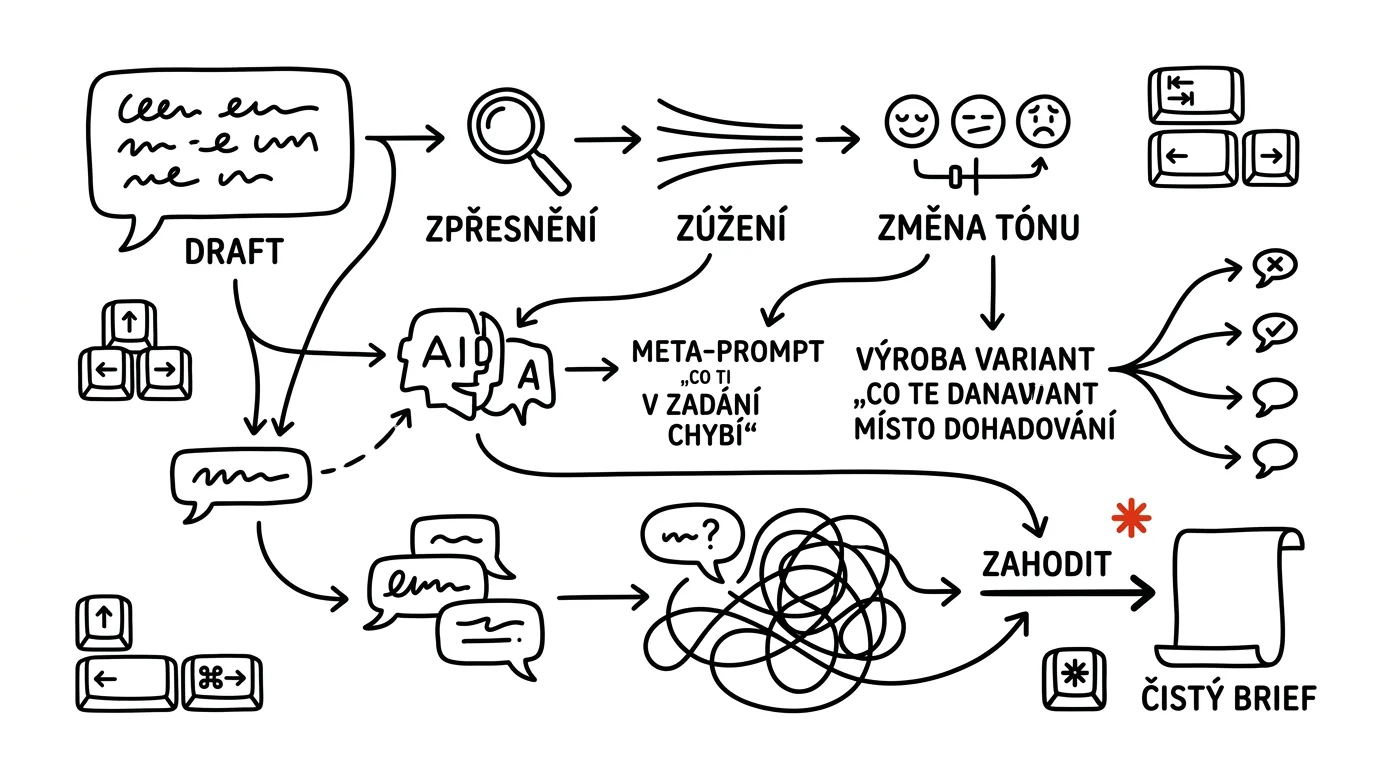
Most disappointment with AI follows the same arc: someone writes a request, gets a generic answer, decides “it just can't do this,” and writes the text themselves instead. But the mistake was never in the model or the prompt. The mistake was expecting the first answer to be the finished result. The first answer is raw material — the stuff you carve into what you actually wanted over a second and third round.
This guide is about the work that happens between the first round and the last. You'll learn to read the first answer diagnostically (what exactly is missing and why), use iteration instructions that actually work, let AI ask you questions instead of guessing, produce variants when you don't know yourself what you want — and, above all, recognize the moment when a conversation is so cluttered that the only right move is to throw it out and start over with a clean brief.
Read it in phases and come back to whichever one you're stuck in. Every phase has prompts you can copy — just fill in the brackets. And one rule holds over the whole thing: AI proposes, the human approves. Iteration produces text that sounds convincing, and convincing isn't the same as true — before you send, pay, or publish, a person always decides.
A typical scenario
Marek works as an account manager and every Friday sends five clients a weekly summary. It used to take him forty minutes each: fifteen minutes gathering material, twenty-five writing and rewriting. He tried AI, typed “write a weekly summary for the client,” and got exactly what he was afraid of — four paragraphs of padding with phrases like “in today's dynamic environment” and “communication plays a key role.” He decided it didn't work and went back to writing by hand.
Then he changed one thing: he stopped treating it as a machine for finished text and started treating it as a conversation. The first round still looks the same — a rough request, a generic answer. But in the second round he writes three sentences: “Cut the whole intro. Expand the point about the migration to twice the length, and add the launch date. Make the tone less formal, like I'm writing to a client I know.” In the third round he fills in numbers the model couldn't have known and has it flag any spots where the text claims more than his source material supports.
The result: the summary is done in twelve minutes and comes out more consistent than when he wrote it by hand, tired, on Friday afternoon. Over time he noticed he was typing the same fix every single time — “no intro filler, start straight with the project status” — and moved it permanently into his custom instructions. He hasn't had to type it since. Exactly how each of these steps works is the rest of this guide.
Phase 1: the first round — a rough prompt and diagnosing the answer
Why it doesn't pay to perfect your prompt
There's a belief that the right approach is to craft the perfect request and send it once. In practice that's the slowest path. Ten minutes spent polishing a prompt costs you ten minutes even when you nail it — and when you don't, you only find out after you've sent it, and you were tuning blind.
It's cheaper to send a rough request in thirty seconds and see how the model interpreted it. The answer is the fastest feedback you can get on the quality of your request. It shows you what you didn't say, what you said ambiguously, and what you honestly didn't know yourself. Most people who say they “don't know how to write prompts” actually just don't know what they want — and that only becomes clear once you're looking at a draft.
That doesn't mean writing one word. The first round should include the minimum: what you want, who it's for, what it's for, and roughly how long it should be. It's worth giving role and context up front, since they raise the level of the first draft. Leave the rest for iteration.
How to read the first answer
Don't read the first answer as text to approve or reject. Read it as a diagnosis: where did the model's interpretation diverge from what you meant. Three questions are enough.
Does the format fit? Length, structure, number of bullet points, level of formality. This is the easiest layer to fix, and also the one people most often agonize over needlessly — usually one sentence is enough.
Does the content fit? Is a specific detail missing, is something extra in there, is it aimed at the wrong audience? This is often where you discover the model didn't have the source material and filled the gap with a generic truth.
Does the intent fit? The worst case: the text is nice but solves a different problem than the one you actually have. Iteration won't help here — you go back to the start with a better brief.
When you can't tell what's bothering you about the answer, flip the direction and let the model ask you:
Here was my original request: [paste original prompt]
Here's the answer I got: [paste answer]

Don't rewrite the text. Answer me in three blocks:
1. How you interpreted my request — what you treated as
   mandatory and what you filled in yourself because I
   didn't say it.
2. Which specific pieces of information were missing from
   my request badly enough that you had to fall back on a
   generic phrasing instead. List them as questions.
3. If you had to nail it on the first try, what three
   sentences should I add to my request? Write them exactly
   as I should paste them in.

Be specific — I don't want general advice about writing
prompts.
You'll get back a list of the holes in your request — and in point 2 you'll typically see that the model had no idea who you were writing to or what you wanted from the reader. Watch out with point 3: only accept the suggested sentences where they match reality. The model sometimes suggests adding a detail you don't actually have, and if you invent it, you get convincing text about something that isn't true.
Phase 2: a glossary of iteration instructions
Iteration lives or dies by how specific your correction is. “Make it better” doesn't work — the model has nothing to trim or add. “Cut it in half, drop the examples, keep only the recommendation” always works. A functional instruction is one that states both direction and degree.
The quantity-and-length axis
The simplest and most effective axis. Use measurable units, not feelings: “cut it in half,” “down to three paragraphs,” “each point no more than two sentences,” “make it fit on one mobile screen.” When you say “make it shorter,” you get a text that's a tenth shorter.
A special case is asymmetric trimming — you don't want to shorten everything, just the part that bloated. “Leave points 1 and 2 as they are, cut point 3 to three sentences, drop the conclusion entirely” is an instruction that saves you two more rounds.
The “make it more / less X” axis
The most underrated technique in all of iteration. Instead of describing the target state, you give a direction of movement — and the model has both the starting text and the vector. It works even when you can't name what you want yourself: “more concrete,” “less salesy,” “more technical,” “less cautious,” “more like spoken language.”
It's worth quantifying the strength of the shift, or the model will move too little: “significantly more concrete, not just a little” or “move it halfway between this and an email to a friend.” When a shift overshoots, you pull back the same way: “a third less than what you just did.”
Take your last version and revise it according to these
shifts. Don't write the text again from scratch — build on
what you already have.

- Significantly more concrete: every general claim should
  either get a number, date, or name attached, or be cut.
- Less salesy: no superlatives, no “unique” and no “critical.”
- Shorter: [250] words maximum total.
- Leave the paragraph about [topic] exactly as it is — that
  one's right.
- Delete the first two sentences and start right at
  [specific point].

At the end, outside the text, tell me what you cut for
length, so I can decide whether any of it should come back.
That last line of the prompt is what separates trimming from loss. Without it, information you actually needed disappears too, and you won't notice until a reader does. Also check that the model really did leave the parts you protected unchanged — it's not malice, it's just that rewriting the whole thing is easier for the model than editing a part of it.
The tone-and-register axis
Tone is the hardest quality of a text to describe and, at the same time, the easiest to fix — once you stop using abstract adjectives. “More professional” means something different to everyone. Anchor the tone to a situation, an audience, or a comparison, and it instantly becomes unambiguous: “write it the way I'd say it to a colleague over coffee,” “tone like a price-list change notice, not an apology,” “keep it so it wouldn't be embarrassing if this got forwarded outside the company.”
Even more reliable is showing a model instead of describing one — a pasted example of finished text does the work of a paragraph of instructions, and it's its own craft; see showing AI an example.
The tone of this version isn't right, and I don't want to
describe it in the abstract. Here's the anchor instead:

- The reader is [recipient's role, e.g. the client's CFO],
  who has thirty seconds for this email and doesn't know
  the project details.
- The relationship is [long-term vendor, formal but not
  stiff].
- It must not sound like [an apology / a sales pitch / a
  complaint].
- The closest thing to what I want is this older text of
  mine: [paste 5-10 lines of your own writing that captures
  the tone]

Rewrite the last version in this tone. Leave the content and
facts unchanged, change only the phrasing. Where you'd have
to drop information because of the tone, keep it instead and
flag it separately below the text.
You'll get back a version that sounds like you, not a corporate newsletter. Watch the last rule: when changing tone, specific numbers and deadlines are the first thing to get lost, because a “nicer” phrasing is usually vaguer.
The structure axis
Structure is the cheapest thing to change, because the text stays the same and only gets rearranged: “turn this into bullet points,” “flip the order — conclusion first, then reasoning,” “convert it to a table with columns what / who / by when,” “split it into a section for leadership and a section for the team.”
A strong trick is to ask for the structure before the text. Have it send you just the skeleton first — headings, number of paragraphs, what goes in each — approve it, and only then let it write. One extra round that saves you three: fixing a skeleton is a one-sentence job; fixing a finished text means a full rewrite every time.
The concreteness-and-verifiability axis
The most common flaw in a first draft isn't style, it's emptiness. The text looks finished and says nothing you could check. The fix is an instruction that bans generic sentences:
Go through your last version and turn it into a version
where every sentence asserts something. Specifically:

- Replace every generic statement (like “the process was
  made more efficient”) with a concrete detail from my
  source material, or cut it entirely.
- Don't add any numbers, dates, or names that I didn't give
  you. Where a specific detail should go but you don't have
  it, write FILL IN: [what's missing] in its place.
- Cut sentences that only introduce other sentences (“In the
  following section, we'll look at...”).
- Keep the facts and the order, only change the level of
  concreteness.

At the end, attach a list of every FILL IN.
That ban on filling gaps is the most important line. Without it, the model fills empty spots with a plausible-looking number and you won't be able to tell in the finished text. The FILL IN list is also your to-do list — it's usually short, and filling it in takes a few minutes. And anything meant to stay in the text as a fact, check against the source, see fact-checking with AI.
Phase 3: let AI ask you questions
Five questions before it starts writing
A reversed approach that saves the most rounds: instead of spelling out your request in detail, you let yourself be interviewed. The model asks exactly what it's missing — and you find out what you hadn't thought through yourself.
I want you to write [what should come out of this, e.g. an
email to a client about a delayed delivery]. I'm not going
to tell you anything else yet.

Before you start writing, ask me 5 questions whose answers
would change the result the most. Rules:
- ask about things you can't guess (context, relationship,
  what happened, what I want, what I want the other party
  to do),
- don't ask about things you can reasonably infer from
  common practice,
- order the questions from the one that changes the result
  most,
- for each question, write one sentence on why it matters.

Once I answer, write the text. If something from my answers
is still missing, say so instead of guessing.
You'll get back five questions, and usually two of them hit exactly the spot where you yourself weren't sure. Answer briefly, bullet points are fine. One thing to watch: the model likes to ask about formal details (“how long should it be?”) instead of substance — when that happens, send back “these questions are surface-level, ask about things that change the content, not the format.”
Pick the number of questions based on the stakes. Three for a routine email, five for a document someone will read more than once, ten for something that'll be in use for months.
The meta-prompt: “what's missing from your request”
A variant for when you already have the request written and want to check it before you build half an hour of work on top of it. It doesn't write the text — it examines your request.
Here's a request I want to send you. Don't act on it yet.

[paste request]

Evaluate it as a request:
1. What's ambiguous in it — where I could picture two
   different ways of fulfilling it, both matching the text.
2. What's missing from it, and what you'd therefore have to
   guess. For each item, write what you'd assume by default.
3. What's unnecessary in it, or contradicts itself.
4. Rewrite the request into a version that doesn't have these
   problems. Don't add anything from your own head — where
   information from me is missing, leave a bracket to fill in
   in the rewritten request.

Points 1-3 first, then the rewrite.
Point 2 is the valuable one: you'll see what default assumptions the model would use, and immediately spot which ones are off. Watch out with point 4 — the rewritten request tends to be longer and more formal than you need; take the content from it, not the style. For prompts you'll reuse, save the resulting version somewhere right away.
Phase 4: variants instead of guessing
Three versions in different tones
When you know a draft isn't right but can't name why, stop hunting for words and have a spread produced instead. The differences between the versions will show you what you're looking for — picking is always easier than inventing.
Write three versions of [what, e.g. a message to the team
channel about the deadline slipping]. The source material is
the same for all three:

[paste facts, numbers, context]

Version A: businesslike and as short as possible, bare facts,
no explaining.
Version B: explanatory — why it happened and what it means
for everyone else, longer, calmer tone.
Version C: takes ownership and gives a clear next step, who
does what by when.

Rules:
- the versions must differ in approach, not just reshuffled
  words,
- the facts must be identical across all three, don't add
  anything,
- no intro or closing commentary, go straight into the three
  blocks,
- one sentence under each version: what situation it suits
  and what risk it carries.
You'll get back three genuinely different texts. If they only differ cosmetically, it's usually because the axes you specified were too close together — rephrase them so they push against each other a bit. The line about risk at the end is a bonus that often settles it: “C sounds good, but it promises a date I don't have confirmed.”
Crossing versions and stepping back
The version you pick rarely works as-is. The fastest approach is to assemble the final one from pieces — the model remembers what it sent, so a reference is enough.
I'm taking version B as the base. Adjust it like this:
- take the first paragraph from version A, it's better,
- add the last sentence from version C (that concrete next
  step) at the end,
- cut the middle section from B in half,
- keep the tone as in B.

Send just the final version, don't comment on what you did.
The same logic works for stepping back. When a text gets worse after a few rounds — and it does happen, since every extra edit strips away some of the good — don't try to fix it with another instruction. Say “go back to the version from the third answer and make just this one change: [change].” If the model doesn't remember the version reliably, paste it back in full; it's two extra seconds of work and it removes the guesswork.
A habit worth building: copy the last version you were happy with somewhere safe — into a note, a document, anywhere. A conversation can be wrecked by one careless instruction, and a backup costs five seconds.
Phase 5: restart, or keep going
How a conversation gets cluttered
A long conversation isn't free. The model takes everything said in it into account — including the three rejected versions, the correction you walked back, and the detour into a different topic. The effect shows up gradually, and you can spot it by the symptoms:
- Corrections stop sticking. You say “no intro filler” for the third time and the filler is still there, or it comes back a round later.
- The text drifts back to older versions. Phrasing you'd already rejected reappears.
- Answers get longer and more generic, even when you asked for the opposite.
- The model mixes contexts — a detail from a previous task sneaks into the client email.
- You're arguing with the model instead of instructing it. When you're typing “no, I never said that,” you're in a cluttered conversation.
- The conversation drifts topic. You started with an email and now you're working on a presentation.
The decision rule
The rule is simple, and it's worth taking literally. Keep going as long as the task isn't changing and corrections stick. Restart once you've given the same correction a third time, or once the task has changed.
Continuing makes sense when you're tuning a single output — length, tone, structure, filling in details. The context the conversation carries is an advantage here: the model knows what you've already rejected.
A restart makes sense when it's a different request (even a related one), when one of the symptoms above has shown up, when you took a detour and came back, or when halfway through you realized the whole brief was wrong to begin with. A restart isn't admitting defeat — it's clearing the table. A new conversation with a good brief gets a better result in one round than continuing a cluttered one for five.
There's one more practical reason to restart: keeping your inputs clean. If something ended up in the conversation that shouldn't have — personal data, an internal document, someone else's data — a new conversation is the only way to stop working with it. Sensitive material generally belongs only in a paid account with contractual data protection, and even there, preferably anonymized.
A handoff brief for the new conversation
A restart doesn't have to mean starting from zero. Have the old conversation extract what the new one needs to know — and nothing more.
I'm ending this conversation and starting a new one. Write me
a handoff brief for a new chat that won't know anything from
this conversation.

Include:
1. What the task is, in one sentence.
2. The facts and numbers I gave you in this conversation
   (only the ones from me, nothing you filled in yourself).
3. Decisions we agreed on — format, tone, length, structure.
4. What I explicitly rejected and shouldn't come back.
5. The current best version of the text, unchanged.

Write it as a brief for the model, not as a narrative about
our conversation. Points 2 and 5 verbatim, don't rephrase
anything.
You'll get back a compact brief you just paste into the new chat. Point 4 is the most valuable — without it, the new conversation will happily offer up exactly what you spent an hour rejecting. Check point 2 before you send it on: summaries sometimes include a detail that started out as an estimate in the conversation, and in the new chat it'll look like a fact you provided.
If you're doing the same task on a regular basis, it's cleaner not to keep the context in a conversation at all, but in a project with persistent context — the source material and rules live there permanently, and every chat starts clean but informed.
Phase 6: turn iterations into permanent settings
When you type the same correction a third time
This is the point where iteration turns from repeated work into savings. Track which corrections you give over and over: “no intro phrases,” “use formal you,” “write dates as day. month. year,” “don't use the word solution.” A correction like that doesn't belong in a conversation — it belongs in your settings.
Here are the last [8] corrections I've repeatedly given you
across different conversations:

[list the corrections, however roughly you remember them]

Turn them into a permanent instruction I can save in my
settings that will apply to all my conversations.
Requirements:
- phrase them as rules, not requests,
- group them into 3-5 thematic blocks (style, format, what
  to avoid, how to behave when you're missing source
  material),
- drop duplicates and contradictions, and flag any
  contradictions for me,
- [200] words maximum total, it has to fit in a field with a
  length limit,
- don't add rules I didn't give you.

Below the instruction, separately list any rules I gave you
that contradict each other, so I can decide.
You'll get back finished text for your custom instructions field — how to work with it further is covered in the tip on custom instructions. Keep the instruction short; a long list of rules gets followed worse than five clear ones. And watch it for a week after you deploy it: if texts start feeling stiff afterward, it's too restrictive, and some of the rules belong back in individual requests.
Saving a tuned request
The second half of this phase is saving not the instruction, but the entire request — for tasks you do repeatedly, the fifth tuned version of a prompt is an asset.
We've gone through [5] rounds of edits together and the last
version is right. Reconstruct the request that would have
produced this final version on the first try.

- Include everything I refined during the iterations
  (length, tone, structure, what to leave out).
- Replace anything that changes every time this task comes up
  with brackets like [this].
- Don't write an explanation, just the prompt itself, ready
  to copy.
- Below it, briefly list which brackets I need to fill in
  when I use it and what goes in each.
You'll get back a template you paste in and fill out next time. Test it right away on a different input — only a second use reveals whether anything left in it was specific to that one case. Keep templates in one place, not buried in chat history where you won't find them a month from now.
A final check before you hit send
After a few rounds of iteration, the text is polished — and that's exactly why it deserves one last, different kind of look. Iteration optimizes form, and it's easy to lose content while optimizing form.
This is the final version of [type of text] that I want to
send to [who, in what situation]:

[paste text]

Don't rewrite it. Check it and list:
1. Claims the text makes that aren't backed by anything I
   gave you — especially numbers, dates, and promises.
2. Sentences the reader could interpret differently than I
   intend, and how they might read them.
3. What's missing from the text for the reader to be able to
   do what I want from them.
4. The three weakest spots, and why.

For every finding, quote the passage in question.
You'll get back a list of findings, not a new text — that's the point. The most common finding is point 1: during iteration, a date or number slipped into the text that you never actually said. A tougher version of this check is described in AI as a reviewer. And from there it's on you: the model never sends, confirms, or publishes anything — a person does.
Common mistakes
- Treating the first answer as a verdict on AI's abilities. The gap between “it can't do this” and usable text is often one specific piece of feedback. Anyone who quits after round one never gets to the result.
- Giving vague corrections. “Make it better,” “still not quite it,” or “add some flair” give neither direction nor degree. Only a specific instruction works: what, where, by how much.
- Sticking with a cluttered conversation out of inertia. Once you're typing the same correction a third time, another round won't fix it. A restart with a handoff brief is faster than trying to talk it into shape.
- Letting the text degrade through repeated rewriting. Every round strips something away; after the fifth edit, the text is often worse than after the second. So back up good versions and know how to return to them.
- Iterating endlessly instead of finishing the last bit by hand. When you're close and only the last tenth is missing, writing it yourself takes two minutes. Extracting it via prompt can easily take ten.
- Checking a text only inside the conversation that produced it. The model that wrote the text judges it leniently, and doesn't treat the numbers it filled in itself as suspicious. Verify facts against the source, not by asking “is this right?”
The best tools
- Whatever AI chat you already use — ChatGPT, Claude, or Gemini; iteration is their natural mode of working, no special feature required.
- Editing a selected passage — highlighting a piece of the answer and directing a change at just that part; it keeps the rest of the text unchanged and is the cheapest way not to lose what already worked.
- Projects with persistent context — instead of one long, cluttered conversation, keep your source material and rules in a project; every new chat then starts clean but informed.
- Custom instructions — the place for corrections you keep repeating; set them once, stop dealing with them after that.
- A note or document with version backups — anywhere you park the last good version of a text before starting another round of edits.
- A second model for the final check — a different AI, one that didn't write the text; it has no instinct to defend its own phrasing.
What you get out of it
- Time: for recurring text (summaries, emails, channel updates), tens of minutes shrink to ten or less — and the biggest saving arrives once you move the recurring corrections into instructions and templates.
- Peace of mind: the feeling of “AI can't do this” disappears, because you know the first answer was never a verdict. What changes is your expectation, not the tool.
- Quality: text refined over three rounds is more concrete and more distinctly yours than the first automatic answer — mainly because iterating forces you to say what you actually want.
- Portability: a tuned request is an asset. What you refine into a template once still works a month from now, and for a colleague too.
Pro tip
The most advanced iteration technique is having the model score its own output against your criteria, not its own taste. Give it three to five criteria you care about for this task (say: concreteness, no promises without backing, under 200 words, no overwrought tone), and instruct: “score your last version against these criteria on a 1-5 scale, for each one write exactly what it's missing to reach a 5, then make one revision that fixes only the worst-scoring criteria.” You'll get a targeted fix instead of a blanket rewrite — which is exactly what a blanket rewrite tends to kill.
And a closing rule for the whole guide: move any correction you've given a third time into your settings, and throw out any conversation you've had to fix a fifth time. Iteration should be a path to a result, not a way to spend an afternoon circling one.
Want to go deeper? The handbook has a whole chapter on it — AI and automation.
Similar tips
A second charger lives in your bag
One charger stays at your desk, a second one lives permanently in your bag. A few bucks buys the end of endless repacking and forgetting.
The Two-Screen Meeting Rule: One for People, One for Notes
Put the meeting window on the monitor with the camera, notes and materials on the other. You look people in the eye, never share anything private, and minutes write themselves.
Email three times a day in blocks, not sixty times in drips
Constantly checking your inbox shreds your focus into pieces. Three fixed blocks a day are enough for 95% of jobs.
Common questions
Isn't it better to polish a perfect prompt up front?
In practice it's the slowest path: ten minutes of polishing costs ten minutes even when you hit the mark, and when you miss, you were polishing blind. It's cheaper to send a rough request in thirty seconds — the answer is the fastest feedback on the quality of your prompt, because it shows what you didn't say and what you didn't know yourself.
Why doesn't “try harder” work?
Because it gives neither direction nor degree — the model has nothing to add or take away. A working instruction says what, where, and by how much: “cut it in half, drop the examples, keep only the recommendations.” For tone, anchoring it in a situation or a recipient works better than abstract adjectives.
What if I can't name what's wrong with the answer?
Have a spread made: three versions in different tones that differ in approach, not just shuffled words. The differences between versions show you what you're looking for — choosing is always easier than inventing. You then assemble the final text from pieces of the variants.
When should I scrap the conversation and start over?
Once you've given the same correction a third time, or once the task has changed. A cluttered conversation shows itself when corrections stop sticking and the text drifts back to older versions. A fresh conversation with a good handoff brief gives a better result in one round than a cluttered one in five.
How do I stop the model from inventing numbers in my text?
With an explicit ban: “don't add any numbers, dates, or names you didn't get from me — where data is missing, write FILL IN.” Without it, the model fills gaps with a plausible-looking number you won't spot in the finished text. Before sending, have it list claims without backing — and check facts against the source, not by asking “is this right?”
What about a correction I keep typing over and over?
A correction given a third time doesn't belong in the conversation — it belongs in your settings: have your repeated fixes turned into a permanent instruction for your custom instructions field. And for recurring tasks, save the whole refined prompt as a template with brackets — the fifth polished version of a prompt is an asset.
Was this helpful?
Liked this tip?
I send one like it every week by email. Two minutes to read, hours saved.
The Top 30 tips e-book, free — it lands in your inbox right away.
Then 1 tip a week · no spam · unsubscribe in one click
Prefer a system to single tips? The free email course — seven days, seven emails, one skill a day.