Tips & tricks · Workflow · Everywhere · ~10 min a week · 2 min read
git add -p: Commit in Chunks, Not Whole Files
Last reviewed:
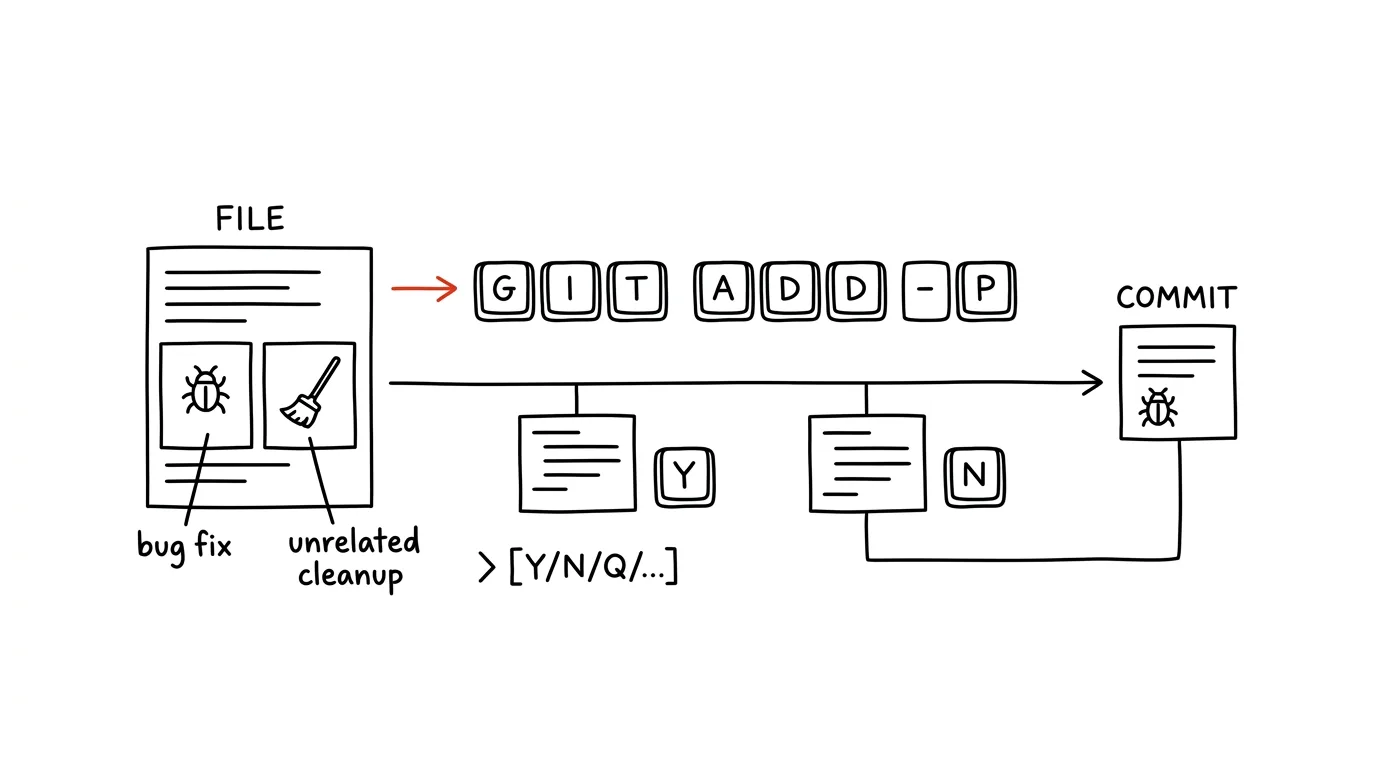
The ideal is simple: one commit, one logical change. Reality: while fixing a bug, you also renamed a variable and deleted dead code in the same file. Commit by whole files and you get a mess — a "fix login" commit that's half cleanup. The command git add -p (patch) solves this elegantly: it walks through your changes section by section, shows each one as a diff, and asks whether it belongs in the commit you're preparing. One tangled work session turns into two or three clean commits.
How to do it
- Instead of
git add file, rungit add -p— git starts walking through changed chunks (hunks) one at a time, asking about each with a single keypress. - Basic answers:
yadds the chunk to the commit,nskips it,qquits the walkthrough.?prints help for all the options. - When git offers a chunk that's too big and mixes both kinds of change, press
s(split) — it breaks it into smaller pieces and asks about each separately. For even finer control there'se, manual patch editing, buty/n/scovers the vast majority of cases. - After going through everything, run
git diff --cached— it shows exactly what you've staged for the commit. Check it and commit. - The remaining changes stay untouched in your working directory — turn them into a second commit (say "cleanup: rename variables"), or discard them.
A typical scenario
A developer fixes a tax calculation and, along the way, tidies up formatting in the file and deletes a commented-out block. If he commits the whole file, his colleague reviewing the PR sees thirty changed lines and has to hunt for which three are the actual fix. With git add -p he selects only the calculation lines, commits "fix VAT rounding," and adds the rest to a second commit, "cleanup." Review then takes two minutes instead of fifteen — and when someone needs to find, six months from now, where the rounding logic changed, git log points straight at one small commit.
Anyone who prefers clicking finds the same thing in graphical tools: VS Code lets you stage individual selected lines in the changes view (right-click in the diff → "Stage Selected Ranges"), and GitHub Desktop and JetBrains IDEs work similarly. Same principle — you commit an idea, not a file.
What you get out of it
Commits start matching what actually happened — one change, one commit, a readable diff. Colleagues' code reviews get faster, because nobody's hunting for a needle in a haystack of unrelated edits. And a bonus for you: reviewing your own changes chunk by chunk is one last check where you often catch a forgotten debug print before it ships to the world. For how to name your commits, see the tip commit messages for future you.
Want to go deeper? The handbook has a whole chapter on it — Core systems: inbox, priorities, reviews.
Similar tips
git reflog: A Rescue When You've “Deleted” Commits
Bad reset, deleted branch, a rebase gone wrong? git reflog shows the history of everywhere HEAD has been — and lost commits can be brought back.
git stash: Set Work Aside for Later
An urgent fix comes in and your code is half-finished? git stash tucks it away in a drawer, git stash pop brings it back. No half-baked commits.
Multiple desktops: separate work from communication
Ctrl+→
Ctrl+arrows switch between virtual desktops. One for focused work, one for mail and chat — and distractions disappear from view.
Was this helpful?
Liked this tip?
I send one like it every week by email. Two minutes to read, hours saved.
The Top 30 tips e-book, free — it lands in your inbox right away.
Then 1 tip a week · no spam · unsubscribe in one click
Prefer a system to single tips? The free email course — seven days, seven emails, one skill a day.