Tips & tricks · AI · Everywhere · ~hours every Monday, and the end of price lists drifting out of sync · 59 min read · in-depth guide, doing it ~3 h
A restaurant as a system: one menu that everything else is derived from
Last reviewed:
In this article
- A typical scenario
- Phase 1: taking stock of the business
- Phase 2: the menu as structured data
- Phase 3: derived outputs
- Phase 4: the Monday routine and editability in practice
- Allergens: a helper, not an alibi
- Food photos: a phone, a consistent style, no faking
- Reviews: decent replies in the business's voice
- Seasonal pricing and price changes
- Reservations, simply
- Security: access, prices, backups
- Rollout: the first three weeks
- Café, patisserie, pub: adapting the system
- What it costs: the shape of the expense
- Why not a ready-made QR menu app
- Common mistakes
- Best tools
- What you get out of it
- Pro tip
Every small restaurant has one soup that gets written down four times each Monday: once into Word for printing, once into the website admin, once into a Facebook post, and once on the chalkboard by the door. Four copies of the same sentence, four places where they can end up saying something different. And because the weekly menu changes every week, it's not a question of whether the copies will eventually drift apart — only when. Then a guest is standing at the register with a phone showing a different price than the one on the receipt, and the argument that follows costs more nerves than the whole Monday of retyping ever saved.
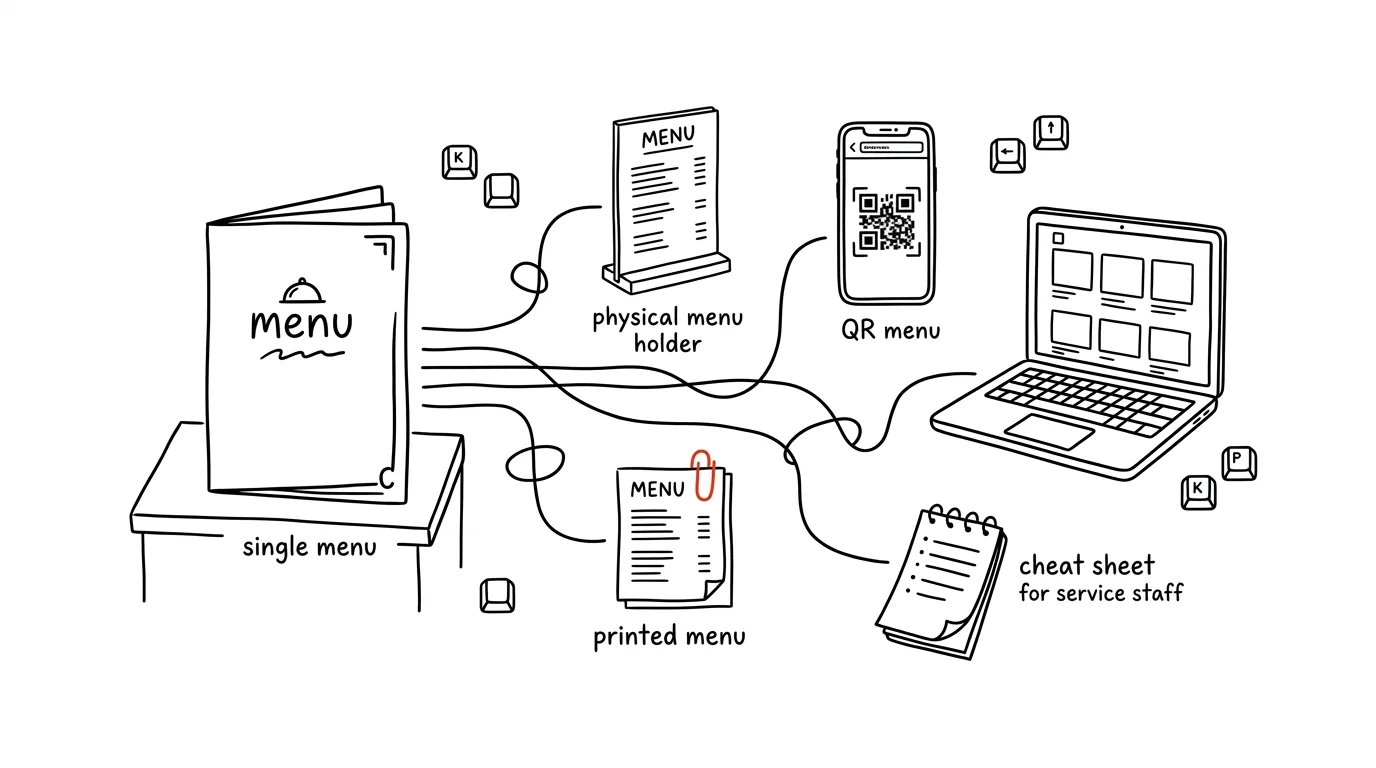
This guide shows a different path: the menu isn't a document — the menu is data, and documents are derived from it. Dishes, descriptions, prices, allergens, and tags live in one structured file that is the single source of truth. The printed menu, the QR menu on the website, social posts, and the staff cheat sheet are just different views of that same source — and when the soup's price changes, it changes in one file and propagates everywhere. That's exactly why food service is the most convincing case for this whole principle: where data changes once a year, a system saves you little; where it changes every Monday, it saves you every Monday.
The line of thinking is the same as in the guide on your brand as a system — inventory, one source of truth, derived outputs, editability, security — just applied to a business whose source changes weekly instead of yearly. The two pieces complement each other: there you'll find print layout and website-building in depth, here you'll find the rhythm of a business that lives by a weekly cycle. You can read it phase by phase — each one stands on its own and comes with prompts to copy — just fill in the brackets.
A typical scenario
Jana runs the family bistro U Lípy: thirty seats, a daily lunch menu, and coffee and homemade cakes in the afternoon. In the kitchen there's her husband and one cook; on the floor, two servers. Every Sunday evening she and her husband agree on what's cooking next week; every Monday morning Jana sits down at the computer and spends an hour and a half retyping: dishes into a Word template, print it out, cut it into table stands; photograph it with her phone for Facebook; retype it into the website admin, which handles worse than a tractor; and finally chalk it onto the board. On Tuesday the side dish changes because the potatoes didn't show up — and the fix makes it onto the board and into the printout, but not onto the website. Every so often the prices drift: the website is showing a menu version that's three weeks old, a guest objects, Jana apologizes and charges the old price. She adds allergens to the printed menu by hand from memory, and once a week it makes her freeze mid-motion, wondering whether those dumplings really are supposed to have egg in them too.
After switching to the system in this guide, Jana's Monday looks different. On Sunday evening she dictates the week's menu into her phone — a plain voice recording, no form. On Monday morning she opens Claude, has it convert the recording into a structured menu file, checks the prices and allergens (she has a checklist from the kitchen for that, not memory), and approves it. From that one file, everything else is derived: a printed menu from the template, an update to the QR menu on the website, drafts of three social posts for Monday, Wednesday, and Friday, and a one-page cheat sheet for the servers with allergens and dish descriptions. The whole thing takes under half an hour, most of which Jana spends checking and approving — not retyping. And when the beef sirloin runs out on Wednesday, she changes one line in the source and every digital output falls back into line; only the chalkboard by the door stays on chalk.
The difference isn't just time. It's that the question "which version is correct?" has stopped existing — the one in the source is correct, always, and everything else is derived from it. The rest of this guide is the path from Jana's old Monday to her new one, step by step.
Phase 1: taking stock of the business
Before you start building, find out what you already have. Every business accumulates materials over the years, scattered across hard drives, emails, and drawers — and that's exactly what the system will be built from. The inventory is one evening of work, and it's worth doing properly, because everything that follows draws on it.
What to gather into a single folder (say, business-ulipa):
- Recipes and cost calculations — in whatever form: a notebook, Excel, photos of handwritten cards. These won't be published; they'll serve as a source for dish descriptions and as the basis for the allergen checklist.
- Menus, old and current — the standing menu, seasonal inserts, Word files of weekly menus from the past few months. This is what you'll distill both the data structure and the business's voice from.
- Photos of dishes and the interior — everything anyone has ever photographed, failed shots included. You'll sort them later, with help.
- Logo and graphics — a vector version of the logo if one exists (from whoever designed the sign), old flyers, business cards. Even an ugly old flyer is information: it shows what fonts and colors the business has used.
- Text the business has written — Facebook and Instagram posts from the past year, the "about us" copy from the website, replies to reviews if there were any.
- Reviews — an export, or at least screenshots, of reviews from Google and other platforms. Reviews are the most honest description of a business that exists: guests say in them what they see in it and how they describe it.
One rule right from the start, and it holds for the whole guide: recipes, cost calculations, and internal figures are company materials — upload them to a paid account with contractual data protection, not into an anonymous free chat.
Taking inventory with Cowork over a folder
Claude Cowork (the desktop mode that works directly on a folder of files) is built for exactly this kind of inventory: you give it a folder and let it map out what's in there. The first prompt doesn't produce anything — it only describes and proposes.
Work on the folder business-ulipa. It has everything I've gathered
about our bistro: recipes, old menus and weekly menus in Word,
photos, the logo, old flyers, Facebook posts, and review screenshots.

Take an inventory:
1. List what's in the folder, by category, with file counts
2. For the weekly menus in Word, describe their structure (what
   repeats: soup, 2-3 mains, dessert?) and whether the structure
   is consistent
3. For dish photos, estimate how many are usable (sharp, dish
   recognizable) and how many aren't — just an estimate for now,
   we'll sort them later
4. List what's missing: a vector logo? dish descriptions? a
   current price list?
5. Propose a folder structure to reorganize all of this into

Don't move or delete anything, I'm waiting for your proposal.
It will come back with a map of the business in files. Point 2 tends to be the most valuable: you'll see in black and white how inconsistent your menus have actually been ("beef sirloin in cream sauce" vs. "beef sirloin", prices sometimes with a currency symbol, sometimes without), and point 4 — a list of the gaps that need filling before you go live.
The business's voice: how U Lípy talks
The second half of the inventory isn't about files, it's about tone. Social posts, review replies, and dish descriptions will all sound the way the business talks — and that needs to be captured once, so AI doesn't have to guess it every time. The general method for distilling tone from your own writing is covered in the tip on brand and tone of voice; here, a shortened version tailored to food service is enough.
In the folder business-ulipa/texts there are our Facebook posts
from the past year, the about-us copy from the website, and a few
review replies. In the reviews folder there are screenshots of
guest reviews.

Create a file voice.md:
1. Who we are, what guests call us, and what they appreciate about
   us according to reviews (quote guests' actual phrasing — "just
   like grandma's", "honest portions")
2. Tone: 4-5 traits, each with a sample sentence (e.g. warm but
   not overfamiliar; formal or informal address with guests?)
3. Vocabulary: how we refer to things ourselves — which word do we
   use for "soup"? "daily menu" or "lunch"? How we write dish names
4. Banned phrases: corporate and marketing filler that doesn't
   belong to us ("culinary experience", "premium quality")
5. Three "not like this / like this" pairs: a post about a new
   menu, a reply to a positive review, a reply to a critical review

Base this on our actual writing, not on some general idea of what
a bistro sounds like. Where you're not sure, ask me instead of
guessing.
The resulting voice.md is a short document — a page, maybe two — and it will carry every text output that follows. Check the sample sentences especially closely: the model tends to slide toward a generic "food service tone" straight off a shopping-mall poster — it sounds professional and belongs to nobody. If your bistro writes "today's soup is a creamy dill number and there's plenty of it," that's how it should read in the document too.
Follow-up questions: situations that aren't in the texts
Old Facebook posts won't answer everything. Let yourself be asked about situations that haven't come up in writing yet — those are exactly the ones that will catch you off guard in daily operations.
Go through voice.md and act like someone starting tomorrow to write
our posts and review replies: ask me the questions the document
doesn't answer. I'm mainly interested in:
- how we announce unpleasant news: closed due to illness, a price
  increase, a dish sold out halfway through lunch
- how we respond to an unfair review (a guest complains about
  something that didn't happen)
- how much humor a post can carry, and how much a review reply can
- what we never promise (speed? dietary substitutions on the spot?)
Ask me one question at a time and work the answers straight into
the document.
That half hour pays for itself many times over: when the first critical review shows up, the business's voice won't have to be invented under stress — it'll already be in the document. Answer in your own words — the document should sound like you behind the counter, not like the model.
Phase 2: the menu as structured data
Now for the core of the whole system. The menu stops being a document (Word, PDF, a post) and becomes structured data: one text file where every dish has its own fields — name, description, price, allergens, tags. Everything else — print, the website, social media, the cheat sheet — is derived from this file and never edited by hand.
It sounds more technical than it is. A structured file in YAML format is just plain text with indentation, read like a tidy list and edited in a plain text editor. Here's what a piece of the U Lípy standing menu looks like:
# standing-menu.yaml — the standing menu, changes a few times a year
soups:
  - name: Kulajda
    description: with dill, a poached egg, and wild mushrooms
    price: 3
    allergens: [1, 3, 7]
    tags: [vegetarian, nut-free]
    photo: kulajda.jpg

mains:
  - name: Svíčková na smetaně
    description: braised beef sirloin in cream sauce, bread dumpling, cranberries
    price: 9
    allergens: [1, 3, 7, 9, 10]
    tags: [classic]
    photo: svickova.jpg

  - name: Fried cheese
    description: breaded edam, boiled potatoes, house tartar sauce
    price: 7
    allergens: [1, 3, 7]
    tags: [vegetarian]
    photo: smazak.jpg
And here's what the weekly menu looks like — a separate file for each week, named after the date so the history stays intact:
# week-2026-34.yaml — lunch menu, Aug 17-21, 2026
valid: Aug 17-21, 2026
soup_of_the_week:
  name: Tomato soup with rice
  price: 3
  allergens: [9]
  tags: [vegetarian, gluten-free]

monday:
  - name: Grilled chicken steak
    description: roasted potatoes, herb butter
    price: 8
    allergens: [7]
    tags: [gluten-free]
  - name: Sour lentils
    description: fried egg, pickle, bread
    price: 7
    allergens: [1, 3]
    tags: [vegetarian]

tuesday:
  - name: Vepřo knedlo zelo
    description: roasted pork shoulder, bread dumpling
    price: 8
    allergens: [1, 3, 7]
    tags: [classic]
Three properties turn this file into a source of truth. First, completeness: every dish here has everything any output needs — print takes the name, description, and price; the website additionally takes tags and a photo; the staff cheat sheet takes allergens and the description. Second, unambiguity: there is exactly one price for the Kulajda, and it's right here; when the website and the printout disagree, that's a bug in the derivation, not a question of "which version is correct." Third, checkability: you can write checks against structured data — is a price missing anywhere? does every dish have allergens? — that you simply can't write against a Word document.
The allergen numbers correspond to the EU list of fourteen mandatory-labeling allergens (1 gluten, 3 eggs, 7 milk, 9 celery, 10 mustard…) — more on that in a dedicated chapter below; for now it's enough that they're data like any other.
Why a text file and not Excel? Excel would work too — a spreadsheet is structured data as well — and anyone already living in one can stay there; the guide's principles don't change. But a text format has three quiet advantages. Everything can read it: git can show you a readable, line-by-line change history (in Excel you just see "file changed"), the website loads it without conversion, and AI works with it more reliably than with cells whose structure is held together only by habit. It doesn't hide formatting: over time, Excel accumulates merged cells, colors carrying meaning, and notes like "valid from September" tucked into a header — information a machine can't see and a human forgets. And you can't accidentally overwrite a formula in it. For a source of truth, the general rule holds: the dumber the format, the longer it lasts.
Converting old menus into structure
You're not starting from a blank slate — you have months of old Word menus from the inventory. Have them converted, partly to build the standing menu, and partly because the model will learn your structure from them.
In the folder business-ulipa/old-menus there are Word files of
weekly menus from the past three months, and a PDF of the standing
menu.

1. Convert the standing menu into a file standing-menu.yaml with
   the structure: name, description, price, allergens (numbers per
   the EU list, ONLY IF they're given in the source menu — never
   fill them in by guessing; mark missing ones TODO-ALLERGENS),
   tags, photo (leave empty for now)
2. From the weekly menus, build a template week-TEMPLATE.yaml: soup
   of the week plus two to three dishes for each day, same fields
3. List the inconsistencies you found during conversion: the same
   dish with different prices across different weeks, different
   spellings of the same name, dishes with no allergens
4. Propose a list of tags that make sense for our offering
   (vegetarian, gluten-free, classic, seasonal…) — I'll approve it
   before you use it

Copy prices over exactly, character for character; don't round
anything.
Watch two things. The point about allergens is critical: the model must not fill in allergens based on a dish's name ("Svíčková, so probably gluten") — either they were in the source, or there's a TODO there and the kitchen fills it in. And go through the list of inconsistencies from point 3 — it's a free audit of what has drifted apart over months of manual retyping; you'll often find price differences you didn't even know about.
Where the source should live: git, or a shared folder
The file has to live somewhere — accessible to everyone who needs it, and safe from anyone accidentally destroying it. Two reasonable options:
- A shared folder (Google Drive, Dropbox, OneDrive). Simpler to start with: you already know the folder, Claude Cowork can work directly on it, your phone can reach it. Downside: change history is limited, and "who changed a price and why" is hard to trace after the fact. Fine for a business where one person changes the menu.
- A git repository (private, say on GitHub). It sounds like a programmer's tool, but you don't need to know git — Claude Code drives it for you and you approve. There are three benefits, and they're felt sharply in food service: history (every price change has a date, an author, and a reason — six months from now you can look up when and why the Svíčková went up), approval (the cook proposes a change, the owner approves it — more on that in the security chapter), and a free backup (the repository is a copy off your own computer).
In practice, a combination works well: the source in git, working files (photos before sorting, voice recordings) in a folder. Setting up the repository is one prompt:
Set up a private git repository ulipa-menu with the structure:
- standing-menu.yaml (add the converted standing menu)
- weekly/ (files week-YYYY-WW.yaml will be added here over time)
- week-TEMPLATE.yaml (weekly menu template)
- voice.md (from phase 1)
- photos/ (selected dish photos, named per the photo field in the
  menu)
- README.md: what the repository is for, and the rule that the
  menu changes ONLY here — anyone who wants to change a price or a
  dish changes this repository, everything else is derived

Add a .gitignore for working files and exports. Before the first
commit, show me the complete file list — I'll check that there are
no recipes, cost calculations, or anything internal in there. Those
don't belong in this repository.
The last paragraph of the prompt matters: a menu repository is a candidate for connecting to the website later, so from the start it shouldn't contain anything that couldn't survive outside eyes. Keep recipes and cost calculations — your know-how and your margins — in a separate folder that never gets connected to anything.
Checking the source: validation in one prompt
The power of structured data is that it can be checked by machine. Turn this check into a ritual — it should run every Monday right after the new menu is written, before anything gets derived from it.
Check the file weekly/week-2026-34.yaml against these rules:
1. Every dish has a name, price, and allergens (an empty list [] is
   fine too — it means "checked, no allergens"; a MISSING field is
   an error)
2. Prices are whole numbers in a reasonable range for a lunch menu
3. Allergens are numbers 1-14, nothing else
4. Tags only from the approved list in standing-menu.yaml
5. A dish that's also on the standing menu has the SAME price there
   — if not, report the difference; it's either a typo or a
   forgotten price change
6. Compare dishes against past weeks: same dish, different price or
   different allergens than last time — flag it for manual review
Return the result as a checklist: what passed, what didn't, what
you recommend fixing. Don't fix anything yourself.
It comes back with a check report. Points 5 and 6 are exactly the errors that couldn't be caught at all in manual mode — now a machine catches them before a guest ever sees them. Notice the difference between "empty allergens" and "missing allergens": an empty list means the kitchen looked and there aren't any; a missing field means nobody looked. That difference is what turns a table into a system.
Sunday evening: dictation instead of typing
What's left to solve is the input: how the new menu actually gets into the source. Nobody wants to write YAML on Sunday evening — and nobody has to. Jana dictates the menu into her phone however it comes out, and the conversion is a job for AI.
Here's a transcript of a voice message with next week's menu
[paste the transcript, or the recording itself]: "...Monday we'll
have a grilled chicken steak with roasted potatoes, and then sour
lentils with egg, soup all week is the tomato one... Tuesday, the
pork with dumpling and cabbage..."

Convert it into week-2026-35.yaml following the template
week-TEMPLATE.yaml:
1. Clean up dish names and descriptions into menu-ready form
   (following the style of standing-menu.yaml — natural, but not
   stiff)
2. Prices: where I didn't state a price, use the price of the same
   dish from previous weeks and FLAG it with a question mark for
   confirmation; leave a new dish with no price and a TODO
3. Allergens: DO NOT FILL IN. Put TODO-ALLERGENS on every dish and
   generate a checklist for the kitchen
4. List what was missing from the dictation (I may have skipped
   Thursday)

Show me the result to review, don't save it anywhere yet.
This prompt is the Monday entry gate for the whole system. Notice the division of labor around allergens again: AI structures the data and watches for completeness, but the kitchen supplies the values. And point 4 is a typical gain from converting through AI: the model notices Thursday is missing from the dictation — something copying from Word would never do.
Phase 3: derived outputs
The source is in place; now it's time to derive from it. Four outputs, four subsections — and one rule above all of them: an output is never edited by hand. When there's an error in the printed menu, you don't fix it in the print file, you fix it in the source, and regenerate the output. The moment you break this rule once ("I'll just quickly fix the price in the PDF"), you're back to two versions of the truth, and the system starts quietly falling apart. A fix in the source takes exactly as long as a fix in the output — it just also propagates everywhere.
The printed daily menu
The first and most tangible output: the menu for table stands and the window display. The process has two steps that are worth strictly separating: the template is built once, filling it in happens every week.
A quick word on tools, so you know what you're working with — with the caveat "as of this writing," because this space moves fast. Affinity (originally a trio of apps from Serif, now under Canva as a single app with studios for vector, pixel, and layout work) is free at the basic tier, and as of this writing has an AI connector for Claude: over MCP, Claude can read and edit documents open in the desktop app — create new ones, set text, export. The connector is labeled beta and requires a paid Claude account; check current documentation for exact capabilities. The second route is Canva: its official AI connector (also over MCP) can, as of this writing, create designs from Claude, fill branded templates with content, resize, and export PDFs or images — the output is an editable design in your own Canva account. What MCP is and how connectors get attached is explained in the overview of MCP tools; the detailed process for laying out print materials through Cowork — including the "draft, approve, produce" rhythm and exporting for a print shop — is spelled out in the guide on your brand as a system and applies here without modification.
First, the template. You build it once, so take your time with it — every Monday from now on will only benefit from it:
Build a weekly lunch menu template in Affinity for our bistro:
A4 portrait, cut after printing into two A5 table stands. Take the
logo and colors from the folder business-ulipa/graphics, and the
tone from voice.md.

Layout: a header with the logo and the week's validity dates, a
"soup of the week" block, then five days — day, two to three
dishes, each with name, description, price, and allergen numbers in
parentheses after the description. Footer: "Numbers indicate
allergens — full list available from staff" and a QR code (I'll
have it generated later, leave space for it for now).

Fill the text as a trial run with data from weekly/week-2026-34.yaml,
so I can see real, longer dish names instead of "Lorem ipsum." Show
me a preview and wait for feedback. Once I approve the template,
save it as the source file menu-template.af — that's the one we'll
just fill in every week from now on.
Two notes from practice. Trial-filling with real data isn't a minor detail: a template tuned against "Lorem ipsum" falls apart on the first real name like "Beef goulash with a bread dumpling and fresh horseradish." And the source file menu-template.af is an asset of the same kind as the menu source — store it alongside the rest of the business's files, because that's exactly the one you'll be editing six months from now when the logo changes or a sixth day gets added.
Every Monday after that, it's just filling in:
Open menu-template.af and fill it with data from
weekly/week-2026-35.yaml. Don't retype anything by hand — pull the
names, descriptions, prices, and allergens straight from the file.
If some text doesn't fit the space reserved for it, don't change
the font size or the text — list it for me, I'll shorten the
description in the source and we'll regenerate.
Show me a preview, and once I approve, export menu-week-35.pdf for
home printing (A4, regular printer) and
menu-week-35-web.pdf (lightweight, for email).
The line "I'll shorten the description in the source" is the system's rule in action: even a typography problem gets solved by editing the source, not the output — because a shortened description should be shortened on the website and in the cheat sheet too. And the line "don't retype anything by hand" is the same safeguard as with the brochure in the brand guide: retyping numbers by hand is the most common way an old price slips into an otherwise correct document.
Anyone who doesn't want Affinity can do the same thing in Canva — a template in your account, autofilled through the connector every week — or skip connectors entirely: have the menu generated as plain HTML with print styling and print it from a browser. That last route is the least polished and the most independent; the principle "template once, fill from the source" holds across all three.
The QR menu on the website
The second output: the page the QR codes on the tables and in the window lead to. It doesn't have to be a "website" in the full sense — one fast page is enough: the weekly menu at the top, the standing menu below it, a footer with opening hours and contact info. Two properties matter: it loads fast even on a phone with a below-average signal, and it reads the same source as print does.
The complete process for building and deploying a website with Claude Code — from the first prompt through git as a safety net to Vercel and a custom domain — has its own detailed guide; here's just what's specific to the menu:
Build a simple website with our bistro's menu. Requirements:
1. Static page, no database: at build time it loads standing-menu.yaml
   and the newest file from weekly/, and renders them
2. Order: the week's validity dates, soup, the days, then the
   standing menu; for each dish, name, description, price, allergen
   numbers, tags as small icons (vegetarian, gluten-free)
3. Mobile first: large type, no popup bars, fast loading; I'll view
   the page in a phone preview
4. At the bottom, a legend spelling out allergens 1-14 in full, plus
   opening hours
5. Deploy on Vercel; every change in the ulipa-menu repository
   triggers an automatic regeneration of the page
First describe to me how you'll build it, and show a design
proposal — colors and typeface from business-ulipa/graphics.
Point 5 is the quiet miracle of the whole system: once the page is connected to the repository, updating the website stops existing as a task. Monday's commit of the new weekly menu triggers it on its own. The website can no longer lag three weeks behind, because there's nobody who could forget it — there's no manual step left.
The QR code is generated once and never changes — it points to a permanent address (say, menu.ulipa.cz), and what changes is the content of the page underneath it. That means: the QR code can go on the printed menu, on a sticker on the table, in the window — and never needs regenerating for a new week. Anyone printing a QR code that links to a specific PDF is manufacturing a future problem for themselves.
A small but effective bonus: the page can also show a "next week's menu is being prepared" state — if the new file isn't there yet on Monday morning, it shows the standing menu and that sentence instead of a week-old lunch. This too is one line in the brief, and one whole class of confused guests fewer.
Social posts
The third output: Facebook and Instagram. The goal isn't "doing social media" — the goal is for people nearby to find out on Monday what's cooking this week, regularly, in the business's voice, and without half an hour of staring at a coffee trying to come up with something.
Deriving the text is direct: the menu source plus the business's voice equals post drafts.
From weekly/week-2026-35.yaml and voice.md, prepare three posts
for this week:
1. Monday morning: the whole weekly menu — clearly laid out by day,
   soup at the top, prices next to dishes; a short intro in our
   tone, no "culinary experience"
2. Wednesday: one dish as the star of the day [I'll pick one, or
   suggest based on what's most photogenic — see the photos folder]
3. Friday: a weekend invitation — coffee and cakes, looser tone
For each post: text for Facebook, a shorter version for Instagram,
a suggestion for which photo from photos/ to use (only real photos
of real dishes — never suggest a generated image of food), and 2-3
local hashtags. Go easy on emoji, so it still sounds like us.
These are drafts — don't publish anything, I'll review and edit.
It comes back with three finished drafts to review. Check the tone against voice.md especially — and the photos: the "only real food" rule is deliberately hard-coded into the prompt; more on it in the chapter on photos.
As of this writing, scheduling publication can be handled through Buffer: the social media management service released a public API and MCP server in May 2026; the connector is available even on the free plan and connects to Claude by signing in through OAuth, no API keys needed. Claude can then schedule drafts straight into the queue for connected channels. Limits as of this writing: the connector only works in a conversation you open yourself (no automatic triggering), and images are passed by link rather than file upload — check current Buffer documentation for the latest state.
Schedule the approved posts from the previous step through Buffer:
the Monday one for today at 9:30 AM, the Wednesday one for
Wednesday at 10:30 AM, the Friday one for Friday at 3:00 PM, on
our bistro's Facebook and Instagram channels. Before scheduling,
show me the final form of each: text, channel, time, photo.
Schedule them as drafts in the queue — I'll confirm publication in
Buffer myself. Don't change or delete anything else in the account.
Anyone who doesn't use Buffer copies the approved text into Meta's scheduler by hand — a few more clicks, same principle: text is derived from the source, publication is approved by a human. Don't turn on automatic publishing without human review, not even "as a trial": one post with a sold-out dish or an old price, on a network the whole neighborhood watches, wipes out a month's worth of time saved.
The staff cheat sheet
The fourth output is unassuming and possibly the most valuable one in day-to-day operation: a one-page cheat sheet for the servers. A server standing at a table needs to know three things without running to the kitchen: what's in the dish (allergens!), how to describe it to a guest, and what guests typically ask about it.
From weekly/week-2026-35.yaml, standing-menu.yaml, and the recipes
in the recipes/ folder, prepare a one-page staff cheat sheet for
this week:
- for each dish: allergens BY NUMBER AND WORD (7 — milk), one
  sentence explaining "what it is" for a guest who doesn't know the
  dish, and a note on substitutions (can it be made without cream?
  can the side be swapped?)
- highlight what's vegetarian and what's gluten-free
- at the bottom, the three most common guest questions and answers
  (what's the tartar sauce made of, is the soup thickened with
  flour…)
Format: one A4 page, large type, printed for the back-of-house
board.
For allergens and substitutions, work EXCLUSIVELY from the recipes
and the data in the source — where a recipe is missing, write
"ASK THE KITCHEN," don't guess anything.
Before we print the cheat sheet, the kitchen reviews it and signs
off on it.
The last two sentences aren't a formality. The cheat sheet is the point where data turns into spoken words directed at a guest with an allergy — which is why the kitchen, not AI and not the owner at her computer, reads and signs off on it before it's printed. A signature on the board sounds bureaucratic right up until the first time it matters.
The same mechanism can carry other internal outputs once the system is running: a shopping list derived from the weekly menu and recipes, an overview of "what to push today, what we have plenty of," or an onboarding sheet for a new part-timer. All of these are just more views onto the same source.
Bonus outputs: a regulars' email and a screen in the window
Once the basic four outputs are running, two more suggest themselves — both cheap, because the source and the templating principle already exist.
A Monday email to regulars. Every lunch business has a circle of people who come regularly and decide over their lunch on Monday morning — offices nearby, the workshop across the street. Offer them a sign-up at the register for a weekly menu email: a simple list of addresses (with consent and an unsubscribe link — guest email addresses are personal data, with everything that entails covered in the security chapter) and, every Monday, one email derived from the source: the menu by day, prices, a link to the QR page. The brief for AI is the same as for social posts, just in a different format and without hashtags — and with the same rule: the draft gets approved, a human confirms the send. For a few dozen addresses, a plain blind-copy email is enough; once the list grows into the hundreds, get a mailing tool, but the same YAML stays the source of the text. This channel's conversion tends to be the best of all: you're writing to people who explicitly asked for the menu.
A screen instead of a chalkboard. An older TV and an inexpensive small computer turn a window or the wall above the counter into a display that shows that same QR page (or optionally a variant of it with larger type and no interactivity — one condition in the website template). The trick is that the screen is a derived output with no manual step: a Wednesday dish change shows up on it by itself, along with the website. A chalkboard has an undeniable charm, and nobody's taking it away from you — but if it's the last place in your business where every change means running over with a rag, a screen crosses out that last manual step. For a pub with rotating taps it's nearly mandatory; for a bistro, a pleasant luxury.
Both bonuses illustrate a general law of the system: every additional output is cheaper than the one before it. The first output cost a template, a source, and a habit; the tenth costs one evening, because everything else already exists. That's the exact opposite of manual mode, where every additional channel meant one more place to retype into — which is exactly why new channels never got added.
Phase 4: the Monday routine and editability in practice
Individual steps have been described; now let's assemble them into a routine that fits inside half an hour — and show what happens when something changes mid-week. Because that's exactly where, on a Wednesday at eleven in the morning, you find out whether you have a system or just a nicer-looking Monday.
Monday morning, step by step
Jana's new Monday follows a fixed script. Sunday evening: a voice dictation of the menu into her phone, two minutes. Monday morning over coffee:
- Input: the dictation is converted into
week-YYYY-WW.yaml(the prompt from phase 2). Jana fills in the missing prices, the kitchen confirms allergens from the checklist. - Validation: the check prompt runs through the source — field completeness, prices against past weeks, consistency with the standing menu.
- Commit: the approved file gets saved to the repository. That alone regenerates the website on its own.
- Derivation: the print template gets filled in (print, cut, table stands), post drafts are generated, the staff cheat sheet is printed and the kitchen signs off on it.
- Publication: Jana goes through the posts, edits anything that's off, and schedules them.
The whole script can be given as a single prompt — after a few weeks of getting a feel for the individual steps and trusting them. Don't start with it; start with the steps one at a time, so you know what happens in each and what a correct result looks like.
Monday routine for bistro U Lípy. There's a new menu dictation in
the folder (recording-2026-35.m4a). Go through the steps in order
and stop for approval after each one:
1. Convert the dictation into weekly/week-2026-35.yaml following
   the template; leave allergens as TODO-ALLERGENS and give me a
   checklist for the kitchen
2. Once I've filled in allergens and prices, run source validation
   (field completeness, prices against past weeks and the standing
   menu) and show me the result
3. Once approved, commit to ulipa-menu with the message "menu week 35"
4. Fill menu-template.af and export a PDF for printing
5. Prepare three social posts following the established pattern
   (Monday menu, Wednesday dish of the day, Friday weekend)
6. Generate the staff cheat sheet
Never skip an approval step, even if the result looks obvious.
The rhythm of "step, stop, approve" turns the routine into a safe semi-automatic: the mechanics run on their own, the decisions stay with Jana. Over time you'll find out which stops you can drop (validation that hasn't found an error in three months) and which ones never (allergens, publication).
A mid-week change: this is where the system pays for itself
Wednesday, 10:40 AM. The duck delivery didn't show up; Thursday's dish is changing to chicken. In the old regime: retype Word, print again, fix the website (don't forget the admin password), write a post — and something never gets done, so Thursday starts with an argument at the table. In the new regime it's one change in the source:
Change in weekly/week-2026-35.yaml: on Thursday, replace [roast
duck] with the dish [chicken thigh in paprika sauce, bread
dumpling], price [8]. The kitchen supplies allergens — here's their
confirmation: [1, 3, 7].
Then:
1. Commit the change with the message "Thursday: duck replaced,
   delivery didn't arrive" (the website regenerates itself)
2. Regenerate the print PDF with just the fix, I'll print new
   inserts
3. Regenerate the staff cheat sheet
4. Suggest a short social post about whether to announce the
   change — I'll decide based on how many people were asking about
   the duck
Finish with a list of every place that now has the new version, and
which ones need a manual step (print, the chalkboard).
The last point in the prompt is worth noticing: the system should always know where automation ends and hands begin. Digital outputs fall into line by themselves or with a single command; print and the chalkboard stay manual, and it's better to have them on a list than in your head. The commit message "delivery didn't arrive" is a seemingly small detail that pays off six months from now — when you're figuring out how often your supplier leaves you in the lurch, it'll be right there in black and white in the repository history.
The derivation map: what comes from where, how often
The whole system fits into one table. Print out something like it and hang it next to the computer — it's both a Monday checklist and a diagnostic tool when something doesn't line up ("the website doesn't match the print version" means the printout was generated from a different version of the source — never anything else):
| Output | Derived from source | How often |
|---|---|---|
| Printed weekly menu | week-*.yaml + menu-template.af | every Monday, plus on any mid-week change |
| QR menu on the website | standing-menu.yaml + week-*.yaml | on its own, on every commit |
| Standing menu (print) | standing-menu.yaml + menu template | when the standing offer changes, a few times a year |
| Social posts | week-*.yaml + voice.md | 3x a week, drafted on Mondays |
| Staff cheat sheet | week-*.yaml + standing-menu.yaml + recipes | every Monday, signed off by the kitchen |
| Review replies | voice.md + review context | ongoing, sent by the owner |
| Shopping list (optional) | week-*.yaml + recipes | every Monday |
| Regulars' email (optional) | week-*.yaml + voice.md | every Monday, sent by a human |
| Screen in the window (optional) | same as the website | on its own, along with the website |
| Chalkboard | week-*.yaml | by hand, daily — the only output with no file |
The table shows one more thing: the business's voice is also a source. Text outputs are derived from two files — data from the menu, tone from voice.md. When you decide to sound different (fewer emoji, more of the local dialect), you change one document and from that moment it applies to every future piece of text. Same mechanism, different axis.
Why call this editability
In the guide on your brand as a system, editability is the main argument against generating finished images in a chat window: an image is a dead end, a source file is a living asset. In food service, that argument reaches its sharpest possible form, because here the source changes every week. A company edits its brochure once every six months, and even then a source file pays for itself; a bistro edits its menu fifty-two times a year, plus Wednesday changes. In the system, every single one of those edits is one fix to one file — without the system, it's four manual retypes and a prayer that none of them get forgotten.
It's worth saying what editability isn't, too: it isn't "everything is automated." Print still gets carried to the printer, the chalkboard still gets written in chalk, posts still get approved by a human. Editability means exactly one thing: no piece of information gets entered twice. Once, into the source; from there, everywhere. That's the whole point — and it doesn't matter whether you get there with git, a shared folder, or something else down the road.
When it drifts apart anyway
Even in a good system, the state "the table shows a different price than the website" will happen once — because someone did retype the PDF by hand on Friday evening after all, or because Tuesday's printout came from a file that wasn't saved. What matters is having a procedure for that moment, not regret:
- The source is always right — but first bring it in line with reality. Question number one isn't "which version is newer," it's "what actually applies at the register today." Write that value into the source; from that moment the dispute is settled.
- Regenerate everything, not just where you found the error. When one output has drifted, you don't know whether another one has too — and a full round of derivation costs minutes. Finish with the check prompt that compares outputs against the source (the price-check variant from the allergens chapter).
- Find the hole the error slipped through. Drift isn't bad luck, it's a symptom: there's a manual step somewhere that bypasses the system. Either automate it (a screen instead of a chalkboard), or at least get it onto the "manual steps after every change" checklist the routine prints out for you.
In the meantime, a guest holding a phone gets handled with a simple rule that's worth telling staff in advance: the lower of the two prices applies, and nobody argues with the guest about it. The difference is always smaller than the value of the guest — and the system exists so that this rule gets used once a year, not once a week.
Allergens: a helper, not an alibi
This chapter is more serious than the others, and deliberately so. Declaring allergens for non-prepackaged food — which includes restaurant dishes — is a legal requirement under EU food information regulations: the operator must inform guests about the presence of the fourteen named allergens (gluten, crustaceans, eggs, fish, peanuts, soybeans, milk, nuts, celery, mustard, sesame, sulphur dioxide/sulphites, lupin, molluscs), whether by numbers on the menu or through staff. And responsibility for accuracy sits with the operator. Not the template vendor, not the tool, not AI — the operator. Check the current specific requirements with your local food safety authority or the regulation in force; this guide addresses how to organize allergen work, not legal interpretation.
This implies a division of roles that runs through the whole guide, and here it's uncompromising:
- Only the person who cooks knows what's in a dish. Only the kitchen knows that today's dish was thickened with flour, that the tartar sauce is made with eggs, and that the supplier changed the stock's composition. It's the kitchen that enters or confirms allergens in the source — always, for every dish, every week.
- AI watches form, completeness, and consistency. That no dish has an empty field where a value should be. That the number 7 means milk in every output. That the printed menu, the website, and the cheat sheet show the same numbers for the same Kulajda. That when a recipe changes, the change reaches everywhere.
- AI may suggest candidates, never decide. From a recipe it can read out "cream — probably 7, roux — probably 1" and hand that to the kitchen as a checklist to confirm. That's useful: the checklist catches items that would otherwise be forgotten. But the person at the stove has the final word, because the model can't see into the pot.
In practice, it looks like this. On Monday, the kitchen gets a checklist derived from the recipes:
From the recipes in the recipes/ folder and the new menu
weekly/week-2026-35.yaml, prepare an allergen checklist for the
kitchen:
- for each dish, list the ingredients from the recipe, and next to
  each a CANDIDATE allergen with a question mark (cream → 7?, bread
  dumpling → 1, 3?)
- add a blank line "other allergens I don't see in the recipe" — the
  kitchen fills in what never made it into the written recipe
  (seasoning, oil, breading)
- format: a table on A4, a "confirmed" column for a signature
Put this explicitly in the header: "Draft from recipes — only valid
once confirmed by the kitchen. Allergens are not entered into the
menu without a signature."
For dishes with no recipe, leave the whole row blank — no guessing
based on the dish's name.
The kitchen goes through the checklist with a pencil — which takes minutes, because it's not starting from zero — corrects it, fills in gaps, and signs it. Only then do the numbers get entered into the source. Once they're there, a consistency check takes over:
Check allergen consistency across all outputs:
1. Compare the allergens in weekly/week-2026-35.yaml and
   standing-menu.yaml against what's in the exported print PDF and
   on the menu website — every dish must show identical numbers
2. Verify that the allergen legend (numbers → names) is the same
   and complete (1-14) on the website and on the cheat sheet
3. Find dishes whose allergens changed compared to last week and
   list them separately — staff should actively be told about
   those changes
4. Find suspicious combinations for manual review: a fried dish
   with no 1 (breading?), a cream soup with no 7, a dish with a
   dumpling and no 3
Return a report: matches, mismatches, suspicions. Don't change
anything.
Point 4 is an example of AI being useful without overstepping its role: it doesn't say "there IS gluten in there," it says "this usually has gluten and it's not in the data — take a look." The difference between an anomaly detector and a referee is exactly what holds this chapter together.
Three more operating rules that have proven themselves. First, "no allergens" is also a value: an empty list gets entered into the source, a field never gets left blank — a blank field means "nobody looked," and validation has to flag it as an error. Second, a recipe change is a source change: when the cook starts thickening a sauce differently, the allergen changes in the source, not only when a guest asks about it. Third, a guest's allergy question is always handled by a person with the cheat sheet, never by a QR code: the website is information, a conversation is certainty. A guest with a serious allergy asks — and staff with the signed-off cheat sheet can answer, or go ask the kitchen. The system isn't here to replace the conversation, it's here so staff never have to answer from memory.
Tags next to allergens deserve special caution. The gluten-free tag in the source says "no gluten-containing ingredient in the recipe" — and that isn't the same as a dish being safe for someone with celiac disease, because in a kitchen that breads food and boils dumplings, cross-contamination exists. Decide once, and write it into the legend on both the website and the cheat sheet: either you mean the tag as a full guarantee and the kitchen has separate procedures for it, or you phrase it honestly and softly ("prepared without gluten-containing ingredients; we are not a gluten-free kitchen") and staff know how to say that. AI helps with consistency here too — the same wording everywhere — but the decision of what the business is willing to claim is operational, and it's yours.
And one last honest sentence: if this system fails somewhere — a wrong number on the menu, a forgotten change — the business bears the consequences. AI dramatically cuts down your opportunities for error (no manual retyping, no drifting versions, checklists instead of memory), but residual responsibility doesn't transfer to anything else. Anyone looking for a tool to point a finger at won't find one here, or anywhere else.
Food photos: a phone, a consistent style, no faking
Photos decide more than restaurant owners would like: on a QR menu and on social media, guests choose with their eyes. The good news — today's phones are more than good enough for food, and AI can help with what used to require a designer: a consistent style. The bad news for anyone looking to cut corners: the dish in the photo has to match what the kitchen actually serves. A model-generated image of "the Svíčková" is deceiving the guest — they're ordering something that doesn't exist — and the first disappointed plate will reliably deliver that straight into the reviews. Generating food is off-limits; editing real photos is a craft.
Shooting: ten minutes during service
Don't organize photography as an event. The best photos happen during ordinary service: a plate that's just heading to a table, a minute by the window. A few rules that raise the quality more than a new phone would: daylight from the side (never a flash from above), the table by the window as a permanent "studio," one or two angles (slightly from above for soups and plates, from the side for burgers and desserts), a tidy background — table wood, a linen napkin, nothing more. And photograph every dish the first time it appears on the menu; within a few months you have a library the weekly menu just draws from.
Bring AI into sorting and editing — this is exactly its territory:
In the folder photos-unsorted there are about 200 dish photos from
the past six months. Go through them and:
1. Sort them: usable (sharp, dish recognizable, tolerable light) /
   fixable (good photo, bad crop or exposure) / discard
2. For the usable and fixable ones, identify which dish from our
   menu is in each (compare against the names in
   standing-menu.yaml and old weekly menus), and suggest renaming
   to dish-name.jpg
3. List dishes from the menu that have no photo at all — that's the
   shot list for coming weeks
4. Don't delete or rename anything until I approve the proposal
The result is the business's photo library: named files that the photo field in the menu source points to. Missing photos from point 3 are a "shoot it next time it's cooked" task, not a reason to reach for a generator.
Editing: one recipe for every photo
A consistent style isn't made by a filter from some app, it's made by consistency: every photo went through the same edit, so both the Instagram grid and the QR menu look like they come from one business. Have an editing recipe drafted once, and then just apply it:
Here are our five best dish photos [attach them]. Propose one
consistent editing recipe that turns them into a visually
coherent set: crop (a consistent aspect ratio for the website and
for Instagram), exposure, color temperature (our window-light
photos run cool/blue — how much should that be pulled back?),
contrast, and optionally light sharpening. Describe the recipe as
steps that can be repeated on every future photo.
IMPORTANT — the boundaries of editing: brightness, color, crop,
removing distracting background AROUND the plate — yes; anything
that changes the food itself (adding ingredients, enlarging the
portion, "improving" how the dish looks, generating steam that
wasn't there) — no. The photo has to show the dish exactly as we
serve it.
Apply the recipe to these five photos and show me before/after.
The resulting "recipe" is another source document — store it alongside voice.md (it's essentially the business's visual voice) and run every new photo through it. Claude with a photo-editor connector can handle the edits, or a phone app can follow the described steps, or once a week anyone in the family can batch through it — what matters is the recipe, not the tool.
The boundary from the prompt is worth repeating in plain terms a guest would use: correcting a blue cast the eye never actually saw is honest — the photo moves closer to reality. Painting in a basil leaf that won't be on the plate is dishonest — the photo moves away from reality. Any doubt gets settled with one simple question: "Would the guest at the table recognize this as the dish from the photo?" If yes, the photo is fine.
Reviews: decent replies in the business's voice
Reviews on Google and other platforms are a shop window for a local business that nobody can lock: everyone searching for "lunch nearby" reads them, and people read the business's replies more closely than the reviews themselves. Replying pays off — on praise and on criticism alike — but it's the kind of work that gets postponed, because it's emotionally taxing and never urgent. That's exactly the kind of work that should be delegated to a system: AI drafts replies in the business's voice, the owner reads them, edits them, and sends them. Never the other way around.
Three principles up front, because mistakes with reviews are expensive:
- Never argue. You're not writing a reply to the reviewer — you're writing it for the hundreds of future guests who will read it. Winning an argument with a reviewer is losing the shop window. Say thank you, respond specifically, with criticism acknowledge what can honestly be acknowledged, and invite them to resolve it outside the public space.
- A human always sends it. A reply is public text signed by the business. AI never sends anything — not even a simple "thank you," because it can slip up there too (thanking someone for praising a dish the reviewer actually criticized is a classic machine-reading mistake).
- No copy-paste templates. Ten identical "Thanks for visiting!" replies in a row look worse than no reply at all. Every draft has to respond to the specific content of the review — that's why the whole review gets quoted in the prompt.
The ongoing work looks like a batch every few days:
Here are new reviews from our bistro's Google profile [paste the
text, including star ratings]. Based on voice.md, draft a reply to
each:
- positive: thank them SPECIFICALLY for what the reviewer mentioned
  (the dish, the service, the cake), no generic phrases; one or two
  sentences is fine
- mixed: thank them for the praise, address the criticism
  specifically — what we'll do about it, no excuses
- critical: no defensiveness, no irony; acknowledge what can
  honestly be acknowledged, explain without dodging what can be
  explained, and offer them my direct contact
For each draft, add a risk rating: where you're not sure about the
context (does it mention a specific shift? a specific person?),
flag it — there I need to know what actually happened before I
reply.
These are drafts. Don't send anything.
A note on "risk rating": this is a safeguard against the trickiest mistake in AI replies — a confident response to a situation the model doesn't actually know about. When a review says "the woman at the counter was rude to us," the reply must not claim "that doesn't happen here" or "we're sorry about our colleague" until the owner knows what actually happened that day. In a spot like that, the draft should have a marked gap, not an invented story.
Critical reviews deserve their own prompt, because there's the most at stake there:
This review is bothering me because I think it's unfair [paste the
review and MY take on what actually happened]. Help me reply in a
way I won't regret a week from now:
1. First, tell me how a stranger with no background is likely to
   read this review — what it implies to them about our business
2. Draft a reply that: doesn't dispute the guest's experience,
   states our side of it factually WITHOUT assigning blame, and
   closes with a direct invitation to resolve it; stay in
   voice.md, but dial down the humor
3. List what from my take on the situation does NOT belong in the
   public reply (internal details, anything about other guests,
   legal threats)
I'll let the reply sit until tomorrow and send it myself.
"I'll let it sit" in the last line isn't a literary flourish — it's the best known fix for replies written in the heat of the moment. AI incidentally also works as an emotional buffer here: the first thing an angry owner vents to isn't the internet, it's the model — and the public version only gets written once her head is cooler.
And once a month, reverse the flow: reviews aren't just a PR task, they're data about the business — and they belong back in the system.
Here are all the reviews from the past three months [paste them, or
point to the folder]. Turn them into an operational overview:
1. What gets praised repeatedly (dishes by name, service, ambience)
   — ranked by frequency
2. What gets criticized repeatedly — same thing; separate one-off
   incidents from patterns (three mentions of "long wait on
   Tuesdays" is a pattern)
3. Which dishes from the menu get mentioned in reviews and which
   never do — compare against standing-menu.yaml
4. Suggest a maximum of three concrete actions: what to feed back
   into the menu (the source!), what into operations, what to
   ignore
No marketing optimism — I want to know what isn't working.
Point 3 closes the loop back to the menu: a dish nobody has mentioned in a year is a candidate for dropping from the standing menu — and that, again, is just one change in the source that propagates into print and onto the website. A system that started as a defense against retyping a soup begins giving information back to the business.
Seasonal pricing and price changes
In manual mode, a price change is so tedious that it gets postponed — and postponing costs money: ingredient costs rise steadily, the price list jumps once in a long while, and in between the business quietly eats the difference. With a source of truth, a price change becomes a one-afternoon task, which means it can be done more often and with less stress.
The mechanics are simple: prices live in standing-menu.yaml (and the weekly menu borrows them from there), so a price change is one edit in one file — and every output regenerates. No hunting for where an old price is still hanging around: the printed menu, the website, any flyers are all generated from the source, so there's simply nowhere for an old price to come from. The one manual spot, again, is the chalkboard.
Working out the decision of what and by how much is also a good fit for AI — as a calculator and a two-sided advocate, not as a referee:
I'm getting ready for a standing-menu price change. Here's
standing-menu.yaml, and here are notes on how much our key
ingredients have gone up over the past six months [paste actual
figures — purchases, not estimates].
1. Propose three price-change options: cautious (only dishes where
   margin dropped the most), moderate, and full; list the changes
   per dish for each
2. Round to prices that look natural on a menu
3. For each option, describe how it will read to a regular who's
   been coming for lunch for years — what will jump out at them
4. Check the menu's internal logic: soup shouldn't cost more than a
   small main, keep desserts below the mains
I'll pick the option and scope — then prepare the change to
standing-menu.yaml as one proposal to review, not dish by dish.
Point 3 is the reason it's worth not doing a price change quietly in Excel: the model can play the guest and flag changes that don't sting in a spreadsheet but do from the table. The decision is still yours — your numbers, your margins, your knowledge of your regulars.
After approval, the standard round follows: change the source, commit with a message ("price change September — ingredients"), regenerate print, the website updates itself, and one thing extra — a landing check. After every price change, run all outputs through the price-check variant of the prompt from the allergens chapter: find anywhere a number doesn't match the source. An old price forgotten in a corner of the website is exactly the kind of small thing this whole system was built to prevent.
Seasonality is then just a planned price and content change combined: a summer menu, a winter menu. In the source, a seasonal tag and a validity date are enough — and once a quarter, a prompt like "prepare the fall refresh: what to drop (see the review analysis), what to bring back from last year (last fall is sitting whole in the repository history), what new to propose trying." The history of weekly files, built up as a side effect, turns out here to be the business's memory: you have all of last October, prices and what got praised at the time included.
Reservations, simply
In a small business, reservations are typically a notebook by the phone — and a notebook has two weaknesses: only whoever is standing next to it can see into it, and nothing can be derived from it. Yet reservations are the same kind of problem as the menu: structured data that multiple people need in multiple places. Date, time, name, party size, phone number, a note — that's really all there is to it.
Don't jump straight to an app. A sensible progression has three tiers, and most businesses stop at the second:
- A shared spreadsheet. One sheet per week, columns for date, time, name, party size, phone, note. The owner can see it from home and staff can see it on the floor; the phone stays the main channel ("give us a call" is still the best reservation system for a bistro). Zero new technology.
- A spreadsheet plus AI over it. Same spreadsheet, but Claude with access to it handles the routine work — logging a voicemail, a daily overview for the shift, watching for conflicts. The prompt below targets this tier.
- A small database (Supabase). Only once the spreadsheet stops being enough: more shifts, a need for guests to book a table themselves from the website, no-show history. At that point, the full process from the guide on an internal CRM with Supabase applies — including the chapters on locking down the database from day one, which we won't repeat here; the same mechanics (schema, access rules, an agent that only reads) are also sketched out in the guide on your brand as a system.
Important: guest names and phone numbers are personal data. That means a paid account with contractual data protection (as with everything internal), sharing the spreadsheet only with people from the business — no public link "just in case" — and choosing an EU region plus access rules from the very first migration when moving to a database. And don't put anything into reservation prompts that doesn't need to be there: a first name, a time, and a party size are enough for a daily shift overview.
The daily routine over the spreadsheet looks like this:
You have read-only access to the spreadsheet reservations-ulipa.
Every day at 9:00 AM, prepare a summary for today:
1. Reservations sorted by time: time, name, party size, note (cake?
   high chair? celebration?)
2. Flag conflicts: two reservations for the same table, a
   reservation bigger than our largest table (8), a reservation for
   a time we're closed — that's usually a typo in the date
3. A running total of seats booked for lunch against capacity (30)
   — if reservations are blocking more than half, note it, so
   staff hold back some free tables for walk-ins
Don't write anything into the spreadsheet — logging a new
reservation is done by whoever answered the phone. Send me the
summary and it gets printed at the bar.
The division of roles is the same as everywhere else: the person on the phone writes it down (because they're talking to the guest and hearing what a spreadsheet never will), AI reads, checks, and summarizes. Point 2 is the quiet workhorse — in the notebook era, date typos and impossible reservations only surface the moment a guest is standing in the doorway.
When is it time for the third tier? Three reliable signals: staff are retyping reservations from a web form into the spreadsheet by hand (duplicate entry — exactly what the system forbids), you want confirmation messages sent to guests, or so many people edit the spreadsheet that they start overwriting each other. At that point, take the guide on an internal CRM and move reservations over — the data structure doesn't change, it just gets a sturdier home.
Security: access, prices, backups
Security notes have been scattered across chapters; here they are together, plus what's specific to a business where family and part-timers take turns at the computer.
- Who's allowed to change prices. In the notebook era, anyone with a pen could "fix" a price. In a source of truth, a price change is a file change — and that can be controlled. Coarsely in a shared folder (edit rights for the owner only, everyone else reads), finely in git: anyone from the business can propose a change, but only the owner can approve and merge it. That sounds strict for a five-person bistro, but it isn't about distrust — it's about every price change having one place, one date, and one author, for when a month from now someone's asking "since when did the Kulajda actually cost more."
- Backing up the source. The source of truth is now the business's most valuable file — treat it that way. A git repository off your own computer is a backup in itself; for a shared folder, turn on version history and download a copy every so often. The backup test is simple: if the computer died today, could you print Monday's menu from somewhere else within the hour? If not, it's not a backup.
- Access to the business's accounts. Facebook, the Google profile, the website, Buffer — each should have specific people with access under their own accounts, not one password like "bistro123" passed around between shifts. A part-timer leaving then means removing one access grant, not changing everyone's password. And connect AI connectors with the least privilege necessary: a connector for scheduling posts doesn't need permission to delete the page.
- A paid account for internal data. Recipes, cost calculations, register figures, reservations with guest names — only into a paid account with contractual data protection. The menu itself is public information, so it doesn't matter there; keep the boundary simple: whatever hangs in the window is public, everything else is internal.
- Recipes and margins stay outside any connected repository. The menu repository gets connected to the website — so it must never contain anything that couldn't survive an accidental leak. Cost calculations and recipes live separately. This rule was already in the prompt when the repository was set up, and it belongs here too, because it's the most common way things leak: "I'll just put it with the menu for now, to keep it all together."
- AI drafts, a human approves. The last line of defense, one more time for good measure: publishing posts, replying to reviews, changing prices, anything facing guests — always goes through human eyes. The agent may read and prepare.
Once a quarter, have a review done — ten minutes that reveals what's loosened up over three months of operation:
Do a security review of our menu and reservation system:
1. List who has what access to the ulipa-menu repository and to
   shared folders (the reservations spreadsheet, photos) — flag
   access nobody has used in over 3 months, and people who no
   longer work here
2. Check that the repository connected to the website contains no
   recipes, cost calculations, or personal data — go through the
   commit history too
3. Verify the backup situation: when was the last one, and could
   Monday's printed menu be restored from it?
4. List connected connectors and AI access (Buffer, the photo
   editor, spreadsheets) and what permissions each has — what's
   broader than it needs to be?
Return findings ranked by severity, with a suggested fix. Don't
change anything without approval.
None of this is big-company paranoia bolted onto a bistro. It's defense against three concrete scenarios that actually happen to small businesses: a former part-timer with the Facebook password, a dead computer with the only copy of everything, and an internal number that accidentally made it onto the public website. All three are cheap beforehand and expensive afterward.
Rollout: the first three weeks
This guide is long, and it risks giving the impression that everything needs to be built at once. It doesn't — and it shouldn't. The system gets rolled out gradually, alongside a business that keeps running, and in no week may it endanger the one sacred thing: that at eleven on Monday the menu is on the tables. A proven three-week plan:
Week 1: inventory and source, run the business the old way. One evening for the folder inventory (phase 1), a second evening for the business's voice, a third for converting old menus into structure and setting up the source (phase 2). This week's Monday menu still gets made the old way, in Word — but you also write the new weekly menu into the source in parallel. You don't derive anything from it yet; you're just getting used to the fact that it exists.
Week 2: the first derived output, run side by side. Build the print menu template and, on Monday, generate the printout from the source — and set it down next to the Word version. Running them side by side matters: you compare what the new path does differently, and catch template bugs without risk. If the result holds up, that was Word's last week of printing. By the end of the week, add the staff cheat sheet — a second output, internal, so a mistake there doesn't hurt.
Week 3: the website and social media. A QR page on Vercel connected to the repository, QR codes on the tables, post drafts from the Monday source. This is the week the whole Monday routine runs for the first time — step by step, not through the combined prompt; that one is earned only by a routine you already trust.
Everything else — reviews, the photo library, price changes, reservations — are modules that get added one at a time, once the basic cycle is running. A month after launch is perfectly fine. The sign of the right pace is that no Monday was worse than the old way; the sign of the wrong pace is that you're nervous on Sunday evening about whether the system will hold up in the morning. If that happens, you added too much at once — put the last module back into manual mode and let it sit.
And when should you not roll the system out? The honest answer: in the middle of a busy season, in the middle of a renovation, or in the month the cook is leaving. Rolling it out needs a few calmer weeks and one person with the energy for a computer in the evening — January and February tend to be the best months of the year for this in food service. And don't roll it out either if the menu practically never changes and the only channel is the board by the door: the system solves the problem of information living in multiple places, and where nothing is multiplying, there's nothing to solve. Come back to this guide once a website, social media, or a second person who changes the menu shows up — which is exactly the moment manual mode starts falling apart.
One practical piece of advice for training family and staff: don't teach them the system, teach them their piece of it. The cook needs to know exactly one thing — confirm the allergen checklist with a pencil. A server needs to know exactly one thing — that the board on the wall is current, and that the reservation notebook gets copied into the spreadsheet. Jana is the only one who sees the whole picture, and that's fine; a system for five people doesn't need five administrators. It does need a backup, though: at least one other person (a husband, a daughter) should be able to run the Monday routine from the guide — this, too, is a form of backup, and a more important one than the file-based kind.
Café, patisserie, pub: adapting the system
The model bistro lives by its weekly menu, but the principle "one source, derived outputs" bends to fit the rhythm of any business. The difference is always just in which part of the source changes often and which rarely.
A café usually doesn't have a weekly menu — it has a standing drinks menu (changing a few times a year) and a fast-rotating display case: today's cakes and pastries. So the source is standing-menu.yaml plus a small daily file, display-case.yaml, dictated in a minute each morning ("today it's carrot cake, cheesecake, and a savory leek pastry"). Derived outputs shift toward a daily rhythm: instead of a printed weekly menu, a card for the display case with names and allergens (essential in pastry — nuts and milk are everywhere), and instead of a Monday social roundup, a daily photo of the display case with text derived from the source. Everything else — the business's voice, reviews, photos, access — applies unchanged.
A patisserie or bakery taking custom orders adds a second axis to the display case: cakes ordered for a date. That's reservations in a different outfit — a spreadsheet with columns for date, customer, cake, size, allergens, deposit paid — and the entire reservations chapter applies to it, including the path to Supabase once the spreadsheet stops being enough. Allergen discipline is at its strictest anywhere in food service here: a cake is baked for a specific person, and "no nuts" in an order note is a commitment, not a preference.
A pub or bar mainly changes what's on tap: rotating draft lines. The source is a list of taps (taps.yaml: brewery, beer, style, gravity, ABV, price per size), and derived outputs are the board above the bar (print or a screen), the website, and a "what's new on tap" post every time a keg changes. This, incidentally, is where a screen pays off the most over print: swapping a keg in the afternoon is a source change, and the screen redraws itself.
A restaurant running both lunch and dinner service has three layers of source: the standing menu, weekly lunches, seasonal dinner menu. Nothing new — just more files of the same kind, and three sections in the website template. One trap to watch for: the dinner menu tends to be the chef's domain and lunch the manager's — two people changing the source. This is exactly where a shared folder stops being enough and git with approvals becomes a necessity, not a luxury.
The common thread across all variants: don't start by copying the whole system from this guide wholesale. Find the one piece of information in your operation that's currently retyped in the most places — the weekly menu in a bistro, the display case in a café, the taps in a pub — and build the source of truth for that one first. The rest of the system will accrete around it on its own, because once one kind of retyping disappears, the rest starts to feel unbearable.
What it costs: the shape of the expense
An honest guide should also say what this costs — not in numbers (those change, and they'll come out differently for every business), but in structure: what you pay in time, what in money, and what stops being paid for altogether.
Time to roll out is the main investment: on the order of evenings, not weeks — the inventory, the business's voice, converting the menu, the template, the website. Spread them out per the plan above. It's important to know the curve is front-loaded: for the first three weeks the system costs time, and only after that does it start giving time back. Anyone who doesn't know this quits in week two feeling like "it isn't working" — it was working, the payoff just hadn't arrived yet.
Tools: a substantial part of this stack has a free tier as of this writing that's enough for a small business — basic Affinity, static-site hosting on Vercel, Buffer with MCP even on the free plan, a git repository. What's reasonable to pay for: a Claude account (for contractual data protection on internal materials — and the desktop integration with connectors requires a paid account), and your own domain. Specific pricing and free-tier limits change; check with providers before deciding.
What stops being paid for: a designer for weekly layout work (kept on for one-off things — a logo, a template design if AI can't handle it), an agency to manage the website (a static site connected to a repository maintains itself), and above all the invisible line item — the owner's hour and a half every Monday, plus all the costs of drifting prices: a discount for an angry guest, a spoiled review, arguments at the register.
The hidden cost nobody talks about: discipline. The system stands or falls on the rule "an output is never edited by hand" — and that rule costs nothing while also being the most expensive thing, because a tired person on Monday morning has to keep it. Budget for this too: for the first few weeks you'll catch yourself wanting to "just quickly fix the PDF." Don't. A fix in the source takes exactly as long.
Why not a ready-made QR menu app
A fair question: ready-made services exist for QR menus, reservations, and review management — why build this yourself? An honest answer has two sides.
A ready-made service is faster to get started with, and for some it will be enough: sign up, click dishes into the admin panel, a QR code on the table, done in an afternoon. If your business doesn't have a weekly menu rotation and you don't want any additional channel, there's no point building a whole system for one static page.
But a business with a weekly menu runs into three things, and they're exactly why this guide exists. First, duplicate entry sneaks back in through the side door: the ready-made service's admin panel is one more place the menu gets retyped into — alongside Word for print and posts for social media. The service solved one output, not the source; the soup still gets written three times, just somewhere different. Second, the data lives at the service, not with you: years of weekly menus — the business's memory, which this guide's planning and seasonal refreshes live off of — sit in someone else's database, and what you'll be able to export from it once the service raises its price, changes its terms, or shuts down, you'll only find out on that day. Third, the service's boundaries are your boundaries: you can't build a staff cheat sheet out of it, an allergen checklist for the kitchen either, an email to regulars only if the service happens to offer one — and in its format, not in your voice.
A system built on a source of truth flips the balance of power: the source is your file, readable by humans and machines alike, and services turn from consumers of your data into derived outputs. Feel free to use a ready-made reservation service or an ordering platform — but as an output that gets filled from the source, not as the place where your data lives in a single copy. This test, by the way, works on any tool anyone ever offers you: "If I leave you a year from now, what do I take with me?" The answer "an export of all data in a machine-readable format" is a good answer. Silence is an answer too.
And there's one more difference that's hard to put a number on and that decides everything else: whoever built their own system — even with AI doing most of the work — understands their system. They know where the source is, they can add an output, they can fix a bug. Whoever rented a system can do whatever's in the price plan. For a business that rests on one owner and her Monday morning, the first position is noticeably calmer.
Common mistakes
- Editing an output instead of the source. The most tempting shortcut and the surest path back into chaos: "I'll just quickly fix the price in the PDF" means the source is now lying, and the next regeneration brings the error right back. This holds without exceptions — even for a comma in a dish description.
- Letting AI fill in allergens based on a dish's name. The model "knows" that Svíčková usually has gluten in it — but it doesn't know how you cook. Allergens go into the source only from the kitchen, through a signed checklist. This is not the place to save time; it's the one spot in this guide where a mistake doesn't end with a wrong price, but with an endangered guest.
- Generating photos of dishes. Deceiving guests, with delivery confirmation straight into the reviews. Real food, a real phone, AI only for consistent editing — brightness, crop, color temperature, nothing that changes the dish itself.
- A QR code pointing to a specific PDF. New week, new PDF, a dead QR code on fifty stickers. The code should point to a permanent page address; what changes is the content underneath it.
- Turning on automatic publishing "as a trial." One automatically sent post with an old price, or a review reply with no human eyes on it, costs more than approval will ever save. AI drafts, a human sends — for everything guests see.
- Building everything at once. A system rolled out on four fronts simultaneously collapses the first busy Monday, and nobody ever goes back to it. One source, one output, running side by side with the old process — and the next module only after that.
- Recipes and cost calculations in a repository connected to the website. "So I have it all in one place" is the shortest path to your margins ending up on the internet. Public data (the menu) and internal data (recipes, figures) live separately from day one.
Best tools
- Claude Cowork — the desktop mode working over a folder of files: the business inventory, converting dictation into a structured source, filling the print template through connectors. This is where the Monday routine happens.
- Claude Code — managing the git repository with the menu (commits, history, approvals) and building the QR page; it drives git for you, you approve. For a business with no programmer, it's a bridge to tools that used to belong only to developers.
- Affinity — laying out the printed menu; as of this writing the basic version is free and the AI connector for Claude is in beta. The template's source file is an asset of the same value as the menu source.
- Canva — an alternative for layout with an official AI connector (designs, filling templates, export); simpler and cloud-based, plenty for a table-stand menu.
- Vercel — hosting for the QR page, connected to the repository: commit the menu, the page regenerates itself. That's what makes updating the website stop existing as a task.
- Buffer — scheduling posts; as of this writing with an MCP server available even on the free plan, connected through OAuth. Claude drafts and queues, a human confirms publication.
- Supabase — the third tier for reservations, once a spreadsheet stops being enough; the process, security included, has its own guide.
- Google Sheets, or plain YAML in a repository — don't underestimate these: for the menu source and for reservations, a "boring" spreadsheet or text file is exactly the right technology. A tool should be the simplest thing that can carry the job.
What you get out of it
- Time: Monday's hour and a half of retyping turns into half an hour of checking and approving; a Wednesday dish change goes from a half-hour relay race to minutes. Over a year that's dozens of hours — and, more importantly, they come back from the worst spot in the week, Monday morning.
- Money: the end of discounts for out-of-sync prices and reprints over a single mistake; price changes that can happen continuously instead of jumping once every two years keep margins in step with ingredient inflation. And design and web work narrows down to one-off jobs.
- Peace of mind: the question "which version is correct" has stopped existing. Allergens have a checklist and a signature instead of memory. A backup exists and has been tested. A critical review has a procedure instead of ten-o'clock-at-night panic.
- Quality: the menu, the website, social media, and replies to guests all sound like one business, because they all read from one voice and one set of data. And reviews and menu history start giving information back to the business: what guests love, what isn't working, what to cook next fall.
Pro tip
Once the system is running, turn the history forward: the week-*.yaml files are, after a year of operation, the most valuable dataset the business has. Once a month, have a planning brief built from it: which dishes repeat and how often, what was last served three months ago (guests have already forgotten, the kitchen hasn't), what was cooked this time last year and how it was praised in reviews back then. Sunday evening then doesn't start with "what on earth are we cooking," but with three week options proposed and built from your own history — and dictating it into the phone takes a minute. The system that came into being so the menu wouldn't need retyping starts helping to think up the menu.
And the closing rule of this whole guide: one piece of information, one place. The price of the Kulajda exists in the business exactly once — in the source — and everything else is derived from it. Every violation of that rule, however innocent, plants a future out-of-sync version and a future argument at the register. Tools will change, connectors will come and go; the menu file you own, readable by human and machine alike, will remain — and with it, a business that has its data under control.
Want to go deeper? The handbook has a whole chapter on it — AI and automation.
Similar tips
Noise-cancelling headphones: focus and a signal, both at once
ANC headphones solve two problems at once: ambient noise, and coworkers who can't tell you don't want to be disturbed.
A closed lid doesn't have to put your laptop to sleep: run it as just a monitor setup
With an external monitor and keyboard, a laptop can run closed and save desk space. Just change one setting for what closing the lid does.
Notion: the slash inserts anything
/
The / key opens the block menu — headings, tables, reminders, columns. Notion's core control.
Common questions
Why isn't it enough to write the menu straight into Word and copy it to Facebook and the website?
Because that creates four independent copies of the same information, and every change has to be made four times. Sooner or later one copy gets forgotten — and a guest at the register is holding a phone with a different price than the one on the receipt. A structured source that every output is derived from eliminates this whole class of error: the fix happens in one place and propagates everywhere.
What does "menu as structured data" mean — do I need to know how to code?
No. It's just a plain text file (YAML, or a table in markdown) where each dish has a name, description, price, allergens, and tags on its own line. You read it like a tidy list and edit it in a plain text editor; the only "programmer" idea is that everything else gets derived from this file instead of being retyped by hand.
Can AI determine the allergens in a dish?
It must never be the one that decides. AI can suggest candidates from a recipe ("cream — milk, roux — gluten") and make sure the allergen numbers stay identical across every output. But only the person who actually cooks the dish knows what's really in it — and legal responsibility for the listed allergens sits with the operator, not the tool.
Can I have AI generate photos of my dishes?
No — guests order based on the photo, and a generated dish that never appears on the actual plate is deceiving the customer. Photograph your own food with a phone, and use AI only to apply a consistent edit to real photos: cropping, brightness, color temperature, a consistent style. The dish in the photo has to match what the kitchen actually serves.
Is AI allowed to reply to Google reviews on its own?
It can draft replies, but never send them. A reply to a review is public text signed by the business — AI prepares a draft in the business's voice (say thank you, respond specifically, never argue), and the owner reads it, edits it, and sends it themselves. This matters even more for critical reviews: a bad reply does more damage than a bad review.
Do I need git, or is a shared folder enough?
Both work. A shared folder (Drive, Dropbox) is simpler to start with, and Claude Cowork can work directly on it. Git additionally gives you a change history (who changed which price, when, and why), the ability to approve changes, and a free backup — and Claude Code drives it for you. For a two-person business, a folder is enough; once more than one person can change the menu, git quickly pays for itself in peace of mind.
Was this helpful?
Liked this tip?
I send one like it every week by email. Two minutes to read, hours saved.
The Top 30 tips e-book, free — it lands in your inbox right away.
Then 1 tip a week · no spam · unsubscribe in one click
Prefer a system to single tips? The free email course — seven days, seven emails, one skill a day.