Tips & tricks · AI · Everywhere · ~25 min after every meeting · 17 min read · in-depth guide, doing it ~1 h
Meetings that write themselves up — down to the tasks in your task list
Last reviewed:
In this article
- A typical scenario
- Phase 1: rules before tech
- Phase 2: recording and transcription that runs unattended
- Phase 3: extracting tasks — a format a machine can parse
- Phase 4: creating tasks through a connector
- Phase 5: review and distribution
- Phase 6: an archive you can actually ask questions of
- Phase 7: what to do when it starts failing
- Common mistakes
- The best tools
- What you get out of it
- Pro tip
Taking notes in a meeting means not being in the meeting. Whoever's writing isn't thinking — and still misses half of what happens anyway. Transcribing spoken words is something almost every tool handles today, so manual note-taking has stopped making sense. But the real payoff doesn't come from the transcript itself: it comes from what happens automatically after the meeting, when decisions and tasks fall out of the transcript and go straight into your task list.
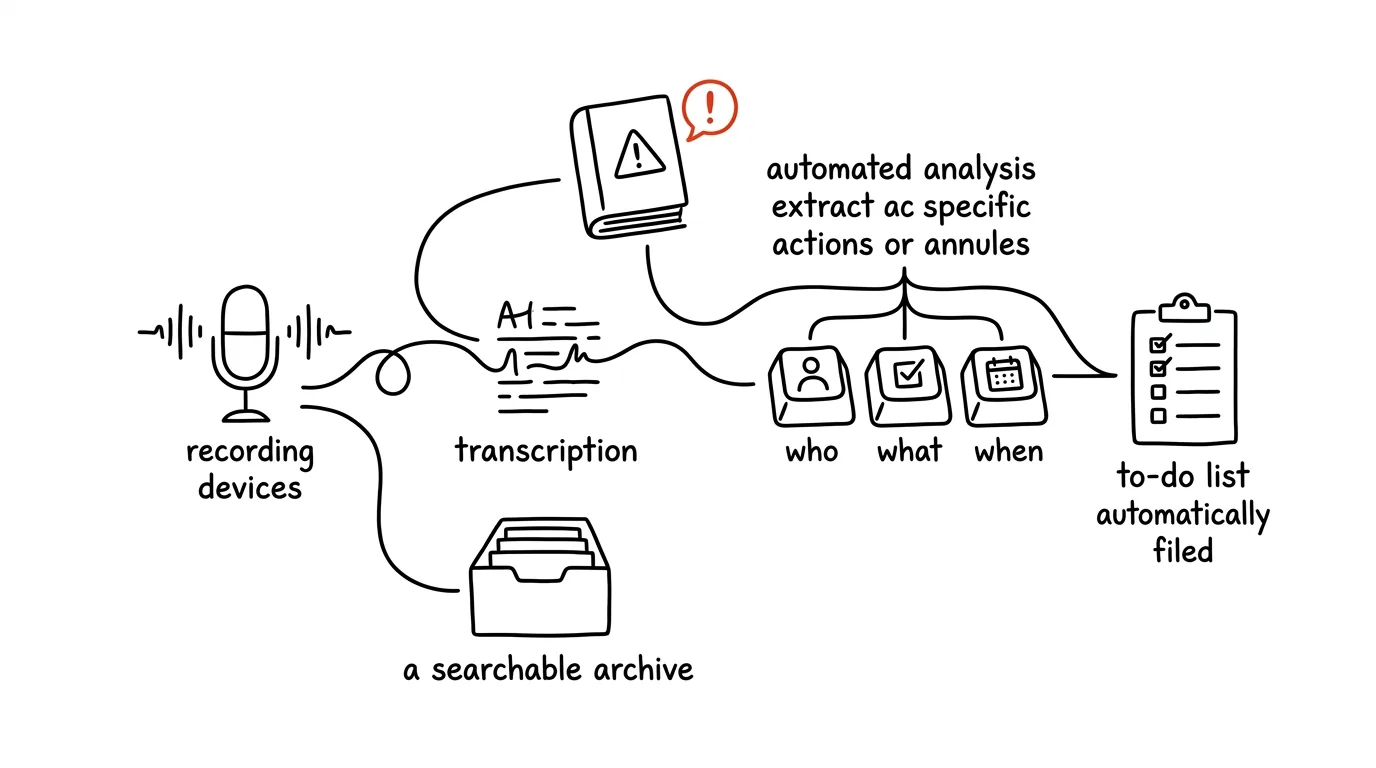
This guide builds the whole chain: recording and transcription, extracting tasks in a who-what-deadline format, creating them in your task list through a connector, sending out the notes, and an archive you can ask, six months later, “what did we decide about X back in May?” It isn't a faster version of the manual process — it's a different way of working. The manual version, where you paste the transcript and write the notes yourself, is covered in the tip from a meeting recording to notes with tasks; start there if this is your first time doing this. It only makes sense to automate a process that already works reliably by hand — otherwise you're just speeding up the production of a mess.
Two rules sit above the whole chain and aren't optional. You record only with participants' consent, and for a recurring automatic setup that means a written company policy, not a sentence at the start of a call. And AI proposes, a human approves: tasks get created as drafts, and notes only go out after a human has read them. Automation that sends things out without review is just a faster way to embarrass yourself in front of the whole team.
A typical scenario
A ninety-minute project meeting, seven people. Jana, the team lead, is jotting notes on a pad, so she only jumps into the discussion three times instead of ten. In the evening she writes up the notes from memory, can't quite recall two details, and phrases them vaguely. A week later comes the classic: “Wait, who was supposed to take that?” Nobody knows, the task never happened. Across fifteen meetings a month, that adds up to roughly six hours of writing up notes and a handful of lost tasks nobody hears about until something's missing.
With the chain set up, Jana's hands are free during the meeting. The recorder runs from the start; once it ends, the transcript sends itself into a routine that processes it. Within ten minutes she has a structured draft: four decisions, six tasks with an owner and a deadline each, two open questions. The tasks are already sitting in the task list in a project called “Pending review,” as drafts. Jana goes through them, rewords two, deletes one, fixes a deadline on another — and only then sends out the notes and moves the tasks into the live project. The whole thing takes five minutes.
The real difference shows up after a quarter. When someone asks in November why supplier B got picked back in May, Jana doesn't have to dig through email — she asks the notes archive and gets an answer with a link to the specific notes and date. That's a value a single set of notes can never give you; it only appears once every meeting produces notes, all in the same format, all in one place.
Phase 1: rules before tech
This is the one phase you can't skip. An automatic recorder that joins meetings on its own is a fundamentally different situation from a one-off recording made with consent — and if you don't sort this out beforehand, you'll find out the hard way, at a point where it's too late to take back.
Consent for recurring recording
For a one-off recording, asking at the start is enough. For a chain that runs every week, you need three additional things.
A written policy people know about in advance. What gets recorded (which types of meetings), what happens to the recording and transcript, how long they're kept, and who has access. One page is enough; what matters is that it exists and that people see it before a robot with a name joins their meeting.
Visible labeling in every meeting. The tool usually handles this itself (a recording icon, a chat notification), but verify that it actually does — and back it up with a line in the invite. For external meetings with clients, suppliers, or job candidates, always put it in writing beforehand; consent given under pressure at the start of a call isn't consent.
A working off switch. It has to be easy to say “we're not recording this meeting” and it has to happen with one click, otherwise nobody does it and people just stop talking freely instead. Personnel matters, performance reviews, legal proceedings, health information, and trade-secret discussions are off by default — and when you're not sure, don't record.
The last layer is about data: the transcript of a sensitive meeting belongs only in a tool your company has approved with a contractual data-processing agreement. Automation makes this worse by sending data further than you'd expect — one careless step in a routine can send an entire transcript to a service nobody ever signed off on.
Before you turn anything on: map the data flow
Five minutes with a pen saves you an awkward explanation later. Write down exactly where the recording flows and everywhere it gets stored along the way.
I'm about to set up automatic meeting notes and want to walk
through the risks beforehand. The chain looks like this:

Recording: [tool]
Transcript comes from: [where, by whom]
Text processing: [tool / model, paid company account yes/no]
Task creation: [task list, via connector / automation]
Notes storage: [location]
Meeting types: [internal project / client / personnel / …]

Give me:
1. At which steps in the chain a copy of the recording or
   transcript gets created, and everywhere the data ends up living.
2. Which types of meetings I shouldn't run through this chain
   and why, sorted by risk.
3. What an internal policy for recording meetings should
   contain — a bulleted outline I can put on one page for colleagues.
4. Five questions I should ask IT or legal before turning this on.
5. What to do when someone objects to being recorded — a concrete
   procedure for whoever's running the meeting.

Be practical, no generic statements about the importance of
data protection.
Returns an overview you can turn into a company policy in an afternoon. Point 1 is the most important and the most commonly overlooked: it typically turns out the transcript exists in three places at once and only gets deleted from one of them. Don't treat the answers as legal advice — they're questions for whoever's actually responsible for this at your company.
Phase 2: recording and transcription that runs unattended
Three options depending on where the meetings happen
Built-in transcription in Teams or Google Meet. The cleanest option: it runs under your company account, nothing to install, and data never leaves an environment you've already approved. The downside is that it only works within that one platform, and the output is a raw transcript that needs further processing.
A standalone recorder (Granola, Fireflies, tl;dv, and similar). Joins meetings across platforms, produces a transcript plus a first-pass summary, and keeps a searchable archive. The cost is that a third party joins the call — which is exactly why you need an agreed list of which meetings it's allowed to join.
A voice recorder, transcribed afterward. For in-person meetings in one room. Put the phone in the middle of the table, and once it's over, upload the recording to an AI tool that transcribes it. Quality will be worse, especially for names and numbers, but from that point the chain runs the same as it would for an online meeting. When you can't record at all, a dictated summary right after the meeting works too — three minutes of talking into your phone contains more than three sentences written up that evening.
A glossary that cuts down transcription errors
Transcripts mangle exactly what hurts the notes the most: last names, product names, and internal abbreviations. Most recorders support a custom glossary. When they don't, one step in your routine handles it.
Here's a raw meeting transcript. Fix systematic transcription
errors in it using this glossary, and don't change anything else.

Participant names and roles:
[name — role, name — role, …]

Names that get mangled in our environment:
[correct form = how the transcript usually hears it]
example: Havelka = Havlicka, Havelku; Orion = Oreon, O-Rion

Abbreviations and what they mean:
[abbreviation — meaning]

Rules:
- only fix instances where the context clearly shows what's meant
- where you're not sure, leave the original wording and flag it with [?]
- don't merge speakers, don't summarize, don't shorten — this is
  only about fixing names and terms
- return the full transcript, not an excerpt

Transcript:
[paste transcript]
Returns a transcript with the names right — and that's the prerequisite for everything else, because tasks get assigned by name. Go through the [?] markers: there are usually only a few, and they point exactly to the spots where the automation would otherwise assign a task to the wrong person.
Phase 3: extracting tasks — a format a machine can parse
This is where manual and automatic notes diverge. With the manual process, you read the output and copy it into your task list yourself. With the automatic one, the output has to be predictable down to the last line, so the next step can process it without human interpretation.
The main extraction prompt
You are a meeting note-taker. Pull structured output from the
transcript. Work strictly from the transcript — don't add
anything and don't guess.

Context:
Meeting: [name]. Date: [date]. Project: [project].
Participants and roles: [name — role, …]
Today's date for converting deadlines: [date]

Return exactly four sections with these headings, in this order:

## DECISIONS
Bullet points. For each: what was decided (a declarative sentence),
who decided it, what options were weighed.
Only things that were actually closed. If it was only a proposal,
it belongs in OPEN.

## TASKS
Each task on one line, in exactly this form:
TASK | owner | action starting with a verb | deadline MM/DD/YYYY | priority
Rules:
- owner is one name from the participant list, never “the team”
- convert relative deadlines to a date based on today's date
- when no deadline was stated, write UNDECIDED
- when it's unclear who took the task, write UNDECIDED for owner
- priority is high / medium / low based on how urgent it sounded
  in the meeting
- no compound tasks, one action per line

## OPEN
What was discussed and not closed: what it's about, what's
blocking a decision, who needs to close it out, and by when
it has to be decided.

## CONTEXT
Three to five sentences on what the meeting was about — for
someone who wasn't there. No names, no discussion details.

Don't write any introduction or conclusion, no explaining the
format. When a section is empty, write “none” under the heading.

Transcript:
[paste transcript]
Returns output you can hand off downstream without manual intervention, because the task lines have a fixed shape. Watch two things when you're setting this up. The TASK line has to match character for character — if the model adds a bullet or reorders the fields, the next step can't parse it; check the output for your first ten meetings before you let the routine run unattended. And the value UNDECIDED is a feature, not a bug: it's a signal that someone needs to be asked, and it's infinitely better than a made-up deadline. The section headings are deliberately written without diacritics for the same reason keeping strict, predictable ASCII helps a machine-processing pipeline — one less thing to worry about.
A review pass before tasks go into the system
Before creating anything, it's worth one cheap extra step: have the model check its own output against the transcript.
Check this task list against the meeting transcript.
Don't fix anything, just list what you find.

For each task, assess:
1. Did it actually come across as a commitment in the transcript,
   or just as an idea or a conditional statement (“if we had
   time, we could…”)? For doubtful ones, quote the exact
   sentence from the transcript.
2. Does the owner match who actually took the task on in the
   transcript? Watch for spots where speakers switch.
3. Was the deadline actually stated in the transcript, or was it inferred?
4. Is there a task that came up in the transcript but is missing
   from the list?

At the end, list the lines I shouldn't create automatically,
with one sentence why for each.

Tasks:
[paste list]

Transcript:
[paste transcript]
Returns a short list of suspicious items — typically one to three per meeting. Point 1 catches the most common silent automation error: “I could maybe take a look at that” turns into a task with a name and a deadline, and the person finds out about their new commitment from a notification.
Phase 4: creating tasks through a connector
Now turn the text into items in your task list. Two paths get you there, and they differ in how much you have to build.
Path A: a connector directly in AI
The simplest option needs no automation platform at all. Connect your task list as a connector (Todoist, Notion, Asana, and others depending on what's in the connector directory, or your own MCP server for an internal system) and let the model create the tasks itself. How connectors work and what to watch for is covered in the tip connectors as USB-C for AI.
You have a connector to [task list] connected.

Create items from this task list. These rules are non-negotiable:

- create everything in the “[Pending review]” project, never in
  the team's live projects
- task title = an action starting with a verb, max 80 characters
- in the task description, include: meeting name, date, the exact
  passage from the transcript the task is based on, and a link to
  the notes
- only set an owner where the name is unambiguous; otherwise leave
  the task unassigned and add a “no-owner” label
- only set a deadline where there's a specific date; for UNDECIDED,
  don't set any deadline and add a “no-deadline” label
- duplicates: before creating anything, check open tasks in the
  project, and if you find the same task with the same owner,
  don't create it again — just list it

Don't delete or edit any existing tasks.
At the end, give me a summary: what you created, what you skipped, and why.
Returns created tasks plus a summary. Three lines are deliberately built in as safeguards. A separate pending-review project means drafts never mix with the team's confirmed work. A ban on deleting or editing protects against the automation touching something someone's already working on. And the exact passage in the description is what settles a dispute in ten seconds: the task owner can see exactly where it came from and doesn't have to take your word for it.
Path B: an automation platform
When you want the chain to run without an open chat window, or the output needs to land in a system no connector covers, reach for Zapier, Make, or n8n — pick n8n when everything needs to stay on your own infrastructure. The principle is the same, just built as platform steps: a trigger (new transcript in storage), an AI step (the extraction prompt from phase 3), splitting the output into lines, creating tasks, saving the notes, sending a notification. Building chains like this is covered in the tip automation without code.
Watch two things with this path. A filter on the input: the routine should only run for meetings that actually belong in the chain — based on name, calendar, or label, never “everything.” And error behavior: when the model returns output in the wrong shape, that should end with a message to you, not with half the tasks created.
A routine that runs on its own
Once everything works reliably by hand, the last step is getting rid of the manual trigger. A scheduled task (a routine) can kick off the chain on a schedule — how to set up routines like this over email and calendar is shown in the tip routines over email and calendar.
Instructions for a scheduled task. Run every workday
at [5:30 PM].

Step 1: Go through [path / storage] and find meeting transcripts
created today that don't have finished notes yet (no file with
the same date and name exists in the [notes] folder).

Step 2: For each such transcript, create notes using the template
stored at [location] — four sections: DECISIONS, TASKS, OPEN,
CONTEXT. Keep the task-line format and the UNDECIDED rules exactly
as in the template.

Step 3: Save the notes as [YYYY-MM-DD]-[meeting-name].md
in the [notes] folder.

Step 4: Create tasks in [task list] in the “Pending review” project
following the rules in the template. Don't send anything to
participants.

Step 5: Send me a summary: how many meetings you processed, how
many tasks you created, which lines had UNDECIDED, and what needs
my review. If something failed, say what and for which file.

Never send out the notes, never edit existing tasks, never delete anything.
When you're not sure, stop and tell me.
Returns one summary every evening instead of a pile of notifications. The last paragraph is the backbone of the whole automation: sending out notes and approving tasks stays with a human. Watch the routine closely for the first two weeks — it's only actually broken in reliably once the summary stops surprising you for two weeks running.
Phase 5: review and distribution
An automatic chain doesn't buy you the right to stop paying attention. What it does buy you is a review that takes five minutes and always looks the same.
Go through the draft tasks in the “Pending review” project and, for each one, ask three questions: is the owner right, is the deadline realistic, and does the wording make it clear what “done” looks like? Move anything that passes into the live project. Fix or delete anything that doesn't. The “no-owner” and “no-deadline” labels are your list of questions for participants.
Only then does the notes document go out — and it's worth sending different versions for different audiences.
Turn these notes into three outputs to send out.

1. FOR PARTICIPANTS: full notes, with three bullet points at the
   top — “what changed since last time” compared to the notes
   from [date of previous meeting].

2. FOR EACH TASK OWNER: a short personal block — their tasks with
   deadlines, one sentence of context for each, and a separate
   list of “what you're waiting on” and “what others are waiting
   on from you.”

3. FOR THE PROJECT PAGE: an archive version — heading
   [date] [meeting name], a list of decisions, a list of tasks,
   open items. No greeting, no pleasantries, so it still makes
   sense a year from now without context.

Don't add anything that isn't in the notes. Plain, matter-of-fact English.
Returns three finished texts. Version 3 is the one the next phase depends on: the archive is only as good as how consistent the notes inside it are.
Phase 6: an archive you can actually ask questions of
This is where the investment pays off. A single set of notes saves half an hour. An archive of a hundred sets of notes answers a question you'd otherwise never be able to answer at all.
How to build an archive that actually works
Three rules are enough. One place — a single folder or a single database, not email plus a drive plus three different channels. A consistent filename starting with the date in a self-sorting format: 2026-05-14-project-meeting-orion.md. The same structure inside every file — the four sections from phase 3, always under the same headings. That last point is the one that decides everything: a model that knows decisions always live under a DECISIONS heading finds the answer reliably. In a pile of differently formatted text, it's guessing.
If you use Notion or a similar database, add a few properties to every entry: date, project, participants, meeting type. Filtering then narrows the search before AI even gets involved.
Asking the archive questions
You have access to an archive of meeting notes in [path]
(files named YYYY-MM-DD-name.md, four sections: DECISIONS,
TASKS, OPEN, CONTEXT).

Question: what did we decide about [topic] during [May 2026]?

Answer like this:
1. A chronologically sorted list of decisions on the topic —
   for each, the date, meeting name, the decision as stated, and who decided
2. How thinking on the topic evolved over time; where an earlier
   decision changed, show both versions
3. Tasks that came out of those decisions, and their status as
   last mentioned in the notes
4. What's still sitting in OPEN sections on this topic and was
   never resolved

For every claim, cite the filename it came from.
When the archive doesn't have an answer, say so — don't infer
anything from general knowledge.
Returns an answer with links to the specific notes, so you can verify it in a minute. The last paragraph is essential: without it, the model fills a gap in the archive with a plausible-sounding sentence. And the same principle still applies — for anything important, open the original notes to check the facts from the archive, especially numbers and names. Turning your own documents into a library you can ask questions of is covered in more depth in the tip a second brain that answers back.
A quarterly look at a series of meetings
Go through the notes for the [series name] meetings over
[time period] in [path] and produce an analysis.

Write:
1. Topics that showed up in three or more sets of notes without
   getting closed — for each, how many times and on which dates
2. Tasks whose deadline shifted more than once across the notes
3. How tasks are distributed among people — who got how many
   over the period
4. Decisions that were later changed, and how long they held
5. Items that repeatedly don't get covered

At the end, give three concrete suggestions for how to run this
meeting series differently, each backed by a number from above.

Work only from the content of the notes. Where you don't have
grounds for a claim, say so instead of estimating.
Returns a mirror that's usually uncomfortable and useful at the same time — it typically surfaces one topic that keeps coming back for six months and one person who has half of all the tasks. Before you act on the conclusions, spot-check two or three numbers against the notes themselves; across dozens of files, models get the totals wrong.
Phase 7: what to do when it starts failing
Automation doesn't fail loudly. It fails quietly: tasks keep getting created, they're just useless. Three symptoms are worth watching for, and they all have the same fix — go back a step, don't add another one.
Tasks keep piling up and nobody closes them. It means extraction is treating ideas as commitments. Tighten the prompt (require a verbatim quote of the commitment) and cut the count: five good tasks beat fifteen weak ones.
Owners are often wrong. The error is in the transcript, not the model. Add to the name glossary from phase 2 and check whether the tool is actually distinguishing speakers.
Nobody reads the notes. They're usually too long. Shorten the CONTEXT section and phrase decisions in one sentence each; notes that take two minutes to read actually get read.
Here are the last [10] sets of notes the chain produced for me,
and my notes on what I had to fix by hand in each one:

[paste notes: what was wrong, in which set of notes]

Find the pattern in the corrections:
1. Which errors repeat, and at which step of the chain do they
   originate (transcription / extraction / task creation)?
2. What specific prompt change would fix each error — write the
   exact line I should add to the prompt.
3. Which of my corrections are actually not a chain error but my
   own shifting preference — those belong in the template, not the prompt.
4. What should I stop automating because it requires a judgment
   call a machine can't make?

Be specific, no generic recommendations.
Returns a list of changes you can apply directly. Take point 4 seriously: parts of the chain you fix every single time aren't worth tuning forever — they're worth handing back to a human.
Common mistakes
- Turning on automation before the manual process works. Automation doesn't improve quality, it only increases volume. Confirm the manual version first, following the tip from a meeting recording to notes with tasks, then build the chain.
- Letting the recorder join every meeting. Without an input filter, personnel meetings and candidate calls end up in the archive too. The list of meeting types allowed into the chain has to be written down and easy to turn off.
- Creating tasks straight in the live projects. Drafts belong in a separate “Pending review” project. Otherwise the team stops trusting the task list after the second made-up task.
- Letting AI fill in a missing deadline or owner. UNDECIDED is the correct answer. A made-up deadline looks exactly like a real one and nobody can tell the difference.
- Sending a sensitive transcript to an unapproved tool. The chain sends data further than you'd expect; map the data flow before you turn it on, and keep sensitive meetings out of it entirely.
- Not keeping the notes format consistent. Once the structure drifts after six months, the archive stops answering reliably — and that was the whole point of the effort.
- Letting the chain run without review. Automation that sends things out without a human reading them will eventually send an error to everyone at once. Sending remains a human step.
The best tools
- Built-in transcription in Teams and Google Meet — the base of the chain when you want data to stay under your company account; nothing to install.
- Granola, Fireflies, tl;dv — standalone cross-platform recorders with an archive and search; use them only for meeting types you've explicitly approved.
- Claude with a task-list connector — pulls who-what-deadline tasks out of a transcript and creates them directly in Todoist or Notion, no automation platform needed as a middle step.
- Scheduled tasks (routines) — kick off processing on a schedule, so the evening batch runs without you and you have a summary by morning.
- Zapier, Make, or n8n — the link between the notes and systems no connector reaches; pick n8n when everything needs to stay on your own infrastructure.
- Your own MCP server — the path into an internal system public connectors don't support; build it once, and the chain creates tasks in it the same way it does in Todoist.
- A shared folder or notes database — the archive with consistent naming and structure; without it, the last two phases don't work.
What you get out of it
- Time: 20 to 30 minutes after every meeting that used to go into writing up notes. At fifteen meetings a month, that's roughly six hours, half of it evening time.
- Money: indirectly, through tasks that used to get lost. One caught commitment that would otherwise have surfaced three weeks later usually pays back all the time spent setting up the chain.
- Attention: you can think and talk during the meeting instead of writing. That shows up in the quality of the discussion far more than any minutes saved.
- Peace of mind: decisions and responsibilities are in black and white and come from what actually happened, not from one person's memory. Arguments about who promised what end with a link to the exact passage.
- Decision quality: an archive you can ask questions of means the same thing doesn't get decided twice, and a year later you still know what assumption was in place at the time.
Pro tip
Have the chain add one extra section to every set of notes: “What was discussed but nobody took on.” Just add an instruction to the prompt telling it to list at most five things that would make sense to do, that nobody picked up, and for each one, what happens if nobody does. That list is a goldmine — it's exactly where the things that come back as problems a month later are hiding. After a quarter, the archive also gives you an uncomfortably good answer to a question worth asking: how many of those unclaimed items actually did come back.
And the closing rule: automate the transfer, not the judgment. The machine is allowed to transcribe, sort, draft, and save. Deciding what's a commitment, who it belongs to, and when the notes go out is a human's job — and it's exactly the job the chain freed your hands up to do.
Want to go deeper? The handbook has a whole chapter on it — AI and automation.
Similar tips
Swipe along the bottom edge: Alt+Tab for your phone
Swiping right along the bottom edge of the screen switches to your previous app — on iPhone and on Android with gesture navigation. No app switcher needed.
Set up swipe gestures in mail: archive with one flick
In mobile Gmail and Outlook, set swipe right to archive, swipe left to snooze. Clear your inbox while waiting in line for coffee.
Widgets: information without opening apps
Calendar, tasks, and weather on your home screen mean you open your phone, glance, and close it — instead of a tour through your apps.
Common questions
When does automating meeting notes make sense?
Only once the manual workflow works reliably for you — automation doesn't improve quality, it only increases volume, so otherwise you just speed up the production of mess. Start with the manual version, where you paste the transcript and shape the notes yourself, and build the chain afterwards.
Is a spoken consent at the start of a call enough for automatic recording?
No — a chain that runs every week needs a written company policy people know in advance: what gets recorded, what happens to the transcript, and who has access. Plus a visible indicator in every meeting and a working one-click off switch. HR matters, legal negotiations, and health information are off-limits by default.
Can extracted tasks go straight into the team's live projects?
No — drafts belong in a separate “For approval” project, never in live projects. Otherwise the team stops trusting the task manager after the second made-up task. A human reviews the drafts, fixes owners and deadlines, and only then moves them into the live project.
What if no deadline or owner was said in the transcript?
Have the model write UNDETERMINED — it's a feature, not a bug: a signal that someone should ask. A made-up deadline looks exactly like a real one and nobody can tell. Same for the owner: an unassigned task with a “no-owner” label is your list of questions for the participants.
Why do task owners keep coming out wrong?
The fault is usually in the transcript, not the model — transcription mangles surnames, product names, and abbreviations. Add a dictionary of names and terms to the chain that corrects the transcript, and verify the tool actually distinguishes speakers.
What's the point of a uniform format and an archive of notes?
A single set of notes saves half an hour; an archive of a hundred answers a question you otherwise couldn't: “what did we decide about X in May?” Three conditions: one place, filenames starting with the date, and the same section structure inside — a model that knows where decisions live answers reliably; in a pile of mixed formats it guesses.
Was this helpful?
Liked this tip?
I send one like it every week by email. Two minutes to read, hours saved.
The Top 30 tips e-book, free — it lands in your inbox right away.
Then 1 tip a week · no spam · unsubscribe in one click
Prefer a system to single tips? The free email course — seven days, seven emails, one skill a day.