Tips & tricks · AI · Everywhere · ~100 hours a year, plus jobs that would otherwise slip through the cracks · 58 min read · in-depth guide, doing it ~3 h
The Freelancer as a One-Person Agency: Brand and Business as a System
Last reviewed:
In this article
- A typical scenario
- Phase 1: the inventory — what you actually have
- Phase 2: personal brand voice — what my brand sounds like
- Phase 3: portfolio as data — one source of truth in git
- Phase 4: derived outputs — CV, website, and case studies from one set of data
- Phase 5: a proposal in twenty minutes
- Phase 6: a mini CRM for inquiries in Notion
- Follow-up discipline: the most expensive hole in a freelancer's budget
- Phase 7: invoicing and payments through the Stripe MCP
- Editability: why a system, and not a pile of outputs
- Security: money, contracts, and other people's data
- Rollout: three evenings, then in pieces
- The most common mistakes
- The best tools
- What you get out of it
- Pro tip
Freelancers get called a “one-person company,” but few of them look like one from the inside. Jobs come by referral, there's plenty of work — and yet every new inquiry sets off the same exhausting loop: dig up work samples across three platforms, try to remember what you charged a similar client last time, open an old proposal and rewrite it, spend the evening on it, and discover the next morning that you forgot to attach references. And meanwhile, somewhere in your inbox, two inquiries you never answered at all are quietly getting old.
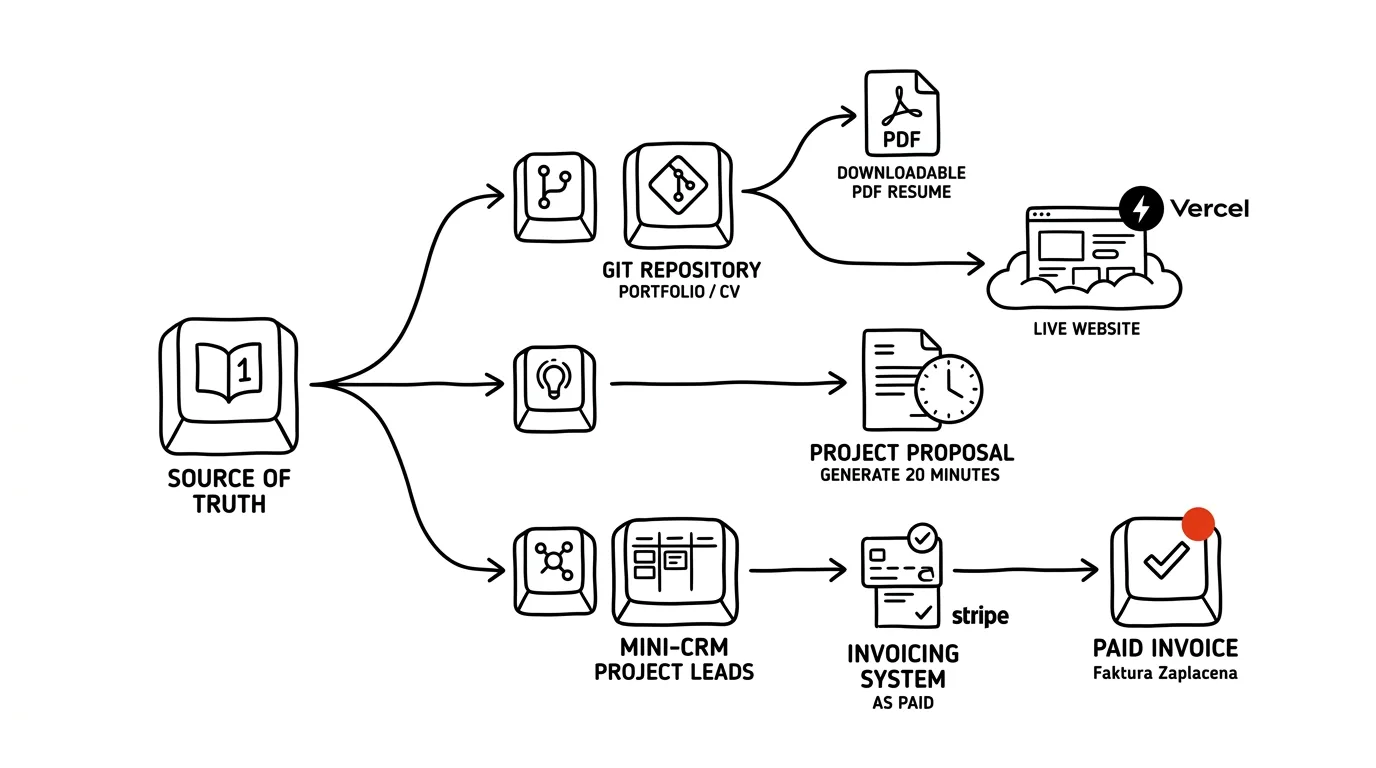
This guide shows a different way: build your personal brand and business as a system, where outputs — CV, website, proposal, invoice — aren't recreated from scratch every time but derived from one source of truth. The thesis is simple: a freelancer whose “business lives in a system” looks, from the outside, like a one-person agency — the proposal arrives the next morning and reads as if an account manager put it together with an archive of case studies at their back. And putting that proposal together takes twenty minutes instead of an evening, because you're not composing it from memory — you're assembling it from data.
The mental model is the same as in the guide on how a company builds its brand as a system: a typical scenario, an inventory, one source of truth, derived outputs, editability, security. Here we'll walk through the one-person version — instead of a brand manual from a studio, you have five years of your own work; instead of a company CRM, a table in Notion; and instead of a billing department, a connector to Stripe. You can read it phase by phase; each one stands on its own and comes with copy-paste prompts — just fill in the brackets. One principle holds from the very first prompt: materials about your business and your clients belong in a paid account with contractual data protection, not in an anonymous free chat.
A typical scenario
Klára is a freelance graphic designer with five years of experience. She does visual identities for small businesses, packaging, and the occasional website in tandem with a developer. Work comes to her almost exclusively through referrals — which sounds ideal, until you look at what happens to each referred inquiry.
Her portfolio lives in three places: a selection on Behance from back when she actively kept it up (the last addition was a year and a half ago), an Instagram feed with whatever she happened to feel like photographing, and an old website from 2022 she's embarrassed to send anyone a link to. None of the three contains her best work from the past year — there was never “time” for that. Her prices live in her head: for every inquiry, she works them out from scratch, based on a rough estimate of the effort, how well-off the client seems, and — which she'd rather not admit — how confident she's feeling that particular day. Last year she sent two similar clients proposals that differed by a third.
She writes every proposal differently. Sometimes a two-page PDF with samples, when there's time; sometimes three paragraphs in an email, when there isn't. Putting together the honest version means an evening: digging up the relevant samples, exporting them, trying to remember results (“did their sales go up after the redesign? did they say anything?”), formatting the document, working out a price. She issues invoices through three different tools — one client insists on their own ordering portal, for domestic clients she uses an invoicing service, and for a client abroad she sends an English PDF from a Word template. Who's paid and who hasn't, she finds out by scrolling through her bank statement.
And then there's the folder she doesn't know about, because it doesn't exist: inquiries that came in, that Klára told herself “I'll answer this evening” — and the evening never came. Four of them quietly slipped away like that last year alone. Given her average job size, that's the single most expensive item in the whole mess — and she never sees it, because nowhere is it recorded.
Now here's the same story after the rebuild the rest of this guide describes. An inquiry arrives on Tuesday evening. Klára pastes it into a chat Wednesday morning; the agent writes it up as a draft record in the CRM table in Notion, and Klára approves it. Then she has it assemble a proposal from the inquiry, her portfolio, her price list, and her brand voice document: the agent picks the three most relevant projects, complete with outcomes and client quotes, builds the structure, fills in prices from the price list — and flags anywhere it's unsure about scope as a question for Klára. Klára decides the price, fills in the deadline, rewrites two sentences in her own words, and sends the proposal at 9:20. When the client doesn't respond after five days, Monday's CRM review reminds her, complete with a draft follow-up email in her tone. Once the job is done, one YAML record gets added to the portfolio — and from that moment on, the website, the CV, and the next proposal all know about it. The deposit gets invoiced with a payment link the agent prepared in Stripe and Klára approved.
None of this is magic, and none of it requires knowing how to code. It's a sequence of steps, each of which stands on its own and can be adopted separately — and, as always, it starts with an inventory.
Phase 1: the inventory — what you actually have
Before you build anything, you need to see what you're building from. A freelancer's inventory is an evening of work with one goal: pile up everything that exists about your business in one place — finished projects, references, your CV, your price list (even the one that only exists in your head), and the email templates you effectively already use, even if you've never called them that.
It's worth doing even if you decide not to follow through on the rest of the guide: most freelancers discover during the inventory that they have more material than they thought — and in worse shape than they thought. Both are good things to know.
What to gather, and where to look
Go through four places. Disk and cloud: folders with finished jobs, exports, client presentations, old CV versions. Email: threads with clients — they hold briefs, approval loops, and above all the compliments you've forgotten about. Portfolios and networks: Behance, Instagram, LinkedIn, your old website — what's published where and how old it is. Your head: the prices you quote over the phone, the reasons you turn certain jobs down, the sentences you keep rewriting in emails over and over. Don't sort anything yet — just try to get it all into one folder, or at least one list of links.
Then let AI make a first pass. Upload what can be uploaded (exports, presentations, your CV, text from your website), and describe what can only be described:
I'm doing an inventory of my freelance business. I'm a [graphic
designer, 5 years of experience, visual identities and packaging for
small businesses]. I'm uploading: [an old CV, a project export from
Behance, 3 client presentations, text from my website] and here's
what I can't upload but can describe: [an Instagram portfolio — about
40 posts, a price list that only exists in my head, invoices spread
across three tools].

Build the inventory as four lists:
1. Finished projects — every one you can identify from the materials:
   name, client (if given), year, what it was about. For each one,
   note whether I also have an outcome or client reaction, or only
   images.
2. References and compliments — anything in the materials that reads
   like an assessment of my work.
3. What the materials say about me — the services I offer, the types
   of clients, what sets me apart. Write only what's actually
   supported by the materials.
4. Gaps — what you think I should have and don't have anywhere:
   missing outcomes, projects with no samples, outdated details in my
   CV.
Don't guess at anything; where you're not sure, write a question
mark.
You'll get back a structured list and — more valuable — a list of gaps. A typical finding: fifteen projects, of which you know the outcome for two; three different phrasings of what you actually do; a CV that stops two years ago. This is exactly what you want to see now, not while writing a proposal under stress.
Mining references from email
The most valuable material in the whole inventory sits in your email: client sentences like “that's exactly it,” “the packaging works, we sold out the first batch,” or “I recommended you to my sister-in-law.” Those are future quotes for case studies and proposals — and nobody remembers them, because they arrived in the middle of a working thread. If you have an email connector set up in claude.ai, this goes directly; otherwise export your threads with your five most important clients and upload them.
Go through the uploaded email threads with clients [or: search my
email, threads with clients X, Y, Z over the last 3 years]. I'm
looking for two kinds of sentences:
1. Outcome assessments — anything where the client says the work
   works, served its purpose, is liked, or delivered results.
2. Referrals — mentions that the client referred me to someone, or
   who a new inquiry came from.
Return a table: client, date, verbatim quote (don't shorten or
smooth it out), one-sentence context, which project it relates to.
Don't paraphrase anything — I need the exact wording, since I'll be
using it later with the clients' consent.
Being literal matters twice over: an AI paraphrase reads like an ad, and you must never use a quote the client didn't actually say that way. And plan on this from the start: you'll want approval to use both the quote and the client's name — that comes in phase 3.
Getting the price list out of your head and onto paper
A price list “in your head” isn't a price list — it's a generator of inconsistency. Klára charges similar jobs differently not as a strategy, but because she recalculates from zero every time. The goal isn't to invent new prices; it's to write down the ones you're already effectively using and see them all together. The fastest way is to let yourself be interviewed:
Help me get my price list out of my head and onto paper. I'm a
[freelance graphic designer]. Ask me one question at a time and
build a structured price list from my answers as we go. Find out
from me:
- what services I actually sell (not what I'd like to sell) and
  exactly what each one includes
- how I charge for them: a fixed package price, hourly, price by
  scope
- what I charged for each service on my last 3 jobs — a range is
  fine if I don't remember exactly
- what's not included in the price and gets billed separately (extra
  print-ready files, an additional round of revisions, font
  licenses, a rush fee)
- what I always hesitate over and why
At the end, give me back: a list of services with a description, a
price range, and a note on what's included and what isn't. List any
contradictions in my answers separately — don't resolve them for me.
That last point is the most useful one: contradictions are exactly the places where you've been deciding by mood. The resulting price list is a working draft — in phase 3 it becomes a file, and the agent will reference it in proposals, so the model stops “estimating” a price and starts pulling it from a decision you already made.
One more pile belongs to the inventory: email templates you effectively already have, even though they're written down nowhere. Replying to an inquiry, clarifying questions, chasing materials, handing off finished work, asking for a reference. For now just list them as a set of situations — you'll actually write them once you have the brand voice document from the next phase, otherwise they'll come out in a generic tone you'll end up rewriting anyway.
Phase 2: personal brand voice — what my brand sounds like
A company has a brand voice so that five people write as one brand. A freelancer needs one for the opposite reason: so that one person sounds like one brand even on a Thursday evening, under stress, in a rushed reminder, and in a proposal written at the last minute — and so that the AI drafting on their behalf sounds that way too. Without a brand voice document, the model gives you text in a generic assistant tone: polite, enthusiastic, interchangeable. With one, you get drafts that sound like you on a good day.
The general methodology — how to distill a style description, banned phrases, and example pairs out of your own writing — is covered in the guide on a brand book AI can actually use; here we'll walk through the personal version and add one section a company brand book usually doesn't have, and a personal brand needs most: what I don't promise.
Distilling from your own writing
Your personal tone isn't distilled from your portfolio, but from your correspondence — that's where you speak naturally. Pick ten to fifteen pieces of writing that, in hindsight, feel good to you: emails to clients, two or three proposals, project descriptions you wrote yourself. Don't select by importance — select by the feeling of “this is me.”
I'm uploading 12 pieces of my writing: emails to clients, two
proposals, and project descriptions [insert]. Distill my personal
tone from them into a document, brand-voice.md, with this structure:
1. Who I am and who I'm talking to (2 sentences, no marketing
   adjectives)
2. Tone: 4-5 traits. For each one: what it means in practice, and a
   verbatim sentence from my writing that demonstrates it — quote it,
   don't invent it.
3. Vocabulary: words and phrases I use (including jargon), how I
   address people (formal/informal), how I write numbers, deadlines,
   and prices.
4. Banned phrases: what never shows up in my writing even though it's
   common in the field — and what I clearly wouldn't write, based on
   the sample.
5. Examples: 3 "not like this / like this" pairs for replying to an
   inquiry, handing off finished work, and following up on an unpaid
   invoice.
Work only from the uploaded texts. Where the sample isn't enough,
write an open question at the end — don't decide for me.
Check point 2 especially: if a trait doesn't have a real quote from your writing next to it, the model invented the quote, and probably the trait too. And expect the first draft to be flattering — models tend to describe the tone you'd like to have. The fix is in points 4 and 5: banned phrases and example pairs are binary, they either fit or they don't.
The “what I don't promise” section
A personal brand isn't just tone — it's boundaries. A freelancer doesn't have a sales department watching what gets promised to a client; you make promises in emails written in the evening, and whatever's written stands. The “what I don't promise” section is a list of sentences that must never leave your keyboard, because you either can't or don't want to deliver on them. It's built best in hindsight, from your own bad experiences:
Add a "What I don't promise" section to my brand voice document. Ask
me one question at a time and work the answers in. Find out:
- when I last promised something I regretted (a deadline, scope,
  availability) and exactly how that sentence went
- how fast I actually respond to messages, and when I'm unavailable
- what clients typically want me to "just quickly throw in" that I
  don't want to do (e.g. a logo in a day, managing social media,
  arranging cheap printing)
- how many rounds of revisions are in my prices, and how I say the
  next round costs extra
- what I do when a client wants a change that would make the work
  worse
For each boundary, also draft a polite sentence in my tone that I can
use to tell the client — I need it ready in advance, not improvised
under stress.
In practice, the result is the most used part of the whole document: ready-made phrasing for situations that are hard to improvise. “I don't promise a reply within an hour — I respond within 24 hours on business days.” “I don't promise a logo in a week — a solid identity needs two rounds and three weeks.” Once the agent is writing proposals and follow-ups, this section keeps it away from enthusiastic promises that you're the one who ends up keeping.
A stress test on uncomfortable situations
A brand voice that only works when things are calm doesn't work. Test the document on situations that aren't in your source material, because they never made it into your sample of “good writing”:
Here's my brand voice document [insert]. Write three texts based on
it:
1. Turning down a job that doesn't fit me (a small budget, a field I
   don't work in) — in a way that leaves the client comfortable
   recommending me further.
2. A price increase for a regular client starting next year.
3. A reply to a client who "doesn't like" the finished work but has
   no specific feedback.
For each text, add your reasoning: which rules in the document
pulled against each other and how you chose. Those are exactly the
spots we'll sharpen in the document.
If the texts are usable after minor edits, the document holds up. If they sound off, don't tighten the prompt — sharpen the document instead, especially the examples. For now, save the finished brand-voice.md to a Project on claude.ai as persistent context; in phase 3 it moves to where it actually belongs. And only now does it make sense to finish writing the email templates from the end of phase 1 — they'll come out in your tone from the start.
Phase 3: portfolio as data — one source of truth in git
Now comes the step that turns a pile of material into a system. Until now, Klára's portfolio existed as images across three platforms — and for any further use, an image is a dead end: you can't build a proposal out of it, it doesn't say what the problem was or what the outcome was, and every update has to happen in three places. The solution sounds technical, but it's mainly a shift in thinking: a portfolio is a list of structured records, not a gallery. Each project is a record with fixed fields — and everything else gets derived from those records.
Why YAML specifically, and why git
YAML is a plain-text “field: value” format that both humans and machines can read. You don't need any app for it — it's a file you can open in any editor, and Claude Code can work with it directly. The alternative is JSON (the same thing, just a chattier syntax); the exact format doesn't matter, what matters is that it's structured text: every project has the same fields, so you can rely on it — a proposal can “take three projects tagged packaging and their outcomes,” because the outcome field simply exists.
And git? For the same reasons as with a company's brand: versioning (every price list change has a date and a reason), availability (Claude Code reads the repository when typesetting a CV, when building the website, and the agent reads it when writing a proposal), and clarity (there's one truth, not five copies scattered across hard drives). You don't need to know git — the agent operates it, you approve. Here's a sample record, so you can see what we're talking about:
- id: rehola-brewery
  name: Visual identity for Řehola microbrewery
  client: Řehola Brewery
  publish_consent: yes         # confirmed by email 2025-11-02
  year: 2025
  service: visual-identity
  tags: [brewery, food-and-drink, packaging, logo]
  problem: >-
    The brewery had grown out of a garage project, but the owner was
    designing the labels himself, and they got lost on the shelf next
    to the competition. It needed an identity that could carry the
    lineup's growth from 3 beers to 10.
  solution: >-
    A label system built on a fixed grid with a changing
    illustration: a new beer means a new illustration, not a new
    design. Logo, labels, coasters, and a merch template.
  outcome: >-
    The first batch of the new lineup sold out in 6 weeks; the
    brewery reports it can now get a new beer onto shelves in 3 days
    instead of 3 weeks.
  quote: >-
    "The packaging works, we sold out the first batch. And we can
    roll out a new label ourselves in an afternoon."
  quote_source: email from the owner, 2025-12-10
  images: [rehola-01.jpg, rehola-02.jpg, rehola-shelf.jpg]
Notice three fields that a gallery normally doesn't have. problem and outcome — because you don't build a proposal or a case study out of images, but out of a story: “this was the problem, this is how I solved it, this is what it delivered.” publish_consent — because you may only use a client's name and their quote with consent, and consent that isn't written down doesn't exist six months later. Feel free to leave projects without consent in the file (publish_consent: no) — they'll still serve for internal use, say as a basis for estimating effort; the system simply won't let them into public-facing outputs.
Converting the inventory into data
Manually retyping fifteen projects into YAML is exactly the kind of mechanical work AI should do — it already has almost everything it needs from the inventory in phase 1:
From the inventory of my projects [insert the output from phase 1,
or upload the materials again], create a file portfolio.yaml. Schema
for each record: id, name, client, publish_consent (set to "no"
everywhere for now — I'll fill it in myself), year, service, tags,
problem, solution, outcome, quote, quote_source, images.

Rules:
- write problem and solution from the materials; where the materials
  are silent, leave the field empty with a TO FILL IN note — don't
  guess at anything
- fill in outcome only where it's actually supported by the
  materials; "the client was happy" is not an outcome
- quotes only verbatim from the materials, with the source noted
- suggest tags consistently across projects (15 distinct tags total,
  max), so I can filter by them
At the end, print a summary: how many records are complete, and how
many are missing a problem, an outcome, or a quote.
That closing summary is your working list for the coming weeks. And it won't be flattering — typically it turns out you know the outcome for two projects out of fifteen.
Filling the gaps: a project without an outcome is just a picture
Missing outcomes aren't a reason to give up — they're a reason for one round of emails. You can write to former clients — and it happens to be the most natural excuse there is to reconnect:
From portfolio.yaml, pick projects missing an outcome or a quote
that are less than 3 years old. For each one, draft a short email to
the former client, in my tone per brand-voice.md:
- a one-sentence reminder of the collaboration
- 2 specific questions tailored to that project: what the work
  delivered (numbers, if they have them, but also just "does it
  still work?"), and whether I may show the project with their name
  in my portfolio
- no pressure, no deadline
Return the emails as drafts for me to review. Don't send anything.
The response rate on a round like this tends to be surprisingly good — clients enjoy looking back on a good collaboration, and more than a few will throw in a new inquiry. Write the answers back into the YAML: outcome, quote, and consent, dated.
The repository: where everything lives
All that's left is to give it a home. The structure is small and deliberately boring:
solo-system/
├── portfolio.yaml   # projects — the core of everything
├── pricing.yaml     # services, prices, what's included and what isn't
├── cv.yaml          # experience, education, skills, contacts
├── brand-voice.md   # tone + the "what I don't promise" section
├── templates/       # emails: inquiry, follow-up, handoff, reference
└── images/          # project samples at a reasonable resolution
Leave the setup to Claude Code — and use the chance to run your first security check:
Set up a private git repository, solo-system, with this structure:
portfolio.yaml, pricing.yaml, cv.yaml, brand-voice.md, folders
templates and images [attach the files from the previous steps].
Convert my CV [insert] into cv.yaml with this schema: experience
(from, to, role, client/company, what I did, outcomes), education,
skills, tools, languages, contacts. Add a README with the rule that
this repository is the single source of truth — the website, CV, and
proposals are all derived from it, and changes happen here, not in
the outputs. Add a .gitignore for .env files and working exports.
Before the first commit, print the complete list of files to be
committed so I can check that it doesn't contain contracts, invoices,
or anything with clients' personal data.
That last sentence isn't a formality. What belongs in your brand repository: portfolio, price list, CV, brand voice, templates, samples. What doesn't belong: contracts and NDAs, invoices, client materials, and never — not even for a moment — API keys and passwords; git remembers deleted files too. The price list is a borderline case, same as for a company: it can live in a private repository, but if you ever make the repository public (say, to show off the system), the price list is the first thing that has to go.
From this point on, a new habit applies: finished a project → log a record in portfolio.yaml. Ten minutes, while the details are still fresh in your head. It's the only habit the system needs to stay alive — everything else is derived from it.
Phase 4: derived outputs — CV, website, and case studies from one set of data
Now the investment starts paying off. You have four files — portfolio, price list, CV, brand voice — and every representative output a freelancer needs can be derived from them. “Derived” is the key word: an output isn't generated out of the model's head, it's assembled from records you've already approved. When the source changes, the outputs get regenerated; when you find an error in an output, you fix it in the source — otherwise it comes back.
CV to PDF: one truth, several versions
A paper CV sounds almost archaic for a freelancer with five years of experience — and then a bigger client's tender comes along, or a grant application, a conference accreditation, or an agency that wants to bring you on as a subcontractor, and everyone wants a CV. In this system there's nothing to figure out: cv.yaml and portfolio.yaml contain everything, and Claude Code handles the typesetting.
Generate my CV as a PDF from cv.yaml and portfolio.yaml. Process:
1. Draft the content for one A4 page: a header with contact details,
   3 sentences about me in the tone of brand-voice.md (no "creative
   professional"), experience, a selection of 4 projects from the
   portfolio — take only ones with publish_consent: yes and a filled
   in outcome, ordered by relevance for [recipient: e.g. a tender for
   a city library's rebrand], skills and tools.
2. For each selected project, one sentence: what the problem was and
   what the solution delivered — numbers from the outcome field,
   don't round anything up.
3. Show me the text draft for approval. Only then typeset it as a
   PDF: clean typography, one page, no photos, no skill bar charts.
Save the typesetting source file alongside the PDF, so next time we
only change the data.
Two notes from practice. First, “ordered by relevance for the recipient” is the reason a CV built from data works better than one maintained by hand: for every opportunity you get a variant with a different project selection in a few minutes — the same truth, just sliced differently. Second, explicitly ban skill bar charts (“Photoshop 90%”); models love adding them to CVs for creative fields, and hiring managers are just as happy without them.
A personal website on Vercel that reads YAML
Building a website with Claude Code — from the first prompt, through git as a safety net, to deployment and a domain — is covered step by step in a dedicated guide, and it applies in full to a personal website too; we won't repeat it here. What interests us here is one extra decision that turns a personal website into part of the system instead of a fourth copy of your portfolio: the website has no content of its own — it reads it from the solo-system repository at build time.
We're building my personal website (see the guide we used to set up
the project). Key requirement: the website has no text of its own
about projects. At build time it loads portfolio.yaml and
pricing.yaml from the solo-system repository and generates:
- a projects page: only records with publish_consent: yes; for each
  one, the problem, solution, outcome, and images
- a services page from pricing.yaml: descriptions and what's
  included, but no amounts — I'm not putting prices on the website,
  they belong in proposals
- an about page from cv.yaml and brand-voice.md
Propose the simplest way to get data from solo-system into the
website project and keep it updated, explain it to me like I'm not
technical, and wait for my approval. Write the website copy in the
tone of brand-voice.md.
One practical consequence is worth calling out: the next time you finish a project, you write it into portfolio.yaml — and after deployment, the website shows it on its own, with the same text the next proposal will see too. Klára's problem — “this year's best jobs aren't in the portfolio” — stops existing structurally: updating the website is no longer a separate task there's never time for, it's a side effect of writing to the source.
The decision of what belongs on the website stays yours — and it's worth thinking through. Pricing on a personal website is a perennial dilemma; in this system the answer is clean: the website describes services, prices live in the price list, and they go out into the world in proposals, where they have context. And don't forget preview deployments: Vercel creates a public preview URL for every change — turn on deployment protection so work-in-progress versions aren't visible to the whole internet.
Case study: the story that (almost) writes itself
A case study is a freelancer's strongest sales material: it doesn't show that you can make pretty things, it shows that you solve problems and deliver outcomes. And it's exactly the format there's “never time” to write. In this system it's different: the record in portfolio.yaml already contains the structure of a case study — problem, solution, outcome, quote. All that's left is to expand it.
A good case study has five parts and one rule. The parts: context (who the client is and what situation they were in), problem (what specifically wasn't working — ideally with a number or a tangible symptom), process (how you went about it, including one real dead end — it builds credibility), solution (what came out of it, with samples), and outcome (what changed, numbers plus a client quote). The rule: every fact comes from the record and the source material — a case study where the AI made up the outcomes is a time bomb under your reputation.
Write a case study from this portfolio.yaml record [insert the
record] and the attached project materials [the brief, a few emails,
notes]. Structure: context — problem — process — solution — outcome.
Tone per brand-voice.md. Rules:
- keep it under 600 words; shorter is better
- every number and quote must come from the record or the materials;
  don't calculate anything I didn't give you, don't round up, don't
  add superlatives
- include one real dead end from the materials in the process
  section, if there is one — and explain why we backed out of it
- where information is missing, leave a TO FILL IN note in the text
  with a question for me, don't invent anything
Also return a list of 3 spots you think are weakest and could use an
extra number or quote from the client.
Go through the resulting text with a pencil: even with good rules, the model sometimes “improves” the wording of an outcome past what the record actually says. Save the finished case study in the repository next to the record and link to it from there — proposals will reach for it. Two or three case studies are enough; it's better to have two honest ones than eight generic ones.
A consistency check: outputs against the source
Derived outputs have one new obligation: they can't drift from the source. Every so often — and always after a major price list or portfolio change — run a check:
Compare the derived outputs against the source of truth in
solo-system:
1. Website: does the project copy match the current portfolio.yaml?
   Is there a project on the website whose publish consent has since
   expired?
2. CV (the last PDF generated): does the experience and project
   selection match cv.yaml and portfolio.yaml?
3. Case studies: do any numbers in them mismatch figures that have
   since been refined in the records?
Return a table of differences: output, location, what the source
says, what the output says. Don't fix anything — I'll decide whether
the outdated one is the output or the source.
Don't report "all clear" until you've stated how many items you
compared.
That last line is a safeguard familiar from the company guide: a check prompt with no reported scope tends to check three items out of thirty and wave it through contentedly. Ask for a number.
Phase 5: a proposal in twenty minutes
This is the phase the whole system gets built for — let's return to the thesis from the introduction and back it up. A proposal is the single most important document a freelancer produces: it decides whether an inquiry turns into a job, and for how much. And at the same time it's a document that gets written under the worst conditions — in the evening, after work, under pressure, knowing the competition might reply sooner. Which is exactly why it's worth having the system assemble most of it.
The anatomy of a good proposal
Before the prompt comes the structure — because a prompt is only as good as the structure it enforces. A good freelancer proposal has seven parts:
- A summary of the brief in your own words. Two or three sentences: here's how I understood what you need and why. The most underrated part — it tells the client you actually read the inquiry, and it tells you if you misunderstood it, while that's still free.
- The proposed solution and process. What you'll do, in what steps, what the client will see after each step, and what you'll need from them. Process sells: the client is also buying the confidence that you know how a job like this gets done.
- Relevant samples. Two or three projects from the portfolio — not the prettiest ones, but the ones most similar to the client's problem, complete with an outcome and a quote. This is where the fact that your portfolio is data first pays off in full: picking “similar jobs with outcomes” is a query, not an evening of digging through the archives.
- Scope — and what's not included. How many rounds of revisions, what output formats, what happens if the brief expands. The section that prevents three quarters of future conflicts.
- Deadline. Realistic, with a note on what could push it back (late materials, slow approvals).
- Price and payment terms. From the price list, not from mood. The deposit and payment terms belong here, not as a surprise on the invoice.
- Next step. One sentence: what happens if you say yes — and how long the proposal is valid.
Putting it together: the system assembles, the human decides
An inquiry has come in [insert the full inquiry email]. Draft a
proposal from my sources: portfolio.yaml, pricing.yaml,
brand-voice.md including the "what I don't promise" section, and the
case studies folder.

Structure: summary of the brief in my own words — proposed solution
and process — 2-3 relevant samples — scope and what's not included —
deadline — price and terms — next step.

Rules:
- pick samples by tags and similarity to the problem, only projects
  with publish_consent: yes; for each one, one sentence with the
  outcome and a quote if one exists — never invent references
- build the price exclusively from pricing.yaml and itemize what it's
  made of; where the price list doesn't cover the inquiry, write
  QUESTION and leave the decision to me
- don't propose a deadline — leave the field blank, I'll fill it in
  based on my calendar
- scope: explicitly list what's not included in the price, per the
  notes in the price list
- never promise anything from the "what I don't promise" section
- wherever the inquiry is unclear, write a list of clarifying
  questions for the client — I might send those instead of a proposal
Return the draft and a separate list of QUESTIONS for me.
Notice the division of labor the prompt enforces. The agent does the mechanics: reads the inquiry, picks samples, assembles the structure, plugs in price-list items, watches the tone and the promises. The human keeps three decisions no one else can make: whether you even want the job (not every inquiry is good news), the final price (the price list is the base, but a rush surcharge or a discount for a returning client is a judgment call), and the deadline (only you can see your calendar). And that list of clarifying questions at the end isn't decoration — for vague inquiries, sending questions instead of a proposal is often the stronger move: it sets you apart from competitors who just fired off a price off the top of their head.
A check before sending
The second prompt in this phase is shorter, but skipping it doesn't pay off:
Check this final proposal [insert] before I send it:
1. Promises: list every sentence that promises something (deadline,
   scope, outcome, availability), and compare it against the "what I
   don't promise" section and against what's in scope.
2. Numbers: does the price add up? Do the line items match the price
   list? Did an amount from a previous version get left in the text?
3. Names: is there a name of a different client left over from a
   past proposal?
4. Tone: sentences that don't sound like brand-voice.md.
Return the findings as a table. Don't rewrite anything.
Point 3 looks paranoid right up until the first time you send a proposal greeting the wrong client — an accident that happens to everyone who recycles old proposals by hand. In a system where the proposal is generated fresh from data, the risk is smaller, but the check is free.
Three tiers: a proposal that doesn't get rejected as a whole
An advanced variant that noticeably lifts your success rate with some clients: instead of one price, three tiers. Not three prices for the same thing, but three honestly graded versions of the job — a base, a recommended scope, and an extended collaboration. The client then isn't choosing between “yes and no” — they're choosing between three yeses.
Restructure this proposal [insert] into three tiers based on my price
list:
- BASE: the smallest option that genuinely solves the client's
  problem — not a stripped-down version I'd be embarrassed by
- RECOMMENDED: the scope I'd advise the client to pick if they asked
  — label it that way in the proposal too, and explain why
- EXTENDED: whatever makes sense on top, only if it genuinely makes
  sense for this type of client; if it doesn't, return just two
  tiers and say so
For each tier: what's included, what isn't, the price from the price
list, and leave the deadline blank. The differences between tiers
must be in scope, not quality — no "the base version will be worse."
That last rule is an ethical safeguard: grading scope is legitimate, grading quality isn't. And the addendum “if it doesn't make sense, return just two” keeps the model from padding out a third tier with filler just because you asked for one.
An inquiry you don't want: a rejection is an output too
A system that speeds up proposals tempts you to send a proposal for everything. Resist it — the decision “do I want this job?” is the first of three human decisions, and it has to happen before the agent starts assembling anything. Every freelancer knows the warning signs after a few years: a budget that doesn't match the scope even after you explain it, an inquiry that says “we need this by Friday” for three weeks of work, a client who trashes their previous vendor in the first email, a field you don't work in and don't want to. A proposal for a bad job isn't a neutral act — a bad job you win is worse than no job at all.
The good news: the system helps here too. A rejection is an output as well — and thanks to the “what I don't promise” section and the stress test from phase 2, you already have ready-made phrasing that turns things down quickly, politely, and in a way the client isn't embarrassed to recommend you further (“this isn't my area, but let me point you to a colleague who's great at it” is a sentence that builds your network more than plenty of jobs do). Speed matters doubly here: an undecided inquiry you don't want but can't bring yourself to say so is the worst resident of your CRM — it rots in the “inquiry” stage, ruins your weekly review, and costs the client time they could spend finding someone else. That's why the CRM has a lost stage, and it comes with one discipline: write down the reason. “Lost — small budget,” “lost — couldn't respond in time” (ouch — but these are exactly the records that improve the system), “lost — went with someone cheaper.” After a year, the reasons add up to a picture, which we'll see in the CRM chapter.
Twenty minutes: what it actually looks like
So the thesis from the introduction doesn't stay an ad slogan, let's break it down. Minute zero: you read the inquiry (5 minutes, with coffee). You paste it into the prompt, the agent assembles it — meanwhile you open your calendar and work out a deadline (5 minutes). You go through the draft: answer the QUESTIONS, decide the price, rewrite two lines in your own words (7 minutes). Check prompt, fix one finding, sent (3 minutes). Twenty minutes is a real number for an inquiry that fits your price list and portfolio — that is, for most of them; an atypical job will take longer, because you're genuinely thinking through scope, and that's as it should be. The real difference from an evening of manual assembly isn't just time: it's consistency (every proposal has all seven parts, even the one written at ten on a Tuesday night) and response speed, which sells on its own — a client who gets a thoughtful proposal within 24 hours thinks exactly what you need them to think: this person has things under control.
Phase 6: a mini CRM for inquiries in Notion
Portfolio, proposals, and the website are the representative side of the system. Now for the operational side: tracking inquiries. It sounds like corporate bureaucracy, but it's the exact opposite — for a freelancer, a CRM is insurance against the most expensive mistake there is: forgetting. A forgotten inquiry, a proposal never followed up on, a reference never asked for. None of it hurts in the moment it happens; it hurts cumulatively at the end of the year, when it doesn't show up anywhere, because it's never counted anywhere.
A freelancer's mini CRM doesn't need any specialized tool. One database in Notion is enough — and Notion is a good choice here for two practical reasons: you're probably already using it for notes, and it has an official MCP connector, so an agent can work with the database. If you want to see where a system like this can grow — a full-fledged CRM with its own database, access rights, and locking from day one — you'll find it in the company guide; but a freelancer starts with a table, and for most freelancers a table is enough.
Five stages and one iron-clad column
The backbone of the CRM is the job lifecycle: inquiry → proposal → job → invoice → reference. Each row in the database is one opportunity, and the stage says where it stands in the cycle. It's worth noting that the cycle doesn't end at getting paid: reference is a full-fledged stage — a finished job you didn't get an outcome, a quote, and publish consent out of for your portfolio is unfinished business.
Columns: client (name, contact), source (who referred them — after a year of data you'll find out where the work actually comes from, and who deserves to be taken out for lunch), service (a tag matching the price list), stage, estimated value (a range is enough), last action (what happened and when), and the iron-clad column of the whole system: next step + date. The rule is: no row may have an empty next step. Even “nothing — waiting on the client until Sep 15, then follow up” is a next step. A row with no next step is an inquiry that has just started slipping through the cracks.
The Notion MCP: what it can do at the time of writing
At the time of writing, Notion has an official MCP server: in claude.ai you connect it from the connector directory, sign in with your Notion account through OAuth, and — an important detail — the integration only sees pages you've shared with it, not the whole workspace. For our purposes it can do exactly enough: full-text search, read pages as text, create and edit pages, create and edit databases, and above all run structured queries against databases with filters and sorting — exactly the kind of operation like “all rows in the proposal stage where the next-step date is in the past.” A deeper look at connecting connectors and reading the permissions screen is in the overview of MCP tools; here, just the principle that's proven itself: give the agent read-only access for the first week, writes only afterward, and always as a draft awaiting approval.
Setting up the database is something the agent can handle from a description:
Set up a database called "Inquiries" in Notion (in the page I've
shared with the connector). Columns:
- Client (text), Contact (text), Referral source (text)
- Service (select — pull the values from my pricing.yaml [insert the
  list of services])
- Stage (select: inquiry / proposal / job / invoice / reference /
  lost)
- Estimated value (select: S / M / L — I'm not putting amounts into
  Notion)
- Last action (text + date), Next step (text), Next step — date
  (date)
- Notes (text), Proposal link (URL)
Also create views: "This week" (next step within 7 days, sorted by
date), "Waiting on me" (next-step date in the past), and a board by
stage. Add 2 sample rows so I can see how it works, and I'll delete
them myself afterward.
The detail of estimating value in S/M/L categories instead of amounts is a deliberate decision we'll come back to in the security section: only put into a third-party tool what actually needs to be there.
Logging an inquiry: the agent proposes, the human confirms
A new inquiry gets into the CRM with a single paste into chat — and here's what “logging with approval” looks like in practice:
A new inquiry has come in [insert the email]. Prepare a draft record
for the Inquiries database: pull out the client, contact, source (if
they mention who referred me), suggest a service based on my price
list, stage "inquiry," estimated value S/M/L based on scope, and for
the next step, suggest what I should do and by when — usually
respond within 24 hours, or send clarifying questions.
Show me the whole record for approval. Only write it to Notion after
I confirm. If you find the same client in the database from before,
flag it for me and remind me what happened with them.
That last sentence is a small miracle of memory: the agent notices this client already made an inquiry once, got a proposal, and vanished — and you walk into the conversation with the context an agency would have in its CRM and a freelancer usually only has in a fog.
Working files in Notion: every job gets its own page
The CRM handles the flow of inquiries; materials for jobs in progress need a home too, and Notion is the natural place for them — but with a clear line for what lives where. Git holds your brand (portfolio, price list, brand voice — things that get versioned and generated from). Notion holds operations: a page for every job with the brief, meeting notes, agreed-upon “here's what we decided” write-ups, links to shared files, and a handoff checklist. A template suits a job page well — generate it once and Notion offers it for every new item afterward. The practical benefit of that line: when a job wraps up, the notes on its page are exactly the material the agent mines for a portfolio.yaml record and a case study — operations flow into the brand with one prompt, not by retyping.
The weekly review: ten minutes that hold the system together
A CRM only stays alive when someone actually looks at it. A rhythm that works: once a week, ideally Monday morning or as part of your Friday admin block, one prompt and ten minutes over the result:
Go through the Inquiries database and prepare a weekly review:
1. WAITING ON ME: rows with a next-step date in the past or this
   week — sort by age, oldest overdue items first.
2. NO MOVEMENT: rows in the inquiry or proposal stage where the last
   action is older than 10 days.
3. UNFINISHED: jobs in the invoice or done stage that never moved
   into the reference stage.
4. THE PICTURE: how many items are in which stage, and what's
   changed since last week.
For each item in points 1-3, suggest a concrete next step in one
sentence. Don't write or send anything — this is material for my
Monday quarter-hour.
If you already have a Friday admin block in place, this ritual has a natural spot in your calendar. Ten minutes a week is the entire operating cost of the system — and it's also insurance against the most common fate of every CRM: three months of dutiful logging, and then nobody ever looks at it again.
What the data will tell you after a year
A CRM usually gets sold to freelancers as a tool for “not forgetting” — and that's true, but it's only half the value. The other half matures slowly: after a year of honest logging, you have, for the first time in your life, data about your own business, and it tells you things you can't figure out from a feeling.
The “referral source” column shows you where the work actually comes from — and it's almost always a surprise: two-thirds of jobs can be traced back to two or three people you had no idea about, while the Instagram you poured evenings into brought in nobody. The practical consequence — take those two people to lunch — is obvious, and almost nobody thinks of it without the data. The ratio of “proposal” to “job” stages shows your proposal conversion: if you win nine out of ten, you're probably underpriced; if you win one out of ten, something's wrong with your proposals, your prices, or which inquiries you're bothering to answer. The reasons under the “lost” stage will tell you which one. Timestamps reveal how long clients typically take to decide — which sharpens the follow-up cadence from the next chapter. And the breakdown of services shows what you actually make your living from, versus what you think you make your living from: a designer who thinks of herself as a “brand designer” and discovers from the data that half her income comes from packaging has a useful conversation ahead of her with herself — and maybe a different price list next year.
For the annual read, you don't need a new tool or an extra prompt: take the weekly review prompt, change the period to twelve months, and add the questions from this paragraph. An hour over the results in January is the cheapest business consulting session you'll ever buy — the consultant is you, just finally armed with data.
When a table stops being enough
Honesty demands stating the upper limit too. A Notion table can carry a freelancer with dozens of inquiries a year without breaking a sweat — and most freelancers never outgrow it, which isn't a failure, it's the definition of a healthy one-person business. Signs that you're outgrowing it: a second person needs to write to the CRM (an assistant, a collaborating freelancer) and you're starting to worry about who's allowed to see what; you're tracking hundreds of contacts and Notion queries are dragging; you need to attach data that doesn't belong in a shared Notion (amounts, contracts, personal data at scale). At that point it's time for a full-fledged CRM with its own database, access rights, and locking from day one — exactly what phase five of the company guide builds — and because your CRM is a structured database and not a pile of emails, migration will be an export and an import, not a month of retyping. This too is a quiet benefit of the system: every piece of it has an exit door built in toward a bigger version.
Follow-up discipline: the most expensive hole in a freelancer's budget
This section could get by on a single sentence from Klára's story: four inquiries quietly slipped away from her in a year, and if just one of them had turned into a job, it would have paid for the whole system many times over. But because it really is the most expensive hole — and because the CRM alone doesn't plug it, only makes it visible — it earns its own chapter.
Why does follow-up systematically fail for freelancers? Not out of laziness. It's psychology: writing “just following up” feels unpleasant. You feel pushy, you tell yourself that if the client wanted to, they'd have gotten in touch — and you have paying work on your plate that shouts louder. But the data from the other side tells a different story: a client who doesn't respond to a proposal mostly hasn't rejected it. It got buried, it's waiting on budget approval, some other priority took over — and they experience a polite reminder as professionalism, not pushiness. Rejection hurts less than uncertainty, and it comes around less often than you imagine lying awake at night.
The systematic fix has three parts. First, the cadence is decided in advance, not improvised each time: respond to a new inquiry within 24 hours (even just “thanks, I'll get back to you by Thursday with a proposal” — that's still a response, and it buys time); follow up on a sent proposal after 5-7 days; a second and final one after another 10-14 days with a calm sign-off (“I'll leave this open in case you want to come back to the project”); after a finished job, ask for feedback and a reference within 2 weeks, while satisfaction is still fresh. Second, the CRM watches the deadlines — the “next step + date” column and the weekly review from the previous phase. And third, the agent drafts the texts in your tone, so all you have to overcome is clicking “send,” not a blank page:
From the weekly review, take the items where the next step is a
follow-up, and draft an email for each one per brand-voice.md.
Rules:
- no "just following up" and no apologizing for writing; always bring
  a reason for the contact: an additional idea for the proposal, a
  question, news related to their project, or simply a clear offer
  of a next step
- the first follow-up short (3-4 sentences), the second even shorter,
  with a calm sign-off that I'm leaving the proposal open
- for reference requests, suggest 2 specific questions tailored to
  the job, so the client doesn't have to compose an essay
Return them as drafts. I send them myself, and after sending I'll log
the last action and next step in the CRM.
The rule “always bring a reason for the contact” turns a follow-up into a service instead of a nag — and it's exactly the thing an agency with an account manager does routinely and a freelancer almost never does. One note on automation, since it's tempting: technically you could have follow-ups sent automatically on a cadence. Don't. A follow-up is personal contact with a person weighing whether to trust you with their money; the send has to pass through your hand — if for no other reason than that only you know the client's warehouse just burned down, and “following up on the rebrand proposal” wouldn't be a good email to send this week.
Phase 7: invoicing and payments through the Stripe MCP
The last phase is about money — which is why the security notes here run denser than anywhere else. The goal: instead of three invoicing tools and scrolling through your bank statement, one place where invoices and payment links get created, and where one query tells you who's paid and who hasn't. And because Stripe has an official MCP server, an agent can work with that one place — in the mode that runs through the whole guide: it prepares and reads, a human finalizes and sends.
First, an honest scoping of who this phase is for. Stripe is a payment platform: it accepts card payments and other methods, issues invoices with a pay button, generates payment links, and handles recurring payments. It charges a percentage fee on transactions for processing payments — as a rule of thumb: think it over for large invoices; for small amounts and clients abroad, the convenience and payment speed usually outweigh it. And above all: Stripe is not bookkeeping. An invoice has to meet the formal requirements of a tax document in your jurisdiction, and your accountant has an opinion on this that matters more than this article — the typical setup is that Stripe handles collection (the client gets an invoice with a button and pays by card right away, instead of a PDF aging for two weeks in their accounts department), and bookkeeping stays wherever it's always been, with exports from Stripe as supporting documents. Anyone Stripe doesn't make sense for — say, you invoice two regular domestic clients by bank transfer and the system works fine — can skip this whole phase and just have the CRM keep an eye on due dates; the rest of the guide still stands.
What the Stripe MCP can do — the state of things at time of writing
Because this is a connector to money, we verified the current state against the official documentation — and you should verify it again yourself before deploying, MCP servers evolve fast. At the time of writing, here's the picture: Stripe runs an official remote MCP server — you connect it as a custom connector (in claude.ai through the connector directory or by adding a custom server; in Claude Code with a single command) and authorize it by signing into your Stripe account through OAuth; no copying keys into a config file. The server offers tools covering a substantial part of the Stripe API: customers (create, search, edit), products and prices, invoices (create, edit, finalize, void, list — including line items), payment links (create, edit, list), subscriptions, refunds, coupons, overviews and reports, balance and payouts — plus searching Stripe's documentation, which comes in handy when you're not sure how something in Stripe works.
Three things from the documentation are worth highlighting, because they line up exactly with this guide's approach. First, Stripe itself recommends turning on human confirmation for tool calls and warns about prompt injection when combining it with other servers — the maker of the payment tool is telling you “don't click yes to everything the agent proposes,” so listen to it. Second, authorized OAuth sessions are visible in your Stripe account settings and can be revoked at any time — try that right after connecting, so you know where the off switch is. Third, Stripe distinguishes between sandbox and live mode: a test environment with play money where you can run through the whole procedure below as a dry run — and you should, before you let the agent near real invoices.
Customers and products: the price list, take two
The first step after connecting is a one-time job: bring the structure you already have into Stripe. Customers from the CRM, services from the price list:
Prepare setting up my services in Stripe (in the sandbox for now).
From my pricing.yaml [insert], propose a structure of products and
prices: which service becomes a product with a fixed price, where a
per-unit price makes sense, and what gets invoiced individually
(don't create a product for those — the invoice will have its own
line items). Show me the proposal as a table: product, price,
currency, note. Once I approve, create the products and list exactly
what you created. Don't create customers yet — they'll be created
one at a time, as I invoice each one for the first time.
That makes the price list the third place your services exist — and this is exactly the moment where systems thinking has to kick in: pricing.yaml in git remains the source of truth; when prices change, they change there, and the agent then gets the job of projecting the change into Stripe. Not the other way around.
Invoice: the agent prepares the draft, the human finalizes
The invoicing flow picks up from the CRM: the job has reached a milestone (deposit, handoff), the CRM shows the “invoice” stage — and the agent has everything it needs:
The [client] job from the Inquiries database has reached the
milestone [50% deposit / completion]. Prepare an invoice in Stripe:
1. Find the customer by email [client's email]; if they don't exist,
   propose creating them with details from the CRM and wait for
   confirmation.
2. Build a draft invoice: line items based on the proposal
   [link/insert], prices from the products we already set up; break
   out individual line items separately.
3. Payment terms [14] days, and note the order/PO number in the memo
   if the client gave one.
4. Do NOT finalize or send the invoice. Show me a complete preview:
   line items, amounts, total, tax treatment, customer details.
I'll finalize and send it myself in the Stripe dashboard after
reviewing it.
Why so fussy about it? In Stripe, finalizing an invoice is a hard line: a draft can be changed freely, a finalized invoice already has a number and limited room for edits — and above all, it goes out to the client. Draft from the agent plus finalization by a human is an arrangement that takes all the benefit from automation (no retyping line items, no typos in amounts — the numbers flow straight from the proposal and the products) and leaves you in control at the one point where it actually matters.
Payment link: the fastest route to a paid deposit
For deposits and smaller amounts, an even simpler tool is often the best one — a payment link. The client clicks and pays by card; no waiting for their accounts department to process a PDF:
Prepare a payment link for a deposit on the [description] job for
client [name]: amount [insert], payment description reading "Deposit
— [service], [client]." Set it up so they see a confirmation with my
name and contact info after paying. Return the link to me for review
along with a preview of what the client will see — I'll insert it
into the email myself. Then draft a CRM update: last action "payment
link sent," next step "verify payment" in 5 days.
Notice that last step: every money-related action gets written back into the CRM as a proposal. It's exactly these seams that hold the system together — an invoice isn't the end, it's a stage in the cycle, followed by checking that it's paid and, eventually, a reference.
Retainers and recurring payments: the freelancer's most underrated tool
Once Stripe is connected, an option opens up that invoicing chaos used to make impossible: a retainer arrangement with a recurring payment. A regular client you do a similar package of work for every month (campaign banners, visual asset upkeep, a few hours of consulting) is the most valuable kind of relationship a freelancer can have — predictable income, no proposal cycle. And plenty of freelancers don't offer it, because billing monthly by hand is a hassle, and “it'll sort itself out somehow” ends in three forgotten invoices. At the time of writing, the Stripe MCP can work with subscriptions — so, on your instructions, the agent can set up the structure of a retainer (a product, a monthly price, what the package includes — the scope definition belongs in pricing.yaml just like any other service), and the client then pays automatically by card, with no monthly ritual. The rules stay the same: you approve setting up the subscription, and above all — a retainer gets manually reviewed every so often. In the CRM, give retainer clients a quarterly “next step”: does the scope still match reality? Have you been doing a third more than the package covers for the past six months? Automatic payment is convenient right up until it automates your silence about expanded scope too.
The reading side: an overview that replaces scrolling through your bank
Writing to Stripe is the cautious half. The reading half carries no risk and might be even more useful — it answers a question Klára used to answer by scrolling through her bank statement:
Give me a monthly financial overview from Stripe (read-only, don't
change anything):
1. Paid invoices and payments over the last 30 days — amounts,
   clients.
2. Overdue invoices: how many days, what amount, which client.
   Compare against the Inquiries database and flag anywhere the CRM
   says something different (stage "invoice" but actually paid — or
   the other way around).
3. Open invoice drafts older than a week — what did I forget?
4. Unpaid payment links older than 10 days.
For points 2 and 4, suggest a next step for the CRM and a reminder
text per brand-voice.md — a payment reminder is exactly the email I
hate writing. I'll send it myself.
A past-due reminder, incidentally, is the second most postponed message in a freelancer's life (right after a proposal follow-up) and rests on the same psychology: it's unpleasant, so it gets put off — and receivables age. A calm-toned draft in your brand voice (“this invoice may have just gotten buried, sending it again; let me know if anything's up”) lowers the barrier to a single click. And because this is about money, once more in plain terms: the agent never issues a refund on its own. Even though a tool for creating a refund exists, returning money is a decision that needs context only a human has. The same goes for deleting or canceling anything.
Editability: why a system, and not a pile of outputs
Let's pause on the principle that holds the whole guide together — because it's exactly what separates “a freelancer who uses AI” from “a freelancer whose business lives in a system.” Both will have AI write them a proposal. The difference is in what's left behind after that proposal.
A freelancer without a system generates outputs: today, a proposal written up fresh from context; a month from now, a case study where the context gets written up again (slightly differently); six months from now, a CV that drifts from both. Every output is a one-off performance, and over time they pile up — copies, versions, small contradictions. AI saves them the typing, but the mess grows just as it always did, only faster, because it's easier to produce. A freelancer with a system generates the same outputs — but from a maintained source. An output is free to be one-off (a proposal for a specific client gets archived and never changes again), because it's only the output that's one-off, not the truth underneath it. A mistake found in a proposal gets fixed in the price list, and the next proposal no longer contains it. A new project gets written once and shows up on the website, in the next CV, and in the next proposal. That's the same point the company guide makes with its brochure: an image out of a chat is a dead end, a source file is a living asset. For a freelancer, the “source file” is their whole business.
That also gives a practical answer to the question everyone asks about guides like this: exactly what will I have to maintain, and how often? Here's the whole system in one table:
| Output | Source | How often to update |
|---|---|---|
| Proposal to a client | portfolio.yaml + pricing.yaml + brand-voice.md | Not generated ahead of time — created fresh for each inquiry |
| CV in PDF | cv.yaml + portfolio.yaml | Regenerate whenever an occasion calls for a CV; update the source on a new role or a major project |
| Personal website | portfolio.yaml + pricing.yaml + cv.yaml | On its own, at build time — after every write to the source |
| Case study | a record in portfolio.yaml + job materials | After finishing a project, with the client's consent; 2-3 live ones are enough |
| Portfolio (source) | your head, while it's still fresh | Within 14 days of every finished project |
| Price list (source) | your decisions | Review 1-2x a year; on the fly, any time a proposal shows the price list falls short |
| Brand voice (source) | your writing | Quarterly review; add to the “what I don't promise” section after every burned experience |
| Inquiries CRM | email + your actions | Ongoing, with every inquiry; a 10-minute weekly review |
| Invoices and payments | CRM + Stripe | At job milestones; a monthly read-only overview |
| Email templates | brand-voice.md | Whenever you notice you're writing the same thing differently for the third time |
Two observations about the table. First, the “how often” column is more modest than the whole article sounds: the recurring obligations are exactly two — ten minutes a week on the CRM and logging a project once it's finished. Everything else happens “on the occasion,” and that's by design; a system that demands discipline in ten different places gets abandoned by any freelancer before Christmas. Second, the rows split into sources and outputs — and maintenance belongs strictly to the sources. The moment you catch yourself fixing a piece of text on the website instead of in the YAML, or rewriting a price in a proposal instead of in the price list, the system has just started to erode.
Security: money, contracts, and other people's data
The security notes have been scattered across the phases; here they are gathered together and expanded, because a freelancer faces one extra difficulty compared to a company: no IT department, no lawyer on speed dial — every decision falls on one person. All the more reason to have them decided in advance.
Stripe and keys to your money. Prefer connecting the official server through OAuth — you never copy a key anywhere, and the session can be revoked at any time from your Stripe settings. If you ever do go the API-key route (more advanced scenarios), three rules apply: never in a prompt, never in a git repository (git doesn't forget — a key that was ever in the history is compromised and has to be rotated), and always a key with permissions limited to exactly what the agent actually does. Leave tool-call confirmation switched on — Stripe itself recommends it — and try out new workflows in the sandbox. And one principle specific to the combination of “agent reads email and also has money tools”: don't put both in the same automatic loop. Email is an untrusted input — it can contain text trying to instruct the agent (prompt injection) — and a human must always stand between an untrusted input and a financial action.
Contracts and NDAs in prompts. Freelancers routinely sign confidentiality agreements — and an NDA typically covers not just “don't gossip about it at the pub,” but handing information to any third party. Before uploading client materials into an AI, read what you signed; “I'll upload it to a chat so it can summarize it for me” is handing it to a third party. In practice: work in a paid account with contractual data protection (where your data isn't used for training — check your plan's terms), upload only what the task actually needs from a client's materials, and for projects under NDA, keep an anonymized version in your portfolio (“a client in the X industry”) — the publish_consent: no field in the YAML exists exactly for these. And request consent to publish a name and a quote in writing, and note it down with a date; memory isn't a record.
Whose data am I allowed to upload to AI. A useful sorting into three buckets. My own data (my own texts, portfolio, price list): into a paid account without hesitation — that's exactly what the system is for. Client data (briefs, materials, internal documents): only within the job, only to the extent necessary, mindful of the NDA — and once the job is done, there's no reason for it to sit in a Project forever. Third-party data (personal information in a client's materials — say, their customer database, sent to you “for inspiration”): here the answer is strictest — don't upload it unless the task genuinely requires it, and then only anonymized. The fact that a client sent you the data doesn't mean you're allowed to pass it along further.
Notion and the CRM. The connector only sees pages you've shared with it — so share it only the page with your system, not the whole workspace with your personal notes. Write the bare factual minimum about clients into the CRM: contact, stage, steps. Notes like “seems indecisive, push on the deadline” doubly don't belong in a database — you wouldn't want to read them out loud, and the CRM might one day be seen by more eyes than you planned for (an assistant, a collaborator, an export). And estimating value in categories instead of amounts (the S/M/L from phase 6) is the same logic: a third-party tool should know what it needs, not everything.
Backups and an exit door. A system built on three services (GitHub, Notion, Stripe, Vercel) raises a fair question: what if one of them disappears, raises prices, or locks you out? The answer is built into the architecture: your sources of truth are text files in git that you also have locally — you'll be able to open YAML and Markdown anywhere, even in ten years. Export your Notion CRM once a quarter; export supporting documents for bookkeeping from Stripe on an ongoing basis. None of this needs more thought than a quarterly review — but you do want it decided in advance.
Once a quarter, then, a full review with one prompt:
Run a security review of my system:
1. Go through the git history of the solo-system repository: look
   for anything that resembles a key, a password, a contract, or
   clients' personal data — including old commits.
2. List which connectors I have connected (Notion, Stripe, email...),
   with what permissions, and flag any I haven't used in the last
   quarter — candidates for disconnecting.
3. Check portfolio.yaml: are there projects with publish_consent: no
   showing up in any public-facing output? Is any consent missing a
   date?
4. Remind me to check active OAuth sessions in my Stripe settings and
   deployment protection in Vercel — list exactly what to click and
   where.
Sort the findings by severity, don't fix anything without my
approval.
Rollout: three evenings, then in pieces
Seven phases put together can look like a quarter-long project — it isn't. The key is that the system works in pieces, and each piece carries its own benefit: you don't have to finish the whole thing before you start reaping rewards. Here's the order that's proven itself, along with what you can safely put off.
First evening: inventory and starting the brand voice. Gather your materials, run the inventory prompt, mine references out of your email, get interviewed for your price list. You'll manage to start the brand voice distillation; feel free to let the follow-up questions and the stress test sit until next week — the document matures with answers, not with hours in a row.
Second evening: portfolio as data and the repository. Convert the inventory into portfolio.yaml, set up the repository, pricing.yaml, and cv.yaml. Resist the perfectionism this evening is most at risk from: don't convert all thirty projects from the last five years — take the ten strongest from the last three years and leave the rest be. The system is meant to serve future jobs, not be a museum of past ones; you can add an older project later, once some proposal actually needs it. Send the emails to former clients about outcomes this evening, and work the answers in as they come.
From that point on: your first proposal through the system. This is an important psychological turning point — don't wait for the whole thing to be finished. The very first inquiry that arrives after the second evening gets handled the new way: the portfolio, price list, and brand voice are enough for it. The first proposal will take closer to forty minutes than twenty, because you're tuning the prompt and finding gaps in the price list; the second will already be close to the promised time. And the success of that first systematic proposal is the fuel that carries you through the rest of the rollout.
Third evening: CRM and templates. The database in Notion, backfilling currently live inquiries and proposals (only the live ones — don't go digging through the archives), the first weekly review, finishing the email templates in your brand voice. From this evening on, the Monday ten-minute review runs — and that's the moment the system stops being a project and starts being operations.
After that, in pieces, as the pressure builds. The website, once your old one starts costing you a job or some embarrassment — with sources already in git, it's a weekend project by the guide, not a month-long postponement. Stripe, once the three-tool invoicing mess or slow payments finally get on your last nerve; until then, let the CRM at least keep an eye on due dates. Case studies as you go: one after the nearest finished job, a second by the end of the quarter, no rush for more. If you want an even more minimalist start, you can have one: price list + portfolio + proposal prompt are three files and one evening — and they carry a solid half of the whole system's benefit. Everything else is an addition, not a requirement.
The last piece of advice on rollout is about expectations: for the first month, accept the system as a work in progress. You'll tune the proposal prompt three times, find gaps in the price list, adjust the YAML schema. That's not the guide failing — that's the guide working correctly: the system is calibrating itself to your business, and every fix to the source is an investment that stays put.
The most common mistakes
- Starting with the tools instead of the inventory. The most tempting mistake: connecting Stripe and Notion on the first evening, because connectors are more fun than sorting through your own material. But a system with no filled-in sources is an empty pipe — the agent has nothing to build proposals from, nothing to watch in the CRM. The order of phases in this guide isn't random: data first, then tone, only then the wiring. Whoever starts with the wiring ends up a week later with five connected services, zero benefit, and the impression that “it doesn't work.”
- A portfolio that's a gallery without outcomes. Fifteen beautiful projects, none of them with a problem, an outcome, or a quote. A portfolio like that looks good on Instagram and is useless in a proposal — a client isn't buying pretty pictures, they're buying a solved problem. The
outcomefield is the most labor-intensive and the most valuable part of the whole system; one round of emails to former clients from phase 3 is the best-invested hour in this entire guide. - Letting AI decide the price. A model will happily “estimate a market price” — and it'll be a number with no grounding, delivered with total confidence. Price is your decision: the agent plugs it in from the price list, and where the price list falls short, it should return a question, not a guess. The same rule applies to deadlines: the model can't see your calendar, and whatever it promises, you're the one who has to deliver on.
- A CRM that only ever gets written to. A database of inquiries nobody looks at is just a monument to a guilty conscience. The value isn't in the logging, it's in the weekly review — ten minutes when someone actually sees the overdue items and slipping inquiries. If you skip three Mondays in a row, don't scrap the system; shrink it (fewer columns, coarser stages) down to a size you can sustain.
- Letting the agent send things and touch money. An automatically sent follow-up to a client whose warehouse just caught fire; an invoice finalized with an amount from a previous version of the proposal; a refund “per the rule.” Every one of those scenarios costs more trust than the automation ever saved in time. The boundary is simple and non-negotiable: the agent prepares, reads, and proposes — a human sends, finalizes, and deletes.
- Taking client data and NDAs lightly. Uploading a client's internal document into a free chat “just for a summary,” showing an NDA-covered project in your portfolio because “they probably won't notice,” leaving a contact database from a client's online store sitting in a Project. A freelancer answers for themselves alone — and the reputation of a reliable vendor, the one that brings in referrals, is lost with exactly one story like this.
- Fixing outputs instead of sources. A quick price fix directly in a proposal, a rewritten paragraph on the website, a manually tweaked CV. Six months later you're back to three versions of the truth — just now in a nicer format. The rule from the editability section: any fix meant to hold next time too belongs in the source.
The best tools
- Claude (claude.ai) with Projects — the operations hub: a Project with brand voice and price list as persistent context, connectors to Notion and Stripe, conversations about inquiries and proposals. For most phases, the only interface you need.
- Claude Code — anywhere files and git are involved: setting up the
solo-systemrepository, converting materials into YAML, typesetting the CV to PDF, building and maintaining the website. It operates git for you; you approve the commits. - A git repository (e.g. GitHub, private) — home for your sources of truth: portfolio, price list, CV, brand voice, templates. Versioning for free, a history of changes, one truth.
- Notion + the official Notion MCP — a mini CRM for inquiries and operational job pages. At the time of writing, the connector can create databases, read them, and query them with filters; it only sees pages you share with it.
- Stripe + the official Stripe MCP — invoices, payment links, customers, products, read-only payment overviews. At the time of writing, a remote server with OAuth; leave human confirmation of actions switched on and start in the sandbox.
- Vercel — hosting for your personal website with deployment straight from git: every change to the source propagates through a build; protect preview deployments from the public.
- NotebookLM — an optional helper for larger research passes through your materials: it only answers from uploaded sources, so it's useful when you're mining facts for a case study out of a pile of old briefs and emails and don't want the model making things up.
What you get out of it
A sober accounting — no “guaranteed,” and with the understanding that the numbers depend on how many inquiries you get. We're assuming a freelancer of Klára's type: low tens of inquiries a year, some fraction of which turn into jobs.
- Time: on the order of a hundred hours a year. Proposals: two to three hours saved on every honest proposal; at twenty inquiries a year, that's 40-60 hours. Invoicing admin and chasing payments: a few hours a month compressed down to tens of minutes — around 20 hours a year. Updating the portfolio, website, and CV: instead of the occasional whole-weekend “I really have to finally do my portfolio” panic, ongoing ten-minute sessions — hard to measure, but it's exactly those weekends that add up to 20-30 hours. Hunting for materials (“where's that reference again?”) stops existing as a category. Altogether, conservatively, 80-110 hours a year — two and a half working weeks you can sell or sleep through.
- Money: two line items that aren't in the hours above. The first: jobs that don't slip away. Follow-up discipline with the CRM means inquiries no longer die quietly — and it takes just one saved job a year to pay for the whole system with room to spare. The second: consistent prices pulled from the price list instead of mood, which in practice mainly means an end to underpricing on the days you don't feel confident. To be fair, weigh the costs against that: a paid AI account, possibly paid tiers of other services, and with Stripe a percentage fee on whatever payments flow through it — roughly speaking, a few percent of revenue on the slice of your invoicing where the convenience is worth it to you.
- Peace of mind: a proposal on Wednesday morning instead of a Tuesday evening at the computer. A Monday quarter-hour instead of a constant nagging feeling that you're forgetting something — because the system remembers for you, and you know it. And responses to uncomfortable situations (price increases, rejections, payment reminders) prepared in advance, calmly, in your own tone.
- Quality and perception: this is the “one-person agency” from the title. Within 24 hours, the client gets a structured proposal with relevant samples and outcomes, a follow-up with a reason behind it, an invoice with a pay button, and after the job, a professional request for feedback. None of it is a miracle on its own — but together it's an experience they know from agencies, not from freelancers. And it's not just the work that gets referred onward — it's this experience too.
Pro tip
A system that's actually standing can be recognized by one thing: it's able to speak up on its own. Set up a scheduled task in Claude — a monthly “operations review” that goes through the CRM and the repository and returns a short report: inquiries with no next step, finished jobs with no portfolio record, projects waiting on publish consent, invoice drafts older than a week, and once a quarter, on top of that, a prompt to review the price list and brand voice. This isn't automating the decisions — it's automating the reminding, which happens to be exactly the task the human brain fails at most reliably. The decisions stay yours: you read the report over coffee and make three clicks.
And one closing rule, the same as in the company version, because it's just as true: own your sources. Connectors get renamed, services come and go, models get swapped out. A portfolio in YAML, a price list, a brand voice document, and the history of your decisions in git stay yours — readable, editable, and ready for whatever tool comes after today's. A freelancer who has this doesn't just have better-organized admin. For the first time, they truly have their own business — in a system, not in their head.
Want to go deeper? The handbook has a whole chapter on it — AI and automation.
Similar tips
Your own deadline: two days before the real one
Submit by your own D−2 deadline. You get a buffer for review, printer trouble, illness — and a calm night's sleep.
A height-adjustable desk: alternate, don't just stand
The trick isn't standing all day — it's alternating positions, plus a bit of movement that fits into your work without interrupting it.
Light controls your energy: bright mornings, warm evenings
A sunrise alarm clock and smart bulbs set your circadian rhythm better than willpower ever could.
Common questions
Why keep a portfolio in a YAML file instead of just on a website or in Notion?
Because both the website and Notion are outputs, not the source. When your portfolio is a structured file in git — project, client, problem, solution, outcome — you can derive a CV, a website, a case study, and a proposal from it, and all of them read the same truth. Write a new project once and it flows everywhere; with a portfolio scattered across three places, you update it three times, and within a year the versions drift apart.
Do I need to know how to code or use git?
No — you need to know how to read and decide. Claude Code handles both git and PDF typesetting for you; you approve: what goes into the repository, which CV version is current, what gets deployed to the website. At the start it's enough to understand three things: a commit is a saved version, the repository is a single source of truth, and you can always roll back to anything older.
Is the AI allowed to send a proposal or issue an invoice on its own?
No. The agent assembles the proposal and prepares the invoice as a draft, but a human approves the price, the deadline, and every send. For money this rule doubles: let the agent prepare invoice and payment-link drafts through the Stripe MCP, but you click finalize and send. One wrong amount sent to a client costs more trust than automation will ever save.
What is the Stripe MCP and what can you actually do with it?
Stripe's official connector for AI assistants — at the time of writing it runs as a remote server, you sign in through OAuth, and it can work with customers, products and prices, invoices, payment links, subscriptions, and refunds, plus search Stripe's documentation. Stripe itself recommends having a human confirm every write; reading (payment overviews, matching up invoices) is the safe half, and it's worth starting there.
Can I upload client materials and contracts to the AI?
Your own texts and materials, yes — into a paid account with contractual data protection. Client materials only within the job they were entrusted to you for, and if you've signed an NDA, read it before uploading anything: confidentiality clauses often cover handing material to a third party too. Only use a client's name in your portfolio or a case study with their consent — and note that consent down.
How long does it take to build a system like this?
The core takes two to three evenings: an inventory plus brand voice in one, portfolio-as-data and the repository in a second, the CRM table in a third. You add the website, case studies, and the Stripe connection gradually, evening by evening — the system works in pieces, and each phase stands on its own. More important than how fast you build it is the upkeep: ten minutes a week on the CRM, and logging every project you finish.
Was this helpful?
Liked this tip?
I send one like it every week by email. Two minutes to read, hours saved.
The Top 30 tips e-book, free — it lands in your inbox right away.
Then 1 tip a week · no spam · unsubscribe in one click
Prefer a system to single tips? The free email course — seven days, seven emails, one skill a day.